
Spark Storage(二) 集群下的broadcast
Broadcast 简单来说就是将数据从一个节点复制到其他各个节点,常见用于数据复制到节点本地用于计算,在前面一章中讨论过Storage模块中BlockManager,Block既可以保存在内存中,也可以保存在磁盘中,当Executor节点本地没有数据,通过Driver去获取数据
Spark的官方描述:
A broadcast variable. Broadcast variables allow the programmer to keep a read-only variable

 * cached on each machine rather than shipping a copy of it with tasks. They can be used, for

 * example, to give every node a copy of a large input dataset in an efficient manner. Spark also

 * attempts to distribute broadcast variables using efficient broadcast algorithms to reduce

 * communication cost.
在Broadcast中,Spark只是传递只读变量的内容,通常如果一个变量更新会涉及到多个节点的该变量的数据同步更新,为了保证数据一致性,Spark在broadcast 中只传递不可修改的数据。
Broadcast 只是细粒度化到executor? 在storage前面的文章中讨论过BlockID 是以executor和实际的block块组合的,executor 是执行submit的任务的子worker进程,随着任务的结束而结束,对executor里执行的子任务是同一进程运行,数据可以进程内直接共享(内存),所以BroadCast只需要细粒度化到executor就足够了
TorrentBroadCast
Spark在老的版本1.2中有HttpBroadCast,但在2.1版本中就移除了,HttpBroadCast 中实现的原理是每个executor都是通过Driver来获取Data数据,这样很明显的加大了Driver的网络负载和压力,无法解决Driver的单点性能问题。
为了解决Driver的单点问题,Spark使用了Block Torrent的方式。
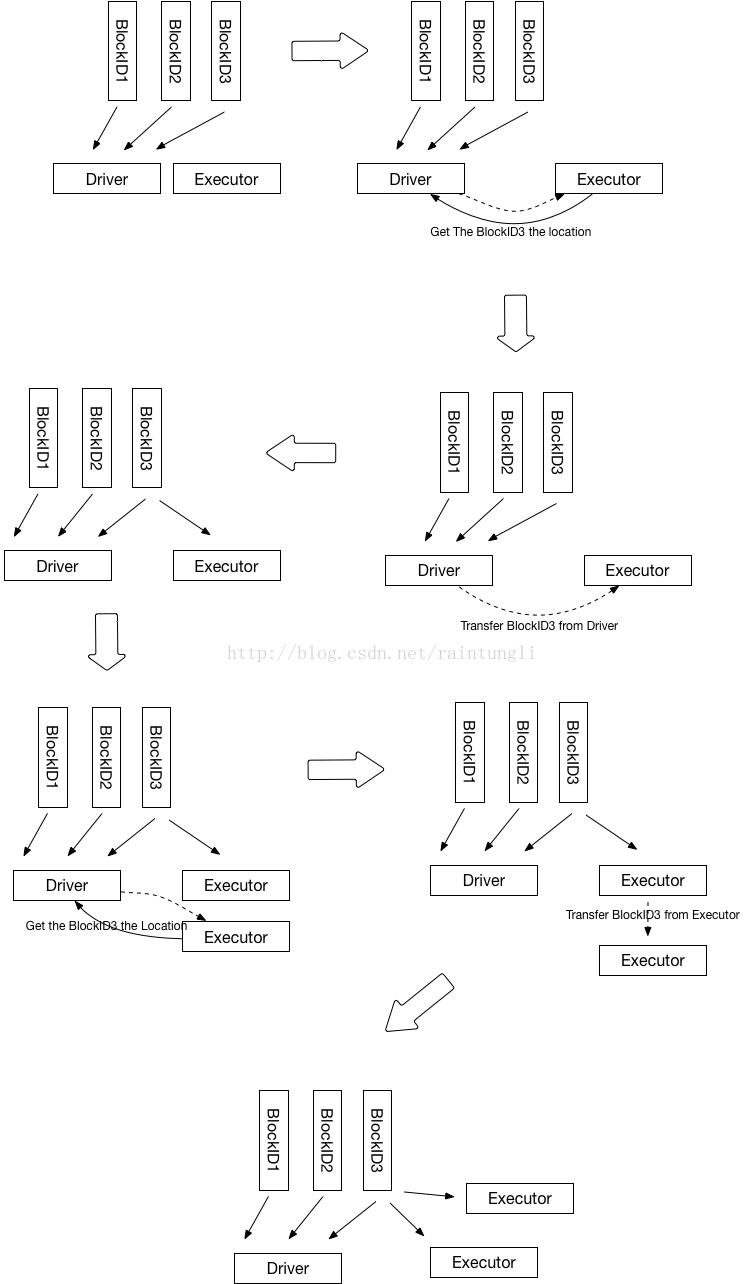
1. Driver 初始化的时候,会知道有几个executor,以及多少个Block, 最后在Driver端会生成block所对应的节点位置,初始化的时候因为executor没有数据,所有块的location都是Driver
2. Executor 进行运算的时候,从BlockManager里的获取本地数据,如果本地数据不存在,然后从driver获取数据的位置
bm.getLocalBytes(pieceId) match {

      case Some(block) =>

        blocks(pid) = block

        releaseLock(pieceId)

      case None =>

        bm.getRemoteBytes(pieceId) match {

          case Some(b) =>

            if (checksumEnabled) {

              val sum = calcChecksum(b.chunks())

              if (sum != checksums(pid)) {

                throw new SparkException(s"corrupt remote block $pieceId of $broadcastId:" +

                  s" $sum != ${checksums(pid)}")

              }

            }

            // We found the block from remote executors/driver's BlockManager, so put the block

            // in this executor's BlockManager.

            if (!bm.putBytes(pieceId, b, StorageLevel.MEMORY_AND_DISK_SER, tellMaster = true)) {

              throw new SparkException(

                s"Failed to store $pieceId of $broadcastId in local BlockManager")

            }

            blocks(pid) = b

          case None =>

            throw new SparkException(s"Failed to get $pieceId of $broadcastId")

        }
3. Driver里保存的块的位置只有Driver自己有,所以返回executer的位置列表只有driver
private def getLocations(blockId: BlockId): Seq[BlockManagerId] = {

  if (blockLocations.containsKey(blockId)) blockLocations.get(blockId).toSeq else Seq.empty

}
4. 通过块的传输通道从Driver里获取到数据
blockTransferService.fetchBlockSync(

          loc.host, loc.port, loc.executorId, blockId.toString).nioByteBuffer()
5. 获取数据后,使用BlockManager.putBytes ->最后使用doPutBytes保存数据
private def doPutBytes[T](

     blockId: BlockId,

     bytes: ChunkedByteBuffer,

     level: StorageLevel,

     classTag: ClassTag[T],

     tellMaster: Boolean = true,

     keepReadLock: Boolean = false): Boolean = {

  .....

     val putBlockStatus = getCurrentBlockStatus(blockId, info)

     val blockWasSuccessfullyStored = putBlockStatus.storageLevel.isValid

     if (blockWasSuccessfullyStored) {

       // Now that the block is in either the memory or disk store,

       // tell the master about it.

       info.size = size

       if (tellMaster && info.tellMaster) {

         reportBlockStatus(blockId, putBlockStatus)

       }

       addUpdatedBlockStatusToTaskMetrics(blockId, putBlockStatus)

     }

     logDebug("Put block %s locally took %s".format(blockId, Utils.getUsedTimeMs(startTimeMs)))

     if (level.replication > ) {

       // Wait for asynchronous replication to finish

       try {

         Await.ready(replicationFuture, Duration.Inf)

       } catch {

         case NonFatal(t) =>

           throw new Exception("Error occurred while waiting for replication to finish", t)

       }

     }

     if (blockWasSuccessfullyStored) {

       None

     } else {

       Some(bytes)

     }

   }.isEmpty

 }
6. 在保存数据后同时汇报该Block的状态到Driver
7. Driver更新executor 的BlockManager的状态,并且把Executor的地址加入到该BlockID的地址集合中
private def updateBlockInfo(

    blockManagerId: BlockManagerId,

    blockId: BlockId,

    storageLevel: StorageLevel,

    memSize: Long,

    diskSize: Long): Boolean = {

  if (!blockManagerInfo.contains(blockManagerId)) {

    if (blockManagerId.isDriver && !isLocal) {

      // We intentionally do not register the master (except in local mode),

      // so we should not indicate failure.

      return true

    } else {

      return false

    }

  }

  if (blockId == null) {

    blockManagerInfo(blockManagerId).updateLastSeenMs()

    return true

  }

  blockManagerInfo(blockManagerId).updateBlockInfo(blockId, storageLevel, memSize, diskSize)

  var locations: mutable.HashSet[BlockManagerId] = null

  if (blockLocations.containsKey(blockId)) {

    locations = blockLocations.get(blockId)

  } else {

    locations = new mutable.HashSet[BlockManagerId]

    blockLocations.put(blockId, locations)

  }

  if (storageLevel.isValid) {

    locations.add(blockManagerId)

  } else {

    locations.remove(blockManagerId)

  }

  // Remove the block from master tracking if it has been removed on all slaves.

  if (locations.size == ) {

    blockLocations.remove(blockId)

  }

  true

}
如何实现Torrent?
1. 为了避免Driver的单点问题,在上面的分析中每个executor如果本地不存在数据的时候,通过Driver获取了该BlockId的位置的集合,executor获取到BlockId的地址集合随机化后,优先找同主机的地址(这样可以走回环),然后从随机的地址集合按顺序取地址一个一个尝试去获取数据,因为随机化了地址,那么executor不只会从Driver去获取数据
/**

  * Return a list of locations for the given block, prioritizing the local machine since

  * multiple block managers can share the same host.

  */

 private def getLocations(blockId: BlockId): Seq[BlockManagerId] = {

   val locs = Random.shuffle(master.getLocations(blockId))

   val (preferredLocs, otherLocs) = locs.partition { loc => blockManagerId.host == loc.host }

   preferredLocs ++ otherLocs

 }
2. BlockID 的随机化
通常数据会被分为多个BlockID,取决于你设置的每个Block的大小
spark.broadcast.blockSize=10M
在获取完整的BlockID块的时候,在Torrent的算法中,随机化了BlockID
for (pid <- Random.shuffle(Seq.range(, numBlocks))) {

......

}
在任务启动的时候,新启的executor都会同时从driver去获取数据,大家如果都是以相同的Block的顺序,基本上的每个Block数据对executor还是会从Driver去获取, 而BlockID的简单随机化就可以保证每个executor从driver获取到不同的块,当不同的executor在取获取其他块的时候就有机会从其他的executor上获取到,从而分散了对Driver的负载压力。
Spark Storage(二) 集群下的broadcast的更多相关文章
- Spark Storage(一) 集群下的区块管理
Storage模块 在Spark中提及最多的是RDD,而RDD所交互的数据是通过Storage来实现和管理 Storage模块整体架构 1. 存储层 在Spark里,单节点的Storage的管理是通过 ...
- spark高可用集群搭建及运行测试
文中的所有操作都是在之前的文章spark集群的搭建基础上建立的,重复操作已经简写: 之前的配置中使用了master01.slave01.slave02.slave03: 本篇文章还要添加master0 ...
- 用redis实现TOMCAT集群下的session共享
上篇实现了 LINUX中NGINX反向代理下的TOMCAT集群(http://www.cnblogs.com/yuanjava/p/6850764.html) 这次我们在上篇的基础上实现session ...
- Spark高可用集群搭建
Spark高可用集群搭建 node1 node2 node3 1.node1修改spark-env.sh,注释掉hadoop(就不用开启Hadoop集群了),添加如下语句 export ...
- was集群下基于接口分布式架构和开发经验谈
版权声明:本文为博主原创文章,未经博主同意不得转载. https://blog.csdn.net/luozhonghua2014/article/details/34084935 某b项目是我首 ...
- 如何解决quartz在集群下出现的资源抢夺现象
Quartz是一个开源的作业调度框架,它完全由Java写成,并设计用于J2SE和J2EE应用中.它提供了巨大的灵活性而不牺牲简单性.你能够用它来为执行一个作业而创建简单的或复杂的调度,简单的说就是可以 ...
- Spark on Yarn 集群运行要点
实验版本:spark-1.6.0-bin-hadoop2.6 本次实验主要是想在已有的Hadoop集群上使用Spark,无需过多配置 1.下载&解压到一台使用spark的机器上即可 2.修改配 ...
- 搭建Spark高可用集群
Spark简介 官网地址:http://spark.apache.org/ Apache Spark™是用于大规模数据处理的统一分析引擎. 从右侧最后一条新闻看,Spark也用于AI人工智能 sp ...
- Jenkins集群下的pipeline实战
关于Jenkins集群 在<快速搭建Jenkins集群>一文中,我们借助docker快速搭建了Jenkins集群,今天就在这个集群环境中创建pipeline任务,体验Jenkins集群下的 ...
随机推荐
- CASE:DB shutdown/open 过程中发生异常导致JOB不能自动执行
CASE:DB shutdown/open 过程中发生异常导致JOB不能自动执行 现象: 一个DB中的所有JOB在3月25日之后就不再自动运行,查询DBA_JOBS,发现LAST_DATE定格在3月2 ...
- vim 正则替换【转】
:[range]s/from/to/[flags] range:搜索范围,如果没有指定范围,则作用于但前行. :1,10s/from/to/ 表示在第1到第10行(包含第1,第10行)之间搜索替换: ...
- QT开发之旅三串口设备调试工具
这里首先说明一下,这个为什么叫串口设备调试工具而不是串口调试工具,是因为这个工具比网络上的串口调试工具多出了一些真实需要的用来调试设备的功能,首先一点就是大部分的串口调试工具收到数据都是立即返回,这样 ...
- 学习 python 编写规范 pep8 的问题笔记
决定开始Python之路了,利用业余时间,争取更深入学习Python.编程语言不是艺术,而是工作或者说是工具,所以整理并遵循一套编码规范是十分必要的.所以今天下午我根据PEP 8整理了一份,以后都照此 ...
- C和C++书籍推荐
http://bestcbooks.com/recommend/most-influential-book/ http://www.ruanyifeng.com/blog/2011/09/c_prog ...
- ndk编译android的lame库
1.lame c库: https://github.com/intervigilium/liblame 下载后解压,进入目录,terminal里运行ndk-build即可 2.lame android ...
- javascript 闭包学习
闭包(closure)是Javascript语言的一个难点,也是它的特色,很多高级应用都要依靠闭包实现. 一.变量的作用域 要理解闭包,首先必须理解Javascript特殊的变量作用域. 变量的作用域 ...
- stdarg.h头文件源代码分析
谈到C语言中可变参数函数的实现(参见C语言中可变参数函数实现原理),有一个头文件不得不谈,那就是stdarg.h 本文从minix源码中的stdarg.h头文件入手进行分析: #ifndef _STD ...
- 23种设计模式之迭代器模式(Iterator)
迭代器模式是一种对象的行为型模式,提供了一种方法来访问聚合对象,而不用暴露这个对象的内部表示.迭代器模式支持以不同的方式遍历一个聚合对象,复杂的聚合可用多种方法来进行遍历:允许在同一个聚合上可以有多个 ...
- ASP.NET MVC 使用Redis共享Session
储存模式 1.InProc模式 这是ASP.NET默认的Session管理模式,在应用进程内维护Session. 2.StateServer模式 这是在服务器装了.NET环境后自带的一个StateSe ...