
Java 打开Excel,往Excel中存入值,保存的excel格式分别是xls和xlsx
https://mirrors.cnnic.cn/apache/poi/xmlbeans/release/src/
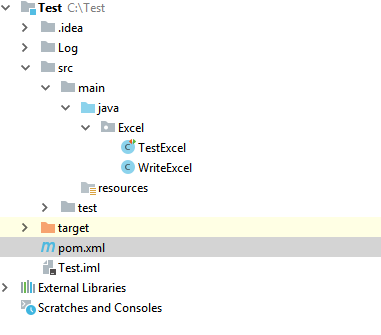
package Excel;

import org.apache.poi.hssf.usermodel.HSSFCell;

import org.apache.poi.hssf.usermodel.HSSFRow;

import org.apache.poi.hssf.usermodel.HSSFSheet;

import org.apache.poi.hssf.usermodel.HSSFWorkbook;

import org.apache.poi.ss.usermodel.CellType;

import org.apache.poi.xssf.usermodel.XSSFCell;

import org.apache.poi.xssf.usermodel.XSSFRow;

import org.apache.poi.xssf.usermodel.XSSFSheet;

import org.apache.poi.xssf.usermodel.XSSFWorkbook;

import java.io.File;

import java.io.FileNotFoundException;

import java.io.FileOutputStream;

import java.io.IOException;

import java.text.SimpleDateFormat;

import java.util.Calendar;

import java.util.Date;

public class WriteExcel {

    Date dt = new Date();

    SimpleDateFormat format = new SimpleDateFormat("YYYYMMddHHmmss");

    String time = format.format(dt);

    public void WriteExcelxls() {

        FileOutputStream out = null;

        try {

            out = new FileOutputStream(new File(".\\Log\\旧的EXCEL文件_"+time+".xls"));

            HSSFWorkbook workxls = new HSSFWorkbook();

            HSSFSheet sheet = workxls.createSheet(time);

            HSSFRow row = workxls.getSheet(time).createRow(0);

            for (short i = 0; i < 10; i++) {

                HSSFCell cell = row.createCell(i);

                cell.setCellValue("测试" + i);

            }

            sheet.createRow(1).createCell(1).setCellValue("1234567890");

            sheet.createRow(2).createCell(0).setCellValue(Calendar.getInstance());

            sheet.createRow(3).createCell(0).setCellValue("字符串");

            sheet.createRow(4).createCell(0).setCellValue(true);

            sheet.createRow(5).createCell(0).setCellType(CellType.ERROR);

            workxls.write(out);

            out.close();

            System.out.println("旧的EXCEL文件_.xls written successfully on disk.");

        } catch (FileNotFoundException e) {

            e.printStackTrace();

        } catch (IOException e) {

            e.printStackTrace();

        }

    }

    public void WriteExcelxlsx() {

        File file = new File(".\\Log\\新的EXCEL文件_"+time+".xlsx");

        FileOutputStream out = null;

        try {

            out = new FileOutputStream(file);

            XSSFWorkbook workbook = new XSSFWorkbook();

            XSSFRow row = workbook.createSheet(time).createRow(0);

            XSSFSheet sheet = workbook.getSheet(time);

            for (short i = 0; i < 10; i++) {

                XSSFCell cell = row.createCell(i);

                cell.setCellValue("新的EXCEL文件" + i);

            }

            sheet.createRow(1).createCell(1).setCellValue("1234567890");

            sheet.createRow(2).createCell(0).setCellValue(Calendar.getInstance());

            sheet.createRow(3).createCell(0).setCellValue("字符串");

            sheet.createRow(4).createCell(0).setCellValue(true);

            sheet.createRow(5).createCell(0).setCellType(CellType.ERROR);

            workbook.write(out);

            out.close();

            System.out.println("新的EXCEL文件_.xlsx written successfully on disk.");

        } catch (FileNotFoundException e) {

            e.printStackTrace();

        } catch (IOException e) {

            e.printStackTrace();

        }

    }

}
package Excel;

import org.testng.annotations.Test;

public class TestExcel {

    @Test(priority = 1)

    private void Testold()

    {

        WriteExcel aaa = new WriteExcel();

        aaa.WriteExcelxls();

    }

    @Test(priority = 2)

    public void Testnew()

    {

        WriteExcel aaa = new WriteExcel();

        aaa.WriteExcelxlsx();

    }

}
依赖:
<?xml version="1.0" encoding="UTF-8"?>

<project xmlns="http://maven.apache.org/POM/4.0.0"

         xmlns:xsi="http://www.w3.org/2001/XMLSchema-instance"

         xsi:schemaLocation="http://maven.apache.org/POM/4.0.0 http://maven.apache.org/xsd/maven-4.0.0.xsd">

    <modelVersion>4.0.0</modelVersion>

    <groupId>Jasmine</groupId>

    <artifactId>Test</artifactId>

    <version>1.0-SNAPSHOT</version>

    <dependencies>

        <dependency>

            <groupId>org.apache.poi</groupId>

            <artifactId>poi</artifactId>

            <version>4.0.0</version>

        </dependency>

        <!-- https://mvnrepository.com/artifact/org.apache.poi/poi-ooxml -->

        <dependency>

            <groupId>org.apache.poi</groupId>

            <artifactId>poi-ooxml</artifactId>

            <version>4.0.0</version>

        </dependency>

        <!-- https://mvnrepository.com/artifact/org.apache.poi/poi-ooxml-schemas -->

        <dependency>

            <groupId>org.apache.poi</groupId>

            <artifactId>poi-ooxml-schemas</artifactId>

            <version>4.0.0</version>

        </dependency>

        <!-- https://mvnrepository.com/artifact/org.testng/testng -->

        <dependency>

            <groupId>org.testng</groupId>

            <artifactId>testng</artifactId>

            <version>6.9.4</version>

            <scope>test</scope>

        </dependency>

        <dependency>

            <groupId>org.testng</groupId>

            <artifactId>testng</artifactId>

            <version>6.13.1</version>

        </dependency>

    </dependencies>

</project>
package Excel;

import org.apache.poi.hssf.usermodel.*;

import org.apache.poi.ss.usermodel.CellType;

import java.io.File;

import java.io.FileNotFoundException;

import java.io.FileOutputStream;

import java.io.IOException;

import java.text.SimpleDateFormat;

import java.util.Calendar;

import java.util.Date;

public class WriteExcelMore {

    static Date dt = new Date();

    static SimpleDateFormat format = new SimpleDateFormat("YYYYMMddHHmmss");

    static String time = format.format(dt);

    public static void main(String args[]) {

        File file = new File(".\\Log\\新的EXCEL文件_" + time + ".xls");

        FileOutputStream out = null;

        try {

            out = new FileOutputStream(file);

            HSSFWorkbook workbook = new HSSFWorkbook(); //创建一个新的excel

            HSSFSheet sheet = workbook.createSheet(time);  //创建sheet页

            HSSFHeader header = sheet.getHeader();//创建header页

            header.setCenter("Title");

            HSSFRow[] row = new HSSFRow[3];

            row[0] = sheet.createRow(0);

            HSSFCell headerCell = row[0].createCell(5);

            headerCell.setCellValue(new HSSFRichTextString("标题"));

            //HSSFRow  row = workbook.getSheet(time).createRow(3);

            row[1] = sheet.createRow(1);

            for (short i = 0; i < 5; i++) {

                HSSFCell cell = row[1].createCell(i);

                cell.setCellValue("新的EXCEL文件" + i);

            }

            row[2] = sheet.createRow(2);

            String[] arr = new String[5];

            String[] arr2 = {"aa", "bb", "cc", "dd", "ee"};

            for (short i = 0; i < 5; i++) {

                HSSFCell cell = row[2].createCell(i);

                cell.setCellValue(arr2[i]);

            }

            sheet.createRow(5).createCell(1).setCellValue("1234567890");

            sheet.createRow(6).createCell(0).setCellValue(Calendar.getInstance());

            sheet.createRow(7).createCell(0).setCellValue("字符串");

            sheet.createRow(8).createCell(0).setCellValue(true);

            sheet.createRow(9).createCell(0).setCellType(CellType.ERROR);

            //设置footer

            sheet.setGridsPrinted(false);

            HSSFFooter footer = sheet.getFooter();

            footer.setRight("page " + HeaderFooter.page() + "of" + HeaderFooter.numPages());

            workbook.write(out);

            out.close();

            System.out.println(file + " written successfully on disk.");

        } catch (FileNotFoundException e) {

            e.printStackTrace();

        } catch (IOException e) {

            e.printStackTrace();

        }

    }

}
遇到的错如下:
1. Exception in thread "main" java.lang.NoClassDefFoundError:
org/dom4j/DocumentExceptionCaused by: java.lang.ClassNotFoundException: org.dom4j.DocumentException
2. Exception in thread "main" java.lang.NoClassDefFoundError: org/apache/commons/compress/archivers/zip/ZipFile
3. Exception in thread "main" java.lang.NoClassDefFoundError: org/apache/commons/collections4/ListValuedMap
4. Exception in thread "main" java.lang.NoClassDefFoundError: org/apache/xmlbeans/XmlObject
5. java.lang.NoClassDefFoundError: org/apache/xmlbeans/XmlException
<!-- https://mvnrepository.com/artifact/org.apache.xmlbeans/xmlbeans -->
<dependency>
<groupId>org.apache.xmlbeans</groupId>
<artifactId>xmlbeans</artifactId>
<version>3.0.0</version>
</dependency>
6. java.lang.NoClassDefFoundError: org/apache/commons/collections4/ListValuedMap
<!-- https://mvnrepository.com/artifact/org.apache.commons/commons-collections4 -->
<dependency>
<groupId>org.apache.commons</groupId>
<artifactId>commons-collections4</artifactId>
<version>4.1</version>
</dependency>
7. java.lang.NoClassDefFoundError: org/apache/commons/compress/archivers/zip/ZipFile
<!-- https://mvnrepository.com/artifact/org.apache.commons/commons-compress -->
<dependency>
<groupId>org.apache.commons</groupId>
<artifactId>commons-compress</artifactId>
<version>1.18</version>
</dependency>
<!-- https://mvnrepository.com/artifact/org.apache.commons/commons-lang3 -->
<dependency>
<groupId>org.apache.commons</groupId>
<artifactId>commons-lang3</artifactId>
<version>3.4</version>
</dependency>
8. java.lang.NoSuchMethodError: org.apache.xmlbeans.XmlOptions.setEntityExpansionLimit(I)Lorg/apache/xmlbeans/XmlOptions;
上述都是包的问题,后来新建了一个项目,换成maven管理依赖包,一次性解决了。
update 20181122
将上述代码拖到UI自动化项目中,发现执行报各种错误,已添加到上面。
都是jar包的问题,但是我已经将测试成功项目中的pom文件中的jar包都下载来了,却还是报各种错,解决了一个又遇到下一个。 (┬_┬)
maven打包,因为网络问题,有时候有的包未能下载下来,就自己下载jar包引用,可是(┬_┬)(┬_┬)无力
苦心人天不负,三千越界可吞吴。哈哈哈哈,在尝试了千万遍之后,终于成功了,下面是所有新引入的jar包,百度网盘链接如下:

其中红框框是为了解决excel中xlsx格式而引入的一系列jar包。
链接:https://pan.baidu.com/s/1JhKENJU1PLlgOwyrnptilg
提取码:ip2u
链接若失效,请联系我
Java 打开Excel,往Excel中存入值,保存的excel格式分别是xls和xlsx的更多相关文章
- Java如何获取JSON数据中的值
场景:在接口自动化场景中,下个接口发送的请求参数,依赖上个接口请求结果中的值.需要将获取值作为全局参数引用. import java.io.File; import java.io.FileInput ...
- java引用数据类型在方法中的值传递
package org.jimmy.autosearch20180821.test; public class TestStringArr { public static void main(Stri ...
- java 基础:方法调用中的值传递是call by value,并且传递的是参数的值的拷贝,而不是引用
public class TestExtends { public static void main(String[]args){ int s = 10; System.out.println(Sys ...
- 一个简单java爬虫爬取网页中邮箱并保存
此代码为一十分简单网络爬虫,仅供娱乐之用. java代码如下: package tool; import java.io.BufferedReader; import java.io.File; im ...
- 将table中的值转换成json格式传到后台接收处理。
table数据 <table style="border:1px" id="tableID"> <tr> <th>编号< ...
- 用SQL语句将数据表中的数据保存为JSON格式
没有找到好的工具,只想到了拼字符串的方式,用 NVARCHAR(MAX) 可能有截断,不推荐使用,方法中使用了 FOR XML PATH('') 实现,有关其使用方法参考这里 表结构: SQL ...
- C# 导出dataGridView中的值到Excel
C# 怎么导出dataGridView中的值到Excel 1 2 3 4 5 6 在系统应用过程中,数据是系统的核心.如果直接在应用软件中看数据,有时也有些不便,所以就会把系统数据转换成Excel格式 ...
- POI操作Excel(xls、xlsx)
阿帕奇官网:http://poi.apache.org/ POI3.17下载:http://poi.apache.org/download.html#POI-3.17 POI操作Excel教程(易百教 ...
- struts框架问题六之从值栈中获取值
6. 问题六: 在JSP中获取值栈的数据 * 总结几个小问题: > 访问root中数据 不需要# > 访问context其它对象数据 加 # > 如果向root中存入对象的话,优先使 ...
随机推荐
- PAT 1032 Sharing[hash][链表][一般上]
1032 Sharing (25)(25 分) To store English words, one method is to use linked lists and store a word l ...
- 软件包管理:yum在线管理-yum命令
只要我们的电脑可以接入互联网,那么yum源就是配好的,yum命令可以直接使用. 列出的是服务器上全部的rpm包. 包名,包全名的概念只在rpm手动管理时有用. 关键字主要指包名,只要知道了关键字就可以 ...
- ZOJ 3949 Edge to the Root
题意: 在一棵树中,可以从根节点往其他节点加一条边,使得根节点到其他所有节点的距离和最小,输出最小的距离和. 思路: 我们考虑在加的一条边为$1 \to v$,那么在树上从$1 \to v$的路径上, ...
- AOAPC I: Beginning Algorithm Contests (Rujia Liu) Volume 6. Mathematical Concepts and Methods
uva 106 这题说的是 说计算 x^2 + y^2 = z^2 xyz 互质 然后计算个数和 在 N内 不在 勾股数之内的数的个数 然后去找需要的 维基百科上 看到 另 n*m*2 =b ...
- java android 环境变量配置备忘录
java android 环境变量配置备忘录,全新重装系统要用到,备忘下来; JAVA_HOME D:\Java\jdk1.6.0_07 CLASSPATH .;%JAVA_HOME%\lib\dt ...
- Js基础知识7-Es6新增对象Map和set数据结构
前言 JavaScript中对象的本质是键值对的集合,ES5中的数据结构,主要是用Array和Object,但是键只能是字符串.为了弥补这种缺憾,ES6带来了一种新的数据结构Map. Map也是键值对 ...
- 深入浅出JavaScript运行机制
一.引子 本文介绍JavaScript运行机制,这一部分比较抽象,我们先从一道面试题入手: console.log(1); setTimeout(function(){ console.log(3); ...
- 2D 2 3D 开源项目
http://www.cvlibs.net/projects.php http://www.cvlibs.net/software/libelas/
- MP4v2 基本使用(二)
MP4转H264文件 本文最目标是基本的MP4v2接口的使用,并且实现一个简单的提取mp4文件里面264流的功能: 1.264文件基本知识 下看看H264文件的基本常识 NAL 头 0x00 0x00 ...
- camera按键采集图像及waitKey的用法
前言 项目需要通过摄像头采集图像并保存,主要是用于后续的摄像头标定.实现过程其实很简单,需要注意一些细节. 系统环境 系统版本:ubuntu16.04:opencv版本:opencv2.4.13:编程 ...