
keras—多层感知器MLP—IMDb情感分析
 import urllib.request

 import os

 import tarfile

 from keras.datasets import imdb

 from keras.preprocessing import sequence

 from keras.preprocessing.text import Tokenizer

 import re

 def rm_tags(text):

     re_tag=re.compile(r'<[^>]+>')

     return re_tag.sub('',text)

 def read_files(filetype):

     path="C:/Users/admin/.keras/aclImdb/"

     file_list=[]

     positive_path=path+filetype+"/pos/"

     for f in os.listdir(positive_path):

         file_list+=[positive_path+f]

     negative_path=path+filetype+"/pos/"

     for f in os.listdir(negative_path):

         file_list+=[negative_path+f]

     print('read',filetype,'files:',len(file_list))

     all_labels=([]*+[]*)

     all_texts=[]

     for fi in file_list:

         with open(fi,encoding='utf8') as file_input:

             all_texts+=[rm_tags(" ".join(file_input.readlines()))]

     return all_labels,all_texts

 y_train,train_text=read_files("train")

 y_test,test_text=read_files("test")

 print(train_text[])

 print(y_train[])

 token=Tokenizer(num_words=)

 token.fit_on_texts(train_text)

 print(token.document_count)

 print(token.word_index)

 x_train_seq=token.texts_to_sequences(train_text)

 x_test_seq=token.texts_to_sequences(test_text)

 print(train_text[])

 print(x_train_seq[])

 x_train=sequence.pad_sequences(x_train_seq,maxlen=)

 x_test=sequence.pad_sequences(x_test_seq,maxlen=)

 print('before pad_sequences lenfth=',len(x_train_seq[]))

 print(x_train_seq[])

 print('after pad_sequences lenfth=',len(x_train[]))

 print(x_train[])

 from keras.models import Sequential

 from keras.layers import Dense,Dropout,Flatten,Activation

 from keras.layers.embeddings import Embedding

 model=Sequential()

 model.add(Embedding(output_dim=,

                  input_dim=,

                  input_length=))

 model.add(Dropout(0.2))

 #model.add(SimpleRNN(units=))

 model.add(Flatten())

 model.add(Dense(units=,

                 activation='relu'))

 model.add(Dropout(0.35))

 model.add(Dense(units=,

                 activation='sigmoid'))

 print(model.summary())

 model.compile(loss='binary_crossentropy',

               optimizer='adam',

               metrics=['accuracy'])

 train_history=model.fit(x=x_train,y=y_train,batch_size=,

                         epochs=,verbose=,

                         validation_split=0.2)

 scores=model.evaluate(x_test,y_test,verbose=)

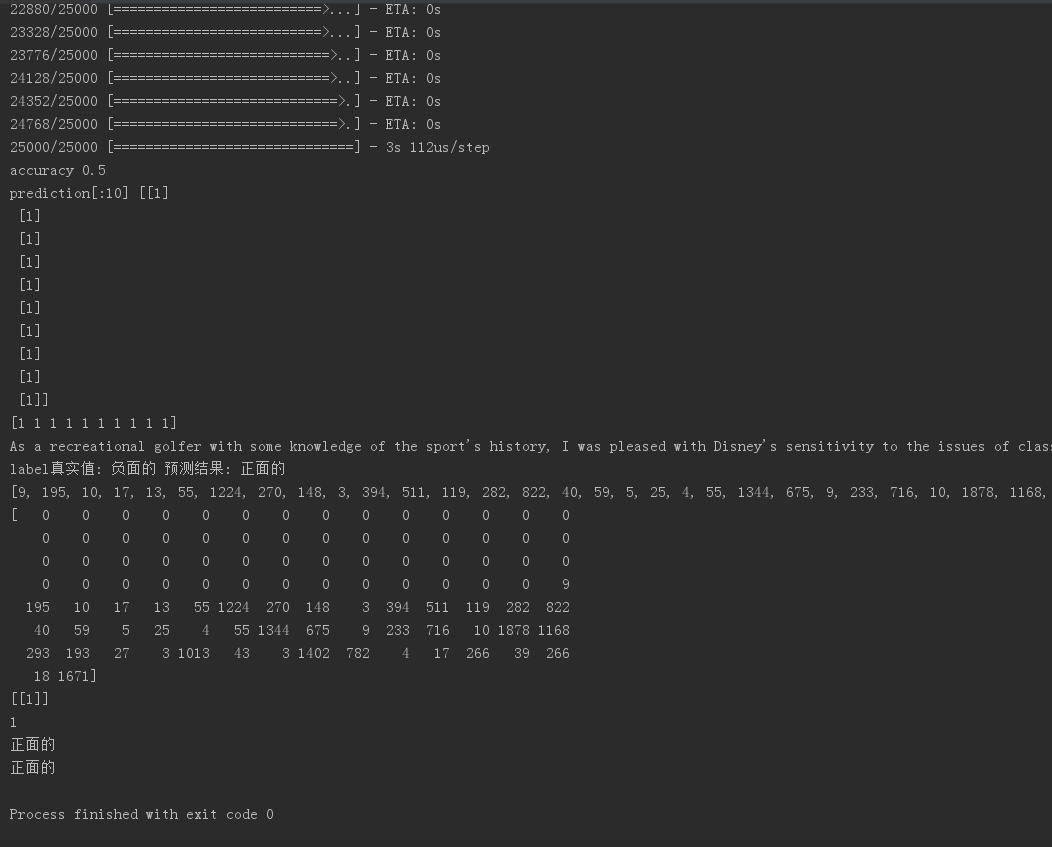
 print('accuracy',scores[])

 predict=model.predict_classes(x_test)

 print("prediction[:10]",predict[:])

 predict_classes=predict.reshape(-)

 print(predict_classes[:])

 SentimentDict = {: '正面的', : '负面的'}

 def display_test_Sentiment(i):

     print(test_text[i])

     print('label真实值:', SentimentDict[y_test[i]],

           '预测结果:', SentimentDict[predict_classes[i]])

 display_test_Sentiment()

 input_text='''

 I saw this film with my -year-old a couple weeks ago. While there's plenty about which to gripe, here's one of

 my biggest problems: I can't stand this constant CGI-heavy everything-must-be-a-sequel-or- a- remake era of film

 making. It's making movie makers lazy.

 '''

 input_seq=token.texts_to_sequences([input_text])

 len(input_seq[])

 print(input_seq[])

 pad_input_seq=sequence.pad_sequences(input_seq,maxlen=)

 len(pad_input_seq[])

 print(pad_input_seq[])

 predict_result=model.predict_classes(pad_input_seq)

 print(predict_result)

 print(predict_result[][])

 print(SentimentDict[predict_result[][]])

 def predict_review(input_text):

     input_seq=token.texts_to_sequences([input_text])

     pad_input_seq=sequence.pad_sequences(input_seq,maxlen=)

     predict_result=model.predict_classes(pad_input_seq)

     print(SentimentDict[predict_result[][]])

 predict_review('''

 They poured on the whole "LeFou is gay" thing a bit thick for my taste. It was the only thing that added levity to the movie (despite how much fun it should have been already), but it seemed a bit cheap. I'm not going to apologize for wanting more for my LGBTQ characters than to be just the comic relief.

 ''')

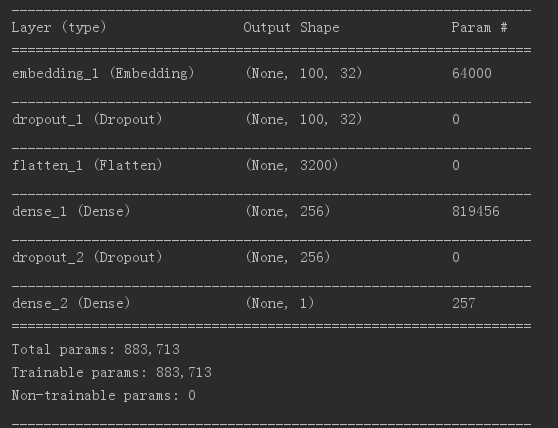
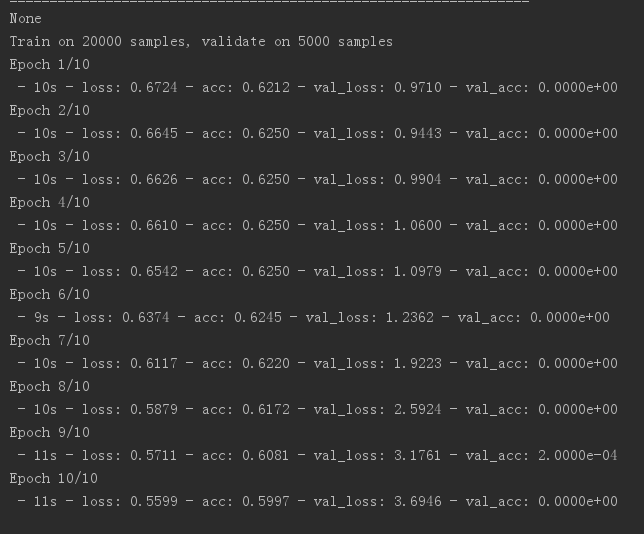
验证的准确率为0问题待解决
keras—多层感知器MLP—IMDb情感分析的更多相关文章
- keras—多层感知器MLP—MNIST手写数字识别
一.手写数字识别 现在就来说说如何使用神经网络实现手写数字识别. 在这里我使用mind manager工具绘制了要实现手写数字识别需要的模块以及模块的功能: 其中隐含层节点数量(即神经细胞数量)计算 ...
- 4.2tensorflow多层感知器MLP识别手写数字最易懂实例代码
自己开发了一个股票智能分析软件,功能很强大,需要的点击下面的链接获取: https://www.cnblogs.com/bclshuai/p/11380657.html 1.1 多层感知器MLP(m ...
- "多层感知器"--MLP神经网络算法
提到人工智能(Artificial Intelligence,AI),大家都不会陌生,在现今行业领起风潮,各行各业无不趋之若鹜,作为技术使用者,到底什么是AI,我们要有自己的理解. 目前,在人工智能中 ...
- TFboy养成记 多层感知器 MLP
内容总结与莫烦的视频. 这里多层感知器代码写的是一个简单的三层神经网络,输入层,隐藏层,输出层.代码的目的是你和一个二次曲线.同时,为了保证数据的自然,添加了mean为0,steddv为0.05的噪声 ...
- MLPclassifier,MLP 多层感知器的的缩写(Multi-layer Perceptron)
先看代码(sklearn的示例代码): from sklearn.neural_network import MLPClassifier X = [[0., 0.], [1., 1.]] y = [0 ...
- 神经网络与机器学习 笔记—多层感知器(MLP)
多层感知器(MLP) Rosenblatt感知器和LMS算法,都是单层的并且是单个神经元构造的神经网络,他们的局限性是只能解决线性可分问题,例如Rosenblatt感知器一直没办法处理简单异或问题.然 ...
- tensorflow学习笔记——自编码器及多层感知器
1,自编码器简介 传统机器学习任务很大程度上依赖于好的特征工程,比如对数值型,日期时间型,种类型等特征的提取.特征工程往往是非常耗时耗力的,在图像,语音和视频中提取到有效的特征就更难了,工程师必须在这 ...
- 使用TensorFlow v2.0构建多层感知器
使用TensorFlow v2.0构建一个两层隐藏层完全连接的神经网络(多层感知器). 这个例子使用低级方法来更好地理解构建神经网络和训练过程背后的所有机制. 神经网络概述 MNIST 数据集概述 此 ...
- Spark Multilayer perceptron classifier (MLPC)多层感知器分类器
多层感知器分类器(MLPC)是基于前馈人工神经网络(ANN)的分类器. MLPC由多个节点层组成. 每个层完全连接到网络中的下一层. 输入层中的节点表示输入数据. 所有其他节点,通过输入与节点的权重w ...
随机推荐
- 垃圾收集器之:throughput吞吐量收集器
在实践中我们发现对于大多数的应用领域,评估一个垃圾收集(GC)算法如何根据如下两个标准: 吞吐量越高算法越好 暂停时间越短算法越好 首先让我们来明确垃圾收集(GC)中的两个术语:吞吐量(through ...
- [转]链接中 href='#' 和 href='###' 的区别以及优缺点
本文来自:http://c.jinhusns.com/bar/t-829 链接中 href='#' 和 href='###' 的区别以及优缺点 上一篇 下一篇近乎_问阳 发表于:2013-09-09 ...
- supervisord管理进程详解
supervisord管理进程详解 supervisor配置详解(转) 官网 Linux后台进程管理利器:supervisor supervisor使用详解
- java接口定义和作用
接口语法 1.接口是一种引用类型,可以等同看作类.修饰符 interface 接口名 2.接口中只能出现常量和抽象方法 3.接口其实是一个特殊的抽象类,特殊在接口是完全抽象的 4.接口中没有构造方法, ...
- 接口测试3-2csv格式
csv文件数据 IntellJ IDEA打开终端:view-tool windows-terminal,可以在终端中查看文件路径 阿里 马云 京东 刘强东 京东 马化腾 #java //读取csv文件 ...
- 学习URL地址(待整理)
编程开发教程:http://www.runoob.com/ ElasticSearch教程:https://es.xiaoleilu.com/index.html 设计模式:http://www.cn ...
- TSubobjectPtr和C++传统指针的区别
转自:http://aigo.iteye.com/blog/2282142 主要有以下区别(1和2的前提条件要满足:指针所在的class必须是UObjcct的子类): 1,TSubobjectPtr指 ...
- JVM内部细节之二:偏向锁(Biased Locking)
在前面一片文章<JVM内部细节之一:synchronized关键字及实现细节>中已经提到过偏向锁的概念,在理解什么是偏向锁前必须先理解什么是轻量级锁(Lightweight Locking ...
- Noip知识点备考
作为一个oier,适当的整理是有必要的.蒟蒻根据自己的理解,筛选出考noip应当掌握的知识点.可能后期还有解题思路和模板,先挖个坑慢慢补呗. 60级张炳琪Noip知识点总结 可能是本人比较弱,写的内容 ...
- [Python] Hermite 插值
# -*- coding: utf-8 -*- #Program 0.5 Hermite Interpolation import matplotlib.pyplot as plt import nu ...