
zend studio快捷模板 开发工具之zend studio一些配置
以下是以Zend Studio 10.0.0版本为基础的:
模板的配置(template):
【菜单】->【Window】->【preferences】->【PHP】->【Editor】->【Templates】->新建模板就可以了,
或者直接在Preferences上面的搜索框中输入template就可以找到了。
epe : echo '<pre>',print_r(${cursor},1);exit;
eppe : echo '<pre>',print_r(${cursor},1);echo '<pre>',print_r( ,1);exit;
vd : var_dump(${cursor});
vde : var_dump(${cursor});exit;
trc :
try {
${cursor}
} catch (Exception $$e) {
Kohana::log('error', __CLASS__.'->'.__METHOD__.' Line:'.__LINE__.' 操作失败:'.$$this->last_query()." \r\n".$$e->getMessage());
return false;
}
lgd : Kohana::log('debug', __CLASS__.'->'.__METHOD__.' Line:'.__LINE__.' '.var_export( ${cursor} ,true));
lge : Kohana::log('error', __CLASS__.'->'.__METHOD__.' Line:'.__LINE__.' '.var_export( ${cursor} ,true));
lgs : Kohana::log('error', __CLASS__.'->'.__METHOD__.' Line:'.__LINE__.' params: '.${cursor}.' '." ".' '." " );
###############------####
echo __FILE__.' Line:'.__LINE__.'<pre>',print_r(${cursor},1);
echo __FILE__.' Line:'.__LINE__.'<pre>',print_r(${cursor},1);exit;
var_dump(${cursor});
var_dump(${cursor});exit;
log::write('File:'.__FILE__.' LINE:'.__LINE__."\r\n".' '.var_export(${cursor},true));
log::write('==API请求参数== '.var_export($$logMessage,true));
log::write('$$API返回结果$$ '.var_export($$this->httpResponse,true));
$$this->translator->${cursor};
$$etime = microtime(true);//获取程序执行结束的时间
$$totalTime = $$etime-$$stime; //计算差值
log::write('File:'.__FILE__.' LINE:'.__LINE__."\r\n".'程序执行时间: '.var_export($$totalTime,true));
$$stime = microtime(true); //获取程序开始执行的时间
js,css,html快捷插件:aptana的安装配置
http://www.zendstudio.net/archives/zend-studio-7-1-and-aptana-are-good-brothers/
zendstudio中的花括号提示符颜色如何修改
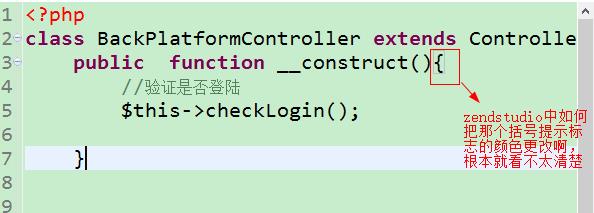
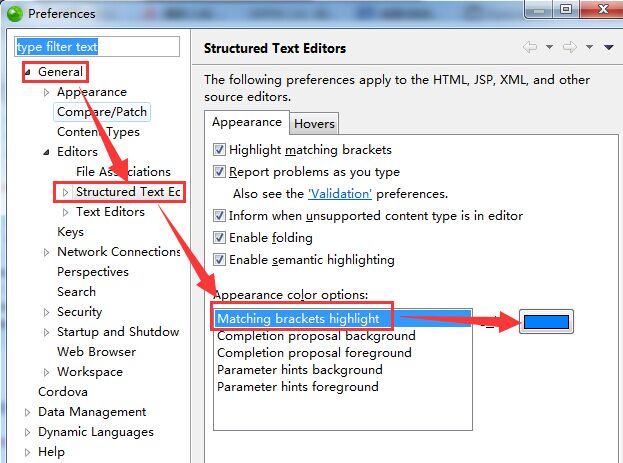
Window->Preferences->General->Editors->Structured Text Editor->Matching brackets hightlight
Zend Studio 修改高亮变量的颜色、括号颜色
Zend Studio 双击变量后会高亮所有用到的该变量的背景色,如何修改高亮变量的背景色:
打开 Window->Preferences->General->Editors->Text Editors->Annotations->PHP elements 'read' occurrences(PHP elements 'write' occurrences)
右侧选择高亮背景色 255,128,192


Zend Studio 修改括号颜色,如下

当鼠标在分号前点击时,前面括号的颜色修改方式:
打 开Window->Preferences->General->Editors->Structured Text Editors , Appearance color options 下修改 Matching brackets highlight的颜色即可
系统自带的快捷键:
CTRL+M | 将当前编辑窗口最大化/还原
CTRL+E |搜索已打开的文件名
CTRL+SHIFT+M | 搜索方法名
CTRL+? | 注释或取消注释
zend studio快捷模板 开发工具之zend studio一些配置的更多相关文章
- win8.1安装开发工具 vs2015 Visual Studio 2015 Preview Downloads
1.首先全新安装win8.1 略 破解激活.... 2.安装Visual Studio 2015 Visual Studio 2015 是免费的,不存在破解版本, 如果安装过程中存在问题,建议先把本文 ...
- android 开发工具(android studio)
Android Studio 从安装到配置使用 okhttp比xutils功能强大,源码地址: https://github.com/search?utf8=✓&q=okhttp andr ...
- 非常有用的开发工具之Android Studio插件
我们都知道Eclipse开发Android将在今年年底google不再继续提供相应的开发支持,转而开始强烈发展Android Studio,现在我就分享几款能帮助团队提升工作效率的几个Android ...
- Android 开发工具(android studio )安装中的问题记录
第一个问题,下载安装android studio . 由于国内无法通过正常方式访问谷歌官网,所以下载的确是个问题,在我仔细寻找下,发现下面两个网站可以下载: 第一个:http://www.androi ...
- android开发工具eclipse的安装与配置
l开发主要应用Eclipse 3.7版本. l辅助工具为jdk.Androidsdk Android环境搭建 –1.1.JDK安装 –1.2.Eclipse安装 –1.3.Android SDK安 ...
- 【开发工具IDE】Eclipse相关配置
1. 修改workspace编码为UTF-8 1.1. 修改jsp编码为UTF-8 2. 修改字体 3. 添加系统中的JDK 4. 导入formatter模板 5. 修改maven配置文件 打开文件: ...
- Android学习总结之开发工具AndroidStudio的安装与配置
安装AndroidStudio 首先下载AndroidStudio的安装包,直接在百度AndroidStudio下载即可,安装过程简单,只需要修改安装路径(不要有空格和中文即可).然后下一步下一步就可 ...
- Win10开发必备工具:Visual Studio 2015正式版下载
7月21日凌晨最新消息,面向大众用户的Visual Studio 2015集成开发工具正式版免费试用版已经推出.本文帮大家汇总一下简体中文社区版.专业版以及企业版在线安装版以及ISO离线安装镜像下载地 ...
- PHP开发工具+电子书+视频教程等资料下载汇总
本汇总帖包括如下内容: PHP开发工具.PHP IDE PHP学习资源 基础.进阶类 PHP学习资源 高级及应用类 经典PHP视频教程系列 1. PHP开发工具.PHP IDE: PHP开发工具:Ze ...
随机推荐
- Java [leetcode 18]4Sum
问题描述: Given an array S of n integers, are there elements a, b, c, and d in S such that a + b + c + d ...
- 【转】iOS页面间传值的方式(Delegate/NSNotification/Block/NSUserDefault/单例)-- 不错
原文网址:http://www.cnblogs.com/JuneWang/p/3850859.html iOS页面间传值的方式(NSUserDefault/Delegate/NSNotificatio ...
- NopCommerce源码架构详解--初识高性能的开源商城系统cms
很多人都说通过阅读.学习大神们高质量的代码是提高自己技术能力最快的方式之一.我觉得通过阅读NopCommerce的源码,可以从中学习很多企业系统.软件开发的规范和一些新的技术.技巧,可以快速地提高我们 ...
- 结构型:代理模式 Vs 适配器模式 Vs 门面模式(外观模式)
先上UML图 代理模式: 适配器模式: 门面模式(外观模式): 打了例子……呃……举个比方 代理模式: 水浒街,西门庆看上潘金莲,想和她嘿咻嘿咻,但是自己有不能去找潘金莲去说,于是他找到了金牌代理人王 ...
- 建立第一个OpenGL工程(GLUT)
本文参考了<计算机图形学>(Donald Hearn著)的第2.9节. OpenGL基本函数库用来描述图元.属性.几何变换.观察变换和进行许多其他的操作.OpenGL被设计成与硬件无关,因 ...
- c#操作XML文件的通用方法
转载地址:http://www.studyofnet.com/news/36.html 原址没找到 sing System; using System.Data; using System.Confi ...
- SMG12232ZK标准字符点阵型液晶显示模块的演示程序[C51编程语言][MCS51并行接口方式]
//SMG12232ZK标准字符点阵型液晶显示模块的演示程序[C51编程语言][MCS51并行接口方式] //应用产品: SMG12232ZK标准中文字符点阵型液晶显示模块 // 本演示程序适用于SM ...
- sizeof的作用——解释类中与类之外static变量的情况
今天看程序员面试宝典的时候遇到一个问题,书上有这么一句话:sizeof计算栈中分配的大小.咋一看这句话的时候,很不理解,难道像函数中类似于static.extern const类型的变量的sizeof ...
- [原]《打造未来的Java》视频笔记
[Date]2013-09-28 [Author]wintys (wintys@gmail.com) http://wintys.cnblogs.com [Content]: 1.Java7新特性 1 ...
- Node.js也分裂了-开源社区动态
继CoreOS与Docker分道扬镳继而推出自己的容器引擎Rocket后不久,又传来了Node.js分裂的消息.由于Node.js的贡献者因对负责Node.js开发的公司Joyent在对Node.js ...