
Android——列表视图(ListView)
列表视图是android中最常用的一种视图组件,它以垂直列表的形式列出需要显示的列表项。在android中有两种方法向屏幕中添加列表视图:一种是直接使用ListView组件创建;另外一种是让Activity继承ListActivity实现。下面分别介绍这两种方法:
一、直接使用ListView组件创建
在布局文件中首先添加ListView
代码如下:
<LinearLayout xmlns:android="http://schemas.android.com/apk/res/android"

    xmlns:tools="http://schemas.android.com/tools"

    android:id="@+id/LinearLayout1"

    android:layout_width="match_parent"

    android:layout_height="match_parent"

    android:orientation="vertical"

    tools:context=".MainActivity" >

    <ListView

        android:id="@+id/listView1"

        android:layout_width="match_parent"

        android:layout_height="wrap_content"

        android:entries="@array/cytpe" >

    </ListView>

</LinearLayout>
这里使用了名称为ctype的数组资源,因此我们要在res/values目录中创建一个定义的数组资源的xml文件arrays.xml代码如下:
<?xml version="1.0" encoding="UTF-8"?>

    <resources>

        <string-array name="cytpe">

        <item>情景模式</item>

        <item>主题模式</item>

        <item>手机</item>

        <item>程序管理</item>

        <item>通话设置</item>

        <item>连接功能</item>

        </string-array>

    </resources>
直接运行就可以看到如下所示的列表视图:
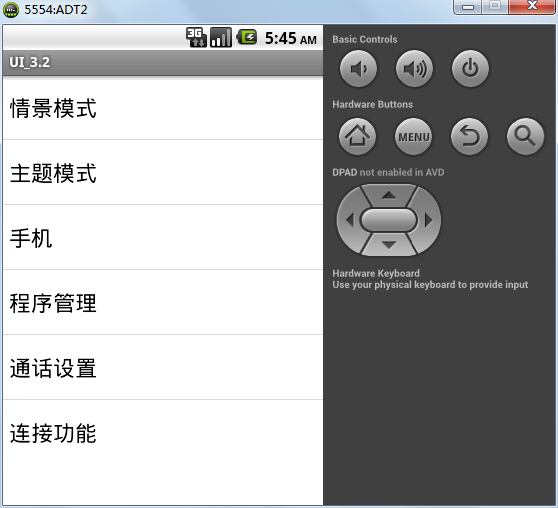
下面通过适配器来指定列表项来创建ListView
布局代码:
<LinearLayout xmlns:android="http://schemas.android.com/apk/res/android"

    xmlns:tools="http://schemas.android.com/tools"

    android:id="@+id/LinearLayout1"

    android:layout_width="match_parent"

    android:layout_height="match_parent"

    android:orientation="vertical"

    tools:context=".MainActivity" >

    <ListView

        android:id="@+id/listView1"

        android:layout_width="match_parent"

        android:layout_height="wrap_content"

        android:divider="@drawable/ic_launcher"

        android:dividerHeight="3px"

        android:footerDividersEnabled="false"

        android:headerDividersEnabled="false"

        >

    </ListView>

</LinearLayout>
Java代码:
package com.basillee.blogdemo;

import java.lang.annotation.Retention;

import java.util.List;

import android.os.Bundle;

import android.app.Activity;

import android.view.Menu;

import android.view.View;

import android.widget.AdapterView;

import android.widget.AdapterView.OnItemClickListener;

import android.widget.ArrayAdapter;

import android.widget.LinearLayout;

import android.widget.ListView;

import android.widget.Toast;

public class MainActivity extends Activity {

	@Override

	protected void onCreate(Bundle savedInstanceState) {

		super.onCreate(savedInstanceState);

		setContentView(R.layout.activity_main);

		ListView listView=(ListView)findViewById(R.id.listView1);

		ArrayAdapter<CharSequence>adapter=ArrayAdapter.createFromResource(this,R.array.cytpe,android.R.layout.simple_list_item_single_choice);

		listView.setAdapter(adapter);

		listView.setOnItemClickListener(new OnItemClickListener() {

			@Override

			public void onItemClick(AdapterView<?> parent, View arg1, int pos,

					long id) {

				String result=parent.getItemAtPosition(pos).toString();

				Toast.makeText(getApplicationContext(), result, Toast.LENGTH_LONG).show();

			}

		});

	}

}
二、让Activity继承ListActivity实现:
如果程序的窗口仅仅需要显示一个列表,则可以直接让Activity继承ListActivity来实现。继承ListActivity的类中无需调用setContentView方法来显示页面,而是可以直接为其设置适配器,从而显示一个列表。
废话少说直接看看代码大家就都懂了:
package com.basillee.blogdemo;

import java.lang.annotation.Retention;

import java.util.List;

import android.os.Bundle;

import android.app.Activity;

import android.app.ListActivity;

import android.view.Menu;

import android.view.View;

import android.widget.AdapterView;

import android.widget.AdapterView.OnItemClickListener;

import android.widget.ArrayAdapter;

import android.widget.LinearLayout;

import android.widget.ListView;

import android.widget.Toast;

public class MainActivity  extends ListActivity{

	@Override

	protected void onCreate(Bundle savedInstanceState) {

		super.onCreate(savedInstanceState);

		String []cytpeStrings=new String[]{"情景模式","主题模式","手机","程序管理"};

		ArrayAdapter<String>adapter=new ArrayAdapter<String>(this, android.R.layout.simple_list_item_single_choice,cytpeStrings);

		setListAdapter(adapter);

	}

	@Override

	protected void onListItemClick(ListView l, View v, int position, long id) {

		// TODO Auto-generated method stub

		super.onListItemClick(l, v, position, id);

		String resultString=l.getItemAtPosition(position).toString();

		Toast.makeText(getApplicationContext(), resultString, Toast.LENGTH_LONG).show();

	}

}
Android——列表视图(ListView)的更多相关文章
- Android列表视图ListView和ListActivity-android学习之旅(二十四)
ListView简介 ListView是android中常用的一种控件,创建ListView有两种方式: 1.在xml中使用ListView控件创建. 2.使用activity继承ListActivi ...
- Android——列表视图 ListView(一)Arrayadapter
一.ArrayAdapter 只显示文字 activitylistview_layout.xml <?xml version="1.0" encoding="utf ...
- Android——列表视图 ListView(三)BaseAdapter
activity_activitybase.xml <?xml version="1.0" encoding="utf-8"?> <ListV ...
- Android——列表视图 ListView(二)SimpleAdapter
SimpleAdapter:可显示文字加图片 activity_activitysimple.xml <?xml version="1.0" encoding="u ...
- Android列表视图(List View)
Android列表视图(ListView) ListView是一个显示滚动项列表的示视图组(viewgroup),通过使用适配器(Adapter)把这些列表项自动插入到列表中.适配器比如从一个数组或是 ...
- React-Native基础_5.列表视图ListView
列表视图ListView 用来显示垂直滚动列表,需要指定两个东西,1 数据的来源 dataSource,2 渲染列表的条目布局 rendRow 'use strict' import React, { ...
- Android 自学之列表视图ListView和ListActivity
ListView是手机系统中使用非常广泛的一种组件,它以垂直列表的形式显示所有列表项. 创建ListView有两种方式: 直接使用ListView创建. 让Activity继承ListActivity ...
- 滚动视图、列表视图[ListView、SimpleAdapter类]
滚动视图 <ScrollView android: layout_width="fill_parent" android: layout_height="fill_ ...
- 列表视图(ListView和ListActivity)
在ListView中显示网络图片 ImageView 类虽然有一个 setImageUri 方法,但不能直接接受一个由网络地址生成的uri作为参数从而显示图片,我们只好使用其 setImageBitm ...
随机推荐
- HW6.7
public class Solution { public static void main(String[] args) { int[] count = new int[10]; int numb ...
- JDBC 创建连接对象的三种方式 、 properties文件的建立、编辑和信息获取
创建连接对象的三种方式 //第一种方式 Connection conn = DriverManager.getConnection("jdbc:mysql://localhost:3306/ ...
- Hadoop概念学习系列之谈谈RPC(三十三)
RPC-------->远程过程调用协议,它是一种通过网络从远程计算机程序上请求服务,而不需要了解底层网络技术的协议.RPC协议假定某些传输协议的存在,如TCP或UDP,为通信程序之间携带信息数 ...
- 问题-Delphi控件选择卡自动选择与滚动方法
问题现象: 在D7的控件工具条中每次要手动点向左向右很累,有没有方法可以自动移动. 问题解决: REGEDIT4 [HKEY_CURRENT_USER\Software\Borland\Delph ...
- JavaScript 原型继承开端
1.原型继承本质 就javascript对象系统的实现来讲,对象并没有原型,而构造器有原型(构造器.prototype指向其原型).对象只有构造自某个原型的说法,并没有持有某个原型的说法. ...
- readonly disabled 区别
readonly 提交表单时包含该属性的内容 控件 disabled 不包含该属性
- 【推荐】对 Linux 用户非常有用的 60 个命令(由浅入深)
对 Linux 新手非常有用的 20 个命令 http://www.oschina.net/translate/useful-linux-commands-for-newbies 对 Linux 中级 ...
- Mysql 培训
1. Mysql 培训 1.1. 培训目的 本文档是针对MySQL 数据库方面的基础培训,为了使项目组成员能够达到使用MySQL 数据库的目的. 1.2. 培训对象 开发者 1.3. 经常使用词及符 ...
- Golang-interface(四 反射)
github:https://github.com/ZhangzheBJUT/blog/blob/master/reflect.md 一 反射的规则 反射是程序执行时检查其所拥有的结构.尤其是类型的一 ...
- css Hack,用IE11模拟测试的,条件注释要找真IE去测,模拟的无效
<!DOCTYPE html> <!--[if lt IE 7 ]> <html class="ie6 ie"> <![endif]--& ...