
/error处理
1 BasicErrorController
1.1 简述
SpringMVC框架在出现错误时有一个默认的错误请求 /error;出现异常之后执行/error请求之前框架会判断出现异常的请求类型,然后根据请求类型判断是返回一个HTML页面还是JSON格式的错误信息
1.2 源码分析
BasicErrorController主要处理 /error 请求,该类中有两个处理 /error 请求的方法,分别是 errorHtml 和 error,前者返回的是HTML页面后者返回的是JSON格式的数据
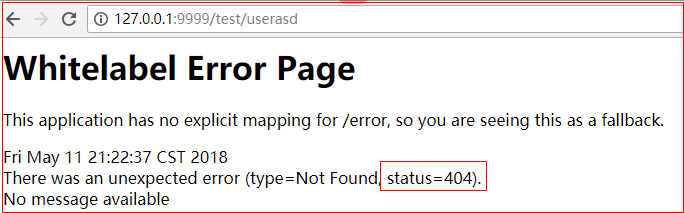
技巧01:如果是浏览器发出的请求出现异常后跳转到 /error 就会执行 errorHtml,然后返回一个HTML页面
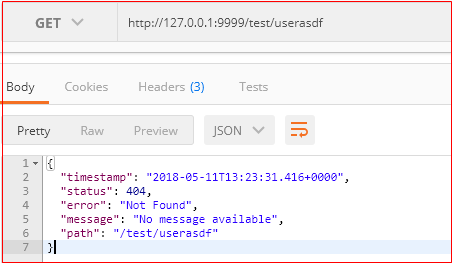
技巧02:如果是其他客户端发出请求出现异常后跳转到 /error 就会执行 error ,然后返回一个JSON格式数据
//

// Source code recreated from a .class file by IntelliJ IDEA

// (powered by Fernflower decompiler)

//

package org.springframework.boot.autoconfigure.web.servlet.error;

import java.util.Collections;

import java.util.List;

import java.util.Map;

import javax.servlet.http.HttpServletRequest;

import javax.servlet.http.HttpServletResponse;

import org.springframework.boot.autoconfigure.web.ErrorProperties;

import org.springframework.boot.autoconfigure.web.ErrorProperties.IncludeStacktrace;

import org.springframework.boot.web.servlet.error.ErrorAttributes;

import org.springframework.http.HttpStatus;

import org.springframework.http.MediaType;

import org.springframework.http.ResponseEntity;

import org.springframework.stereotype.Controller;

import org.springframework.util.Assert;

import org.springframework.web.bind.annotation.RequestMapping;

import org.springframework.web.bind.annotation.ResponseBody;

import org.springframework.web.servlet.ModelAndView;

@Controller

@RequestMapping({"${server.error.path:${error.path:/error}}"})

public class BasicErrorController extends AbstractErrorController {

    private final ErrorProperties errorProperties;

    public BasicErrorController(ErrorAttributes errorAttributes, ErrorProperties errorProperties) {

        this(errorAttributes, errorProperties, Collections.emptyList());

    }

    public BasicErrorController(ErrorAttributes errorAttributes, ErrorProperties errorProperties, List<ErrorViewResolver> errorViewResolvers) {

        super(errorAttributes, errorViewResolvers);

        Assert.notNull(errorProperties, "ErrorProperties must not be null");

        this.errorProperties = errorProperties;

    }

    public String getErrorPath() {

        return this.errorProperties.getPath();

    }

    @RequestMapping(

        produces = {"text/html"}

    )

    public ModelAndView errorHtml(HttpServletRequest request, HttpServletResponse response) {

        HttpStatus status = this.getStatus(request);

        Map<String, Object> model = Collections.unmodifiableMap(this.getErrorAttributes(request, this.isIncludeStackTrace(request, MediaType.TEXT_HTML)));

        response.setStatus(status.value());

        ModelAndView modelAndView = this.resolveErrorView(request, response, status, model);

        return modelAndView != null ? modelAndView : new ModelAndView("error", model);

    }

    @RequestMapping

    @ResponseBody

    public ResponseEntity<Map<String, Object>> error(HttpServletRequest request) {

        Map<String, Object> body = this.getErrorAttributes(request, this.isIncludeStackTrace(request, MediaType.ALL));

        HttpStatus status = this.getStatus(request);

        return new ResponseEntity(body, status);

    }

    protected boolean isIncludeStackTrace(HttpServletRequest request, MediaType produces) {

        IncludeStacktrace include = this.getErrorProperties().getIncludeStacktrace();

        if (include == IncludeStacktrace.ALWAYS) {

            return true;

        } else {

            return include == IncludeStacktrace.ON_TRACE_PARAM ? this.getTraceParameter(request) : false;

        }

    }

    protected ErrorProperties getErrorProperties() {

        return this.errorProperties;

    }

}
BasicErrorController.java
1.3 实例
1.3.1 浏览器
利用浏览器请求一个不存在的url
1.3.2 postman
利用postman请求一个不存在的url
1.4 修改默认的HTML页面
如果是浏览器发送的请求出现异常后,跳转到 /error 请求后会根据错误编号返回对应的HTML文档,例如:404.html、500.html
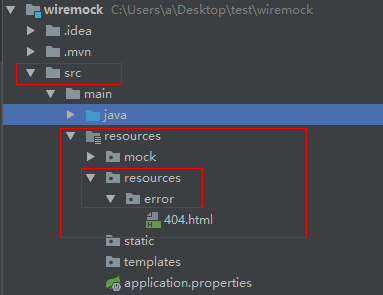
技巧01:我们可以重写这些404.html等文档,直接在 src/main/resources 路径下创建一个 resources/error 文件夹,形如:
<!DOCTYPE html>

<html>

<head>

<meta charset="UTF-8">

<title>Insert title here</title>

</head>

<body>

    <h2>你所访问的资源不存在</h2>

</body>

</html>
404.html
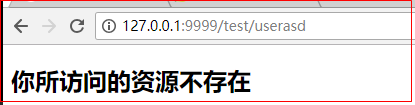
技巧02:在到 error 文件夹内部创建 404.html 等异常HTML文件即可,重启项目后利用浏览器访问一个不存在的url就会返回自定义的那个404.html文档,例如:
/error处理的更多相关文章
- Mediaplayer error (-19,0)
Android MediaPlayer 发生 error (-19,0) 错误解决方法. 引起原因:由于多次实例化MediaPlayer.start() 进行播放操作引起的.由于没有及时释放内存资源导 ...
- 4.Android 打包时出现的Android Export aborted because fatal error were founds [closed]
Android 程序开发完成后,如果要发布到互联网上供别人使用,就需要将自己的程序打包成Android 安装包文件(Android Package,APK),其扩展名为.apk.使用run as 也能 ...
- myeclipse 内存不够用报错PermGen space 和 An internal error has occurred.
最近项目中又增加了新的模块,项目的代码又多了不少.运行的时候总是报如下错误 Exception in thread "http-apr-80-exec-6" java.lang.O ...
- error C4430:missing type specifier 解决错误
错误 3 error C4430: missing type specifier - int assumed. Note: C++ does not support default-int ...
- PhpStorm和WAMP配置调试参数,问题描述Error. Interpreter is not specified or invalid. Press “Fix” to edit your project configuration.
PhpStorm和WAMP配置调试参数 问题描述: Error. Interpreter is not specified or invalid. Press “Fix” to edit your p ...
- Visual Studio:error MSB8020(搬运)
状况如下: error MSB8020: The builds tools for v120 (Platform Toolset = 'v120') cannot be found. To build ...
- 转:ORA-15186: ASMLIB error function = [asm_open], error = [1], 2009-05-24 13:57:38
转:ORA-15186: ASMLIB error function = [asm_open], error = [1], 2009-05-24 13:57:38http://space.itpub. ...
- 解决 Error: getaddrinfo EADDRINFO 错误
安装npm失败,提示Error: getaddrinfo EADDRINFO,原因在于虚拟机未连接互联网,悲剧.
- mono-3.4.0 源码安装时出现的问题 [do-install] Error 2 [install-pcl-targets] Error 1 解决方法
Mono 3.4修复了很多bug,继续加强稳定性和性能(其实Mono 3.2.8 已经很稳定,性能也很好了),但是从http://download.mono-project.com/sources/m ...
- keil MDK error: L6236E: No section matches selector - no section 错误
今天板子刚到,新建的第一个工程就报错了. .\Objects\cse.sct(7): error: L6236E: No section matches selector - no section t ...
随机推荐
- Linux 安全rm
先将shell脚本放在某个全局路径下,如/usr/local/bin #!/bin/sh # safe rm # Don't remove the file, just move them to a ...
- 【前端】CSS入门笔记
教程 CSS 指层叠样式表 (Cascading Style Sheets) CSS 语法 CSS 规则由两个主要的部分构成:选择器,以及一条或多条声明. 选择器通常是您需要改变样式的 HTML 元素 ...
- 【LeetCode】129. Sum Root to Leaf Numbers
Given a binary tree containing digits from 0-9 only, each root-to-leaf path could represent a number ...
- 调试VBA程序常用方法
在中断模式下(ctrl+Break键),可以做: 1.执行 工具----选项----编辑器----勾选“自动显示数据提示” 则当用鼠标悬停在变量或表达式上时,会出现提示窗口,显示其名称和值! 2 ...
- mysql时间运算
DELETE FROM zhongqiu WHERE caretatime<=ADDDATE(NOW(),-14) caretatime` timestamp NOT NULL DEFAULT ...
- 第17篇 shell编程基础(2)
shell study 1.Exit StatusIf the command executed successfully (or true), the value of $? is zero. If ...
- php中的continue用法
continue 2 表示跳出两层 continue 默认跳出一层 if (count($content_arr) > 0 ) { // 获取相应的goods数据 $goodsdata = ar ...
- mysql ,show slave status详解
===想确认sql_thread线程是否应用完了io_thread接收到的了relay log,看 Master_Log_File=Relay_Master_Log_File , Read_Maste ...
- CVE-2017-8464(震网三代)复现
开启msf root@sch01ar:~# msfconsole 设置模块 msf > use exploit/windows/fileformat/cve_2017_8464_lnk_rce ...
- JS||JQUERY常用语法
cookieEnabled属性语法 通常可以在浏览器的临时文件夹中保存一个文件,此文件可以包含用户信息(比如浏览过什么页面,是否选择了自动登录)等,这个文件被称作cookie,通过cookieEnab ...