
python操作——RabbitMQ
RabbitMQ是一个在AMQP基础上完整的,可服用的企业消息系统。他遵循Mozilla Public License开源协议。
MQ全称为Message Queue,消息队列(MQ)是一种应用程序对应用程序的通信方法。
应用程序通过读写出入队列的消息(针对应用程序的数据)来通信,而无需专用连接来链接它们。
消息传递指的是程序之间通过在消息中发送数据进行通信,而不是通过直接调用彼此来通信,直接调用通常是用于诸如远程过程调用的技术。
队列的使用除去了接收和发送应用程序同时执行的要求。
RabbitMQ安装
安装配置epel源

   $ rpm -ivh http://dl.fedoraproject.org/pub/epel/6/i386/epel-release-6-8.noarch.rpm

安装erlang

   $ yum -y install erlang

安装RabbitMQ

   $ yum -y install rabbitmq-server
注意:service rabbitmq-server start/stop
安装API
pip install pika

or

easy_install pika

or

源码

https://pypi.python.org/pypi/pika
使用API操作RabbitMQ
基于Queue实现生产者消费者模型
 #!/usr/bin/env python

 # -*- coding:utf-8 -*-

 import Queue

 import threading

 message = Queue.Queue(10)

 def producer(i):

     while True:

         message.put(i)

 def consumer(i):

     while True:

         msg = message.get()

 for i in range(12):

     t = threading.Thread(target=producer, args=(i,))

     t.start()

 for i in range(10):

     t = threading.Thread(target=consumer, args=(i,))

     t.start()
基于Queue
对于RabbitMQ来说,生产和消费不再针对内存里的一个Queue对象,而是某台服务器上的RabbitMQ Server实现的消息队列。
生产者:
 #!/usr/bin/env python

 import pika

 # ######################### 生产者 #########################

 connection = pika.BlockingConnection(pika.ConnectionParameters(

         host='localhost'))

 channel = connection.channel()

 channel.queue_declare(queue='hello')

 channel.basic_publish(exchange='',

                       routing_key='hello',

                       body='Hello World!')

 print(" [x] Sent 'Hello World!'")

 connection.close()
消费者:
 #!/usr/bin/env python

 import pika

 # ########################## 消费者 ##########################

 connection = pika.BlockingConnection(pika.ConnectionParameters(

         host='localhost'))

 channel = connection.channel()

 channel.queue_declare(queue='hello')

 def callback(ch, method, properties, body):

     print(" [x] Received %r" % body)

 channel.basic_consume(callback,

                       queue='hello',

                       no_ack=True)

 print(' [*] Waiting for messages. To exit press CTRL+C')

 channel.start_consuming()
1.acknowledgment消息不丢失
no-ack = False,如果消费者遇到情况(its channel is closed, connection is closed, or TCP connection is lost)挂掉了,那么,RabbitMQ会重新将该任务添加到队列中。
import pika

connection = pika.BlockingConnection(pika.ConnectionParameters(

        host='10.211.55.4'))

channel = connection.channel()

channel.queue_declare(queue='hello')

def callback(ch, method, properties, body):

    print(" [x] Received %r" % body)

    import time

    time.sleep(10)

    print 'ok'

    ch.basic_ack(delivery_tag = method.delivery_tag)

channel.basic_consume(callback,

                      queue='hello',

                      no_ack=False)

print(' [*] Waiting for messages. To exit press CTRL+C')

channel.start_consuming()
消费者
2.durable消息不丢失
#!/usr/bin/env python

import pika

connection = pika.BlockingConnection(pika.ConnectionParameters(host='10.211.55.4'))

channel = connection.channel()

# make message persistent

channel.queue_declare(queue='hello', durable=True)

channel.basic_publish(exchange='',

                      routing_key='hello',

                      body='Hello World!',

                      properties=pika.BasicProperties(

                          delivery_mode=2, # make message persistent

                      ))

print(" [x] Sent 'Hello World!'")

connection.close()
生产者
#!/usr/bin/env python

# -*- coding:utf-8 -*-

import pika

connection = pika.BlockingConnection(pika.ConnectionParameters(host='10.211.55.4'))

channel = connection.channel()

# make message persistent

channel.queue_declare(queue='hello', durable=True)

def callback(ch, method, properties, body):

    print(" [x] Received %r" % body)

    import time

    time.sleep(10)

    print 'ok'

    ch.basic_ack(delivery_tag = method.delivery_tag)

channel.basic_consume(callback,

                      queue='hello',

                      no_ack=False)

print(' [*] Waiting for messages. To exit press CTRL+C')

channel.start_consuming()
消费者
3.消费获取顺序
默认消息队列里的数据是按照顺序被消费者拿走,例如:消费者1 去队列中获取 奇数 序列的任务,消费者1去队列中获取 偶数 序列的任务。
channel.basic_qos(prefetch_count=1) 表示谁来谁取,不再按照奇偶数排列
#!/usr/bin/env python

# -*- coding:utf-8 -*-

import pika

connection = pika.BlockingConnection(pika.ConnectionParameters(host='10.211.55.4'))

channel = connection.channel()

# make message persistent

channel.queue_declare(queue='hello')

def callback(ch, method, properties, body):

    print(" [x] Received %r" % body)

    import time

    time.sleep(10)

    print 'ok'

    ch.basic_ack(delivery_tag = method.delivery_tag)

channel.basic_qos(prefetch_count=1)

channel.basic_consume(callback,

                      queue='hello',

                      no_ack=False)

print(' [*] Waiting for messages. To exit press CTRL+C')

channel.start_consuming()
消费者
4.发布订阅
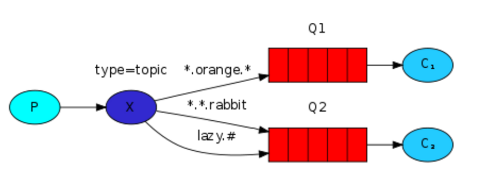
发布订阅和简单的消息队列区别在于,发布订阅会将消息发送给所有的订阅者,而消息队列中的数据被消费一次便消失。
所以,RabbitMQ实现发布和订阅时,会为每一个订阅者创建一个队列,而发布者发布消息时,会将消息放置在所有相关队列中。
exchange type = fanout
#!/usr/bin/env python

import pika

import sys

connection = pika.BlockingConnection(pika.ConnectionParameters(

        host='localhost'))

channel = connection.channel()

channel.exchange_declare(exchange='logs',

                         type='fanout')

message = ' '.join(sys.argv[1:]) or "info: Hello World!"

channel.basic_publish(exchange='logs',

                      routing_key='',

                      body=message)

print(" [x] Sent %r" % message)

connection.close()
发布者
#!/usr/bin/env python

import pika

connection = pika.BlockingConnection(pika.ConnectionParameters(

        host='localhost'))

channel = connection.channel()

channel.exchange_declare(exchange='logs',

                         type='fanout')

result = channel.queue_declare(exclusive=True)

queue_name = result.method.queue

channel.queue_bind(exchange='logs',

                   queue=queue_name)

print(' [*] Waiting for logs. To exit press CTRL+C')

def callback(ch, method, properties, body):

    print(" [x] %r" % body)

channel.basic_consume(callback,

                      queue=queue_name,

                      no_ack=True)

channel.start_consuming()
订阅者
5.关键字发送
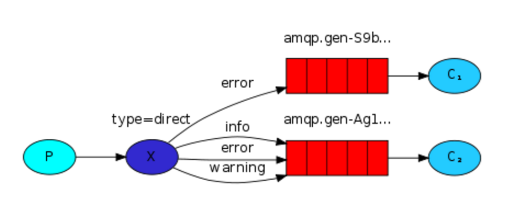
exchange type = direct
之前事例,发送消息时明确指定某个队列并向其中发送消息,RabbitMQ还支持根据关键字发送,即:队列绑定关键字,发送者将数据根据关键字发送到消息exchange,exchange根据 关键字 判定应该将数据发送至指定队列。
 #!/usr/bin/env python

 import pika

 import sys

 connection = pika.BlockingConnection(pika.ConnectionParameters(

         host='localhost'))

 channel = connection.channel()

 channel.exchange_declare(exchange='direct_logs',

                          type='direct')

 result = channel.queue_declare(exclusive=True)

 queue_name = result.method.queue

 severities = sys.argv[1:]

 if not severities:

     sys.stderr.write("Usage: %s [info] [warning] [error]\n" % sys.argv[0])

     sys.exit(1)

 for severity in severities:

     channel.queue_bind(exchange='direct_logs',

                        queue=queue_name,

                        routing_key=severity)

 print(' [*] Waiting for logs. To exit press CTRL+C')

 def callback(ch, method, properties, body):

     print(" [x] %r:%r" % (method.routing_key, body))

 channel.basic_consume(callback,

                       queue=queue_name,

                       no_ack=True)

 channel.start_consuming()
消费者
 #!/usr/bin/env python

 import pika

 import sys

 connection = pika.BlockingConnection(pika.ConnectionParameters(

         host='localhost'))

 channel = connection.channel()

 channel.exchange_declare(exchange='direct_logs',

                          type='direct')

 severity = sys.argv[1] if len(sys.argv) > 1 else 'info'

 message = ' '.join(sys.argv[2:]) or 'Hello World!'

 channel.basic_publish(exchange='direct_logs',

                       routing_key=severity,

                       body=message)

 print(" [x] Sent %r:%r" % (severity, message))

 connection.close()
生产者
6.模糊匹配
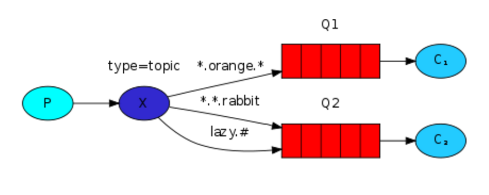
exchange type = topic
在topic类型下,可以让队列绑定几个模糊的关键字,之后发送者将数据发送到exchange,exchange将传入”路由值“和 ”关键字“进行匹配,匹配成功,则将数据发送到指定队列。
- # 表示可以匹配 0 个 或 多个 单词
- * 表示只能匹配 一个 单词
 发送者路由值              队列中

 old.boy.python          old.*  -- 不匹配

 old.boy.python          old.#  -- 匹配
 #!/usr/bin/env python

 import pika

 import sys

 connection = pika.BlockingConnection(pika.ConnectionParameters(

         host='localhost'))

 channel = connection.channel()

 channel.exchange_declare(exchange='topic_logs',

                          type='topic')

 result = channel.queue_declare(exclusive=True)

 queue_name = result.method.queue

 binding_keys = sys.argv[1:]

 if not binding_keys:

     sys.stderr.write("Usage: %s [binding_key]...\n" % sys.argv[0])

     sys.exit(1)

 for binding_key in binding_keys:

     channel.queue_bind(exchange='topic_logs',

                        queue=queue_name,

                        routing_key=binding_key)

 print(' [*] Waiting for logs. To exit press CTRL+C')

 def callback(ch, method, properties, body):

     print(" [x] %r:%r" % (method.routing_key, body))

 channel.basic_consume(callback,

                       queue=queue_name,

                       no_ack=True)

 channel.start_consuming()
消费者
 #!/usr/bin/env python

 import pika

 import sys

 connection = pika.BlockingConnection(pika.ConnectionParameters(

         host='localhost'))

 channel = connection.channel()

 channel.exchange_declare(exchange='topic_logs',

                          type='topic')

 routing_key = sys.argv[1] if len(sys.argv) > 1 else 'anonymous.info'

 message = ' '.join(sys.argv[2:]) or 'Hello World!'

 channel.basic_publish(exchange='topic_logs',

                       routing_key=routing_key,

                       body=message)

 print(" [x] Sent %r:%r" % (routing_key, message))

 connection.close()
生产者
 sudo rabbitmqctl add_user alex 123

 # 设置用户为administrator角色

 sudo rabbitmqctl set_user_tags alex administrator

 # 设置权限

 sudo rabbitmqctl set_permissions -p "/" alex '.''.''.'

 # 然后重启rabbiMQ服务

 sudo /etc/init.d/rabbitmq-server restart

 # 然后可以使用刚才的用户远程连接rabbitmq server了。

 ------------------------------

 credentials = pika.PlainCredentials("alex","")

 connection = pika.BlockingConnection(pika.ConnectionParameters('192.168.14.47',credentials=credentials))
注意事项
python操作——RabbitMQ的更多相关文章
- Python操作RabbitMQ
RabbitMQ介绍 RabbitMQ是一个由erlang开发的AMQP(Advanced Message Queue )的开源实现的产品,RabbitMQ是一个消息代理,从“生产者”接收消息并传递消 ...
- Python之路【第九篇】:Python操作 RabbitMQ、Redis、Memcache、SQLAlchemy
Python之路[第九篇]:Python操作 RabbitMQ.Redis.Memcache.SQLAlchemy Memcached Memcached 是一个高性能的分布式内存对象缓存系统,用 ...
- python - 操作RabbitMQ
python - 操作RabbitMQ 介绍 RabbitMQ是一个在AMQP基础上完整的,可复用的企业消息系统.他遵循Mozilla Public License开源协议.MQ全称为Mess ...
- 文成小盆友python-num12 Redis发布与订阅补充,python操作rabbitMQ
本篇主要内容: redis发布与订阅补充 python操作rabbitMQ 一,redis 发布与订阅补充 如下一个简单的监控模型,通过这个模式所有的收听者都能收听到一份数据. 用代码来实现一个red ...
- Python之路第十二天,高级(4)-Python操作rabbitMQ
rabbitMQ RabbitMQ是一个在AMQP基础上完整的,可复用的企业消息系统.他遵循Mozilla Public License开源协议. MQ全称为Message Queue, 消息队列(M ...
- python操作RabbitMQ(不错)
一.rabbitmq RabbitMQ是一个在AMQP基础上完整的,可复用的企业消息系统.他遵循Mozilla Public License开源协议. MQ全称为Message Queue, 消息队列 ...
- Python菜鸟之路:Python基础-Python操作RabbitMQ
RabbitMQ简介 rabbitmq中文翻译的话,主要还是mq字母上:Message Queue,即消息队列的意思.rabbitmq服务类似于mysql.apache服务,只是提供的功能不一样.ra ...
- Python操作 RabbitMQ、Redis、Memcache
Python操作 RabbitMQ.Redis.Memcache Memcached Memcached 是一个高性能的分布式内存对象缓存系统,用于动态Web应用以减轻数据库负载.它通过在内存中缓存数 ...
- Python 【第六章】:Python操作 RabbitMQ、Redis、Memcache、SQLAlchemy
Memcached Memcached 是一个高性能的分布式内存对象缓存系统,用于动态Web应用以减轻数据库负载.它通过在内存中缓存数据和对象来减少读取数据库的次数,从而提高动态.数据库驱动网站的速度 ...
- Python操作 RabbitMQ、Redis、Memcache、SQLAlchemy
Memcached Memcached 是一个高性能的分布式内存对象缓存系统,用于动态Web应用以减轻数据库负载.它通过在内存中缓存数据和对象来减少读取数据库的次数,从而提高动态.数据库驱动网站的速度 ...
随机推荐
- iptables修改
https://fedoraproject.org/wiki/How_to_edit_iptables_rules?rd=User_talk:Rforlot Listing Rules Current ...
- Django学习之模板标签和变量
safe过滤器和{% autoescape %}标签 首先看这样一个例子: views.py中: c = '<h3>更上一层楼</h3>' render(request,'te ...
- java包命名规则
package indi/onem.发起者名.项目名.模块名... package pers.个人名.项目名.模块名... package priv.个人名.项目名.模块名... package te ...
- mock调用返回值是void类型
//调用void方法 doNothing().when(templateWrapper).process();// doCallRealMethod().when(templateWrapper).p ...
- springMVC集成mybatis-paginator实现分页
mybatis-paginator下载地址:https://github.com/miemiedev/mybatis-paginator 1.引入maven依赖 <dependency> ...
- MongoDb数据结构详解
首先,向数据库插入一条bjson数据 首先是定义文档,然后使用admin用户名密码登录,进入test数据库,向test数据库中插入此文档(“表名称和表中的记录”) 插入结果,查看mongoVUE如下图 ...
- PHP 关掉浏览器还会执行代码
ignore_user_abort();//关掉浏览器,PHP脚本也可以继续执行. set_time_limit(0);// 通过set_time_limit(0)可以让程序无限制的执行下去 $int ...
- 从获取点击事件根元素谈 target和currentTarget
事情由来: 写了一个点击事件,想获取根元素,想的直接用current就行了,因为之前就是这么用的,但是之前的点击元素是没子元素的,current就是根元素,但是这次点击元素内部有子元素,current ...
- OpenCV学习笔记八:opencv_photo模块
一,简介: 该库用于数码照片的处理,处于发展中,目前只包含如下算法: //! restores the damaged image areas using one of the available i ...
- 更改Scala的代码自己主动补全快捷键code completion
使用Eclipse的代码补全快捷键alt+/已经习惯了.可是IntelJIDEA中这个快捷键组合没有效果,那么我们来改动之,按ctrl+alt+s打开设置界面 之后在keymaps中选择Eclipse ...