
scrapy学习-爬取天天基金网基金列表
描述
爬取http://fundact.eastmoney.com/banner/pg.html#ln网站的数据,
要求:爬取所有基金(有27页)的基金代码、基金名称、单位净值、日期、日增长率、近1周、近1月、近3月、近6月、近1年、近2年、近3年、今年来、成立来和手续费|起购金额。将爬取的数据放入mariaDB数据库中。
环境描述
python 3.6.3
scrapy 1.4.0
步骤记录
创建scrapy项目
进入打算放代码的地方(F:\myPycharm_ws),创建项目funds,执行命令:
scrapy startproject funds
创建好项目后,查看会发现生成一些文件,这里对相关文件做下说明
- scrapy.cfg 项目的配置信息,主要为Scrapy命令行工具提供一个基础的配置信息。(真正爬虫相关的配置信息在settings.py文件中)
- items.py 设置数据存储模板,用于结构化数据,如:Django的Model
- pipelines 数据处理行为,如:一般结构化的数据持久化
- settings.py 配置文件,如:递归的层数、并发数,延迟下载等
- spiders 爬虫目录,如:创建文件,编写爬虫规则
接下来就可以使用pycharm打开项目进行开发了
设置在pycharm下运行scrapy项目
step 1:在funds项目里创建一个py文件(项目的任何地方都行)
from scrapy import cmdline

cmdline.execute("scrapy crawl fundsList".split())
step 2:配置 Run --> Edit Configurations (本人测试,不配置该步骤,也可运行)
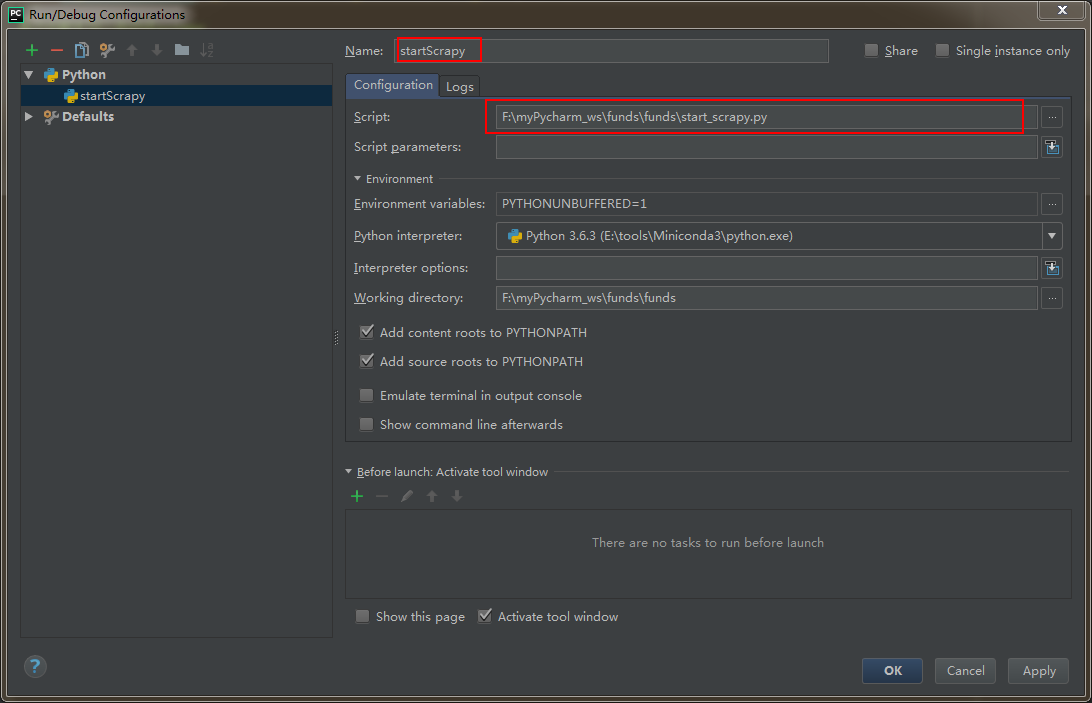
运行方式:直接运行该.py文件即可。
分析如何获取数据
由于通过ajax请求即可获取到列表的全部结构化数据,所以我决定通过谷歌浏览器分析得到请求数据的url:
(参考:https://www.jianshu.com/p/1e35bcb1cf21)
通过分析,发现接口:https://fundapi.eastmoney.com/fundtradenew.aspx?ft=pg&sc=1n&st=desc&pi=1&pn=100&cp=&ct=&cd=&ms=&fr=&plevel=&fst=&ftype=&fr1=&fl=0&isab=
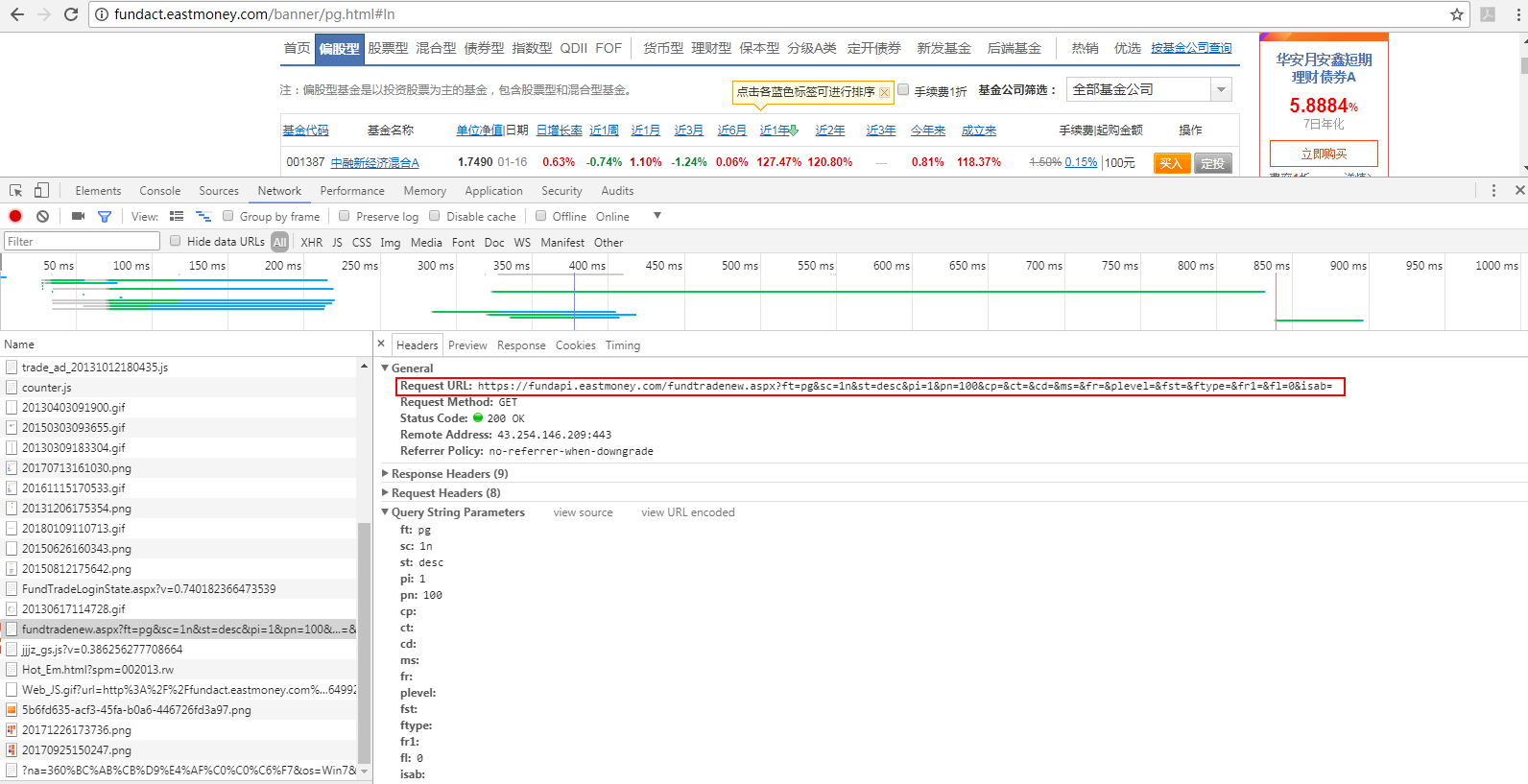
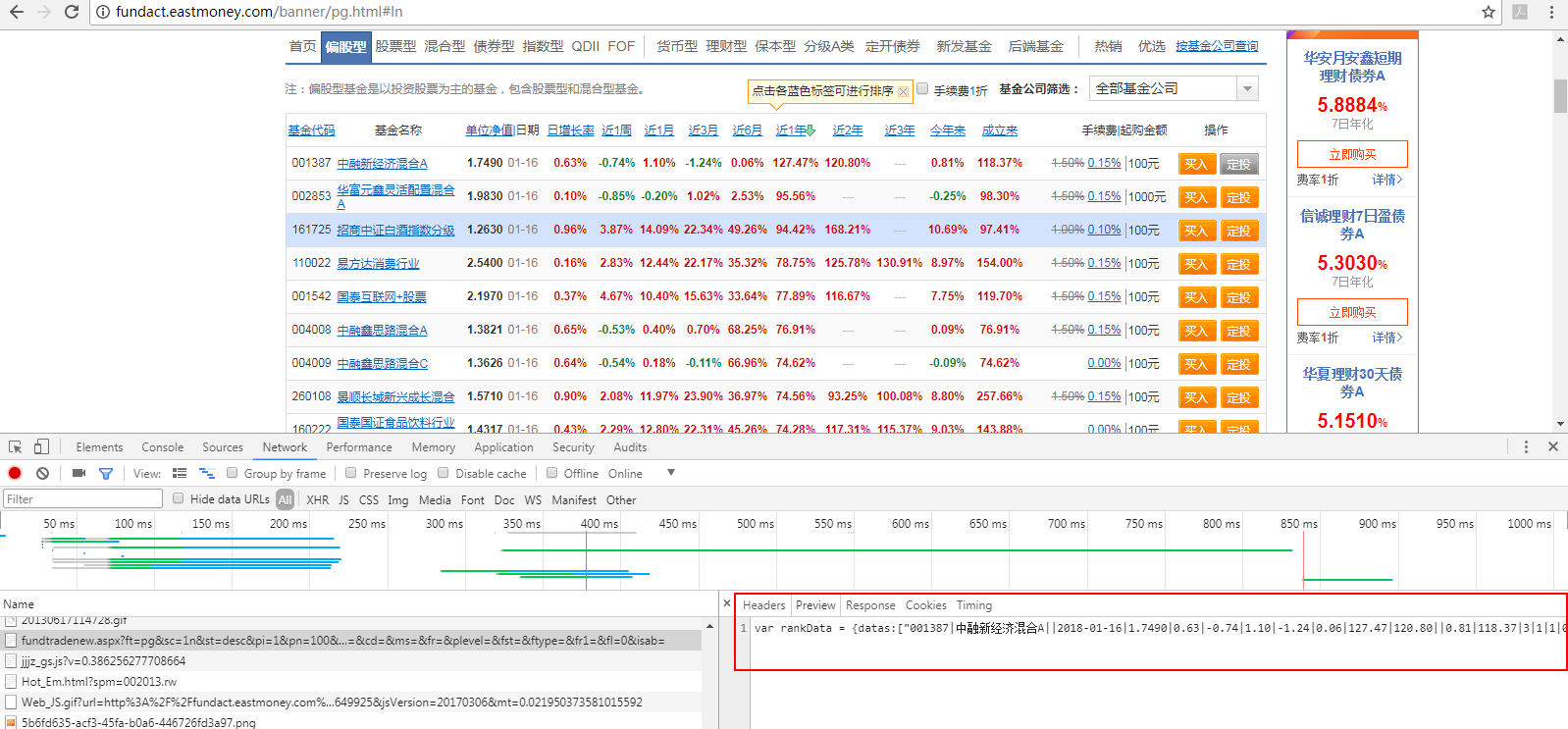
查看,接口返回的数据,发现并非直接是一个json,而是形如这样的:我们只需取出datas项就行

OK,那我直接请求获取这个接口的数据即可。
编写代码
step 1:设置item
class FundsItem(scrapy.Item):

    # define the fields for your item here like:

    # name = scrapy.Field()

    code = scrapy.Field()   # 基金代码

    name = scrapy.Field()   # 基金名称

    unitNetWorth = scrapy.Field()   # 单位净值

    day = scrapy.Field()    # 日期

    dayOfGrowth = scrapy.Field()  # 日增长率

    recent1Week = scrapy.Field()    # 最近一周

    recent1Month = scrapy.Field()   # 最近一月

    recent3Month = scrapy.Field()   # 最近三月

    recent6Month = scrapy.Field()   # 最近六月

    recent1Year = scrapy.Field()    # 最近一年

    recent2Year = scrapy.Field()    # 最近二年

    recent3Year = scrapy.Field()    # 最近三年

    fromThisYear = scrapy.Field()   # 今年以来

    fromBuild = scrapy.Field()  # 成立以来

    serviceCharge = scrapy.Field()  # 手续费

    upEnoughAmount = scrapy.Field()     # 起够金额

    pass
step 2:编写spider
import scrapy

import json

from scrapy.http import Request

from funds.items import FundsItem

class FundsSpider(scrapy.Spider):

    name = 'fundsList'   # 唯一,用于区别Spider。运行爬虫时,就要使用该名字

    allowed_domains = ['fund.eastmoney.com']  # 允许访问的域

    # 初始url。在爬取从start_urls自动开始后,服务器返回的响应会自动传递给parse(self, response)方法。

    # 说明:该url可直接获取到所有基金的相关数据

    # start_url = ['http://fundact.eastmoney.com/banner/pg.html#ln']

    # custome_setting可用于自定义每个spider的设置,而setting.py中的都是全局属性的,当你的scrapy工程里有多个spider的时候这个custom_setting就显得很有用了

    # custome_setting = {

    #

    # }

    # spider中初始的request是通过调用 start_requests() 来获取的。 start_requests() 读取 start_urls 中的URL, 并以 parse 为回调函数生成 Request 。

    # 重写start_requests也就不会从start_urls generate Requests了

    def start_requests(self):

        url = 'https://fundapi.eastmoney.com/fundtradenew.aspx?ft=pg&sc=1n&st=desc&pi=1&pn=3000&cp=&ct=&cd=&ms=&fr=&plevel=&fst=&ftype=&fr1=&fl=0&isab='

        requests = []

        request = scrapy.Request(url,callback=self.parse_funds_list)

        requests.append(request)

        return requests

    def parse_funds_list(self,response):

        datas = response.body.decode('UTF-8')

        # 取出json部门

        datas = datas[datas.find('{'):datas.find('}')+1] # 从出现第一个{开始,取到}

        # 给json各字段名添加双引号

        datas = datas.replace('datas', '\"datas\"')

        datas = datas.replace('allRecords', '\"allRecords\"')

        datas = datas.replace('pageIndex', '\"pageIndex\"')

        datas = datas.replace('pageNum', '\"pageNum\"')

        datas = datas.replace('allPages', '\"allPages\"')

        jsonBody = json.loads(datas)

        jsonDatas = jsonBody['datas']

        fundsItems = []

        for data in jsonDatas:

            fundsItem = FundsItem()

            fundsArray = data.split('|')

            fundsItem['code'] = fundsArray[0]

            fundsItem['name'] = fundsArray[1]

            fundsItem['day'] = fundsArray[3]

            fundsItem['unitNetWorth'] = fundsArray[4]

            fundsItem['dayOfGrowth'] = fundsArray[5]

            fundsItem['recent1Week'] = fundsArray[6]

            fundsItem['recent1Month'] = fundsArray[7]

            fundsItem['recent3Month'] = fundsArray[8]

            fundsItem['recent6Month'] = fundsArray[9]

            fundsItem['recent1Year'] = fundsArray[10]

            fundsItem['recent2Year'] = fundsArray[11]

            fundsItem['recent3Year'] = fundsArray[12]

            fundsItem['fromThisYear'] = fundsArray[13]

            fundsItem['fromBuild'] = fundsArray[14]

            fundsItem['serviceCharge'] = fundsArray[18]

            fundsItem['upEnoughAmount'] = fundsArray[24]

            fundsItems.append(fundsItem)

        return fundsItems
step 3:配置settings.py
custome_setting可用于自定义每个spider的设置,而setting.py中的都是全局属性的,当你的scrapy工程里有多个spider的时候这个custom_setting就显得很有用了。
但是我目前项目暂时只有一个爬虫,所以暂时使用setting.py设置spider。
设置了DEFAULT_REQUEST_HEADERS(本次爬虫由于是请求接口,该项不配置也可)
DEFAULT_REQUEST_HEADERS = {

  # 'Accept': 'text/html,application/xhtml+xml,application/xml;q=0.9,*/*;q=0.8',

  # 'Accept-Language': 'en',

    'Accept':'*/*',

    'Accept-Encoding':'gzip, deflate, br',

    'Accept-Language':'zh-CN,zh;q=0.9',

    'Connection':'keep-alive',

    'Cookie':'st_pvi=72856792768813; UM_distinctid=1604442b00777b-07f0a512f81594-5e183017-100200-1604442b008b52; qgqp_b_id=f10107e9d27d5fe2099a361a52fcb296; st_si=08923516920112; ASP.NET_SessionId=s3mypeza3w34uq2zsnxl5azj',

    'Host':'fundapi.eastmoney.com',

    'Referer':'http://fundact.eastmoney.com/banner/pg.html',

    'User-Agent':'Mozilla/5.0 (Windows NT 6.1; Win64; x64) AppleWebKit/537.36 (KHTML, like Gecko) Chrome/62.0.3202.94 Safari/537.36'

}
设置ITEM_PIPELINES
ITEM_PIPELINES = {

   'funds.pipelines.FundsPipeline': 300,

}
pipelines.py,将数据写入我本地数据库里
import pymysql.cursors

class FundsPipeline(object):

    def process_item(self, item, spider):

        # 连接数据库

        connection = pymysql.connect(host='localhost',

                                     user='root',

                                     password='123',

                                     db='test',

                                     charset='utf8mb4',

                                     cursorclass=pymysql.cursors.DictCursor)

        sql = "INSERT INTO funds(code,name,unitNetWorth,day,dayOfGrowth,recent1Week,recent1Month,recent3Month,recent6Month,recent1Year,recent2Year,recent3Year,fromThisYear,fromBuild,serviceCharge,upEnoughAmount)\

                                      VALUES('%s','%s','%s','%s','%s','%s','%s','%s','%s','%s','%s','%s','%s','%s','%s','%s')" % (

            item['code'], item['name'], item['unitNetWorth'], item['day'], item['dayOfGrowth'], item['recent1Week'], \

            item['recent1Month'], item['recent3Month'], item['recent6Month'], item['recent1Year'], item['recent2Year'],

            item['recent3Year'], item['fromThisYear'], item['fromBuild'], item['serviceCharge'], item['upEnoughAmount'])

        with connection.cursor() as cursor:

            cursor.execute(sql) # 执行sql

        connection.commit()  # 提交到数据库执行

        connection.close()

        return item
错误处理
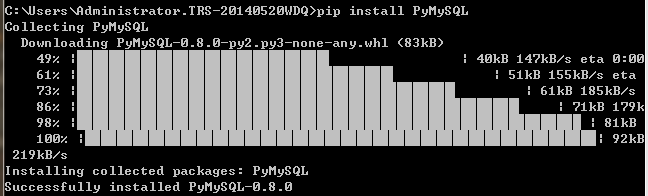
ModuleNotFoundError: No module named 'pymysql'
解决办法:(参考:https://stackoverflow.com/questions/33446347/no-module-named-pymysql)
pip install PyMySQL
1366, "Incorrect string value: '\xE6\x99\xAF\xE9\xA1\xBA...' for column 'name' at row 1"
即:入库的中文是乱码
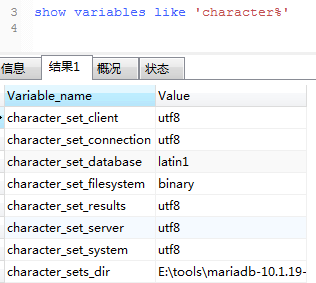
查看数据库编码,为latin1。
解决办法:
alter table funds convert to character set utf8
scrapy学习-爬取天天基金网基金列表的更多相关文章
- Scrapy实战篇(七)之爬取爱基金网站基金业绩数据
本篇我们以scrapy+selelum的方式来爬取爱基金网站(http://fund.10jqka.com.cn/datacenter/jz/)的基金业绩数据. 思路:我们以http://fund.1 ...
- 使用scrapy框架爬取自己的博文(2)
之前写了一篇用scrapy框架爬取自己博文的博客,后来发现对于中文的处理一直有问题- - 显示的时候 [u'python\u4e0b\u722c\u67d0\u4e2a\u7f51\u9875\u76 ...
- 【Scrapy(四)】scrapy 分页爬取以及xapth使用小技巧
scrapy 分页爬取以及xapth使用小技巧 这里以爬取www.javaquan.com为例: 1.构建出下一页的url: 很显然通过dom树,可以发现下一页所在的a标签 2.使用scrapy的 ...
- Java学习-042-获取目录文件列表(当前,级联)
以下三个场景,在我们日常的测试开发中经常遇到: 软件自动化测试,在进行参数测试时,我们通常将所有相似功能的参数文件统一放在一个目录中,在自动化程序启动的时候,获取资源参数文件夹中所有参数文件,然后解析 ...
- 简单的scrapy实战:爬取腾讯招聘北京地区的相关招聘信息
简单的scrapy实战:爬取腾讯招聘北京地区的相关招聘信息 简单的scrapy实战:爬取腾讯招聘北京地区的相关招聘信息 系统环境:Fedora22(昨天已安装scrapy环境) 爬取的开始URL:ht ...
- 一起学爬虫——使用selenium和pyquery爬取京东商品列表
layout: article title: 一起学爬虫--使用selenium和pyquery爬取京东商品列表 mathjax: true --- 今天一起学起使用selenium和pyquery爬 ...
- 如何提高scrapy的爬取效率
提高scrapy的爬取效率 增加并发: 默认scrapy开启的并发线程为32个,可以适当进行增加.在settings配置文件中修改CONCURRENT_REQUESTS = 100值为100,并发设置 ...
- scrapy框架爬取笔趣阁完整版
继续上一篇,这一次的爬取了小说内容 pipelines.py import csv class ScrapytestPipeline(object): # 爬虫文件中提取数据的方法每yield一次it ...
- scrapy框架爬取笔趣阁
笔趣阁是很好爬的网站了,这里简单爬取了全部小说链接和每本的全部章节链接,还想爬取章节内容在biquge.py里在加一个爬取循环,在pipelines.py添加保存函数即可 1 创建一个scrapy项目 ...
随机推荐
- iOS之苹果调整 App Store 截图上传规则,截图尺寸、大小等
作者:ASO100链接:https://zhuanlan.zhihu.com/p/23041522来源:知乎著作权归作者所有.商业转载请联系作者获得授权,非商业转载请注明出处. 自从 8 月中旬苹果向 ...
- vim删除文件所有内容
在命令模式下,输入:.,$d 回车.
- jQuery最重要的知识点
1.各种常见的选择器.2.对于属性的操作.[重点] 2.1)获取或设置属性的值: prop(); 2.2 ) 添加.删除.切换样式: addClass/removeClass/toggleClass ...
- zookeeper相关知识与集群搭建
Zookeeper Zookeeper相关概念 Zookeeper概述 Zookeeper是一个分布式协调服务的开源框架,主要用来解决分布式集群中应用系统的一致性问题. Zookeeper本质上是一个 ...
- Python学习笔记:第2天while循环 运算符 格式化输出 编码
目录 1. while循环 continue.break和else语句 2. 格式化输出 3. 运算符 3.1 算数运算 3.2 比较运算符 3.3 赋值运算符 3.4 逻辑运算符 3.5 成员运算符 ...
- ruby OpenURI模块使用
OpenURI is an easy-to-use wrapper for Net::HTTP, Net::HTTPS and Net::FTP(OpenURI支持重定向) 像打开普通文件那样打开ht ...
- ubuntu64位运行32位程序
sudo dpkg --add-architecture i386 sudo apt install libc6:i386 转:https://blog.csdn.net/zoomdy/article ...
- 003---socket介绍
socket介绍 什么是socket? socket是应用层与tcp/ip协议族通信的中间软件抽象层,它是一组接口.在设计模式中.其实就是一个门面模式.我们无需深入理解tcp/udp协议,socket ...
- linux c fprintf()
#include<stdio.h> #include<unistd.h> #include<time.h> int main(int argc,char *argv ...
- HBase import tsv,csv File
一,HBase中创建table 表(liupeng:test)并创建 info ,contect 列簇 hbase(main):258:0> create "liupeng:Test& ...