
Django学习---自定义分页
自定义分页
简单例子:
urls.py:
from django.contrib import admin

from django.urls import path

from django.conf.urls import url,include

from app01 import views

urlpatterns = [

    url(r'^user_list/',views.user_list),

]
先固定写死数据:view.py:
LIST = []

for i in range(100):

    LIST.append(i)

def user_list(request):

    current_page = request.GET.get('p',1)

    current_page = int(current_page)

    start = (current_page-1)*10

    end = current_page * 10

    data = LIST[start:end]

    return render(request,'user_list.html',{'li':data})
user_item.py
<!DOCTYPE html>

<html lang="en">

<head>

    <meta charset="UTF-8">

    <title>Title</title>

</head>

<body>

    <ul>

        {% for item in li %}

            {% include 'li.html' %}

        {% endfor %}

    </ul>

    <div>

        <a href="/user_list/?p=1">1</a>

        <a href="/user_list/?p=2">2</a>

        <a href="/user_list/?p=3">3</a>

    </div>

</body>

</html>
显示效果:
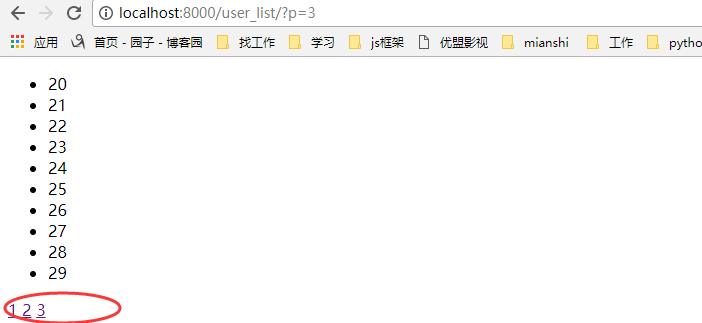
我们都知道后台穿过来的是一个字符串,如果我们把那些a标签从后台传过来,那会是什么样的呢?
views.py:
def user_list(request):

    current_page = request.GET.get('p',1)

    current_page = int(current_page)

    start = (current_page-1)*10

    end = current_page * 10

    data = LIST[start:end]

    page_str = '''

        <a href="/user_list/?p=1">1</a>

        <a href="/user_list/?p=2">2</a>

        <a href="/user_list/?p=3">3</a>

    '''

    #return render(request,'user_list.html',{'li':data})

    return render(request,'user_list.html',{'page_str':page_str,'li':data})
html.py:
<div>

        {{ page_str }}

</div>
显示效果:

这里可以引入一个知识:XSS攻击:即评论,输入框等输入一些脚本,for循环。
如果想要显示的话:
第一种方法:
{{ page_str|safe }}
第二种方法:
from django.utils.safestring import mark_safe

page_str = '''

        <a href="/user_list/?p=1">1</a>

        <a href="/user_list/?p=2">2</a>

        <a href="/user_list/?p=3">3</a>

    '''

page_str = mark_safe(page_str)
分页1.0版本:使用固定的列表数据,然后获得页数,
views.py:
def user_list(request):

    current_page = request.GET.get('p',1)

    current_page = int(current_page)

    start = (current_page-1)*10

    end = current_page * 10

    data = LIST[start:end]

    all_count = len(LIST)

    count,y = divmod(all_count,10)

    if y:

        count+=1

    page_list = []

    for i in range(1,count+1):

        if i == current_page:

            temp = '<a class="page active" href="/user_list/?p=%s">%s</a>' % (i, i)

        else:

            temp = '<a class="page" href="/user_list/?p=%s">%s</a>' %(i,i)

        page_list.append(temp)

    page_str = "".join(page_list)

    return render(request,'user_list.html',{'page_str':page_str,'li':data})
html文件:
<!DOCTYPE html>

<html lang="en">

<head>

    <meta charset="UTF-8">

    <title>Title</title>

    <style>

        .pagination .page{

            display: inline-block;

            padding:5px;

            background-color: seashell;

            margin:5px;

        }

        .pagination .active{

            background-color: coral;

        }

    </style>

</head>

<body>

    <ul>

        {% for item in li %}

            {% include 'li.html' %}

        {% endfor %}

    </ul>

    <div class="pagination">

        {{ page_str|safe }}

    </div>

</body>

</html>
显示效果:
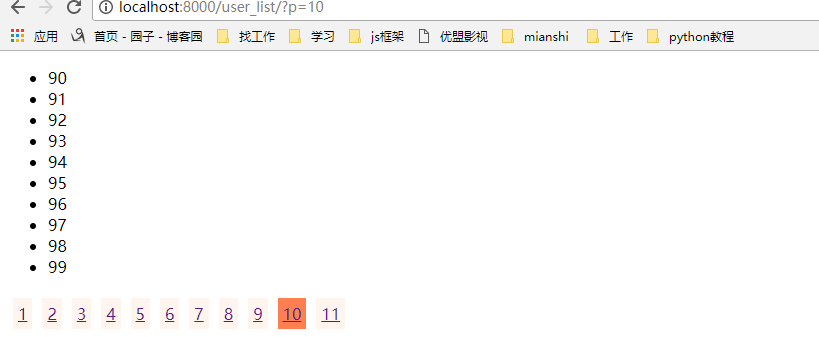
上面的分页代码我们在数据少的时候将就一下,但是如果一旦我们的数据多了,那我们如果一下子把所有的页数都显示在html中,那显然是不合适的,那我们应该要隐藏多的页数
那我们需要该for循环,显示当前页的前五个和后五个,来我们改写一些views里面的函数:
 def user_list(request):

     current_page = request.GET.get('p',1)

     current_page = int(current_page)

     page_size = 10#页面一次显示多少条数据

     page_num=11#页面显示的页数

     start = (current_page-1)*page_size

     end = current_page * page_size

     data = LIST[start:end]

     all_count = len(LIST)

     count,y = divmod(all_count,page_size)

     if y:

         count+=1

     page_list = []

     if count <= 11:

         start_index = 1

         end_index = count+1

     elif count > 11:

         if current_page <= (page_num+1)/2:

             start_index = 1

             end_index = page_num + 1

         elif (current_page+(page_num-1)/2) > count :

             start_index = count-page_num+1

             end_index = count + 1

         else:

             start_index = current_page - (page_num-1)/2

             end_index = current_page + (page_num+1)/2

     if current_page != 1:

         prev_page = '<a class="page" href="/user_list/?p=%s">上一页</a>' % (current_page-1)

         page_list.append(prev_page)

     for i in range(int(start_index),int(end_index)):

         if i == current_page:

             temp = '<a class="page active" href="/user_list/?p=%s">%s</a>' % (i, i)

         else:

             temp = '<a class="page" href="/user_list/?p=%s">%s</a>' %(i,i)

         page_list.append(temp)

     if current_page != count:

         after_page = '<a class="page" href="/user_list/?p=%s">下一页</a>' % (current_page + 1)

         page_list.append(after_page)

     jump = '''

     <input type="text" /><a onclick='jumpTo(this,"/user_list/?p=");'>GO</a>

     <script>

         function jumpTo(ths,base){

             var val = ths.previousSibling.value;

             location.href = base+val;

         }

     </script>

     '''

     page_list.append(jump)

     page_str = "".join(page_list)

     #return render(request,'user_list.html',{'li':data})

     return render(request,'user_list.html',{'page_str':page_str,'li':data})
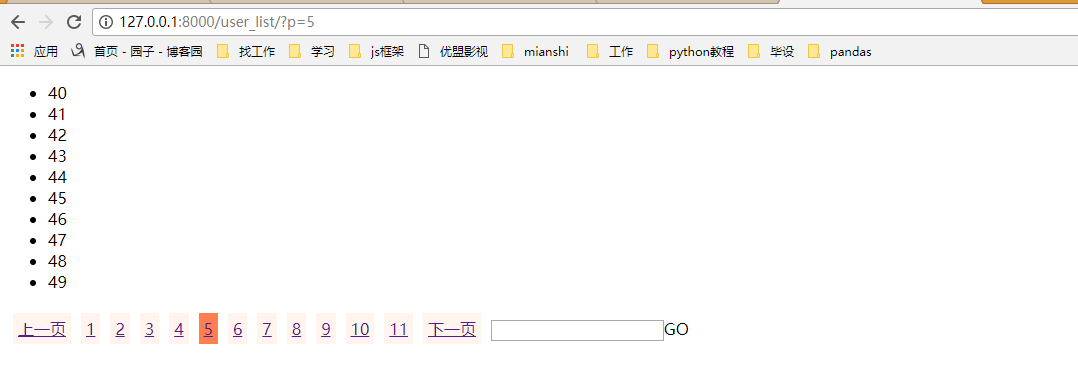
效果显示:这样就实现了上一页下一页,跳转,根据当前页数的不同显示不一样的页码
我们再把这个分页功能封装成一个Page类,以后就可以通过类方法来生成分页:
 class Page(object):

     def __init__(self,current_page,data_count,page_size=10,page_num=11):

         self.current_page = current_page

         self.data_count = data_count

         self.page_size = page_size

         self.page_num = page_num

     @property

     def start(self):

         return (self.current_page-1)*self.page_size

     @property

     def end(self):

         return self.current_page * self.page_size

     @property

     def allCount(self):

         count, y = divmod(self.data_count, self.page_size)

         if y:

             count += 1

         return count

     def pageList(self,count,base_url):

         page_list = []

         if count <= 11:

             start_index = 1

             end_index = count + 1

         elif count > 11:

             if self.current_page <= (self.page_num + 1) / 2:

                 start_index = 1

                 end_index = self.page_num + 1

             elif (self.current_page + (self.page_num - 1) / 2) > count:

                 start_index = count - self.page_num + 1

                 end_index = count + 1

             else:

                 start_index = self.current_page - (self.page_num - 1) / 2

                 end_index = self.current_page + (self.page_num + 1) / 2

         if self.current_page != 1:

             prev_page = '<a class="page" href="%s?p=%s">上一页</a>' % (base_url,self.current_page - 1)

             page_list.append(prev_page)

         for i in range(int(start_index), int(end_index)):

             if i == self.current_page:

                 temp = '<a class="page active" href="%s?p=%s">%s</a>' % (base_url,i, i)

             else:

                 temp = '<a class="page" href="%s?p=%s">%s</a>' % (base_url,i, i)

             page_list.append(temp)

         if self.current_page != count:

             after_page = '<a class="page" href="%s?p=%s">下一页</a>' % (base_url,self.current_page + 1)

             page_list.append(after_page)

         jump = '''

             <input type="text" /><a onclick='jumpTo(this,"%s?p=");'>GO</a>

             <script>

                 function jumpTo(ths,base){

                     var val = ths.previousSibling.value;

                     location.href = base+val;

                 }

             </script>

             ''' % (base_url)

         page_list.append(jump)

         return page_list
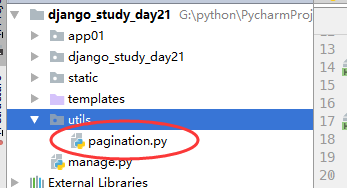
然后创建一个utils,把分页类放在里面,用的时候调用就可以了
调用分页类:
from utils.pagination import Page

LIST = []

for i in range(1009):

    LIST.append(i)

def user_list(request):

    current_page = request.GET.get('p',1)

    current_page = int(current_page)

    page = Page(current_page,len(LIST))

    data = LIST[ page.start : page.end ]

    count = page.allCount

    page_list = page.pageList(count,'/user_list/')

    page_str = "".join(page_list)

    #return render(request,'user_list.html',{'li':data})

    return render(request,'user_list.html',{'page_str':page_str,'li':data})
Django学习---自定义分页的更多相关文章
- django上课笔记2-视图CBV-ORM补充-Django的自带分页-Django的自定义分页
一.视图CBV 1.urls url(r'^login.html$', views.Login.as_view()), 2.views from django.views import View cl ...
- Django框架---- 自定义分页组件
分页的实现与使用 class Pagination(object): """ 自定义分页 """ def __init__(self,cur ...
- django【自定义分页】
1. views.py def app(request): page_info = PageInfo(request.GET.get('p'), 6, 100, request.path_info, ...
- 7.django之自定义分页记录
只是大概记录下步骤: 1.表结构: class UserProfile(models.Model): ''' 用户表 ''' user = models.OneToOneField(User,verb ...
- Django之自定义分页
分页功能在每个网站都是必要的,对于分页来说,其实就是根据用户的输入计算出应该显示在页面上的数据在数据库表中的起始位置. 1. 每页显示的数据条数 2. 每页显示页号链接数 3. 上一页和下一页 4. ...
- python 学习笔记十八 django深入学习三 分页,自定义标签,权限机制
django Pagination(分页) django 自带的分页功能非常强大,我们来看一个简单的练习示例: #导入Paginator>>> from django.core.p ...
- Django学习手册 - 初识自定义分页
核心: <a href='http://127.0.0.1:8000/index-%s'>%s<a> 自定义分页 1.前端处理字符 后端的字符 return render(r ...
- Django学习笔记之Cookie、Session和自定义分页
cookie Cookie的由来 大家都知道HTTP协议是无状态的. 无状态的意思是每次请求都是独立的,它的执行情况和结果与前面的请求和之后的请求都无直接关系,它不会受前面的请求响应情况直接影响,也不 ...
- python 全栈开发,Day87(ajax登录示例,CSRF跨站请求伪造,Django的中间件,自定义分页)
一.ajax登录示例 新建项目login_ajax 修改urls.py,增加路径 from app01 import views urlpatterns = [ path('admin/', admi ...
随机推荐
- 如何从github下载项目的源代码,包含git客户端,直接下载,vs下载
有好多小伙伴可能刚刚接触github,还不知道如果和github下载项目,此处写个博客统一的声明.从多种方式下载源代码,加深对git的理解. 首先先解释下git的含义,git是一个源代码的管理工具,通 ...
- OPEN(SAP) UI5 学习入门系列之二: 最佳实践练习(上)
这篇博文难产了很久,原来是打算一周更新一篇的,上周原计划写MVC,但是写了一半,发现带入了太多的细节,不太符合这个入门系列的主题. 当我们学习一个新的技能的时候,如果一开始就面对大量的细节,很容易陷入 ...
- IOS开发 清空数组正确方法
NSArray以及NSMutableArray 在Objc中的两种数组(不可变数组和可变数组), 在日常开发中,经常会遇到需要清空数组的情况,很多人下意识的会想到nil这个方法,这里是不提倡的.因为如 ...
- Hadoop2.x下安装HBase
1.安装好 hadoop 集群,并启动 [grid@hadoop4 ~]$ /sbin/start-dfs.sh [grid@hadoop4 ~]$ /sbin/start-yarn.sh 查看 ha ...
- AX内部公司
<object width="450" height="500" align="middle" id="reader&quo ...
- HTML中name,value属性区分
name和value区分(注重前后台的结合),个人笔记使用^_^ 前台 后台对于单选框来说,name是一样的,决定后台的键名,value的值决定了后台键值 复选框同理,但name应该是不同的
- HihoCoder1050 树中的最长路 树形DP第三题(找不到对象)
题意:求出的树中距离最远的两个结点之间相隔的距离. 水题一道,以前只会用路的直径来解. 代码如下: #include<cstdio> #include<cstdlib> #in ...
- MySQL中的表中增加删除字段
1.增加一个字段alter table user表 add COLUMN new1字段 VARCHAR(20) NOT NULL DEFAULT 0; //增加一个字段,VARCHERA 20 , ...
- Linux下Apache服务器配置
Linux下Apache服务器配置 相关包: httpd-2.2.3-29.e15.i386.rpm //主程序包 httpd-devel-2.2.3-29.e15.i ...
- nginx+uwsgi 和nginx+gunicorn区别、如何部署
[线上环境部署Django,nginx+uwsgi 和nginx+gunicorn,这两种方案,应该如何选择?] 大家是采用的何种部署方式? 第一种,高并发稳定一点 我们公司使用的是nginx+gun ...