
vue-cli中实现全选、单选计算总价格(vue2.0)
<template>

	<div>

		<table>

			<tr>

				<td><input type="checkbox" v-model="checkAll">全选({{checkedCount}})</td>

				<td>产品名称</td>

				<td>价格</td>

				<td>数量</td>

			</tr>

			<tr v-for="(item,$index) in lists">

				<td><span v-show="checkedCount===lists.length || item.checked===true">我被选中</span><input type="checkbox" :value="item.id" v-model="checked" @click="currClick(item,$index)"></td>

				<td>{{item.productName}}</td>

				<td>{{item.price}}</td>

				<td>{{item.count}}</td>

			</tr>

			<tr>

				总价:{{totalMoney}}

			</tr>

		</table>

	</div>

</template>

<script>

	export default{

		data() {

			return {

				checked:[],

				totalPrice:[],

				lists : [

					{

						productName:'产品1',

						price:'24',

						count:'3',

						id:1

					},

					{

						productName:'产品2',

						price:'25',

						count:'6',

						id:2

					},

					{

						productName:'产品3',

						price:'54',

						count:'7',

						id:3

					}

				]

			}

		},

		computed:{

			totalMoney:function(item,index){

				let sum = 0;

				for(let i=0;i<this.totalPrice.length;i++){

					sum += this.totalPrice[i];

				};

				return sum;

			},

			checkAll: {

			    get: function() {

			        return this.checkedCount == this.lists.length;

			    },

			    set: function(value){

			      	var _this = this;

			        if (value) {

			        	this.totalPrice = [];

		        		this.checked = this.lists.map(function(item) {

		        			item.checked = true;

				            let total = item.price*item.count;

							_this.totalPrice.push(total);

							return item.id

						})

			        }else{

			            this.checked = [];

			            this.totalPrice=[];

			            this.lists.forEach(function(item,index){

							item.checked = false;

			            });

			        }

			    }

		    },

		    checkedCount: {

		        get: function() {

		        	return this.checked.length;

		        }

		    }

		},

		methods:{

			currClick:function(item,index){

				var _this = this;

				if(typeof item.checked == 'undefined'){

					this.$set(item,'checked',true);

						let total = item.price*item.count;

						this.totalPrice.push(total);

						console.log(this.totalPrice);

				}else{

					item.checked = !item.checked;

					if(item.checked){

						this.totalPrice = [];

						this.lists.forEach(function(item,index){

							if(item.checked){

								let total = item.price*item.count;

								_this.totalPrice.push(total);

							}

						});

					}else{

						this.totalPrice = [];

						this.lists.forEach(function(item,index){

							if(item.checked){

								let total = item.price*item.count;

								_this.totalPrice.push(total);

							}

						});

					}

				}

			}

		}

	}

</script>

<style>

	tr td{

		width:200px;

		background: #eee;

		padding:10px 0;

	}

</style>
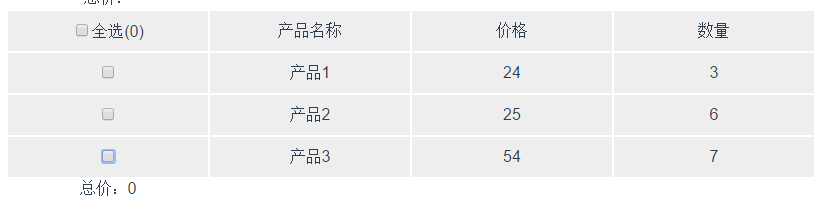
效果:


vue-cli中实现全选、单选计算总价格(vue2.0)的更多相关文章
- vue开发购物车,解决全选单选问题
实现全选单选,在vue中无法通过this获取input中的checkbox的checked属性,但是可以通过vue对input的特殊方式v-model来实现对应数据的绑定,同样也可以通过这种方式实现购 ...
- vue2.0实现在table中实现全选和反选
其实在去年小颖已经写过一篇:Vue.js实现checkbox的全选和反选 小颖今天在跟着慕课网学习vue的过程中,顺便试试如何在table中实现全选和反选,页面的css样式是直接参考慕课网的样式写的, ...
- vue table中使用多选的问题(翻页后如何保存已选项),联动echarts图表实现流量监控
流量监控项目需求: 根据表格数据,添加多选功能,默认全选,根据已选项更新图表视图 1.表格需要多选 2.要联动图表,所以关键是要利用表格多选的触发回调函数 vue table中使用多选: 很简单,只需 ...
- vue2.0在table中实现全选和反选
其实在去年小颖已经写过一篇:Vue.js实现checkbox的全选和反选 小颖今天在跟着慕课网学习vue的过程中,顺便试试如何在table中实现全选和反选,页面的css样式是直接参考慕课网的样式写的, ...
- jquery中checkbox全选失效的解决方法
这篇文章主要介绍了jquery中checkbox全选失效的解决方法,需要的朋友可以参考下 如果你使用jQuery 1.6 ,代码if ( $(elem).attr(“checked”) ),将 ...
- ExtJS中,将Grid表头中的全选复选框取消复选
今天发现公司产品用的EXTJS中使用Grid时,Grid表头中的全选复选框的选中状态不是很准确,就写了这个小扩展 在js中加入下面方法,在需要取消全选的地方调用即可,例:Ext.getCmp('gri ...
- VUE实现简单的全选/全不选
<!DOCTYPE html> <html> <head lang="en"> <meta charset="UTF-8&quo ...
- vue中实现全选功能
<!DOCTYPE html><html><head><meta charset="utf-8"><title>Vue ...
- 第八十二篇:Vue购物车(三) 实现全选功能
好家伙, 继续完善购物车相应功能 1.如何实现全选和反全选 1.1.全选框的状态显示(父传子) 来一波合理分析: 在页面中,有三个商品中 三个商品中的第二个未选择, 我么使用一个计算属性(fullSt ...
随机推荐
- 一次WEB前端优化尝试
今天对自己做的项目中的一个设计器界面加载速度上进行了优化,因为页面在加载的时候,感觉有点慢.首先,我用firefox的yslow和chrome的pagespeed进行了测试,效果如下,分数有点不同,但 ...
- java中的深浅克隆
假设有一个对象object,在某处又需要一个跟object一样的实例object2,强调的是object和object2是两个独立的实例,只是在开始的时候,他们是具有相同状态的(属性字段的值都相同). ...
- Think Pad T410键盘溅水有惊无险
昨日不小心单位给配的T410溅水了,由于水不多,用餐巾纸擦干后就晾起来了. 大概过了6小时,心想现在该好了吧,于是按开机键,无效! 当时暗骂Thinkpad给LX做坏了,一点小水都挡不住,还敢号称防洒 ...
- (剑指Offer)面试题56:链表中环的入口结点
题目: 一个链表中包含环,请找出该链表的环的入口结点. 思路: 1.哈希表 遍历整个链表,并将链表结点存入哈希表中(这里我们使用容器set),如果遍历到某个链表结点已经在set中,那么该点即为环的入口 ...
- leetCode 86.Partition List(分区链表) 解题思路和方法
Given a linked list and a value x, partition it such that all nodes less than x come before nodes gr ...
- Linux mkdir 如何递归创建目录?
mkdir 如何递归创建目录? mkdir –vp 目录1/目录2/目录3 详细介绍: linux mkdir 命令用来创建指定的名称的目录,要求创建目录的用户在当前目录中具有写权限,并且指定的目 ...
- Python 遍历dict
遍历dict 由于dict也是一个集合,所以,遍历dict和遍历list类似,都可以通过 for 循环实现. 直接使用for循环可以遍历 dict 的 key: >>> d = { ...
- Linux日志分析的实战专题
来自 日志也是用户应该注意的地方之一.不要低估日志文件对网络安全的重要作用,因为日志文件能够详细记录系统每天发生的各种各样的事件.用户可以通过日志文件 检查错误产生的原因,或者在受到攻击和黑客入侵 ...
- oracle 对系统日期sysdate进行格式化:to_date(sysdate,'yyyy-MM-dd')
oracle 对系统日期sysdate进行格式化:to_date(sysdate,'yyyy-MM-dd') CreateTime--2018年5月17日10:11:34 Author:Maryd ...
- JDBC 关于大文本数据
大文本数据Clob,在不同的数据库中类型名不一致,有的是text格式,有的是clob,还有其他一些格式 package test; import java.io.BufferedReader; i ...