
vue2.0在table中实现全选和反选
其实在去年小颖已经写过一篇:Vue.js实现checkbox的全选和反选
小颖今天在跟着慕课网学习vue的过程中,顺便试试如何在table中实现全选和反选,页面的css样式是直接参考慕课网的样式写的,js是小颖自己写哒,欢迎大家吐槽和点赞,嘻嘻
慕课网demo的 git 地址:ShoppingCart
页面效果:
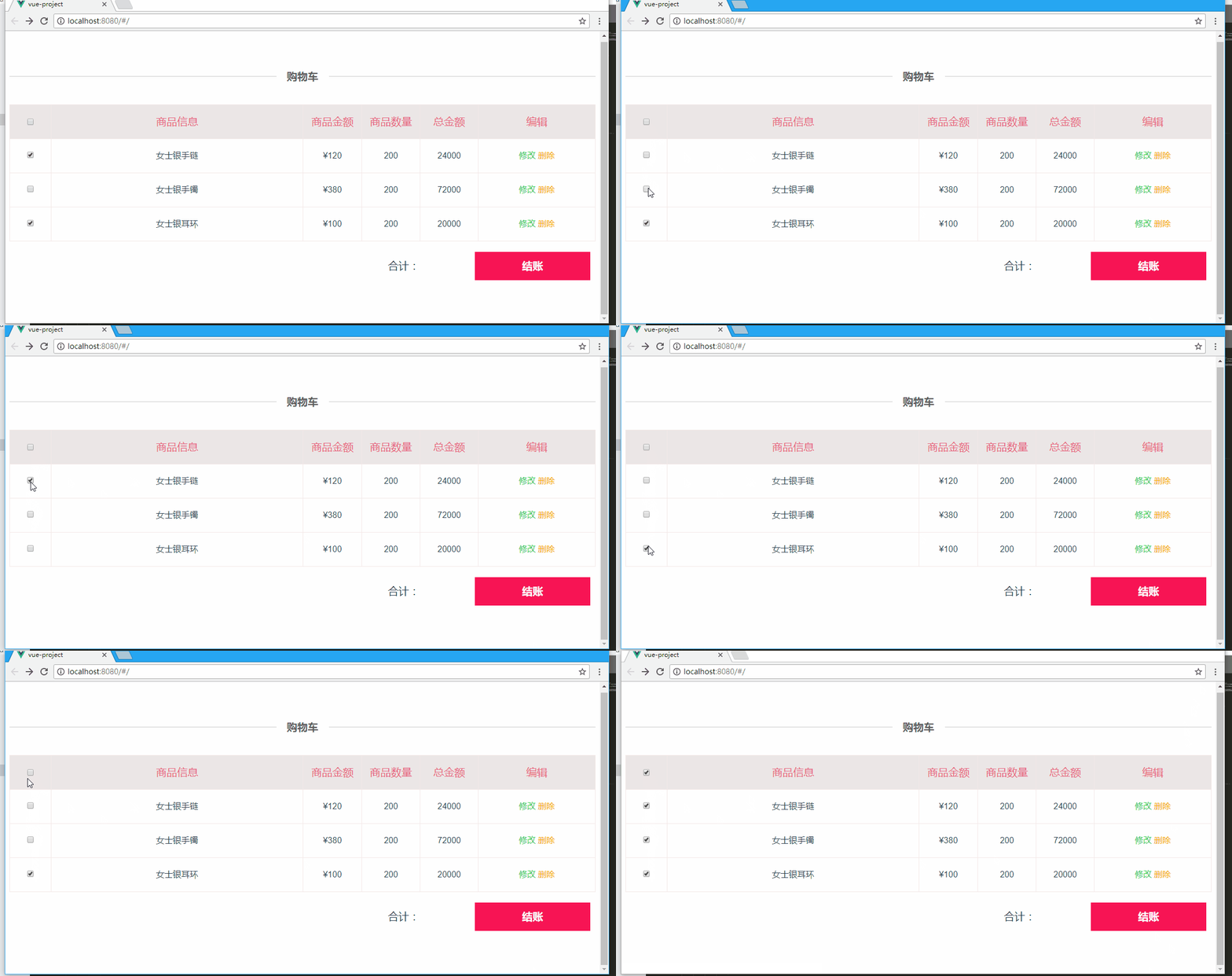
具体怎么实现的呢?
因为上篇文章:使用localstorage来存储页面信息 中已经有写项目是怎么创建的所以小颖在这里就不重复了,其实只是在上篇文章的基础上稍微做了改动:
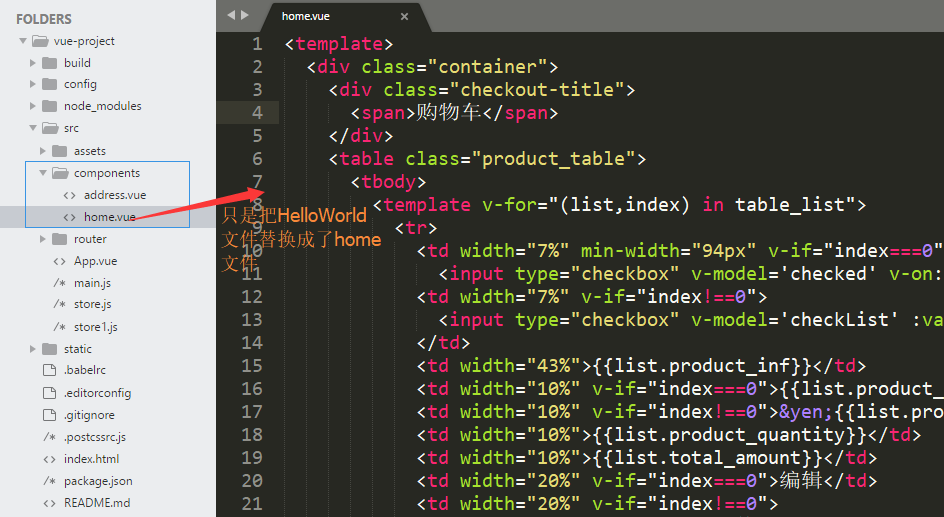
App.vue文件
<template>

  <div id="app">

    <router-view/>

  </div>

</template>

<script>

export default {

  name: 'app'

}

</script>

<style>

#app {

  font-family: 'Avenir', Helvetica, Arial, sans-serif;

  -webkit-font-smoothing: antialiased;

  -moz-osx-font-smoothing: grayscale;

  color: #2c3e50;

}

li,

dl,

dt,

dd,

h1,

h2,

h3,

h4,

h5,

h6,

hgroup,

p,

blockquote,

figure,

form,

fieldset,

input,

legend,

pre,

abbr,

button {

  margin: 0;

  padding: 0;

}

ul,

ol {

  list-style: none;

  margin: 0;

  padding: 0;

}

*,

*::before,

*::after {

  box-sizing: border-box;

}

div,

p,

dl,

dt,

dd {

  margin: 0;

  padding: 0;

}

a {

  color: inherit;

  text-decoration: none;

}

.checkout-title {

  position: relative;

  margin-bottom: 41px;

  text-align: center;

}

.checkout-title::before {

  position: absolute;

  top: 50%;

  left: 0;

  content: "";

  width: 100%;

  height: 1px;

  background: #ccc;

  z-index: 0;

}

.checkout-title span {

  position: relative;

  padding: 0 1em;

  background-color: #fff;

  font-family: "moderat", sans-serif;

  font-weight: bold;

  font-size: 20px;

  color: #605F5F;

  z-index: 1;

}

</style>
home.vue文件
<template>
<div class="container">
<div class="checkout-title">
<span>购物车</span>
</div>
<table class="product_table">
<tbody>
<template v-for="(list,index) in table_list">
<tr>
<td width="7%" min-width="94px" v-if="index===0">
<input type="checkbox" v-model='checked' v-on:click='checkedAll'></td>
<td width="7%" v-if="index!==0">
<input type="checkbox" v-model='checkList' :value="list.id">
</td>
<td width="43%">{{list.product_inf}}</td>
<td width="10%" v-if="index===0">{{list.product_price}}</td>
<td width="10%" v-if="index!==0">¥{{list.product_price}}</td>
<td width="10%">{{list.product_quantity}}</td>
<td width="10%">{{list.total_amount}}</td>
<td width="20%" v-if="index===0">编辑</td>
<td width="20%" v-if="index!==0">
<a href="#" class="update">修改</a>
<a href="#" class="delete">删除</a>
</td>
</tr>
</template>
</tbody>
</table>
<div class="price_total_bottom">
<div class="price_total_ms">
<label>合计:{{allProductTotal}}</label>
<router-link to="/userAddress">结账</router-link>
</div>
</div>
</div>
</template>
<script>
import userAddress from './address'
export default {
components: {
userAddress
},
data() {
return {
table_list: [{
'id': 0,
'product_inf': '商品信息',
'product_price': '商品金额',
'product_quantity': '商品数量',
'total_amount': '总金额'
}, {
'id': '1',
'product_inf': '女士银手链',
'product_price': 120,
'product_quantity': 200,
'total_amount': 24000
}, {
'id': '2',
'product_inf': '女士银手镯',
'product_price': 380,
'product_quantity': 200,
'total_amount': 72000
}, {
'id': '3',
'product_inf': '女士银耳环',
'product_price': 100,
'product_quantity': 200,
'total_amount': 20000
}],
checked: false,
allProductTotal: null,
checkList: ['1', '3']
}
},
methods: {
checkedAll: function() {
var _this = this;
console.log(_this.checkList);
if (_this.checked) { //实现反选
_this.checkList = [];
} else { //实现全选
_this.checkList = [];
_this.table_list.forEach(function(item, index) {
if (index > 0) {
_this.checkList.push(item.id);
}
});
}
}
},
watch: { //深度 watcher
'checkList': {
handler: function(val, oldVal) {
if (val.length === this.table_list.length - 1) {
this.checked = true;
} else {
this.checked = false;
}
},
deep: true
}
}
} </script>
<!-- Add "scoped" attribute to limit CSS to this component only -->
<style scoped>
.container {
padding: 69px 0 54px 0;
} table {
border-collapse: collapse;
border-color: transparent;
text-align: center;
} .product_table,
.product_table tbody {
width: 100%
} .product_table tr:first-child {
background: #ece6e6;
color: #e66280;
font-size: 20px;
} .product_table td {
border: 1px solid #f3e8e8;
height: 62px;
line-height: 62px;
} .product_table a.update:link,
.product_table a.update:visited,
.product_table a.update:hover,
.product_table a.update:active {
color: #1CE24A;
} .product_table a.delete:link,
.product_table a.delete:visited,
.product_table a.delete:hover,
.product_table a.delete:active {
color: #ffa700;
} .price_total_bottom {
font-size: 20px;
padding: 20px 10px;
} .price_total_ms {
text-align: right;
} .price_total_bottom .price_total_ms label {
margin-right: 100px;
} .price_total_bottom .price_total_ms a {
cursor: default;
text-align: center;
display: inline-block;
font-size: 20px;
color: #fff;
font-weight: bold;
width: 220px;
height: 54px;
line-height: 54px;
border: 0;
background-color: #f71455;
} </style>
vue2.0在table中实现全选和反选的更多相关文章
- vue2.0实现在table中实现全选和反选
其实在去年小颖已经写过一篇:Vue.js实现checkbox的全选和反选 小颖今天在跟着慕课网学习vue的过程中,顺便试试如何在table中实现全选和反选,页面的css样式是直接参考慕课网的样式写的, ...
- 原生js中实现全选和反选功能
<!DOCTYPE html> <html> <head lang="en"> <meta char ...
- jquery中的全选、反选、全不选和单删、批删
HTML页面 <!doctype html><html lang="en"><head> <meta charset="UTF- ...
- vue中的checkbox全选和反选
前几天有个博客园的朋友问小颖,小颖之前写的vue2.0在table中实现全选和反选 .Vue.js实现checkbox的全选和反选,为什么他将里面的js复制下来,但是实现不了全选和反选.小颖当时看他 ...
- Android中购物车的全选、反选、问题和计算价格
此Demo主要解决的是购物车中的全选,反选计算价格和选中的条目个数的问题,当选中几条时,点击反选,会把当先选中的变为不选中,把不选中的变为选中.点击全选会全部选中,再次点击时,变为全部不选中. //- ...
- 【jquery】一个简单的单选、多选、全选、反选、删除的小功能
对表格内容进行单行删除.单行选中.多行选中.全选.反选.删除选中行等操作 HTML代码 <table class="table table-bordered border-shadow ...
- 实现table中checkbox复选框、以及判断checked是否被选中、js操作checkedbox选中
上图是实现效果. 下面贴代码 表的第一行也就是<th>中的代码,onclick事件是实现全选或者全不选效果. <th> <input id="allboxs&q ...
- vue table中使用多选的问题(翻页后如何保存已选项),联动echarts图表实现流量监控
流量监控项目需求: 根据表格数据,添加多选功能,默认全选,根据已选项更新图表视图 1.表格需要多选 2.要联动图表,所以关键是要利用表格多选的触发回调函数 vue table中使用多选: 很简单,只需 ...
- ExtJS中,将Grid表头中的全选复选框取消复选
今天发现公司产品用的EXTJS中使用Grid时,Grid表头中的全选复选框的选中状态不是很准确,就写了这个小扩展 在js中加入下面方法,在需要取消全选的地方调用即可,例:Ext.getCmp('gri ...
随机推荐
- SOFA企业应用框架
前言 从业这么多年,接触过银行的应用,Apple的应用,eBay的应用和现在阿里的应用,虽然分属于不同的公司,使用了不同的架构,但有一个共同点就是都很复杂.导致复杂性的原因有很多,如果从架构的层面看, ...
- APP投资 历史 十万到 十亿元的项目
马云又投了课程表APP 1亿元. 还能输入106字 http://www.tuicool.com/articles/ARVN3qI#0-qzone-1-41007-d020d2d2a4e8d1a3 ...
- Spring AOP的日志记录
现在的项目是Spring+MyBatis,前段时间项目经理让我干了一个活,就是给所有的controller里的所有方法加上日志记录的代码,其实没有多少,也就300来个方法,也没有抱怨什么,一边打着瞌睡 ...
- 在eclipse中查看sources源码和JavaDoc帮助文档
今天学习Netty的过程中,从官网下载的netty里面的内容如下: 其中jar文件夹里面的内容如下: 可以看到每一个具体的jar包就对应有一个sources.jar包,然后所有的帮助文档在javaDo ...
- Android : Your APK does not seem to be designed for tablets.
1. 解决办法: Add these config in AndroidManifest.xml <supports-screens android:smallScreens="tru ...
- ABBYY FineReader错误代码142和55
在使用ABBYY FineReader 12OCR文字识别软件创建PDF文件时,有时会出现以下错误提示:内部程序错误..\Src\SpecialFontFactory.cpp,142和内部程序错误.. ...
- 小波变换——哈尔小波,Haar
哈尔小波转换是于1909年由Alfréd Haar所提出,是小波变换(Wavelet transform)中最简单的一种变换,也是最早提出的小波变换. Alfréd Haar,1885~1933,匈牙 ...
- 使用Eclipse构建Maven项目
http://blog.csdn.net/qjyong/article/details/9098213
- 英文版Ubuntu18.10安装搜狗输入法过程(图文并茂,亲自尝试!)
英文版Ubuntu18.10安装搜狗输入法过程 过程比较艰辛,折腾了好长的时间,不过最终还是装好了,特记录一下! 首先去搜狗输入法网址下载Linux版本:https://pinyin.sogou.co ...
- 五步整理你的css文件
鉴于实在无法忍受那种写一句就换一行的css写法,有个项目中的一个css文件竟然高达6000多行,看着实在蛋疼,无实今天下定决心整理一下,在DW里可以用正则很好的进行替换,步骤如下: 一:\r => ...