
虚拟机上使用 opecnv 读取USB摄像头无法显示
使用opecv读取USB摄像头时候,无法显示图像。
设置
首先查看虚拟机Ubuntu检测摄像头是否已正常插入:
ls /dev/video*
结果为:

设置虚拟机USB属性:
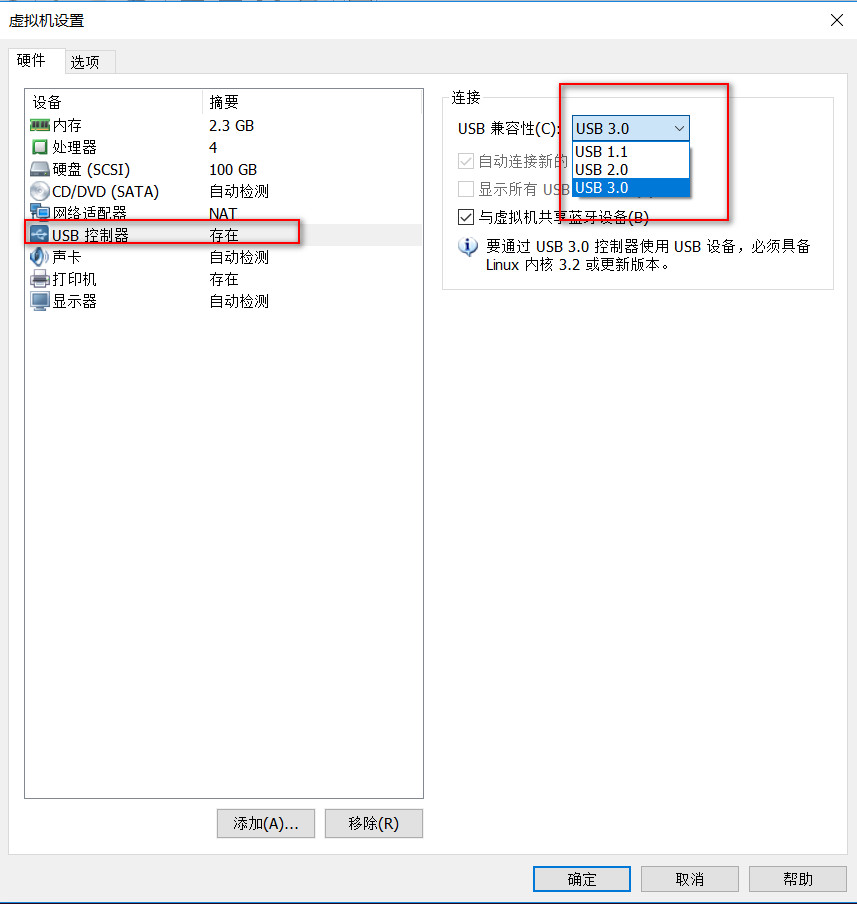
USB的兼容性设置为USB3.0。

将USB连接到虚拟机上。
程序
#include <sys/types.h>

#include <sys/stat.h>

#include <fcntl.h>

#include <stdio.h>

#include <stdlib.h>

#include <string.h>

#include <unistd.h>

#include <pthread.h>

#include <errno.h>

#include <sys/socket.h>

#include <netinet/in.h>

#include <time.h>

#include <math.h>

#include <sys/ioctl.h>

#include <linux/fb.h>

#include <iostream>

#include <signal.h>

#include <string>

#include <iostream>

#include <opencv2/opencv.hpp>

using namespace cv;

using namespace std;

int main()

{

    VideoCapture capture(1);

    if(capture.isOpened())

    {

        cout<<"success"<<endl;

    }

    Mat frame;

    while (capture.isOpened())

    {

	capture >> frame;

  	if (!frame.empty())

        {

            //imshow("edges", frame);

	    imwrite("test.bmp",frame);

 	    imshow("capture", frame);

	    //cout<<"can get ";

        }

        else

        {

            //cout<<"can not get";

        }

        if(waitKey(10) == 27)

            break;

    }

    return 0;

}
Makefile
LIBS += -L /usr/lib/ -lstdc++

LIBS += `pkg-config --libs opencv`

TARGET = test

target:

	$(CC) $(CFLAGS) -o  $(TARGET)   $(SRCS) $(INC) $(LIBS)

    	#*****************finished building*****************

clean:

	rm -f $(TARGET)
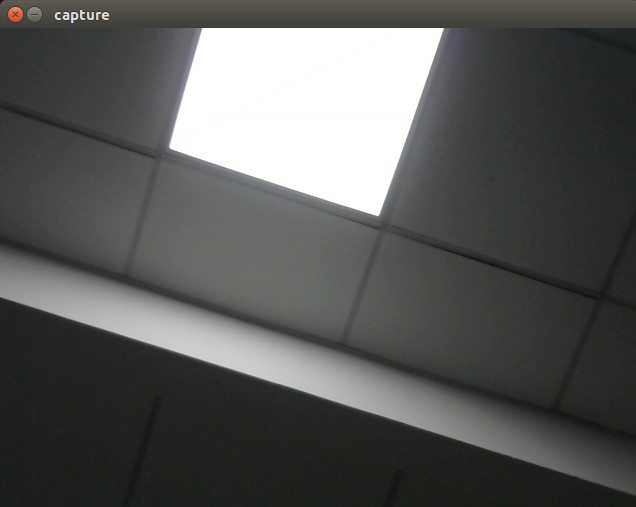
成功打开:
注意
capture(0)是笔记本摄像头,capture(1)是USB摄像头。
虚拟机上使用 opecnv 读取USB摄像头无法显示的更多相关文章
- python opencv 读取USB摄像头的像素问题
问题描述 每次调用capture读取video的时候,还回的像素都是640x480,不管是笔记本的摄像头还是USB摄像头,明明我的摄像头是支持130万读取的功能的呀. 问题分析 一番查找,关于用ope ...
- ubuntu-Linux系统读取USB摄像头数据(gspca)
将摄像头图像保存为jpg格式.摄像头需要是gspca免驱的.uvc若用uvc格式的需要在图像中插入Huffman表.否则无法正常显示. 程序代码: #include <stdio.h> # ...
- ubuntu-Linux系统读取USB摄像头数据(uvc)
这几天在做小车的过程中,需要用到图像采集.我想现在用的摄像头是UVC免驱的.根据国嵌的教程中有一个gspca摄像头的程序.我发现把gspca的采集程序用到uvc上时,在显示图像的时候提示没有huffm ...
- unity3d 读取usb摄像头
using UnityEngine; using System.Collections; public class C : MonoBehaviour { private WebCamTexture ...
- USB摄像头无法正常读取问题
opencv读取摄像头或者视频一种是早期版本的IplImage结构体,图片就存在结构体指针IplImage*中,另一种是Mat类,两者在操作上略有差异,且opencv2都兼容这两个版本,前面的博客也说 ...
- [运维] 如何访问虚拟机上的 Tomcat ?
环境: 虚拟机: VMware 15 pro 操作系统 Linux CentOS 7 64 物理机: Windows 7 事先准备: 1: 下载 Tomcat 的压缩包 apache-t ...
- 在linux下玩转usb摄像头
硬件平台:PC机一台 .usb摄像头 操作系统:Linux3.0.8 交叉编译环境:arm-none-Linux-gnueabi-gcc 4.5.1 调试步骤: 一.linux 内核解压 1.1使用 ...
- 25、写一个USB摄像头驱动程序(有ioctrl分析)
videobuf2-core.h中的vb2_buffer,记录了v4l2_buffer ,驱动可以对vb2_buffer的v4l2_buffer进行操控, vb2_buffer是v4l2框架层的代码, ...
- 在Windows Azure虚拟机上开发Windows 8 应用
前提条件 Windows Azure开发者账号:如果您拥有微软MSDN Subscription账户,那么意味着您可免费申请Windows Azure开发者账号. 创建虚拟机 点击Windows Az ...
随机推荐
- Solidity智能合约调用智能合约
来源:https://medium.com/@blockchain101/calling-the-function-of-another-contract-in-solidity-f9edfa921f ...
- CentOS压力测试工具Tsung安装和图形报表生成Tsung安装配置
Tsung 是一个压力测试工具,可以测试包括HTTP, WebDAV, PostgreSQL, MySQL, LDAP, and XMPP/Jabber等服务器.针对 HTTP 测试,Tsung 支持 ...
- [JAVA] 小数转百分数
import java.text.NumberFormat; //获取格式化对象 NumberFormat format = NumberFormat.getPercentInstance(); // ...
- Mac Sublime 相关资源
MAC上安装并破解最新SublimeText3103版本 http://blog.csdn.net/yanzi1225627/article/details/50703942 Mac版的Sublime ...
- nginx与tomcat 组合 实现静态文件和jsp组合访问
主要修改nginx的配置文件: 设置代理 location /{proxy_pass http://47.94.158.2:8080;proxy_redirect off;proxy_set_head ...
- PM2部署资料
问题1:pm2的log怎么查看?(pm2 show (name))可以看到日志地址,直接查看 问题2:日志怎么清除:pm2 flush 问题3:修改日志输出路径 问题4:怎么重新加载,restart貌 ...
- 用Word 写csdn blog
目前大部分的博客作者在用Word写博客这件事情上都会遇到以下3个痛点: 1.所有博客平台关闭了文档发布接口,用户无法使用Word,Windows Live Writer等工具来发布博客.使用Word写 ...
- JavaScript语言精粹 笔记01 语法 对象
内容比较简单,只是从头梳理一下JS的知识 语法空白标识符数字字符串语句 对象对象字面量检索更新引用原型反射枚举删除减少全局变量污染 语法 1 空白 空白可能表现为格式化字符或注释的形式.空白通常没有 ...
- 常见的MIME
"css": "text/css", "gif": "image/gif", "html": &qu ...
- 测试驱动开发 VS 行为驱动开发
测试驱动开发(Test Driven Development,英文缩写TDD)是极限编程的一个重要组成部分,它的基本思想就是在开发功能代码之前,先编写测试代码.也就是说在明确要开发某个功能后,首先思考 ...