
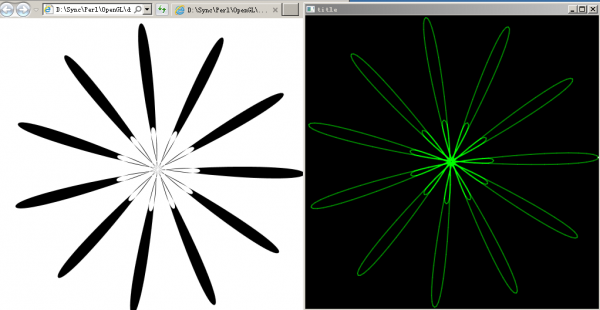
Perl+OpenGL 重绘inkscape生成的svg矢量图
Perl+OpenGL 重绘inkscape生成的svg矢量图
还不够完善,先挖个坑,后面慢慢填
Code: [全选] [展开/收缩] [Download] (Untitled.pl)
=info

    Author: 523066680

      Date: 2016-11

=cut

use IO::Handle;

use OpenGL qw/ :all /;

use OpenGL::Config;

use Time::HiRes 'sleep';

use feature 'state';

STDOUT->autoflush(1);

open READ, "<:raw", "multi.svg";

my @all;

my $tl;

for my $line (<READ>)

{

    if ( $line=~/\s+d="(.*)"/ )

    {

        @all = split(" ",  $1 );

    }

}

my @coords;

for my $e (@all)

{

    if ( $e =~/[a-zA-Z]/ )

    {

        $head = $e;

        next;

    }

    push @coords,

        {

            'head' => $head,

            'data' => [ split(",", $e) ],

        };

}

#相对坐标 叠加为绝对坐标

my ($ox, $oy);

for (my $i = 0; $i <= $#coords; $i++)

{

    if ($coords[$i]->{head} eq 'c')

    {

        grep

        {

            $coords[ $i+$_ ]->{'data'}[0] += $ox;

            $coords[ $i+$_ ]->{'data'}[1] += $oy;

        } (0..2) ;

        $i += 2;

    }

    else

    {

    }

    #ox oy 始终是最后一点的坐标值

    ($ox, $oy) = ($coords[$i]->{'data'}[0], $coords[$i]->{'data'}[1]) ;

}

my ($xmin, $xmax, $ymin, $ymax) = (10000.0, -10000.0, 10000.0, -10000.0);

for my $e (@coords)

{

    printf("%.2f, %.2f\n", $e->{'data'}[0], $e->{'data'}[1]);

    $xmin = $e->{'data'}[0] if ($e->{'data'}[0] < $xmin);

    $xmax = $e->{'data'}[0] if ($e->{'data'}[0] > $xmax);

    $ymin = $e->{'data'}[1] if ($e->{'data'}[1] < $ymin);

    $ymax = $e->{'data'}[1] if ($e->{'data'}[1] > $ymax);

}

printf("%f %f %f %f\n", $xmin, $xmax, $ymin, $ymax);

&Main();

sub display

{

    glClear(GL_COLOR_BUFFER_BIT);

    glBlendFunc(GL_SRC_ALPHA, GL_DST_ALPHA);

    glPushMatrix();

    my $array;

    my @points;

    for (my $i = 0; $i <= $#coords; $i++)

    {

        if ($coords[$i]->{head} eq 'C')

        {

            glColor4f(0.0,0.5,0.0,1.0);

            $array = OpenGL::Array->new( 3*4, GL_FLOAT);

            @points = (

                        $coords[$i-1]->{'data'}[0], $coords[$i-1]->{'data'}[1], 0.0 ,

                        $coords[$i+0]->{'data'}[0], $coords[$i+0]->{'data'}[1], 0.0 ,

                        $coords[$i+1]->{'data'}[0], $coords[$i+1]->{'data'}[1], 0.0 ,

                        $coords[$i+2]->{'data'}[0], $coords[$i+2]->{'data'}[1], 0.0 ,

                        );

            $array->assign(0, @points);

            glMap1f_c(GL_MAP1_VERTEX_3, 0.0, 1.0, 3, 4, $array->ptr);

            glMapGrid1f(20, 0.0, 1.0);

            glEvalMesh1(GL_LINE, 0, 20);

            $i+=2;

        }

        elsif ($coords[$i]->{head} eq 'c')

        {

            glColor4f(0.0,0.5,0.0,1.0);

            $array = OpenGL::Array->new( 3*4, GL_FLOAT);

            @points = ( $coords[$i-1]->{'data'}[0], $coords[$i-1]->{'data'}[1], 0.0,

                        $coords[$i+0]->{'data'}[0], $coords[$i+0]->{'data'}[1], 0.0 ,

                        $coords[$i+1]->{'data'}[0], $coords[$i+1]->{'data'}[1], 0.0 ,

                        $coords[$i+2]->{'data'}[0], $coords[$i+2]->{'data'}[1], 0.0 ,

                        );

            $array->assign(0, @points);

            glMap1f_c(GL_MAP1_VERTEX_3, 0.0, 1.0, 3, 4, $array->ptr);

            glMapGrid1f(20, 0.0, 1.0);

            glEvalMesh1(GL_LINE, 0, 20);

            $i += 2;

        }

        elsif ($coords[$i]->{head} eq 'L')

        {

            glBegin(GL_LINES);

                glVertex3f(  $coords[$i-1]->{'data'}[0], $coords[$i-1]->{'data'}[1], 0.0 );

                glVertex3f(  $coords[$i]->{'data'}[0], $coords[$i]->{'data'}[1], 0.0 );

            glEnd();

        }

        elsif ($coords[$i]->{head} =~/m/i)

        {

            glBegin(GL_POINTS);

                glColor3f(1.0, 1.0, 1.0);

                glVertex3f(  $coords[$i]->{'data'}[0], $coords[$i]->{'data'}[1], 0.0 );

            glEnd();

        }

    }

    glPopMatrix();

    glutSwapBuffers();

}

sub init

{

    glClearColor(0.0, 0.0, 0.0, 1.0);

    glPointSize(2.0);

    glLineWidth(2.0);

    glEnable(GL_BLEND);

    glEnable(GL_POINT_SMOOTH);

    glEnable(GL_LINE_SMOOTH);

    glEnable(GL_MAP1_VERTEX_3);

}

sub idle

{

    sleep 0.05;

    glutPostRedisplay();

}

sub Reshape

{

    my $half = 1000;

    glViewport(0, 0, 500.0, 500.0);

    glMatrixMode(GL_PROJECTION);

    glLoadIdentity();

    #glOrtho(-$half, $half, -$half, $half, 0.0, 200.0);

    glOrtho($xmin, $xmax, $ymin, $ymax, 0.0, 200.0);

    glMatrixMode(GL_MODELVIEW);

    glLoadIdentity();

    gluLookAt(0.0,0.0,100.0,0.0,0.0,0.0, 0.0,1.0,100.0);

}

sub hitkey

{

    my $keychar = lc(chr(shift));

    if ($keychar eq 'q')

    {

        glutDestroyWindow($WinID);

    }

}

sub Main

{

    glutInit();

    glutInitDisplayMode(GLUT_RGBA | GLUT_DOUBLE );

    glutInitWindowSize(500, 500);

    glutInitWindowPosition(1,1);

    our $WinID = glutCreateWindow("title");

    &init();

    glutDisplayFunc(\&display);

    glutReshapeFunc(\&Reshape);

    glutKeyboardFunc(\&hitkey);

    glutIdleFunc(\&idle);

    glutMainLoop();

}

__END__

要使glMap1f_c 正常工作,需要借用OpenGL::Array 建立一个

仿C的指针

    my $array = OpenGL::Array->new( 3*4, GL_FLOAT);

    $array->assign(0, @points);

    glMap1f_c(GL_MAP1_VERTEX_3, 0.0, 1.0, 3, 4, $array->ptr);

    glEnable(GL_MAP1_VERTEX_3);
请将一下内容保存到multi.svg,保存后可以拖入IE或者火狐中浏览。
Code: [全选] [展开/收缩] [Download] (multi.svg)
<?xml version="1.0" encoding="UTF-8" standalone="no"?>

<!-- Created with Inkscape (http://www.inkscape.org/) -->

<svg

  xmlns:dc="http://purl.org/dc/elements/1.1/"

  xmlns:cc="http://creativecommons.org/ns#"

  xmlns:rdf="http://www.w3.org/1999/02/22-rdf-syntax-ns#"

  xmlns:svg="http://www.w3.org/2000/svg"

  xmlns="http://www.w3.org/2000/svg"

  xmlns:sodipodi="http://sodipodi.sourceforge.net/DTD/sodipodi-0.dtd"

  xmlns:inkscape="http://www.inkscape.org/namespaces/inkscape"

  width="210mm"

  height="297mm"

  viewBox="0 0 744.09448819 1052.3622047"

  id="svg2"

  version="1.1"

  inkscape:version="0.91 r13725"

  sodipodi:docname="penta.svg">

  <defs

    id="defs4" />

  <sodipodi:namedview

    id="base"

    pagecolor="#ffffff"

    bordercolor="#666666"

    borderopacity="1.0"

    inkscape:pageopacity="0.0"

    inkscape:pageshadow="2"

    inkscape:zoom="1.4"

    inkscape:cx="402.20655"

    inkscape:cy="647.84062"

    inkscape:document-units="px"

    inkscape:current-layer="layer1"

    showgrid="false"

    inkscape:window-width="1440"

    inkscape:window-height="837"

    inkscape:window-x="-4"

    inkscape:window-y="120"

    inkscape:window-maximized="1" />

  <metadata

    id="metadata7">

    <rdf:RDF>

      <cc:Work

        rdf:about="">

        <dc:format>image/svg+xml</dc:format>

        <dc:type

          rdf:resource="http://purl.org/dc/dcmitype/StillImage" />

        <dc:title></dc:title>

      </cc:Work>

    </rdf:RDF>

  </metadata>

  <g

    inkscape:label="Layer 1"

    inkscape:groupmode="layer"

    id="layer1">

    <path

      sodipodi:type="star"

      style="fill-rule:evenodd"

      id="path4140"

      sodipodi:sides="11"

      sodipodi:cx="421.86606"

      sodipodi:cy="388.68654"

      sodipodi:r1="219.29707"

      sodipodi:r2="63.376858"

      sodipodi:arg1="0.029801473"

      sodipodi:arg2="-2.8262334"

      inkscape:flatsided="false"

      inkscape:rounded="-0.07"

      inkscape:randomized="0"

      d="m 641.06576,395.22096 c -0.58462,19.63861 -285.54568,-7.5131 -279.45113,-26.19125 6.09452,-18.67807 252.23038,127.45733 241.12118,143.66224 C 591.62657,528.89693 366.58139,351.99388 381.80662,339.57579 397.03179,327.15774 525.08769,583.16575 506.981,590.7921 488.87423,598.41849 395.1952,327.92957 414.7172,325.71418 c 19.52193,-2.21538 -11.15897,282.38451 -30.51441,279.01099 -19.35551,-3.37353 48.07402,-281.57 65.6947,-272.87931 17.62062,8.69065 -162.05612,231.52397 -176.51508,218.22165 -14.45903,-13.30238 192.67067,-210.88099 202.79559,-194.04345 10.12488,16.83746 -261.50159,107.1562 -266.47347,88.14847 -4.9719,-19.00782 276.09575,-73.23875 275.51032,-53.60016 -0.58543,19.6385 -277.92215,-51.2329 -271.82841,-69.91123 6.09378,-18.6784 271.86238,87.65628 260.75247,103.8608 -11.10987,16.20446 -206.1044,-193.35592 -190.87975,-205.77459 15.22471,-12.41873 181.31462,220.72105 163.20754,228.34669 -18.107,7.6256 -68.84995,-274.0898 -49.32811,-276.30599 19.52191,-2.2162 33.20075,283.70845 13.84538,280.33412 -19.3553,-3.37432 90.26387,-267.80211 107.88484,-259.11218 17.62105,8.68996 -125.45412,256.62042 -139.91259,243.31744 -14.45842,-13.30292 220.71955,-176.48913 230.84513,-159.65209 10.12562,16.83712 -244.2782,148.05723 -249.24931,129.04921 -4.97109,-19.00794 281.09833,-29.14211 280.51372,-9.50359 z" />

  </g>

</svg>
Perl+OpenGL 重绘inkscape生成的svg矢量图的更多相关文章
- Android 使用 SVG 矢量图
android svg矢量图 可能包含的操作有: SVG图还包括改变颜色,透明度,大小,矩阵操作(平移.旋转.缩放),selector, (图标,背景,按钮),动画,等 setTint(int Col ...
- Android中使用SVG矢量图(一)
SVG矢量图介绍 首先要解释下什么是矢量图像,什么是位图图像? 1.矢量图像:SVG (Scalable Vector Graphics, 可伸缩矢量图形) 是W3C 推出的一种开放标准的文本式矢量图 ...
- svg矢量图绘制以及转换为Android可用的VectorDrawable资源
项目需要 要在快速设置面板里显示一个VoWiFi图标(为了能够区分出来图形,我把透明的背景填充为黑色了) 由于普通图片放大后容易失真,这里我们最好用矢量图(SVG(Scalable Vector Gr ...
- svg矢量图
svg简介 Scalable Vector Graphics 可缩放矢量图形 SVG 图像在放大或改变尺寸的情况下其图形质量不会有所损失 svg知识点 svg如何绘图 svg和cnavas区别 svg ...
- SVGO: Node.js 开发的 SVG 矢量图优化工具(svg压缩工具)
SVG图片压缩 这是个通过借助npm包的一种方式去压缩svg的图片,由于阿里的图库自己创建的图标有大小的限制,当我们想要自己用自己的图标的时候就可以使用这种方式去完成对svg的图片压缩. 1.下载no ...
- SVG矢量图学习实例
从W3school上学习了一下SVG矢量图形,感觉和HTML相比还是有一些新的元素和属性的,一时间不能全部记住,特此留下笔记,供遗忘时作为参考 <!DOCTYPE html> <!- ...
- svg矢量图在flex布局中样式扭曲的问题
问题机型 小米5 华为nova 其他未知的可能机型 问题描述 利用flex 布局的一行中, 左一样式: -webkit-box-flex: 0; flex: 0 1 auto; 左二样式: -webk ...
- SVG矢量图--爱心
aixin.xml: <!-- height:width=viewportHeight:viewportWidth --> <vector xmlns:android="h ...
- SVG矢量图【转】
var iconArray=[ //'circle', //实心圆 //'rect', //矩形 //'roundRect', //圆角矩形 //'triangle', //三角形 //'diamon ...
随机推荐
- C++Primer笔记-----day04
1.函数指针.函数指针指向某种特定类型,函数的类型由它的返回类型和形参类型决定,与函数名无关.比如:bool lengthCompare(const string &,const string ...
- 简析SynchronousQueue,LinkedBlockingQueue,ArrayBlockingQueue
SynchronousQueue SynchronousQueue是无界的,是一种无缓冲的等待队列,但是由于该Queue本身的特性,在某次添加元素后必须等待其他线程取走后才能继续添加:可以认为Sync ...
- Python面向对象相关知识1
1. python是动态的语言,这样在使用类的时候,类的属性就可以随意的添加,但是这样在实际开发中有一定的缺陷,所以,可以在类中定义一个特殊的__init__()方法,当创建实例时,__init__( ...
- openLDAP 2
一.安装OPENLDAP 二.打开安装目录中的文件 slapd.conf 三.安装完成后退出 编辑文本,输入以下内容,并命名为test.ldif dn: dc=company objectClass: ...
- 【Todo】Linux进程调度算法学习
参考这篇文章 http://blog.chinaunix.net/uid-27052262-id-3239260.html Linux支持三种进程调度策略,分别是SCHED_FIFO . SCHED_ ...
- ajax获取json数据为undefined--原因解析
解决办法:var dataObj=eval("("+data+")");//转换为json对象 问题: 1. 碰到一个问题ajax成功获取json数据后,取值显 ...
- Sqlserver时间函数用法(二)
--1. 当前系统日期.时间 select getdate() --2015-01-06 09:27:27.277 --2.时间操作 dateadd 在向指定日期加上一段时间的基础上,返回新的 dat ...
- Linux-shell-算术运算{expr、bc、dc、(( ))和[ ]}
Linux-shell-算术运算{expr.bc.dc.(( ))和[ ]} 摘自: https://www.cnblogs.com/snowsolf/p/3325235.html 在Linux下做算 ...
- Part2_lesson4---ARM寻址方式
所谓寻址方式就是处理器根据指令中给出的信息来找到指令所需操作数的方式. 1.立即数寻址 ADD R0,R0,#0x3f; R0<-R0+0x3f 在以上指令中,第二个源操作数即为立即数,要求以“ ...
- 借助LVS+Keepalived实现负载均衡(转)
出处:http://www.cnblogs.com/edisonchou/p/4281978.html 一.负载均衡:必不可少的基础手段 1.1 找更多的牛来拉车吧 当前大多数的互联网系统都使用了服务 ...