
sFlow-RT
sFlow-RT™ incorporates InMon's asynchronous analytics technology (patent pending), delivering real-time visibility to Software Defined Networking (SDN), DevOps and Orchestration stacks and enabling new classes of performance aware application such as load balancing, DDoS protection, and workload placement.
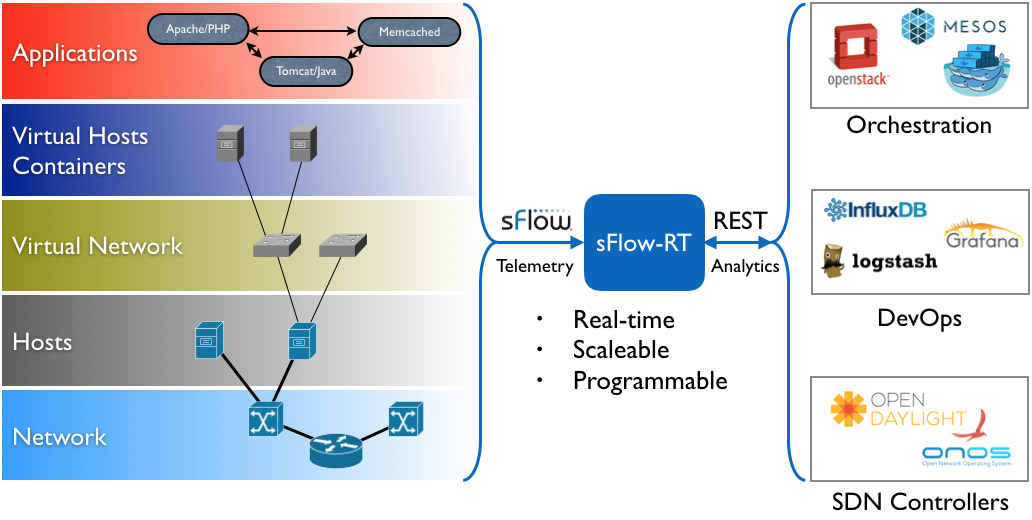
The sFlow-RT analytics engine receives a continuous telemetry stream from sFlow Agents embedded in network devices, hosts and applications and converts them into actionable metrics, accessible through the RESTflow™ API. The RESTflow API makes it easy for to configure customized measurements, retrieve metrics, set thresholds, and receive notifications. Applications can be external, written in any language that supports HTTP/REST calls, or internal, using sFlow-RT's embedded JavaScript/ECMAScript.
Network visibility is essential to understanding the interaction between scale-out services running on cloud infrastructure. By combining network, host and application monitoring within an integrated analytics pipeline, sFlow-RT provides visibility into applications and the server and network resources needed to sustain performance.
Download
Visit sFlow-RT.com to download sFlow-RT software and applications.
Support
Please post questions, suggestions and applications to the sFlow-RT group.
Commercial use
Contact sales@inmon.com to discuss commercial licensing options for sFlow-RT.
===================================================
http://sflow-rt.com/download.php
Download and install
sFlow-RT requires Java 1.7+. The following commands download, install and run the software:
wget http://www.inmon.com/products/sFlow-RT/sflow-rt.tar.gz

tar -xvzf sflow-rt.tar.gz

cd sflow-rt

./start.sh
Alternatively, the following command runs sFlow-RT in a Docker container (see sflow/sflow-rt):
docker run -p 8008:8008 -p 6343:6343/udp -d sflow/sflow-rtUse a web browser to connect to http://localhost:8008 to interact with the REST API.
The software is also available as RPM and DEB packages:
Software is installed under the path /usr/local/sflow-rt/ and log files are directed to /usr/local/sflow-rt/log/sflow-rt-<N>.log
Note There are no access controls built into sFlow-RT. However, HTTP access can be restricted to the local host by settings the http.hostname property to 127.0.0.1 and a reverse proxy can then be used to secure remote access to the API. For example, the following Apache configuration settings make the interface accessible on port 80 under the path /sflow-rt/
<IfModule mod_proxy.c>

  ProxyRequests off

  ProxyVia off

  ProxyPass        /sflow-rt/ http://127.0.0.1:8008/ retry=0 timeout=5

  ProxyPassReverse /sflow-rt/ http://127.0.0.1:8008/

</IfModule>

<Location /sflow-rt/>

# insert access policy

</Location>
Please read and accept the License Agreement before downloading this software.
Applications
The following command (run in the sFlow-RT home directory) downloads and installs an application:
./get-app.sh sflow-rt dashboard-exampleThe following applications are currently available on GitHub:
| User | Application | Description |
|---|---|---|
| sflow-rt | dashboard-example | Real-time dashboard example |
| sflow-rt | flow-graph | Real-time graph of network associations |
| sflow-rt | top-flows | Real-time top network flows table |
| sflow-rt | svg-weather | Real-time network weathermap example |
| sflow-rt | fabric-view | Real-time visibility for leaf / spine ECMP fabrics |
| sflow-rt | ddos-blackhole | Real-time DDoS flood mitigation using null route |
| sflow-rt | active-routes | Real-time active BGP route cache |
| sflow-rt | sflow-test | Test data center switch sFlow implementation |
| sflow-rt | ix-metrics | Real-time monitoring of Internet Exchange (IX) traffic |
| sflow-rt | mininet-dashboard | Real-time dashboard for Mininet |
| sflow-rt | world-map | Real-time traffic displayed on world map |
| pphaal | ovs-2015 | Overlay/underlay network virtualization visibility demo |
| pphaal | sc15-weather | SC15 SCinet real-time weathermap |
Writing Applications provides an introduction describing the structure of an sFlow-RT application. Post information on new applications to the sFlow-RT group to have them listed.
Support
Please post questions, suggestions and applications to the sFlow-RT group.
Production use
Contact sales@inmon.com to discuss production licensing options for sFlow-RT.
sFlow-RT的更多相关文章
- 华为交换机sflow配置
华为交换机sflow功能配置 1.配置交换机的sflow流发送 [系统视图]sflow agen ip x.x.x.x 设置sflow输出源 [系统视图]sflow ...
- sFlow
http://www.sflow.org/developers/specifications.php http://www.inmon.com/technology/index.php sFlow s ...
- curl 查看一个web站点的响应时间(rt)
1. curl 查看web站点rt curl -o /dev/null -s -w %{time_namelookup}::%{time_connect}::%{time_starttransfer} ...
- Workspace defines a VM that does not contain a valid jre/lib/rt.jar: C:\Program Files\Java\jre7
Maven编译时两则信息 (Workspace以及default classpath container) 博客分类: Java 使用Maven一年有余,却总是被两则不起眼的编译信息困扰,终想查明 ...
- 自己写方法处理WP(RT)后退键事件处理
不用微软的NavigationHelper,自己写方法处理WP后退键事件 在WP8.1(RT)程序中,你会发现按下后退键时,应用会直接退出,变为后台运行,这是因为RT与Silverlight对后退键的 ...
- 高并发应用中客户端等待、响应时间的推算,及RT/QPS概念辨析
高并发应用中客户端等待.响应时间的推算,及RT/QPS概念辨析 对于一个网站,已知服务端的服务线程数和处理单个请求所需的时间时,该如何算出高并发时用户从点击链接到收到响应的时间?注意这个时间并不等于服 ...
- cpu进程调度---RT Throttling【转】
转自:http://book.2cto.com/201302/16291.html RT Throttling是对分配给实时进程的CPU时间进行限制的功能.使用实时调度策略的进程由于bug等出现不可控 ...
- RT/Metro商店应用如何如何获取图片的宽高
RT/Metro商店应用如何如何获取图片的宽高 var file = await StorageFile.GetFileFromApplicationUriAsync(new Uri("ms ...
- JRE下的rt.jar、tools.jar
JRE下的rt.jar: 这个文件是极为重要的一个文件,rt是runtime的缩写,即运行时的意思.是java程序在运行时必不可少的文件. 里面包含了java程序员常用的包,如java.lang,ja ...
- Installing your app on your Windows RT device
Alright… so my app is almost finished and I want to install it for real on my Surface tablet. How do ...
随机推荐
- js 阻止事件冒泡和默认行为 preventDefault、stopPropagation、return false
preventDefault: preventDefault它是事件对象(Event)的一个方法,作用是取消一个目标元素的默认行为.既然是说默认行为,当然是元素必须有默认行为才能被取消,如果元素本身就 ...
- 搭建基于 STM32 和 rt-thread 的开发平台
我们需要平台 如果说,SharePoint 的价值之一在于提供了几乎开箱即用的 innovation 环境,那么,智能设备的开发平台也一样.不必每次都从头开始,所以需要固定的工作室和开发平台作为创新的 ...
- SQLiteOpenHelper类
SQLiteOpenHelper是管理数据库的工具类. 下面提供一个模板: package com.example.intelligencecontrol.utils; import android. ...
- iOS Swift-控制流(The Swift Programming Language)
iOS Swift-控制流(The Swift Programming Language) for-in 在Swift中for循环我们可以省略传统oc笨拙的条件和循环变量的括号,但是语句体的大括号使我 ...
- Masonry使用注意事项
1 理解自身内容尺寸约束与抗压抗拉 自身内容尺寸约束:一般来说,要确定一个视图的精确位置,至少需要4个布局约束(以确定水平位置x.垂直位置y.宽度w和高度h).但是,某些用来展现内容的用户控件,例如文 ...
- 敏捷开发与jira之阶段工作项概述
每次迭代都分这5个阶段,但每个阶段的时间根据版本情况定,最终目标是:第一个阶段拿到交付范围,在第五个阶段都完成,并拿到本次版本团队所消耗的工时. Jira是项目过程管理的一种手段,跟多体现在工时跟踪, ...
- 页面以base64输出图片
<% //读取文件路径,输出base64 编码 System.IO.FileStream stream = System.IO.File.OpenRead(ViewBag.FilePath); ...
- 代替Reflection(反射)的一些方法
Reflection(反射)是深入学习.Net必须掌握的技能之一.最初学Reflection的时候,的确是被惊住了,原来还可以这样.只要给你一个Assembly, 你就能获取到其中所有的类型,根据类型 ...
- WebBrowser的Cookie操作之流量刷新机
最近一直在思考着如何通过代码去伪装或实现人工自然浏览网页的效果,起初能想到的是用WebBrowser实现这一效果,需要达到的功能预想有以下几点: 1.自动刷新 2.模拟人工下拉滚动条并停留一段时间: ...
- Windows Phone 8.1低功耗蓝牙开发-Nokia Treasure Tag
1. 引言 上一篇文章<Windows 8.1 低功耗蓝牙开发>讲述了如何在Windows 8.1平台上创建低功耗蓝牙应用,并且以TI的Sensor Tag为例,给出了代码步骤和演示.其实 ...