
【Hadoop】9、Sqoop组件
Sqoop组件安装与配置
Sqoop是Apache旗下一款 “Hadoop和关系数据库服务器之间传送数据” 的工具。主要用于在Hadoop(Hive)与传统的数据库(MySQL、Oracl、 Postgres等)之间进行数据的传递, 可以将一个关系型数据库中的数据 导进到Hadoop的HDFS中,也可以将HDFS的数据导进到关系型数据库中。
1、使用xftp将软件包上传到/opt/software
# 解压

[root@master ~]# tar xf /opt/software/sqoop-1.4.7.bin__hadoop-2.6.0.tar.gz -C /usr/local/src/

[root@master ~]# cd /usr/local/src/

# 重命名

[root@master src]# mv sqoop-1.4.7.bin__hadoop-2.6.0 sqoop
2、部署sqoop(在master上执行)
# 复制 sqoop-env-template.sh 模板,并将模板重命名为 sqoop-env.sh。

[root@master src]# cd /usr/local/src/sqoop/conf/

[root@master conf]# cp sqoop-env-template.sh sqoop-env.sh

# 修改 sqoop-env.sh 文件,添加 Hdoop、Hbase、Hive 等组件的安装路径。

[root@master conf]# vi sqoop-env.sh

export HADOOP_COMMON_HOME=/usr/local/src/hadoop

export HADOOP_MAPRED_HOME=/usr/local/src/hadoop

export HBASE_HOME=/usr/local/src/hbase

export HIVE_HOME=/usr/local/src/hive

# 配置 Linux 系统环境变量,添加 Sqoop 组件的路径。

[root@master conf]# vi /etc/profile.d/sqoop.sh

export SQOOP_HOME=/usr/local/src/sqoop

export PATH=$SQOOP_HOME/bin:$PATH

export CLASSPATH=$CLASSPATH:$SQOOP_HOME/lib

# 查看环境变量

[root@master conf]# source /etc/profile.d/sqoop.sh

[root@master conf]# echo $PATH

/usr/local/src/sqoop/bin:/usr/local/src/hbase/bin:/usr/local/src/jdk/bin:/usr/local/src/hadoop/bin:/usr/local/src/hadoop/sbin:/usr/local/sbin:/usr/local/bin:/usr/sbin:/usr/bin:/usr/local/src/hive/bin:/root/bin

# 连接数据库

[root@master conf]# cp /opt/software/mysql-connector-java-5.1.46.jar /usr/local/src/sqoop/lib/
3、启动sqoop集群(在master上执行)
[root@master ~]# su - hadoop

# 执行 Sqoop 前需要先启动 Hadoop 集群。

[hadoop@master ~]$ start-all.sh

This script is Deprecated. Instead use start-dfs.sh and start-yarn.sh

Starting namenodes on [master]

hadoop@master's password:

master: starting namenode, logging to /usr/local/src/hadoop/logs/hadoop-hadoop-namenode-master.example.com.out

192.168.100.30: starting datanode, logging to /usr/local/src/hadoop/logs/hadoop-hadoop-datanode-slave2.example.com.out

192.168.100.20: starting datanode, logging to /usr/local/src/hadoop/logs/hadoop-hadoop-datanode-slave1.example.com.out

Starting secondary namenodes [0.0.0.0]

hadoop@0.0.0.0's password:

0.0.0.0: starting secondarynamenode, logging to /usr/local/src/hadoop/logs/hadoop-hadoop-secondarynamenode-master.example.com.out

starting yarn daemons

starting resourcemanager, logging to /usr/local/src/hadoop/logs/yarn-hadoop-resourcemanager-master.example.com.out

192.168.100.30: starting nodemanager, logging to /usr/local/src/hadoop/logs/yarn-hadoop-nodemanager-slave2.example.com.out

192.168.100.20: starting nodemanager, logging to /usr/local/src/hadoop/logs/yarn-hadoop-nodemanager-slave1.example.com.out

# 检查 Hadoop 集群的运行状态。

[hadoop@master ~]$ jps

50448 NameNode

50836 ResourceManager

51096 Jps

47502 QuorumPeerMain

50670 SecondaryNameNode

# 测试 Sqoop 是否能够正常连接 MySQL 数据库。

[hadoop@master ~]$ sqoop list-databases --connect jdbc:mysql://master:3306 --username root -P

Warning: /usr/local/src/sqoop/../hcatalog does not exist! HCatalog jobs will fail.

Please set $HCAT_HOME to the root of your HCatalog installation.

Warning: /usr/local/src/sqoop/../accumulo does not exist! Accumulo imports will fail.

Please set $ACCUMULO_HOME to the root of your Accumulo installation.

22/04/29 15:50:36 INFO sqoop.Sqoop: Running Sqoop version: 1.4.7

Enter password:

22/04/29 15:50:45 INFO manager.MySQLManager: Preparing to use a MySQL streaming resultset.

Fri Apr 29 15:50:45 CST 2022 WARN: Establishing SSL connection without server's identity verification is not recommended. According to MySQL 5.5.45+, 5.6.26+ and 5.7.6+ requirements SSL connection must be established by default if explicit option isn't set. For compliance with existing applications not using SSL the verifyServerCertificate property is set to 'false'. You need either to explicitly disable SSL by setting useSSL=false, or set useSSL=true and provide truststore for server certificate verification.

information_schema

hive

mysql

performance_schema

sys

# 能 够 查 看 到 MySQL 数 据 库 中 的 information_schema 、hive、mysql、performance_schema、sys等数据库,说明 Sqoop 可以正常连接 MySQL。

# 回到root用户

[hadoop@master ~]$ exit

logout
4、连接hive配置(在master上执行)
[root@master ~]# cp /usr/local/src/hive/lib/hive-common-2.0.0.jar  /usr/local/src/sqoop/lib/

# 登录 MySQL 数据库

[root@master ~]# mysql -uroot -pWangzhigang.1

mysql: [Warning] Using a password on the command line interface can be insecure.

Welcome to the MySQL monitor.  Commands end with ; or \g.

Your MySQL connection id is 28

Server version: 5.7.18 MySQL Community Server (GPL)

Copyright (c) 2000, 2017, Oracle and/or its affiliates. All rights reserved.

Oracle is a registered trademark of Oracle Corporation and/or its

affiliates. Other names may be trademarks of their respective

owners.

Type 'help;' or '\h' for help. Type '\c' to clear the current input statement.

# 创建 sample 库

mysql> create database sample;

Query OK, 1 row affected (0.00 sec)

# 使用 sample 库

mysql> use sample;

Database changed

mysql> create table student(number char(9) primary key, name varchar(10));

Query OK, 0 rows affected (0.01 sec)

# 向 student 表插入几条数据

mysql> insert into student values('01','zhangsan'),('02','lisi'),('03','wangwu');

Query OK, 3 rows affected (0.00 sec)

Records: 3  Duplicates: 0  Warnings: 0

# 查询 student 表的数据

mysql> select * from student;

+--------+----------+

| number | name     |

+--------+----------+

| 01     | zhangsan |

| 02     | lisi     |

| 03     | wangwu   |

+--------+----------+

3 rows in set (0.00 sec)

# 如果能看到以上三条记录则表示数据库中表创建成功

# 退出

mysql> quit

Bye
5、在Hive中创建sample数据库和student数据表
[root@master ~]# su - hadoop

# 启动 hive 命令行

[hadoop@master ~]$ hive

SLF4J: Class path contains multiple SLF4J bindings.

SLF4J: Found binding in [jar:file:/usr/local/src/hive/lib/hive-jdbc-2.0.0-standalone.jar!/org/slf4j/impl/StaticLoggerBinder.class]

SLF4J: Found binding in [jar:file:/usr/local/src/hive/lib/log4j-slf4j-impl-2.4.1.jar!/org/slf4j/impl/StaticLoggerBinder.class]

SLF4J: Found binding in [jar:file:/usr/local/src/hadoop/share/hadoop/common/lib/slf4j-log4j12-1.7.10.jar!/org/slf4j/impl/StaticLoggerBinder.class]

SLF4J: See http://www.slf4j.org/codes.html#multiple_bindings for an explanation.

SLF4J: Actual binding is of type [org.apache.logging.slf4j.Log4jLoggerFactory]

Logging initialized using configuration in jar:file:/usr/local/src/hive/lib/hive-common-2.0.0.jar!/hive-log4j2.properties

Hive-on-MR is deprecated in Hive 2 and may not be available in the future versions. Consider using a different execution engine (i.e. spark, tez) or using Hive 1.X releases.

# 创建 sample 库

hive> create database sample;

OK

Time taken: 0.659 seconds

# 使用 sample 库

hive> use sample;

OK

Time taken: 0.012 seconds

# 创建 student 表

hive> create table student(number STRING,name STRING);

OK

Time taken: 0.206 seconds

# 退出 hive 命令行

hive> exit;
6、从MySQL导出数据,导入Hive
需要说明该命令的以下几个参数:
1)--connect:MySQL 数据库连接 URL。
2)--username 和--password:MySQL 数据库的用户名和密码。
3)--table:导出的数据表名。
4)--fields-terminated-by:Hive 中字段分隔符。
5)--delete-target-dir:删除导出目的目录。
6)--num-mappers:Hadoop 执行 Sqoop 导入导出启动的 map 任务数。
7)--hive-import --hive-database:导出到 Hive 的数据库名。
8)--hive-table:导出到 Hive 的表名。
[hadoop@master ~]$ sqoop import --connect jdbc:mysql://master:3306/sample --username root --password Wangzhigang.1 --table student --fields-terminated-by '|' --delete-target-dir --num-mappers 1 --hive-import --hive-database sample --hive-table student
再开一个窗口用于查看
[root@master ~]# su - hadoop

# 启动hive

[hadoop@master ~]$ hive

# 查看

hive> select * from sample.student;

OK

01|zhangsan     NULL

02|lisi NULL

03|wangwu       NULL

Time taken: 1.32 seconds, Fetched: 3 row(s)

# 退出

hive> exit;

# 能看到以上内容则表示将数据从mysql导入到hive成功了。
7、将数据从hive中导出到mysql数据库中(在master上执行)
清空mysql数据库中sample库的student表内容
student 表中 number 为主键,添加信息导致主键重复,报错,所以删除表数据
# 回到之前的窗口

[hadoop@master ~]$ mysql -uroot -pWangzhigang.1

mysql: [Warning] Using a password on the command line interface can be insecure.

Welcome to the MySQL monitor.  Commands end with ; or \g.

Your MySQL connection id is 66

Server version: 5.7.18 MySQL Community Server (GPL)

Copyright (c) 2000, 2017, Oracle and/or its affiliates. All rights reserved.

Oracle is a registered trademark of Oracle Corporation and/or its

affiliates. Other names may be trademarks of their respective

owners.

Type 'help;' or '\h' for help. Type '\c' to clear the current input statement.

# 删除

mysql> delete from sample.student;

Query OK, 3 rows affected (0.00 sec)

# 查看

mysql> select * from sample.student;

Empty set (0.00 sec)

# 能看到以上Empty set则表示清空成功

# 退出

mysql> quit

Bye
8、从Hive导出数据,导入到MySQL
需要说明该命令的以下几个参数:
1)--connect:MySQL 数据库连接 URL。
2)--username 和--password:MySQL 数据库的用户名和密码。
3)--table:导出的数据表名。
4)--fields-terminated-by:Hive 中字段分隔符。
5)--export-dir:Hive 数据表在 HDFS 中的存储路径。
[hadoop@master ~]$ sqoop export --connect "jdbc:mysql://master:3306/sample?useUnicode=true&characterEncoding=utf-8" --username root --password Wangzhigang.1 --table student --input-fields-terminated-by '|' --export-dir /user/hive/warehouse/sample.db/student/*
进入MySQL查看
[hadoop@master ~]$ mysql -uroot -pWangzhigang.1

mysql: [Warning] Using a password on the command line interface can be insecure.

Welcome to the MySQL monitor.  Commands end with ; or \g.

Your MySQL connection id is 72

Server version: 5.7.18 MySQL Community Server (GPL)

Copyright (c) 2000, 2017, Oracle and/or its affiliates. All rights reserved.

Oracle is a registered trademark of Oracle Corporation and/or its

affiliates. Other names may be trademarks of their respective

owners.

Type 'help;' or '\h' for help. Type '\c' to clear the current input statement.

# 查看

mysql> select * from sample.student;

+--------+----------+

| number | name     |

+--------+----------+

| 01     | zhangsan |

| 02     | lisi     |

| 03     | wangwu   |

+--------+----------+

3 rows in set (0.00 sec)

# 能看到以上内容则表示从hadoop集群的hive中导出数据到mysql数据库成功。

# 退出

mysql> quit

Bye
9、sqoop常用命令
# 列出所有数据库

[hadoop@master ~]$ sqoop list-databases --connect jdbc:mysql://master:3306/ --username root --password Wangzhigang.1

Warning: /usr/local/src/sqoop/../hcatalog does not exist! HCatalog jobs will fail.

Please set $HCAT_HOME to the root of your HCatalog installation.

Warning: /usr/local/src/sqoop/../accumulo does not exist! Accumulo imports will fail.

Please set $ACCUMULO_HOME to the root of your Accumulo installation.

22/04/29 16:11:30 INFO sqoop.Sqoop: Running Sqoop version: 1.4.7

22/04/29 16:11:30 WARN tool.BaseSqoopTool: Setting your password on the command-line is insecure. Consider using -P instead.

22/04/29 16:11:30 INFO manager.MySQLManager: Preparing to use a MySQL streaming resultset.

Fri Apr 29 16:11:30 CST 2022 WARN: Establishing SSL connection without server's identity verification is not recommended. According to MySQL 5.5.45+, 5.6.26+ and 5.7.6+ requirements SSL connection must be established by default if explicit option isn't set. For compliance with existing applications not using SSL the verifyServerCertificate property is set to 'false'. You need either to explicitly disable SSL by setting useSSL=false, or set useSSL=true and provide truststore for server certificate verification.

information_schema

hive

mysql

performance_schema

sample

sys

# 连接 MySQL 并列出 sample 数据库中的表

[hadoop@master ~]$ sqoop list-tables --connect "jdbc:mysql://master:3306/sample?useSSL=false" --username root --password Wangzhigang.1

Warning: /usr/local/src/sqoop/../hcatalog does not exist! HCatalog jobs will fail.

Please set $HCAT_HOME to the root of your HCatalog installation.

Warning: /usr/local/src/sqoop/../accumulo does not exist! Accumulo imports will fail.

Please set $ACCUMULO_HOME to the root of your Accumulo installation.

22/04/29 16:11:54 INFO sqoop.Sqoop: Running Sqoop version: 1.4.7

22/04/29 16:11:54 WARN tool.BaseSqoopTool: Setting your password on the command-line is insecure. Consider using -P instead.

22/04/29 16:11:54 INFO manager.MySQLManager: Preparing to use a MySQL streaming resultset.

student

# 将关系型数据的表结构复制到 hive 中,只是复制表的结构,表中的内容没有复制过去

[hadoop@master ~]$ sqoop create-hive-table --connect jdbc:mysql://master:3306/sample --table student --username root --password Wangzhigang.1 --hive-table test

# 结果显示hive.HiveImport: Hive import complete.则表示成功

# 从关系数据库导入文件到 Hive 中。

[hadoop@master ~]$ sqoop import --connect jdbc:mysql://master:3306/sample --username root --password Wangzhigang.1 --table student --fields-terminated-by '|' --delete-target-dir --num-mappers 1 --hive-import --hive-database default --hive-table test

# 结果显示_SUCCESS则表示成功

# 启动hive查看

[hadoop@master ~]$ hive

SLF4J: Class path contains multiple SLF4J bindings.

SLF4J: Found binding in [jar:file:/usr/local/src/hive/lib/hive-jdbc-2.0.0-standalone.jar!/org/slf4j/impl/StaticLoggerBinder.class]

SLF4J: Found binding in [jar:file:/usr/local/src/hive/lib/log4j-slf4j-impl-2.4.1.jar!/org/slf4j/impl/StaticLoggerBinder.class]

SLF4J: Found binding in [jar:file:/usr/local/src/hadoop/share/hadoop/common/lib/slf4j-log4j12-1.7.10.jar!/org/slf4j/impl/StaticLoggerBinder.class]

SLF4J: See http://www.slf4j.org/codes.html#multiple_bindings for an explanation.

SLF4J: Actual binding is of type [org.apache.logging.slf4j.Log4jLoggerFactory]

Logging initialized using configuration in jar:file:/usr/local/src/hive/lib/hive-common-2.0.0.jar!/hive-log4j2.properties

Hive-on-MR is deprecated in Hive 2 and may not be available in the future versions. Consider using a different execution engine (i.e. spark, tez) or using Hive 1.X releases.

# 查看表

hive> show tables;

OK

test

Time taken: 0.641 seconds, Fetched: 1 row(s)

# 如果能看到以上test表则表示成功

# 退出

hive> exit;

# 从mysql中导出表内容到HDFS文件中

[hadoop@master ~]$ sqoop import --connect jdbc:mysql://master:3306/sample --username root --password Wangzhigang.1 --table student --num-mappers 1 --target-dir /user/test
10、浏览器查看
在浏览器上访问master:50070
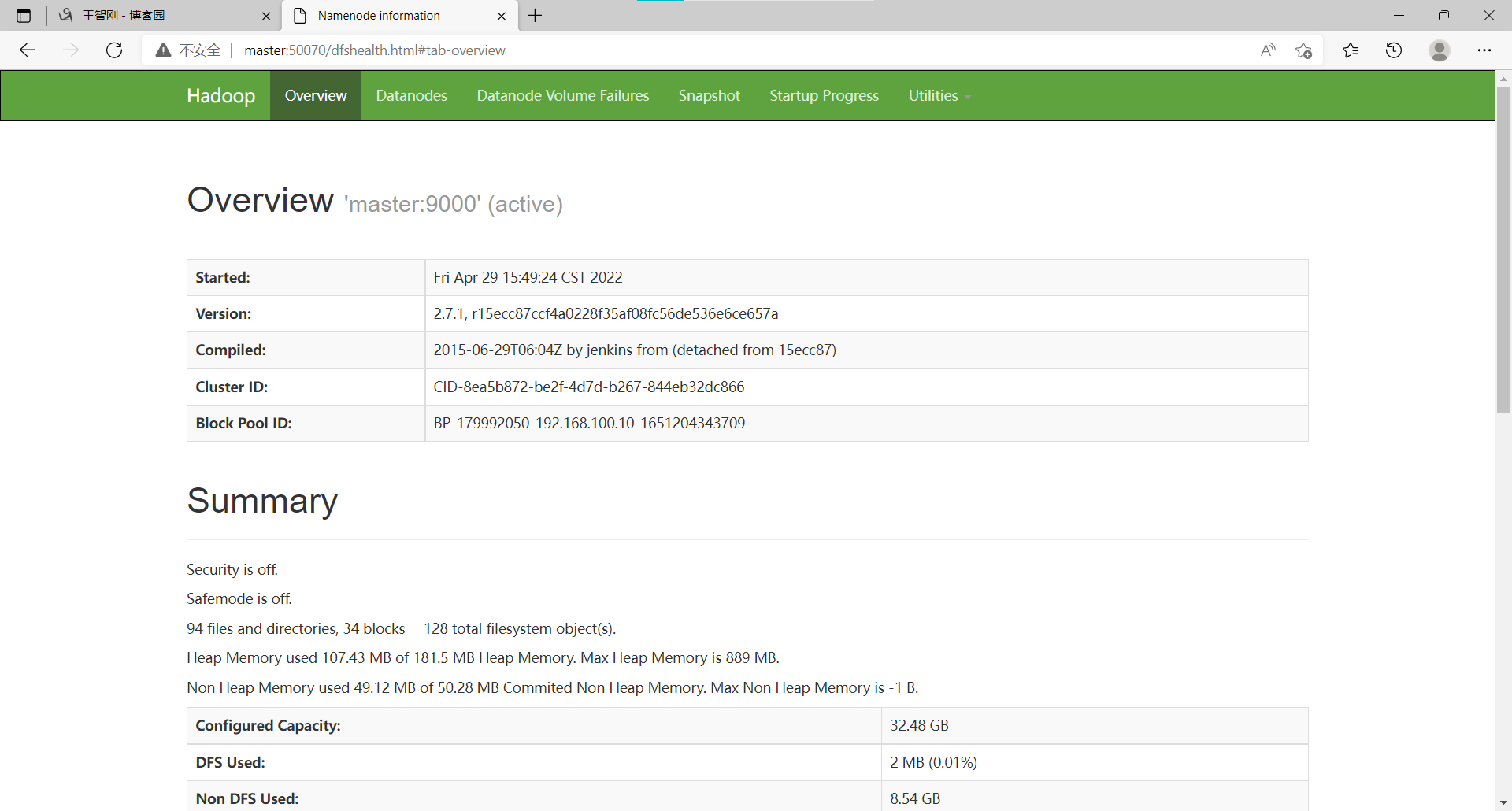
然后点击Utilities下面的Browse the file system,要能看到user就表示成功
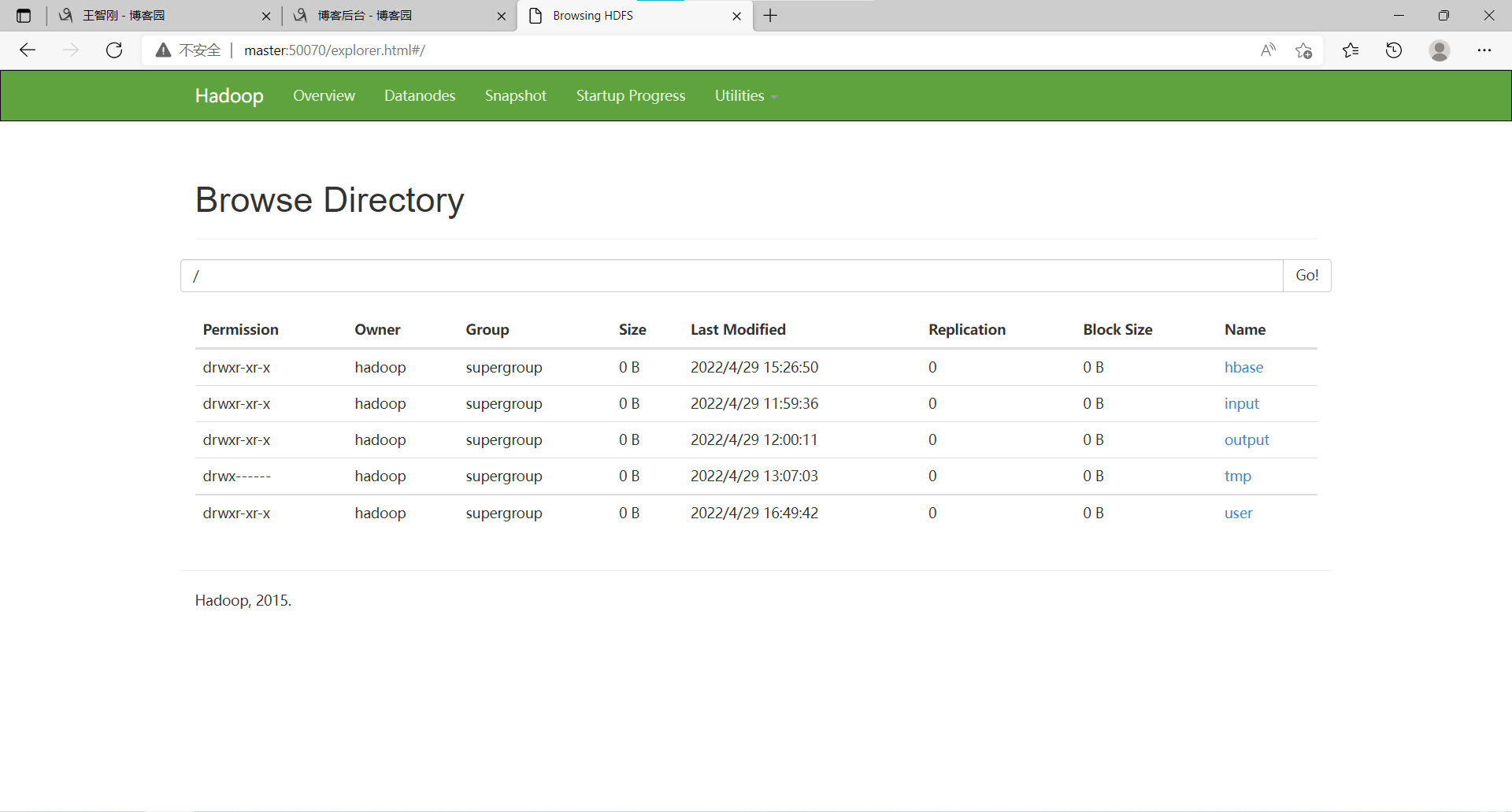
查看导入数据
[hadoop@master ~]$ hdfs dfs -ls /user/test

Found 2 items

-rw-r--r--   2 hadoop supergroup          0 2022-04-29 16:49 /user/test/_SUCCESS

-rw-r--r--   2 hadoop supergroup         30 2022-04-29 16:49 /user/test/part-m-00000

[hadoop@master ~]$ hdfs dfs -cat /user/test/part-m-00000

01,zhangsan

02,lisi

03,wangwu

#  执行以上命令后要能看到数据库中的内容则表示成功
声明:未经许可,不得转载
【Hadoop】9、Sqoop组件的更多相关文章
- 如何将mysql数据导入Hadoop之Sqoop安装
Sqoop是一款开源的工具,主要用于在Hadoop(Hive)与传统的数据库(mysql.postgresql...)间进行数据的传递,可以将一个关系型数据库(例如 : MySQL ,Oracle , ...
- hadoop伪分布式组件安装
一.版本建议 Centos V7.5 Java V1.8 Hadoop V2.7.6 Hive V2.3.3 Mysql V5.7 Spark V2.3 Scala V2.12.6 Flume V1. ...
- [Hadoop] Sqoop安装过程详解
Sqoop是一个用来将Hadoop和关系型数据库中的数据相互转移的工具,可以将一个关系型数据库(例如 : MySQL ,Oracle ,Postgres等)中的数据导进到Hadoop的HDFS中,也可 ...
- Sqoop 组件安装与配置
下载和解压 Sqoop Sqoop相关发行版本可以通过官网 https://mirror-hk.koddos.net/apache/sqoop/ 来获取 安装 Sqoop组件需要与 Hadoop环境适 ...
- Hadoop生态圈-Sqoop部署以及基本使用方法
Hadoop生态圈-Sqoop部署以及基本使用方法 作者:尹正杰 版权声明:原创作品,谢绝转载!否则将追究法律责任. Sqoop(发音:skup)是一款开源的工具,主要用于在Hadoop(Hive)与 ...
- 【Hadoop】ZooKeeper组件
目录 一.配置时间同步 二.部署zookeeper(master节点) 1.使用xftp上传软件包至~ 2.解压安装包 3.创建 data 和 logs 文件夹 4.写入该节点的标识编号 5.修改配置 ...
- 零碎记录Hadoop平台各组件使用
>20161011 :数据导入研究 0.sqoop报warning,需要安装accumulo: 1.下载Microsoft sql server jdbc, 使用ie下载,将42版j ...
- Hadoop 的常用组件一览
Hadoop 集群安装及原理:hdfs命令行操作:Java操作hdfs的常用API接口:动态添加删除数据节点. HBase 集群安装及原理:Hbase命令行操作:Java操作Hbase的常用API接口 ...
- hadoop以及相关组件介绍以及个人理解
前言 本人是由java后端转型大数据方向,目前也有近一年半时间了,不过我平时的开发平台是阿里云的Maxcompute,通过这么长时间的开发,对数据仓库也有了一定的理解,ETL这些经验还算比较丰富.但是 ...
随机推荐
- Kafka学习(二)
作者:程序员cxuan链接:https://www.zhihu.com/question/53331259/answer/1262483551来源:知乎著作权归作者所有.商业转载请联系作者获得授权,非 ...
- Zookeeper 有哪几种几种部署模式?
部署模式:单机模式.伪集群模式.集群模式.
- Redis 常见的性能问题都有哪些?如何解决?
Redis 常见的性能问题都有哪些?如何解决? Master写内存快照,save命令调度rdbSave函数,会阻塞主线程的工作,当快照比较大时对性能影响是非常大的,会间断性暂停服务,所以Master最 ...
- Java 中,Comparator 与 Comparable 有什么不同?
Comparable 接口用于定义对象的自然顺序,而 comparator 通常用于定义用户 定制的顺序.Comparable 总是只有一个,但是可以有多个 comparator 来定义 对象的顺序.
- 学习Apache(五)
apache目前主要有两种模式:prefork模式和worker模式: 1)prefork模式(默认模式) prefork是Unix平台上的默认(缺省)MPM,使用多个子进程,每个子进程只有一个线程 ...
- 机器学习之linear_model (线性回归算法模型)
1.matplotlib 首先看一下这个静态图绘制模块 静态图形处理 数据分析三剑客 Numpy : 主要为了给pandas提供数据源 pandas : 更重要的数据结构 matplotlib : 静 ...
- ACM - 动态规划 - UVA437 The Tower of Babylon
UVA437 The Tower of Babylon 题解 初始时给了 \(n\) 种长方体方块,每种有无限个,对于每一个方块,我们可以选择一面作为底.然后用这些方块尽可能高地堆叠成一个塔,要求只有 ...
- HTML5离线存储整理
前端html部分 //canvas.html <!DOCTYPE html> <html manifest="/test.appcache"> <he ...
- python大佬养成计划----基于flask_sqlalchemy的网页显示数据库信息
网页显示数据库信息 使用我们刚学习的flask_sqlalchemy,在网页中显示数据库表中的数据.在开始运行程序前,确保数据库中执行过创建表和创建用户的操作,详见链接描述. # 模板文件templa ...
- 界面跳转+信息传递+AS中如何将ADV转移到其他盘中
今日所学:界面跳转 信息传递 遇到的问题: 昨天遇到不能新建java类,在网上百度了很多,大多原因是没有新建java类的模板,但是我有,换了一个新的新建的方式后,发现虽然能建立了,但在测试时还是不能页 ...