
Android中实现APP文本内容的分享发送与接收方法简述
谨记(指定选择器Intent.createChooser())
开始今天的内容前,先闲聊一下:
(1)突然有一天头脑风暴,对很多问题有了新的看法和见解,迫不及待的想要分享给大家,文档已经写好了,我需要通过微信或者QQ,短信等社交工具发送给大家。
(2)在网上发现一段特别好的文章,想要保存收藏下来。
上面描述了进入智能手机时代后,我们经常遇到的两种情况,那么作为开发者的我们如何让自己开发的APP实现这两种功能呢,下面我们以实现文本的发送分享以及接收来梳理下两种功能的实现过程(其他类型的数据在博文末尾会给大家做简单介绍)。
第一种情况:APP实现发送分享文本功能
在实现APP发送与分享的功能时,根据是否指定选择器Intent.createChooser(),会有两种不同的实现效果。
(1)指定选择器的实现效果如下:
每次需要发送分享的时候,都会弹出所有具有分享功能的APP供选择。(个人认为很人性化)
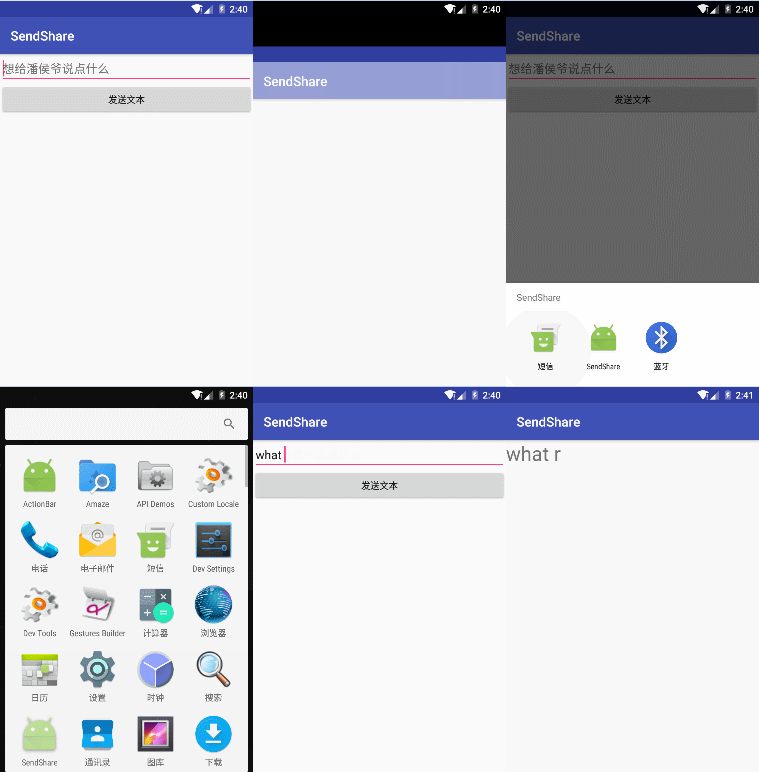
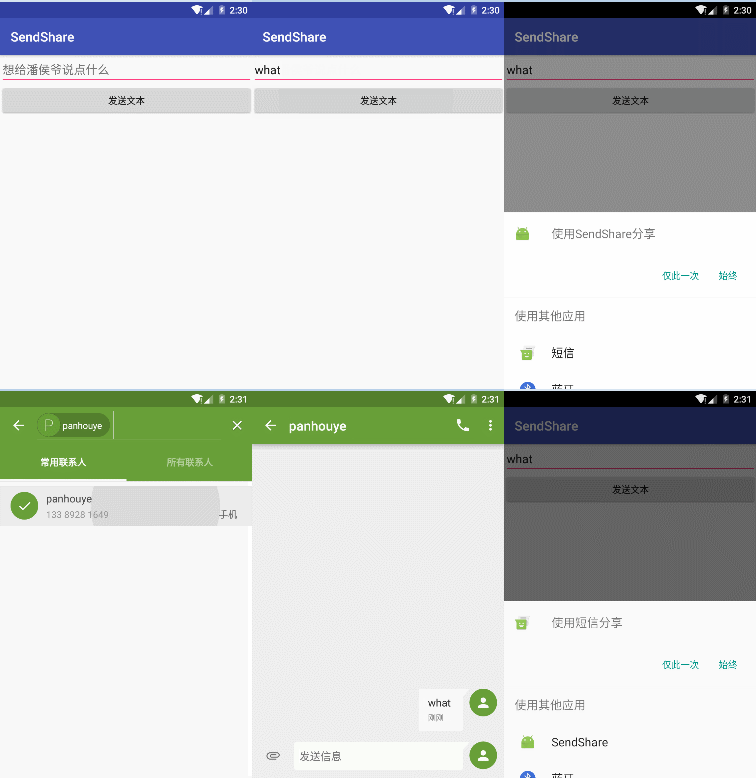
(2)未指定选择器的实现效果如下:
图中演示测试使用的安卓原生系统,在未设置选择器的时候,每次会提醒用户使用当前APP提交发送分享所使用的APP仅使用一次还是始终都使用(经测试万一大家手滑,误点了“始终”,那么好吧,如果下次想换其他APP分享内容时,除非你卸载重装当前APP);但在其他一些安卓定制系统的品牌手机上测试时,发现仅第一次会跳出所有具有发送分享功能的APP供你选择(但是不会提示你仅使用一次还是始终),一旦选择后,后果与在原生系统上点击始终的效果相同 。立马卸载APP的心都有了。
好了,实现效果大家都看到了,我们开始撸一把代码吧:
第一步:Layout中界面布局文件activity_main.xml文件(文本编辑框以及按钮):
 <?xml version="1.0" encoding="utf-8"?>

     <LinearLayout

     xmlns:android="http://schemas.android.com/apk/res/android"

     xmlns:tools="http://schemas.android.com/tools"

     android:id="@+id/activity_main"

     android:layout_width="match_parent"

     android:layout_height="match_parent"

     android:orientation="vertical"

     tools:context="com.example.administrator.sendshare.MainActivity">

     <EditText

         android:id="@+id/et"

         android:layout_width="match_parent"

         android:layout_height="wrap_content"

         android:hint="想给潘侯爷说点什么"/>

     <Button

         android:layout_width="match_parent"

         android:layout_height="wrap_content"

         android:onClick="sendtext"

         android:text="发送文本" />

 </LinearLayout>
第二步:Java中实现代码MainActivity.java功能实现代码:
注意注意:指定选择器啊
 public class MainActivity extends AppCompatActivity {

     EditText et;//声明文本编辑框

     String str;//声明字符串,用于获取文本编辑框内的内容

     @Override

     protected void onCreate(Bundle savedInstanceState) {

         super.onCreate(savedInstanceState);

         setContentView(R.layout.activity_main);

         //获取文本框

         et = (EditText) findViewById(R.id.et);

     }

     //创建方法将输入的内容发出去

     public void sendtext(View view){

         str=et.getText().toString();

         Intent intent = new Intent();

         /*设置action为发送分享,

         *并判断要发送分享的内容是否为空

          */

         intent.setAction(Intent.ACTION_SEND);

         if(str!=null){

             intent.putExtra(Intent.EXTRA_TEXT,str);

         }else{

             intent.putExtra(Intent.EXTRA_TEXT,"");

         }

         intent.setType("text/plain");//设置分享发送的数据类型

         //未指定选择器,部分定制系统首次选择后,后期将无法再次改变

 //        startActivity(intent);

         //指定选择器选择使用有发送文本功能的App

         startActivity(Intent.createChooser(intent,getResources().getText(R.string.app_name)));

     }

 }
第二种情况:APP实现接收分享文本功能
实现效果如下(将短信内容分享到我们的APP上):
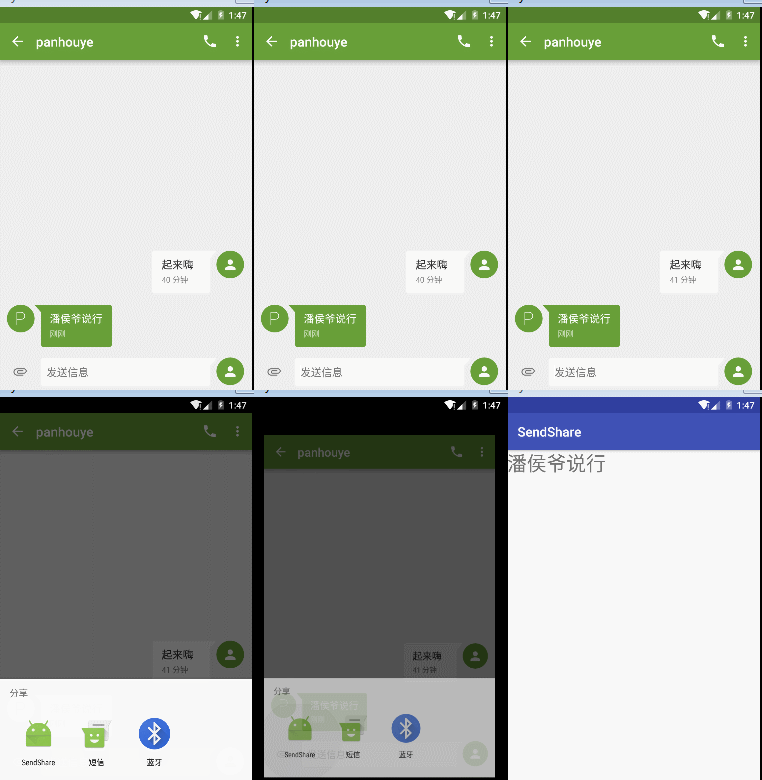
layout布局界面为初始默认,仅一个默认helloworld的TextView界面,这里就省略不写了。
第一步:AndroidMainfest.xml配置文件(添加接收文本所需的action等intent属性)
 <?xml version="1.0" encoding="utf-8"?>

 <manifest xmlns:android="http://schemas.android.com/apk/res/android"

     package="com.example.administrator.test" >

     <application

         android:allowBackup="true"

         android:icon="@mipmap/ic_launcher"

         android:label="@string/app_name"

         android:supportsRtl="true"

         android:theme="@style/AppTheme" >

         <activity android:name=".MainActivity" >

             <intent-filter>

                 <action android:name="android.intent.action.MAIN" />

                 //添加接收文本用的action,category,mimeType

                 <action android:name="android.intent.action.SEND" />

                 <category android:name="android.intent.category.DEFAULT" />

                 <data android:mimeType="text/plain" />

                 <category android:name="android.intent.category.LAUNCHER" />

             </intent-filter>

         </activity>

     </application>

 </manifest>
第二步:Java中实现代码MainActivity.java功能实现代码
 import android.content.Intent;

 import android.support.v7.app.AppCompatActivity;

 import android.os.Bundle;

 import android.widget.TextView;

 public class MainActivity extends AppCompatActivity {

     private TextView tv;

     @Override

     protected void onCreate(Bundle savedInstanceState) {

         super.onCreate(savedInstanceState);

         setContentView(R.layout.activity_main);

         tv = (TextView) findViewById(R.id.tv);

         //获取intent

         Intent intent =getIntent();

         String action = intent.getAction();

         String type = intent.getType();

         //设置接收类型为文本

         if (Intent.ACTION_SEND.equals(action) && type != null){

             if ("text/plain".equals(type)) {

                 handlerText(intent);

             }

         }

 }

 //该方法用于获取intent所包含的文本信息,并显示到APP的Activity界面上

     private void handlerText(Intent intent) {

         String data = intent.getStringExtra(Intent.EXTRA_TEXT);

         tv.setText(data);

     }

 }
额外补充:
设置更新桌面背景,核心代码如下:
 import android.content.Intent;

 import android.support.v7.app.AppCompatActivity;

 import android.os.Bundle;

 import android.view.View;

 public class Main2Activity extends AppCompatActivity {

     @Override

     protected void onCreate(Bundle savedInstanceState) {

         super.onCreate(savedInstanceState);

         setContentView(R.layout.activity_main2);

     }

     public void select(View view){

         Intent intent = new Intent();

         intent.setAction(Intent.ACTION_SET_WALLPAPER);

         startActivity(Intent.createChooser(intent,getResources().getText(R.string.app_name)));

 //        startActivity(intent);

     }

 }
以二进制的形式分享发送图片,核心代码如下:
 public void sendimage(View view) {

     Intent intent = new Intent();

     intent.setAction(Intent.ACTION_SEND);

     intent.putExtra(Intent.EXTRA_STREAM, Uri.parse(Environment.getExternalStorageDirectory()+"/DCIM/Camera/20161204_195228.jpg"));

     intent.setType("image/*");

 //  startActivity(intent);

     startActivity(Intent.createChooser(intent,getResources().getText(R.string.app_name)));

 }
发送分享多张图片,核心代码如下:
 public void sendimages(View view) {

     ArrayList<Uri> uris = new ArrayList<>();

     //演示发送两张图片

     uris.add(Uri.parse(Environment.getExternalStorageDirectory()+"/DCIM/Camera/20161204_195228.jpg"));

     uris.add(Uri.parse(Environment.getExternalStorageDirectory()+"/DCIM/Camera/20161204_195155.jpg"));

     Intent intent = new Intent();

     intent.setAction(Intent.ACTION_SEND_MULTIPLE);

     intent.putParcelableArrayListExtra(Intent.EXTRA_STREAM,uris);

     intent.setType("image/*");

 //        startActivity(intent);

     startActivity(Intent.createChooser(intent,getResources().getText(R.string.app_name)));

 }
今天到这了,有问题欢迎评论讨论,晚安喽!
Android中实现APP文本内容的分享发送与接收方法简述的更多相关文章
- 【聊技术】在Android中实现自适应文本大小显示
本周的聊技术话题和大家说说如何在Android中实现自适应文本大小显示. 想象一下,在布局中,通常显示文本的区域大小是固定的,但是文本长度并不总是固定的.比如列表中的文章标题.界面下方的按钮文本等等. ...
- Android 中如何计算 App 的启动时间?
(转载) 已知的两种方法貌似可以获取,但是感觉结果不准确:一种是,adb shell am start -w packagename/activity,这个可以得到两个值,ThisTime和Total ...
- Android中为APP创建快捷方式的原理(自己的理解)
我们首先来看Android中为APP创建快捷方式的原理: 从图上可以看出,Android大致分7步完成快捷方式的创建: 第一步:Android系统的launcher程序会调用它的pickShortcu ...
- 在Android中使App高速、简单地支持新浪微博、微信、QQ、facebook等十几个主流社交平台的分享功能
前言 在如今的APP或者游戏中,分享功能差点儿已经成为标配.分享功能不但能够满足用户的需求.也能够为产品带来很多其它的用户,甚至能够对用户的行为.活跃度.年龄段等情况进行数据统计,使得软件公司能够对产 ...
- 用jQuery向div中添加Html文本内容
前台代码: <link href="http://www.cnblogs.com/Content/themes/base/jquery-ui.css" rel="s ...
- Android中使用异步线程更新UI视图的几种方法
在Android中子线程是不能更新ui的. 所以我们要通过其他方式来动态改变ui视图, 1.runOnUiThreadactivity提供的一个轻量级更新ui的方法,在Fragment需要使用的时候要 ...
- 关于import android.support.v4.app.ContextCompat;找不到contextcompat的解决方法
android迁移到了androidx,那么相关库的import就有问题了,需要转变为androidx的,这里比如 import android.support.v4.app.ContextCompa ...
- 手把手教你Android手机与BLE终端通信--连接,发送和接收数据
假设你还没有看上一篇 手把手教你Android手机与BLE终端通信--搜索,你就先看看吧,由于这一篇要接着讲搜索到蓝牙后的连接.和连接后的发送和接收数据. 评论里有非常多人问假设一条信息特别长,怎么不 ...
- Android测试(一):在Android中测试App
原文:https://developer.android.com/training/testing/index.html 测试你的App是开发过程中的重要组成部分.通过对应用程序持续的运行测试,你可以 ...
随机推荐
- .NET Core中的认证管理解析
.NET Core中的认证管理解析 0x00 问题来源 在新建.NET Core的Web项目时选择“使用个人用户账户”就可以创建一个带有用户和权限管理的项目,已经准备好了用户注册.登录等很多页面,也可 ...
- 通过AngularJS实现前端与后台的数据对接(二)——服务(service,$http)篇
什么是服务? 服务提供了一种能在应用的整个生命周期内保持数据的方法,它能够在控制器之间进行通信,并且能保证数据的一致性. 服务是一个单例对象,在每个应用中只会被实例化一次(被$injector实例化) ...
- dotNET跨平台相关文档整理
一直在从事C#开发的相关技术工作,从C# 1.0一路用到现在的C# 6.0, 通常情况下被局限于Windows平台,Mono项目把我们C#程序带到了Windows之外的平台,在工作之余花了很多时间在M ...
- Android 获取meta-data中的数据
在 Android 的 Mainfest 清单文件中,Application,Activity,Recriver,Service 的节点中都有这个的存在.很多时候我们可以通过 meta-data 来配 ...
- [C#] 进阶 - LINQ 标准查询操作概述
LINQ 标准查询操作概述 序 “标准查询运算符”是组成语言集成查询 (LINQ) 模式的方法.大多数这些方法都在序列上运行,其中的序列是一个对象,其类型实现了IEnumerable<T> ...
- 读书笔记汇总 - SQL必知必会(第4版)
本系列记录并分享学习SQL的过程,主要内容为SQL的基础概念及练习过程. 书目信息 中文名:<SQL必知必会(第4版)> 英文名:<Sams Teach Yourself SQL i ...
- 一款开源免费的.NET文档操作组件DocX(.NET组件介绍之一)
在目前的软件项目中,都会较多的使用到对文档的操作,用于记录和统计相关业务信息.由于系统自身提供了对文档的相关操作,所以在一定程度上极大的简化了软件使用者的工作量. 在.NET项目中如果用户提出了相关文 ...
- beans.xml
<?xml version="1.0" encoding="UTF-8"?> <beans xmlns="http://www.sp ...
- C++常见笔试面试要点以及常见问题
1. C++常见笔试面试要点: C++语言相关: (1) 虚函数(多态)的内部实现 (2) 智能指针用过哪些?shared_ptr和unique_ptr用的时候需要注意什么?shared_ptr的实现 ...
- EChart系列:在echart3中使用百度地图扩展之后,如何获取到百度地图对象
最近做项目想要在百度地图上叠加显示echart的散点图,然后根据地图的缩放等级和区域范围要显示不同的散点图,这中间折腾了好久.功能要求包括: (1)底图使用百度地图: (2)可以在地图上叠加显示ech ...