
c# windows编程控件学习-1
 using System;

 using System.Collections.Generic;

 using System.ComponentModel;

 using System.Data;

 using System.Drawing;

 using System.Linq;

 using System.Text;

 using System.Threading.Tasks;

 using System.Windows.Forms;

 namespace proj9_1

 {

     public partial class Form1 : Form

     {

         public Form1()

         {

             InitializeComponent();

         }

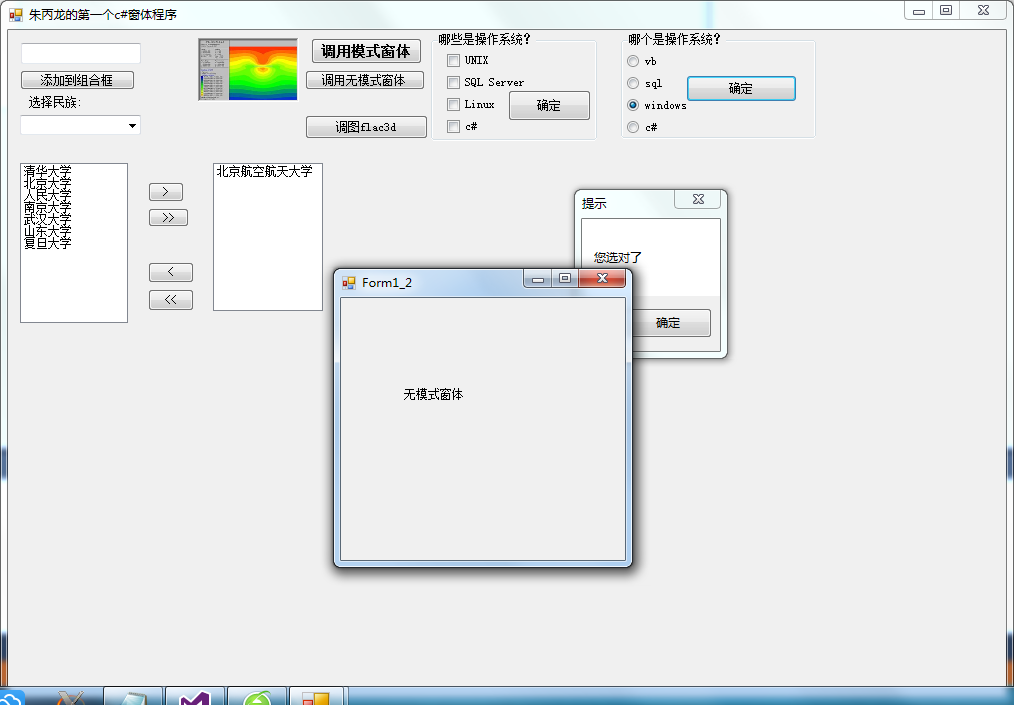
         private void button1_Click(object sender, EventArgs e)

         {

             Form myform = new Form1_1();

             myform.ShowDialog();

         }

         private void Form1_Load(object sender, EventArgs e)

         {

             //MessageBox.Show("3个按钮", "信息提示", MessageBoxButtons.AbortRetryIgnore);

             listBox1.Items.Add("清华大学"); listBox1.Items.Add("北京大学");

             listBox1.Items.Add("北京航空航天大学"); listBox1.Items.Add("人民大学");

             listBox1.Items.Add("南京大学"); listBox1.Items.Add("武汉大学");

             listBox1.Items.Add("山东大学"); listBox1.Items.Add("复旦大学");

             enbutton();

         }

         private void enbutton()

         {

             if (listBox1.Items.Count == )

             {

                 button7.Enabled = false; button8.Enabled = false;

             }

             else

             {

                 button7.Enabled = true; button8.Enabled = true;

             }

             if (listBox2.Items.Count == )

             {

                 button9.Enabled = false; button10.Enabled = false;

             }

             else

             {

                 button9.Enabled = true; button10.Enabled = true;

             }

         }

         private void button2_Click(object sender, EventArgs e)

         {

             Form myform = new Form1_2();

             myform.Show();

         }

         private void richTextBox1_TextChanged(object sender, EventArgs e)

         {

         }

         private void groupBox1_Enter(object sender, EventArgs e)

         {

         }

         private void checkBox1_CheckedChanged(object sender, EventArgs e)

         {

             MessageBox.Show("3个按钮", "信息提示", MessageBoxButtons.AbortRetryIgnore);

         }

         private void button3_Click(object sender, EventArgs e)

         {

             if (checkBox1.Checked && checkBox3.Checked && !checkBox2.Checked && !checkBox4.Checked)

             {

                 MessageBox.Show("您答对了,真的很棒!!!", "信息提示", MessageBoxButtons.OK);

             }

             else

                 MessageBox.Show("您答错了,继续努力。", "信息提示", MessageBoxButtons.OK);

         }

         private void button4_Click(object sender, EventArgs e)

         {

             if (radioButton3.Checked)

             {

                 MessageBox.Show("您选对了", "提示", MessageBoxButtons.OK);

             }

             else if (radioButton1.Checked || radioButton4.Checked)

             {

                 MessageBox.Show("您选错了", "提示", MessageBoxButtons.OKCancel);

             }

             else

             {

                 MessageBox.Show("您选错了,这是数据库系统", "提示", MessageBoxButtons.OKCancel);

             }

         }

         private void button5_Click(object sender, EventArgs e)

         {

             pictureBox1.Image = Image.FromFile("E:\\flac3d.jpg");

         }

         private void comboBox1_SelectedIndexChanged(object sender, EventArgs e)

         {

         }

         private void button6_Click(object sender, EventArgs e)

         {

             if (textBox1.Text != "")

                 if (!comboBox1.Items.Contains(textBox1.Text))

                     comboBox1.Items.Add(textBox1);

         }

         private void button7_Click(object sender, EventArgs e)

         {

             if (listBox1.SelectedIndex >= )

             {

                 listBox2.Items.Add(listBox1.SelectedItem);

                 listBox1.Items.RemoveAt(listBox1.SelectedIndex);

             }

             enbutton();

         }

         private void button8_Click(object sender, EventArgs e)

         {

             foreach (var item in listBox1.Items)

             {

                 listBox2.Items.Add(item);

             }

             enbutton();

             listBox1.Items.Clear();

         }

     }

 }
c# windows编程控件学习-1的更多相关文章
- c# windows编程控件学习-2
using System; using System.Collections.Generic; using System.ComponentModel; using System.Data; usin ...
- [转]Windows平台下Makefile学习笔记
Windows平台下Makefile学习笔记(一) 作者:朱金灿 来源:http://blog.csdn.net/clever101 决心学习Makefile,一方面是为了解决编译开源代码时需要跨编译 ...
- DevExpress控件学习总结(转)
DevExpress控件学习总结 1.Navigation & Layout 1.1 Bar Manager 如果想在窗体或用户控件(user control)上添加工具条(bars)或弹 ...
- Windows标准控件
学习目的 学习创建, 使用Windows标准控件(按钮, 滚动条, 静态控件, 列表框, 编辑框, 组合框); 学习使用子窗口控件操作函数(EnableWindow, MoveWindow, SetW ...
- 如何:对 Windows 窗体控件进行线程安全调用
http://msdn.microsoft.com/zh-cn/library/ms171728(VS.90).aspx http://msdn.microsoft.com/zh-cn/library ...
- C#可扩展编程之MEF学习笔记(五):MEF高级进阶
好久没有写博客了,今天抽空继续写MEF系列的文章.有园友提出这种系列的文章要做个目录,看起来方便,所以就抽空做了一个,放到每篇文章的最后. 前面四篇讲了MEF的基础知识,学完了前四篇,MEF中比较常用 ...
- C#可扩展编程之MEF学习笔记(四):见证奇迹的时刻
前面三篇讲了MEF的基础和基本到导入导出方法,下面就是见证MEF真正魅力所在的时刻.如果没有看过前面的文章,请到我的博客首页查看. 前面我们都是在一个项目中写了一个类来测试的,但实际开发中,我们往往要 ...
- C#可扩展编程之MEF学习笔记(三):导出类的方法和属性
前面说完了导入和导出的几种方法,如果大家细心的话会注意到前面我们导出的都是类,那么方法和属性能不能导出呢???答案是肯定的,下面就来说下MEF是如何导出方法和属性的. 还是前面的代码,第二篇中已经提供 ...
- C#可扩展编程之MEF学习笔记(二):MEF的导出(Export)和导入(Import)
上一篇学习完了MEF的基础知识,编写了一个简单的DEMO,接下来接着上篇的内容继续学习,如果没有看过上一篇的内容, 请阅读:http://www.cnblogs.com/yunfeifei/p/392 ...
随机推荐
- Android PullToRefresh (GridView 下拉刷新上拉加载)
做这个需要自己去git hub上下载个pull-to-refresh 里面有个library为依赖包自己导到自己的项目中 (下载地址:https://github.com/chrisbanes/And ...
- [已解决] windows 下 git 免输密码
在 .git/config 里面加上这句话即 [credential] helper = store 原文地址:http://www.cnblogs.com/gifisan/p/5829578.htm ...
- Oracle 流复制实践笔记
最近因为业务需求,需要在两个数据库之间做双向实时同步,遂实践了一把Oracle的流复制,遇到了很多疑难问题,最终也貌似成功,现记录如下. 我是使用OEM来实现流复制的. 10.进行流复制的两个数据库的 ...
- [课程设计]Scrum 1. 9 多鱼点餐系统开发进度(最后页面完善&修复BUG&用户测试反馈)
[课程设计]Scrum 1. 9 多鱼点餐系统开发进度(最后页面完善&修复BUG&用户测试) 1.团队名称:重案组 2.团队目标:长期经营,积累客户充分准备,伺机而行 3.团队口号:矢 ...
- 模块(序列化(json&pickle)+XML+requests)
一.序列化模块 Python中用于序列化的两个模块: json 跨平台跨语言的数据传输格式,用于[字符串]和 [python基本数据类型] 间进行转换 pickle python内置的数据 ...
- python基础(三元运算+深浅拷贝+函数参数)
三元运算 三元运算,又称三目运算,主要作用是减少代码量,是对简单的条件语句的缩写. 书写格式: result = 值1 if 条件 else 值2 即如果条件成立,则将值1赋给result变量,如果不 ...
- [问题2014S02] 解答
[问题2014S02] 解答 首先注意到: 两个实系数多项式 \(f(x),g(x)\) 互素当且仅当 \(f(x),g(x)\) 在复数域 \(\mathbb{C}\) 上没有共公根, 当且仅当结 ...
- Web的Ajax应用开发模式(二)——Ajax开发模式分析
寄语: 前天在查看一些公司的招聘要求时,看到有公司要求测试人员了解Ajax,故写此博文旨在帮助测试人员提高自身技术知识水平,愿与广大测试同胞共同进步.(欢迎纠错!!!) Web应用的传统开发模式总结: ...
- 提取data.frame中的部分数据(不含列标题和行标题)
?unlist Given a list structure x, unlist simplifies it to produce a vector which contains all th ...
- css模块化策略
为什么要模块化? 分治和复用 封装,不污染全局,不被全局污染. 继承 BEM(block:块,Element:元素,Modifier:修饰符)策略 .block__Element--Modifier ...