
ios - 纯代码创建collectionView
开始考虑好一点点时间,因为一般的都是用xib,或者storyboard来写的.这次用纯代码...废话较多请看
首先把storyboard干掉,工程里面的main干掉
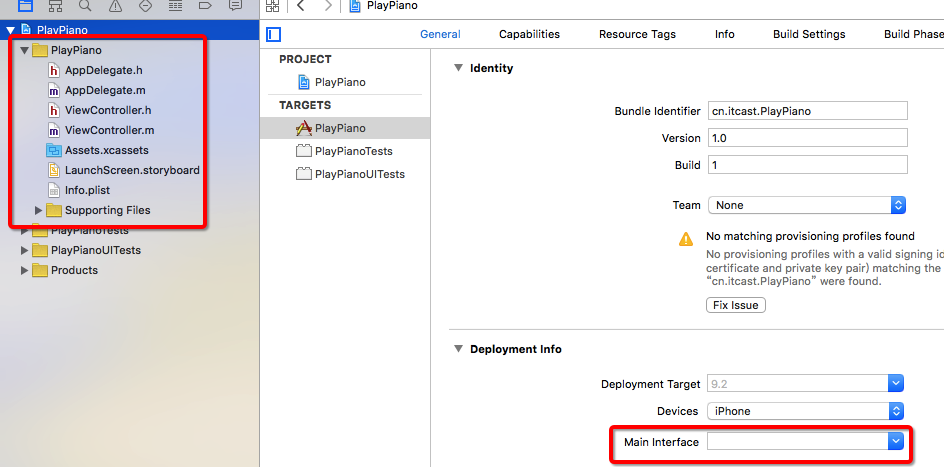
由于干掉了storyboard则启动的控制器要在Appdelegate中指定
#import "AppDelegate.h"

#import "ViewController.h"

@interface AppDelegate ()

@end

@implementation AppDelegate

- (BOOL)application:(UIApplication *)application didFinishLaunchingWithOptions:(NSDictionary *)launchOptions {

    self.window = [[UIWindow alloc] initWithFrame:[UIScreen mainScreen].bounds];

    UICollectionViewFlowLayout * fly = [UICollectionViewFlowLayout new];

    fly.itemSize = CGSizeMake(50, 50);

    fly.sectionInset = UIEdgeInsetsMake(50, 10, 0, 10);

    //创建collectionViewController并设置布局参数

    ViewController * vc = [[ViewController alloc] init];

    self.window.rootViewController = vc;

    UICollectionView * colView = [[UICollectionView alloc] initWithFrame:[UIScreen mainScreen].bounds collectionViewLayout:fly];

    vc.collectionView = colView;

    //必须注册可重用id

    [vc.collectionView registerClass:[UICollectionViewCell class] forCellWithReuseIdentifier:@"Cell"];

    [vc.collectionView setCollectionViewLayout:fly];

    vc.collectionView.backgroundColor = [UIColor blueColor];

    [self.window makeKeyAndVisible];

    return YES;

}
- 上述代码中,一定要在创建viewcontroller的时候给它的collectionView指定布局参数,否则一直会报错,报错原因就是:"请给UICollectionView初始化一个non-nil的layout(布局参数)",如果报这个错误而你在控制的.m文件中viewDidload中给self.CollectionView 设置并且初始化了一个布局参数,再次运行程序依然会报上面的错误.
- 所以创建控制器的时候给控制器.collectionView指定布局参数.
- 指定布局参数后还会报错,说:请给cell设置一个可重用ID,当你在viewdidload中注册了一个Id后依然报错,打全局断点会崩到数据源第三个方法中...此时正确的解决方式就是,在Appdelegate中创建控制器的时候让控制器的.collectionView register 注册一个可重用id.此时再运行正确.
- 注意点1: 此时打断点在Viewcontroller中的viewdidload方法,----结果是根本不会执行viewdidload,所以它才报错让你注册一个可重用id,如果在Appdelegate中的控制器的.collectionView注册一个可重用ID则 解决.
#import "ViewController.h"

@interface ViewController ()<UICollectionViewDataSource,UICollectionViewDelegate,UICollectionViewDelegateFlowLayout>

/** 布局参数 */

//@property (nonatomic, strong) UICollectionViewFlowLayout *flowLayout;

@end

@implementation ViewController

//此时懒加载没有用 因为viewdidload中的方法根本不会执行

//-(UICollectionViewFlowLayout *)flowLayout{

//

//    if (_flowLayout == nil) {

//        _flowLayout = [[UICollectionViewFlowLayout alloc] init];

//    }

//    return _flowLayout;

//}

//不执行---

- (void)viewDidLoad {

    [super viewDidLoad];

//    self.view.backgroundColor = [UIColor whiteColor];

//    self.collectionView.dataSource = self;

//    self.collectionView.delegate = self;

//    [self.collectionView registerClass:[UICollectionViewCell class] forCellWithReuseIdentifier:@"Cell"];

}

-(void)collectionView:(UICollectionView *)collectionView didSelectItemAtIndexPath:(NSIndexPath *)indexPath{

    NSLog(@"dianji");

}

- (void)didReceiveMemoryWarning {

    [super didReceiveMemoryWarning];

    // Dispose of any resources that can be recreated.

}

#pragma mark <UICollectionViewDataSource>

- (NSInteger)collectionView:(UICollectionView *)collectionView numberOfItemsInSection:(NSInteger)section {

    return 100;

}

- (UICollectionViewCell *)collectionView:(UICollectionView *)collectionView cellForItemAtIndexPath:(NSIndexPath *)indexPath {

    static NSString * const reuseIdentifier = @"Cell";

    UICollectionViewCell * cell = [collectionView dequeueReusableCellWithReuseIdentifier:reuseIdentifier forIndexPath:indexPath];

    cell.backgroundColor = [UIColor colorWithPatternImage:[UIImage imageNamed:@"Snip20160422_5"]];

    return cell;

}

@end
综上: 纯 代码创建collectionView,以及collectionVIewController,在哪里创建的collectionViewcontroller就在哪里设置布局参数以及cell的可重用ID即可. 切记切记...demo地址:http://pan.baidu.com/s/1i4KLlbv
ios - 纯代码创建collectionView的更多相关文章
- iOS UICollectionView(转一) XIB+纯代码创建:cell,头脚视图 cell间距
之前用CollectionViewController只是皮毛,一些iOS从入门到精通的书上也是泛泛而谈.这几天好好的搞了搞苹果的开发文档上CollectionViewController的内容,亲身 ...
- iOS开发 纯代码创建UICollectionView
转:http://jingyan.baidu.com/article/eb9f7b6d8a81a5869364e8a6.html iOS开发 纯代码创建UICollectionView 习惯了使用xi ...
- iOS回顾笔记( 01 )-- XIB和纯代码创建应用的对比
header{font-size:1em;padding-top:1.5em;padding-bottom:1.5em} .markdown-body{overflow:hidden} .markdo ...
- swift 之 纯代码创建 cell
初学swift 但是网上只有很多swift用xib创建的cell,就算是有也不是我想要的.今天自己弄了一个不用xib纯代码写的,来上代码 博客地址: https://github.com/liguol ...
- 【Android】纯代码创建页面布局(含异步加载图片)
开发环境:macOS 10.12 + Android Studio 2.2,MinSDK Android 5.1 先看看总体效果 本示例是基于Fragment进行的,直接上代码: [界面结构] 在 F ...
- iOS纯代码工程手动快速适配
首先说下让自己的程序支持iPhone6和6+,第一种使用官方提供的launch screen.xib,这个直接看官方文档即可,这里不再多述:第二种方法是和之前iPhone5的类似,比较简单,为iPho ...
- iOS纯代码手动适配 分类: ios技术 2015-05-04 17:14 239人阅读 评论(0) 收藏
首先说下让自己的程序支持iPhone6和6+,第一种使用官方提供的launch screen.xib,这个直接看官方文档即可,这里不再多述:第二种方法是和之前iPhone5的类似,比较简单,为iPho ...
- iOS Swift 开发语言之初接触,纯代码创建UIView,UITableView,UICollectionView
1. 初始化Label设置AttributeString override func viewDidLoad() { let label = UILabel(frame:CGRect(x:,y:,wi ...
- Object-C iOS纯代码布局 一堆代码可以放这里!
前言: 最近写的文章都是创业类,好吧,今天好好写写技术类的文章! 不过分享的不是IOS相关的文章,毕竟这几天在速成IOS,看的是object-c,由于速成的很快,好累! 好在现在基本已经入了点门道了, ...
随机推荐
- Java中集合Set的用法
转载 http://blog.163.com/asd_wll/blog/static/210310402010112833332260/ 1.HashSet类 Java.util.HashSet类实现 ...
- windows下cmd时复制dos中的内容 错误信息等
16:28 2015/11/23小发现 windows下cmd时复制dos中的内容,错误信息等:鼠标右键选择标记,然后ctrl c 即可.
- 【BZOJ】1524: [POI2006]Pal
题意 给出\(n\)个回文串\(s_i(\sum_{i=1}^{n} |s_i| \le 2000000)\)求如下二元组\((i, j)\)的个数\(s_i + s_j\)仍然是回文串. 分析 这道 ...
- Java中UIManager的几种外观的详细讲解
Java'中的几种Look and Feel 1.Metal风格 (默认) String lookAndFeel = "javax.swing.plaf.metal.MetalLookAnd ...
- HDU-1466 计算直线的交点数 经典dp
1.HDU-1466 计算直线的交点数 2.链接:http://acm.hdu.edu.cn/showproblem.php?pid=1466 3.总结:不会推这个,看了题解.. 状态转移: m条 ...
- Java_Java中动态加载jar文件和class文件
转自:http://blog.csdn.net/mousebaby808/article/details/31788325 概述 诸如tomcat这样的服务器,在启动的时候会加载应用程序中lib目录下 ...
- 20145330第五周《Java学习笔记》
20145330第五周<Java学习笔记> 这一周又是紧张的一周. 语法与继承架构 Java中所有错误都会打包为对象可以尝试try.catch代表错误的对象后做一些处理. 使用try.ca ...
- Linux文件锁flock
Linux文件锁flock 在多个进程同时操作同一份文件的过程中,很容易导致文件中的数据混乱,需要锁操作来保证数据的完整性,这里介绍的针对文件的锁,称之为“文件锁”-flock. flock,建议性锁 ...
- 常见的sql语句 注意点及用法【区分mysql 和Sqlserver】
如何判断在字符串字段中是否包含某个字符串 mysql: url:http://www.springload.cn/springload/detail/399 mysql> SELECT * ...
- [LintCode] Roman to Integer 罗马数字转化成整数
Given a roman numeral, convert it to an integer. The answer is guaranteed to be within the range fro ...