
bootstrap实现弹出窗口
bootstrap使用modal-dialog实现弹对话框。
一个对话框包含3部分:
对话框头部 modal-header
对话框内容体 modal-body
对话框底部 modal-footer
如下html可以放入<body>标签的任何位置,我习惯紧随<body>标签之后。
html代码片段:
<div class="modal fade" id="loginModalId" tabindex="-1" role="dialog" aria-hidden="true">

			<div class="modal-dialog">

				<div class="modal-content">

					<div class="modal-header">

						<button type="button" class="close" data-dismiss="modal" aria-hidden="true">

							×

						</button>

						<h4 class="modal-title" id="myModalLabel">登录提示:</h4>

					</div>

					<div class="modal-body">

						<div class="input-group">

							<span class="input-group-addon" id="basic-addon3">帐号:</span>

							<input type="text" class="input-sm" id="loginUser" aria-describedby="basic-addon3" placeholder="admin">

						</div>

						<div class="input-group">

							<span class="input-group-addon" id="basic-addon3">密码:</span>

							<input type="password" class="input-sm" id="loginPassword" aria-describedby="basic-addon3" placeholder="******">

						</div>

					</div>

					<div class="modal-footer">

						<button type="button" class="btn btn-default" data-dismiss="modal">取消</button>

						<button type="button" class="btn btn-primary" id="loginModalYesId">登录</button>

					</div>

				</div>

			</div>

		</div>
默认div是隐藏的 aria-hidden="true"
显示效果:
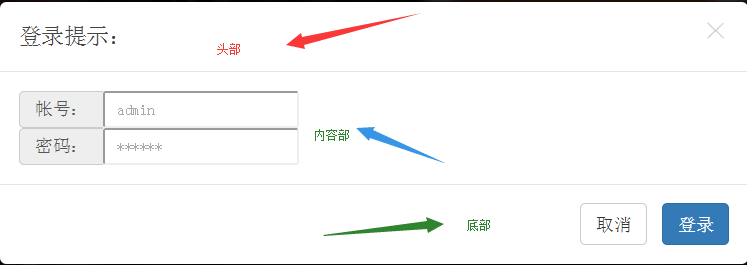
增加一个触发弹出对话框的按钮。
<button type="button" class="btn btn-blue nav-external animated hiding" id="loginBntId" hidden="true">点击登录...</button>
增加js代码,当按钮loginBtnId按下时,显示对话框($('#loginModalId').modal('show');)。
$(document).ready(function() {

	document.getElementById("loginBntId").onclick = function() {

		$('#loginModalId').modal('show');

	}

	document.getElementById("loginModalYesId").onclick = function() {

		$('#loginModalId').modal('hide');

		alert("登录功能未实现!");

	}

});
为对话框上的 登录 按钮增加点击事件,事件发生后隐藏对话框($('#loginModalId').modal('hide');),并触发登录操作("登录功能未实现!")
参考:
http://www.runoob.com/bootstrap/bootstrap-modal-plugin.html?from=androidqq
bootstrap实现弹出窗口的更多相关文章
- bootstrap 解决弹出窗口(modal) 常见问题
无法使用键盘esc关闭窗口方法: 首先在modal容器的div中增加属性tabindex="-1",其次设置键盘ESC属性keyboard为true: 方法1:使用js打开窗口时 ...
- AngularJS进阶(六)AngularJS+BootStrap实现弹出对话框
AngularJS+BootStrap实现弹出对话框 参考资料: http://angular-ui.github.io/bootstrap/#/modal https://www.zybuluo.c ...
- jQuery弹出窗口浏览图片
效果预览:http://keleyi.com/keleyi/phtml/jqtexiao/3.htm HTML文件代码: <!DOCTYPE HTML> <html> < ...
- EasyUI弹出窗口实例
效果体验:http://hovertree.com/texiao/jeasyui/1.htm 源代码下载:HovertreeJEasyUI HTML文件代码: <!DOCTYPE html> ...
- 让IE8在win7下面能显示使用window.showmodaldialog弹出窗口的地址状态栏
问题来源:最近又要对老的系统进行改善,由于用到了window.showmodaldialog这个方法弹出窗口,比如从主界面弹出新增或者修改窗口,如下图所示,显示没有地址栏,进行代码修改还要找到相应的文 ...
- java selenium (十二) 操作弹出窗口
selenium 中如何处理弹出窗口 阅读目录 原理 在代码里, 通过 Set<String> allWindowsId = driver.getWindowHandles ...
- JSP弹出窗口和模式对话框
本文转载于其它blog,在此向本文原创者,致意! JSP 弹出窗口 一.window.open() 基础知识 1.window.open()支持环境: JavaScript1.0+ ...
- Bootstrap模态弹出窗
Bootstrap模态弹出窗有三种方式: 1.href触发模态弹出窗元素: <a class="btn btn-primary" data-toggle="moda ...
- [转]js来弹出窗口的详细说明
1.警告对话框 <script> alert("警告文字") </script> 2.确认对话框 <script> confirm(" ...
随机推荐
- PTA fzu_oop_east
GitHub链接: 传送门 5-1该日是该年的第几天 定义一个日期类Date,内有数据成员年.月.日,另有成员函数:构造函数用于初始化数据成员,输出,闰年的判断. 编写主函数:创建日期对象,计算并输出 ...
- Linux操作系统发展史
1984年,面对美国电话电报公司启动的UNIX商业化计划和程序开发的封闭模式,麻省理工学院的RichardM.Stallman发起了一项国际性的源代码开放的GNU(GNU's Not Unix)计划, ...
- 修改nginx的访问目录以及遇到的403错误修改总结
对于这个问题困扰了我好几天,前篇文章介绍了图片服务器的使用,但是两个服务器如何进行通话访问呢,即如何通过nginx来访问ftp服务器上的资源文件呢,这里面需要修改nginx的配置文件(vi /usr/ ...
- nodejs fs module
fs.watchFile(filename[, options], listener)# Added in: v0.1.31 filename <String> | <Buffer& ...
- Bootstrap基本类和组件学习二
一.联系方式:(自带鼠标的移动动画) 1.头文件CSS <link rel="shortcut icon" href="favicon.ico"> ...
- 2016 年 Python 开发者调查结果
1.在团队中工作 vs 独立工作 有趣的是,半数的受访者大部分时间在团队中工作,而另外半数的受访者则独立的做项目. 在公司中工作 vs 独立从事自己的项目 大约80%的受访者告诉我们,他们在公司里面工 ...
- Spring MVC学习笔记——Welcome
参考: http://blog.csdn.net/hehexiaoyou/article/details/23747617 http://www.codingyun.com/article/47.ht ...
- HTML学习笔记——标签设置格式
1>标签设置格式 <!DOCTYPE html PUBLIC "-//W3C//DTD XHTML 1.0 Transitional//EN" "http:/ ...
- How to (seriously) read a scientific paper
How to (seriously) read a scientific paper Adam Ruben’s tongue-in-cheek column about the common diff ...
- fcc的中级算法题
核心提示:这是网上开源编程学习项目FCC的javascript中级编程题(Intermediate Algorithm Scripting(50 hours)),一共20题.建议时间是50个小时,对于 ...