
WebFlux03 SpringBoot WebFlux实现CRUD
1 准备
基于SpringBoot2.0搭建WebFlux项目,详情请参见三少另外一篇博文
2 工程结构
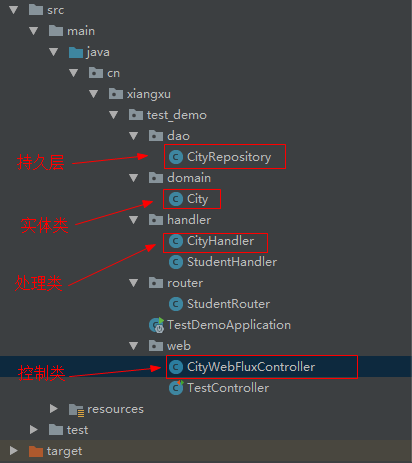
<?xml version="1.0" encoding="UTF-8"?>

<project xmlns="http://maven.apache.org/POM/4.0.0" xmlns:xsi="http://www.w3.org/2001/XMLSchema-instance"

    xsi:schemaLocation="http://maven.apache.org/POM/4.0.0 http://maven.apache.org/xsd/maven-4.0.0.xsd">

    <modelVersion>4.0.0</modelVersion>

    <groupId>cn.xiangxu</groupId>

    <artifactId>springboot-webflux-2-crud</artifactId>

    <version>0.0.1-SNAPSHOT</version>

    <packaging>jar</packaging>

    <name>springboot-webflux-2-crud</name>

    <description>Demo project for Spring Boot</description>

    <parent>

        <groupId>org.springframework.boot</groupId>

        <artifactId>spring-boot-starter-parent</artifactId>

        <version>2.0.3.RELEASE</version>

        <relativePath/> <!-- lookup parent from repository -->

    </parent>

    <properties>

        <project.build.sourceEncoding>UTF-8</project.build.sourceEncoding>

        <project.reporting.outputEncoding>UTF-8</project.reporting.outputEncoding>

        <java.version>1.8</java.version>

    </properties>

    <dependencies>

        <dependency>

            <groupId>org.springframework.boot</groupId>

            <artifactId>spring-boot-starter-webflux</artifactId>

        </dependency>

        <dependency>

            <groupId>org.springframework.boot</groupId>

            <artifactId>spring-boot-devtools</artifactId>

            <scope>runtime</scope>

            <optional>true</optional>

        </dependency>

        <!-- https://mvnrepository.com/artifact/org.projectlombok/lombok -->

        <dependency>

            <groupId>org.projectlombok</groupId>

            <artifactId>lombok</artifactId>

            <version>1.18.0</version>

        </dependency>

        <dependency>

            <groupId>org.springframework.boot</groupId>

            <artifactId>spring-boot-starter-test</artifactId>

            <scope>test</scope>

        </dependency>

        <dependency>

            <groupId>io.projectreactor</groupId>

            <artifactId>reactor-test</artifactId>

            <scope>test</scope>

        </dependency>

    </dependencies>

    <build>

        <plugins>

            <plugin>

                <groupId>org.springframework.boot</groupId>

                <artifactId>spring-boot-maven-plugin</artifactId>

                <configuration>

                    <fork>true</fork>

                </configuration>

            </plugin>

        </plugins>

    </build>

</project>
pom.xml
2.1 创建实体类
package cn.xiangxu.springbootwebflux2crud.domain;

import lombok.Data;

/**

 * @author 王杨帅

 * @create 2018-06-21 10:42

 * @desc 城市实体类

 **/

@Data

public class City {

    /**

     * 城市编号

     */

    private Long id;

    /**

     * 省份编号

     */

    private Long provinceId;

    /**

     * 城市名称

     */

    private String cityName;

    /**

     * 描述

     */

    private String description;

}
City.java
2.2 创建持久层类
技巧01:本博文利用一个 Map 容器来存储数据
package cn.xiangxu.springbootwebflux2crud.dao;

import cn.xiangxu.springbootwebflux2crud.domain.City;

import org.springframework.stereotype.Repository;

import java.util.Collection;

import java.util.concurrent.ConcurrentHashMap;

import java.util.concurrent.ConcurrentMap;

import java.util.concurrent.atomic.AtomicLong;

/**

 * @author 王杨帅

 * @create 2018-06-21 10:54

 * @desc 城市持久层

 **/

@Repository

public class CityRepository {

    private ConcurrentMap<Long, City> repository = new ConcurrentHashMap<>();

    private static final AtomicLong idGenerator = new AtomicLong(0);

    public Long save(City city) {

        Long id = idGenerator.incrementAndGet();

        city.setId(id);

        repository.put(id, city);

        return id;

    }

    public Collection<City> findAll() {

        return repository.values();

    }

    public City findCityById(Long id) {

        return repository.get(id);

    }

    public Long updateCity(City city) {

        repository.put(city.getId(), city);

        return city.getId();

    }

    public Long deleteCity(Long id) {

        repository.remove(id);

        return id;

    }

}
CityRepository.java
2.3 创建服务层【处理器类】
技巧01:在 SpringBoot WebFlux 中返回的数据类型是 Mono 或者 Flux 类型
技巧02:依赖注入时使用的是构造器注入,目的是为了减少和spring的耦合
package cn.xiangxu.springbootwebflux2crud.handler;

import cn.xiangxu.springbootwebflux2crud.dao.CityRepository;

import cn.xiangxu.springbootwebflux2crud.domain.City;

import org.springframework.beans.factory.annotation.Autowired;

import org.springframework.stereotype.Component;

import reactor.core.publisher.Flux;

import reactor.core.publisher.Mono;

/**

 * @author 王杨帅

 * @create 2018-06-21 11:08

 * @desc 城市处理器类

 **/

@Component

public class CityHandler {

    private final CityRepository cityRepository;

    public CityHandler(CityRepository cityRepository) {

        this.cityRepository = cityRepository;

    }

    public Mono<Long> save(City city) {

        return Mono.create(cityMonoSink -> cityMonoSink.success(cityRepository.save(city)));

    }

    public Mono<City> findCityById(Long id) {

        return Mono.justOrEmpty(cityRepository.findCityById(id));

    }

    public Flux<City> findAllCity() {

        return Flux.fromIterable(cityRepository.findAll());

    }

    public Mono<Long> modifyCity(City city) {

        return Mono.create(cityMonoSink -> cityMonoSink.success(cityRepository.updateCity(city)));

    }

    public Mono<Long> deleteCity(Long id) {

        return Mono.create(cityMonoSink -> cityMonoSink.success(cityRepository.deleteCity(id)));

    }

}
CityHandler.java
2.4 创建控制层
技巧01:和SpringMVC的套路一样
package cn.xiangxu.springbootwebflux2crud.controller;

import cn.xiangxu.springbootwebflux2crud.domain.City;

import cn.xiangxu.springbootwebflux2crud.handler.CityHandler;

import org.springframework.beans.factory.annotation.Autowired;

import org.springframework.web.bind.annotation.*;

import reactor.core.publisher.Flux;

import reactor.core.publisher.Mono;

/**

 * @author 王杨帅

 * @create 2018-06-21 11:10

 * @desc 城市控制类

 **/

@RestController

@RequestMapping(value = "/city")

public class CityWebFluxController {

    @Autowired

    private CityHandler cityHandler;

    @GetMapping(value = "/{id}")

    public Mono<City> findCityById(@PathVariable("id") Long id) {

        return cityHandler.findCityById(id);

    }

    @GetMapping()

    public Flux<City> findAllCity() {

        return cityHandler.findAllCity();

    }

    @PostMapping()

    public Mono<Long> saveCity(@RequestBody City city) {

        return cityHandler.save(city);

    }

    @PutMapping()

    public Mono<Long> modifyCity(@RequestBody City city) {

        return cityHandler.modifyCity(city);

    }

    @DeleteMapping(value = "/{id}")

    public Mono<Long> deleteCity(@PathVariable("id") Long id) {

        return cityHandler.deleteCity(id);

    }

}
CityWebFluxController.java
3 Mono
- Mono:实现发布者,并返回 0 或 1 个元素,即单对象。
4 Flux
- Flux:实现发布者,并返回 N 个元素,即 List 列表对象。
WebFlux03 SpringBoot WebFlux实现CRUD的更多相关文章
- Spring Boot 2 快速教程:WebFlux Restful CRUD 实践(三)
摘要: 原创出处 https://www.bysocket.com 「公众号:泥瓦匠BYSocket 」欢迎关注和转载,保留摘要,谢谢! 这是泥瓦匠的第102篇原创 03:WebFlux Web CR ...
- Spring Boot WebFlux-02——WebFlux Web CRUD 实践
第02课:WebFlux Web CRUD 实践 上一篇基于功能性端点去创建一个简单服务,实现了 Hello.这一篇用 Spring Boot WebFlux 的注解控制层技术创建一个 CRUD We ...
- spring-boot+quartz的CRUD动态任务管理系统
版权声明:作者: 小柒 出处: https://blog.52itstyle.com 分享是快乐的,也见证了个人成长历程,文章大多都是工作经验总结以及平时学习积累,基于自身认知不足之处在所难免,也请大 ...
- WebFlux04 SpringBootWebFlux集成MongoDB之Windows版本、WebFlux实现CRUD、WebFlux实现JPA、参数校验
1 下载并安装MongoDB 1.1 MongoDB官网 1.2 下载 solutions -> download center 1.3 安装 双击进入安装即可 1.3.1 安装时常见bug01 ...
- WebFlux02 SpringBoot WebFlux项目骨架搭建
1 环境搭建 1.1 版本说明 jdk -> 1.8 maven -3.5 springboot -> 2.0.3 开发工具 -> IDEA 1.2 创建项目 利用 IDEA 或者 ...
- Springboot WebFlux集成Spring Security实现JWT认证
我最新最全的文章都在南瓜慢说 www.pkslow.com,欢迎大家来喝茶! 1 简介 在之前的文章<Springboot集成Spring Security实现JWT认证>讲解了如何在传统 ...
- 1.SpringBoot整合Mybatis(CRUD的实现)
准备工具:IDEA jdk1.8 Navicat for MySQL Postman 一.新建Project 选择依赖:mybatis Web Mysql JDBC 项目结构 pom依赖: & ...
- [读书笔记] 四、SpringBoot中使用JPA 进行快速CRUD操作
通过Spring提供的JPA Hibernate实现,进行快速CRUD操作的一个栗子~. 视图用到了SpringBoot推荐的thymeleaf来解析,数据库使用的Mysql,代码详细我会贴在下面文章 ...
- springboot + mybatis 的项目,实现简单的CRUD
以前都是用Springboot+jdbcTemplate实现CRUD 但是趋势是用mybatis,今天稍微修改,创建springboot + mybatis 的项目,实现简单的CRUD 上图是项目的 ...
随机推荐
- ArcGIS_Lisence安装步骤
1.双击lisence.exe文件 2.下一步 3.关闭 4.下一步 5.下一步 6.下一步 7.安装 8.完成 9.OK
- ubantu 安装tree命令
前提:必须安装好VMware tools 在linux系统中找不到tree这个命令时,需要安装,如ubuntu用下面的命令就可以安装tree这个命令工具,其他linux系统类似. 1 sudo apt ...
- [转]json-lib 的maven dependency
转载自http://www.cnblogs.com/yqskj/archive/2013/05/27/3101934.html 项目中要用到json-lib,mvnrepository.com查找它的 ...
- Oracle事务的隔离
事务是指一些列操作的集合,它有4个属性:原子性(Automacity).一致性(Consistency).隔离性(Isolation)和持久性(Durability),这4个属性简称为ACID.原子性 ...
- Linux 简单字符设备驱动
1.hello_drv.c (1) 初始化和卸载函数的格式是固定的,函数名自定义 (2) printk是内核的打印函数,用法与printf一致 (3) MODULE_LICENSE:模块代码支持开源协 ...
- ubuntu14.04安装python3.7.1
https://www.python.org/ftp/python/3.7.1/Python-3.7.1.tgz python3.7.1 提示 ModuleNotFoundError: No modu ...
- Delphi2010中DataSnap高级技术(转)
一. 为DataSnap系统服务程序添加描述 这几天一直在研究Delphi 2010的DataSnap,感觉功能真是很强大,现在足有理由证明Delphi7该下岗了. DataSnap有三种服务模式,其 ...
- Python--urllib3库
Urllib3是一个功能强大,条理清晰,用于HTTP客户端的Python库,许多Python的原生系统已经开始使用urllib3.Urllib3提供了很多python标准库里所没有的重要特性: 1 ...
- java多线程练习实例
总结: 循环的使用率蛮高,Thraed.sleep(),try-catch语句 package com.aa; public class West { public static void main( ...
- 分布式缓存系统 Memcached 工作线程初始化
Memcached采用典型的Master-Worker模式,其核心思想是:有Master和Worker两类进程(线程)协同工作,Master进程负责接收和分配任务,Worker进程负责处理子任务.当各 ...