
openebula vm无法获取IP问题解决
http://archives.opennebula.org/documentation:archives:rel2.2:cong
Contextualizing Virtual Machines 2.2
There are two contextualization mechanisms available in OpenNebula: the automatic IP assignment, and a more generic way to give any file and configuration parameters. You can use any of them individually, or both.
Using Virtual Network Leases within a Virtual Machine
With OpenNebula you can derive the IP address assigned to the VM from the MAC address using the MAC_PREFFIX:IP rule. In order to achieve this we provide context scripts for Debian, Ubuntu, CentOS and openSUSE based systems. This scripts can be easily adapted for other distributions, check dev.opennebula.org.
To configure the Virtual Machine follow these steps:
 These actions are to configure the VM, the commands refer to the VMs root file system
- Copy the script
$ONE_SRC_CODE_PATH/share/scripts/vmcontext.shinto the/etc/init.ddirectory in the VM root file system.
- Execute the script at boot time before starting any network service, usually runlevel 2 should work.
$ ln /etc/init.d/vmcontext.sh /etc/rc2.d/S01vmcontext.sh
Having done so, whenever the VN boots it will execute this script, which in turn would scan the available network interfaces, extract their MAC addresses, make the MAC to IP conversion and construct a /etc/network/interfaces that will ensure the correct IP assignment to the corresponding interface.
Generic Contextualization
The method we provide to give configuration parameters to a newly started virtual machine is using an ISO image (OVF recommendation). This method is network agnostic so it can be used also to configure network interfaces. In the VM description file you can specify the contents of the iso file (files and directories), tell the device the ISO image will be accessible and specify the configuration parameters that will be written to a file for later use inside the virtual machine.
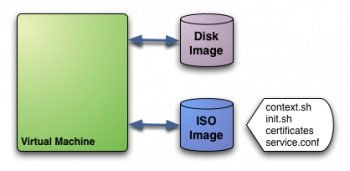
In this example we see a Virtual Machine with two associated disks. The Disk Image holds the filesystem where the Operating System will run from. The ISO image has the contextualization for that VM:
context.sh: file that contains configuration variables, filled by OpenNebula with the parameters specified in the VM description fileinit.sh: script called by VM at start that will configure specific services for this VM instancecertificates: directory that contains certificates for some serviceservice.conf: service configuration
This is just an example of what a contextualization image may look like. Only context.sh is included by default. You have to specify the values that will be written inside context.sh and the files that will be included in the image.Defining Context
In VM description file you can tell OpenNebula to create a contextualization image and to fill it with values using CONTEXTparameter. For example:
CONTEXT = [

  hostname   = "MAINHOST",

  ip_private = "$NIC[IP]",

  dns        = "$NETWORK[DNS, NAME=\"Public\"]",

  ip_gen     = "10.0.0.$VMID",

  files      = "/service/init.sh /service/certificates /service/service.conf"

]
Variables inside CONTEXT section will be added to context.sh file inside the contextualization image. These variables can be specified in three different ways:
- Hardcoded variables:
hostname = "MAINHOST"
- Using template variables
$<template_variable>: any single value variable of the VM template, like for example:\\ip_gen = "10.0.0.$VMID"
$<template_variable>[<attribute>]: Any single value contained in a multiple value variable in the VM template, like for example:ip_private = $NIC[IP]
$<template_variable>[<attribute>, <attribute2>=<value2>]: Any single value contained in a multiple value variable in the VM template, setting one atribute to discern between multiple variables called the same way, like for example:ip_public = "$NIC[IP, NETWORK=\"Public\"]"
- Using Virtual Network template variables
$NETWORK[<vnet_attribute>, NAME=<vnet_name>]: Any single value variable in the Virtual Network (vnet_name) template, like for example:dns = "$NETWORK[DNS, NAME=\"Public\"]"
The file generated will be something like this:
# Context variables generated by OpenNebula

hostname="MAINHOST"

ip_private="192.168.0.5"

dns="192.168.4.9"

ip_gen="10.0.0.85"

files="/service/init.sh /service/certificates /service/service.conf"

target="sdb"
Some of the variables have special meanings, but none of them are mandatory:
| Attribute | Description |
|---|---|
| files | Files and directories that will be included in the contextualization image |
| target | device where the contextualization image will be available to the VM instance. Please note that the proper device mapping may depend on the guest OS, e.g. ubuntu VMs should use hd* as the target device |
A default target attribute is generated automatically by OpenNebula as “hdb” or “sdb”, depending on the default prefix set at oned.conf. You can set here any other value, but you have to take into account the other disks defined in the VM template to avoid collisions.Using Context
The VM should be prepared to use the contextualization image. First of all it needs to mount the contextualization image somewhere at boot time. Also a script that executes after boot will be useful to make use of the information provided.
The file context.sh is compatible with bash syntax so you can easilly source it inside a shellscript to get the variables that it contains.
EXAMPLE
Here we propose a way to use this contextualization data. Each unix has their own filesystem layout and way of handling init scripts, this examples assumes a debian-based virtual machine.
We are going to use contextualization data to set the hostname, the IP address and a user with known ssh keys.
First thing, lets outline the CONTEXT section of the VM template:
CONTEXT = [

  hostname  = "$NAME",

  ip_public = "$NIC[IP, NETWORK=\"Public\"]",

  username  = virtualuser

  files     = "/vms_configuration/id_rsa.pub /vms_configuration/init.sh"

]
The OpenNebula front-end will thus require a /vms_configuration folder with:
id_rsa.pub: Public ssh key to be added to the trusted ssh keys of the new userinit.sh: script that will perform the configuration. Explained below.
Now we will need to configure the VM to make use of this data. We are going to place in /etc/rc.local as:
#!/bin/sh -e


mount -t iso9660 /dev/sdc /mnt


if [ -f /mnt/context.sh ]; then

  . /mnt/init.sh

fi


umount /mnt


exit 0
We use an indirection (rc.local calls init.sh) so changing the script means editing a file locally rather that changing it inside the VMs.
The init.sh script will be the one actually doing the work:
#!/bin/bash


if [ -f /mnt/context.sh ]; then

  . /mnt/context.sh

fi


hostname $HOSTNAME

ifconfig eth0 $IP_PUBLIC


useradd -m $USERNAME


mkdir -p ~$USERNAME/.ssh

cat /mnt/id_rsa.pub >> ~$USERNAME/.ssh/authorized_keys


chown -R $USERNAME /home/$USERNAME
openebula vm无法获取IP问题解决的更多相关文章
- Oracle VM Virtual 下CentOS不能自动获取IP地址
在CentOS配置网卡开机自动获取IP地址: vi /etc/sysconfig/network-scripts/ifcfg-eth0 将 ONBOOT="no" 改为 ONBOO ...
- VM无法正常使用桥接模式获取IP上网
问题: 有时候会遇到VM使用桥接模式时无法正常获取IP的情况 原因: 初步怀疑是因为你的电脑是双网卡 解决方法: 这时候,就需要修改VM的虚拟网络编辑器的配置 解决步骤: 编辑->虚拟网络编辑器 ...
- VMware桥接模式无法自动化获取IP的解决方法
虚拟机桥接无法自动获取IP的解决方法 在虚拟机VM里面装了centos系统,网卡选用桥接方式. 刚开始的时候还能自动获取到IP地址,突然有一天IP消失了,再怎么重启都无法获取IP地址.因为之前是可以获 ...
- Linux VM 设置静态ip地址上网
因为是路由器共享上网,VM每次都是通过DHCP方式自动获取ip地址,连接Linux VM时ip地址经常变,很麻烦.现在把VM设置静态ip的方法总结一下,以免以后忘了. 1. VM上网方式设置为桥接. ...
- [解决]Kali Linux DHCP自动获取IP失败 坑爹的VMWare桥接
root@kali:~# service networking restart [....] Running /etc/init.d/networking restart is deprecated ...
- 【linux】centos6.9设置etc0网卡开机自动获取ip
在vm新安装的centos系统中,一般选择NAT来设置和主机共享局域网,通过ifconfig etc0 192.168.xx.xx 这种作法机器重启之后就会失效,所以可以使用更改文件的方式完成设置ce ...
- 四、获取IP地址工具包
由于getHostAddress()方法在Linux下读取hosts文件获取的是127.0.0.1 InetAddress.getLocalHost().getHostAddress() 所以这里采用 ...
- windows下获取IP地址的两种方法
windows下获取IP地址的两种方法: 一种可以获取IPv4和IPv6,但是需要WSAStartup: 一种只能取到IPv4,但是不需要WSAStartup: 如下: 方法一:(可以获取IPv4和I ...
- Azure PowerShell (9) 使用PowerShell导出订阅下所有的Azure VM的Public IP和Private IP
<Windows Azure Platform 系列文章目录> 笔者在之前的工作中,有客户提出想一次性查看Azure订阅下的所有Azure VM的Public IP和Private IP. ...
随机推荐
- C#获取文件的MD5码
using System; using System.IO; using System.Security.Cryptography; using System.Text; namespace Send ...
- 常见26个jquery使用技巧详解
本文列出jquery一些应用小技巧,比如有禁止右键点击.隐藏搜索文本框文 字.在新窗口中打开链接.检测浏览器.预加载图片.页面样式切换.所有列等高.动态控制页面字体大小.获得鼠标指针的X值Y值.验证元 ...
- SEO优化---10分钟学会建立高转化率的网站关键词库
想要优化好一个网站,行业的分析,以及关键词的挖掘是必要的,有一定的关键词排名了,但是转化率和流量方面却很不理想这种情况大部分是只注重了有指数的关键词排名,而忽略了长尾关键词和一些没有指数但是可以带来巨 ...
- idea的有些路径问题
resource文件在xml的路径 http://www.cnblogs.com/zqr99/p/7642712.html resource文件在io流的读取 this.getClass().getR ...
- bzoj 3779 重组病毒 —— LCT+树状数组(区间修改+区间查询)
题目:https://www.lydsy.com/JudgeOnline/problem.php?id=3779 RELEASE操作可以对应LCT的 access,RECENTER则是 makeroo ...
- Windows下安装Object C开发环境,及Hello Word(转)
Windows下安装Object C开发环境,及Hello Word 最近想学习iphone开发,但是由于没有c基础,只有java基础.所以先从基础学习,首先是搭建环境,目前手头没有mac机子,只能先 ...
- jmeter --- 测试计划里的元件
1.线程组 线程组元件是任何一个测试计划的开始点.在一个测试计划中的所有元件都必须在某个线程组下.顾名思义,线程组元件控制JMeter执行你的测试计划时候使用的线程数量.对线程组的控制允许你: 设置线 ...
- 【转】Pro Android学习笔记(九八):BroadcastReceiver(2):接收器触发通知
文章转载只能用于非商业性质,且不能带有虚拟货币.积分.注册等附加条件.转载须注明出处:http://blog.sina.com.cn/flowingflying或作者@恺风Wei-傻瓜与非傻瓜 广播接 ...
- java代码List接口和Arraylist类
总结: package clientFrame; import java.util.*; //集合类 List是一个接口.ArrayList是一个类 public class ArraylitTest ...
- PHP面向对象深入研究之【组合模式与装饰模式】
组合模式 定义:组合模式定义了一个单根继承体系,使具有截然不同职责的集合可以并肩工作. 一个军队的案例, <?php abstract class Unit { // 个体 abstract f ...