
springboot整合swagger笔记
首先,在pom.xml中添加依赖
<!--swagger-->

        <dependency>

            <groupId>io.springfox</groupId>

            <artifactId>springfox-swagger-ui</artifactId>

            <version>2.7.</version>

        </dependency>

        <!-- https://mvnrepository.com/artifact/io.springfox/springfox-swagger2 -->

        <dependency>

            <groupId>io.springfox</groupId>

            <artifactId>springfox-swagger2</artifactId>

            <version>2.7.</version>

        </dependency>
然后在启动类中添加Swagger2 java配置文件
package com.example.demomybatis;

import org.mybatis.spring.annotation.MapperScan;

import org.springframework.boot.SpringApplication;

import org.springframework.boot.autoconfigure.EnableAutoConfiguration;

import org.springframework.boot.autoconfigure.SpringBootApplication;

import org.springframework.boot.autoconfigure.jdbc.DataSourceAutoConfiguration;

import org.springframework.context.annotation.Bean;

import springfox.documentation.builders.ApiInfoBuilder;

import springfox.documentation.builders.PathSelectors;

import springfox.documentation.builders.RequestHandlerSelectors;

import springfox.documentation.service.ApiInfo;

import springfox.documentation.service.Contact;

import springfox.documentation.spi.DocumentationType;

import springfox.documentation.spring.web.plugins.Docket;

import springfox.documentation.swagger2.annotations.EnableSwagger2;

@SpringBootApplication

@EnableSwagger2

@MapperScan("com.example.demomybatis.mapper")

public class DemoMybatisApplication {

    public static void main(String[] args) {

        SpringApplication.run(DemoMybatisApplication.class, args);

    }

@Bean

public Docket createRestApi() {

    return new Docket(DocumentationType.SWAGGER_2)

            .select()

            .apis(RequestHandlerSelectors.basePackage("com.example.demomybatis.Controller"))

                    .paths(PathSelectors.any())

                    .build()

                    .apiInfo(apiInfo());

}

    private ApiInfo apiInfo() {

        return new ApiInfoBuilder()

                .title("测试接口平台API")

                .description("cathy demo  API.")

                        .termsOfServiceUrl("Terms of service")

                        .contact(new Contact("ylw","",""))

                        .version("1.0")

                        .build();

    }

}
在上面这个代码中,为swagger加入的部分是

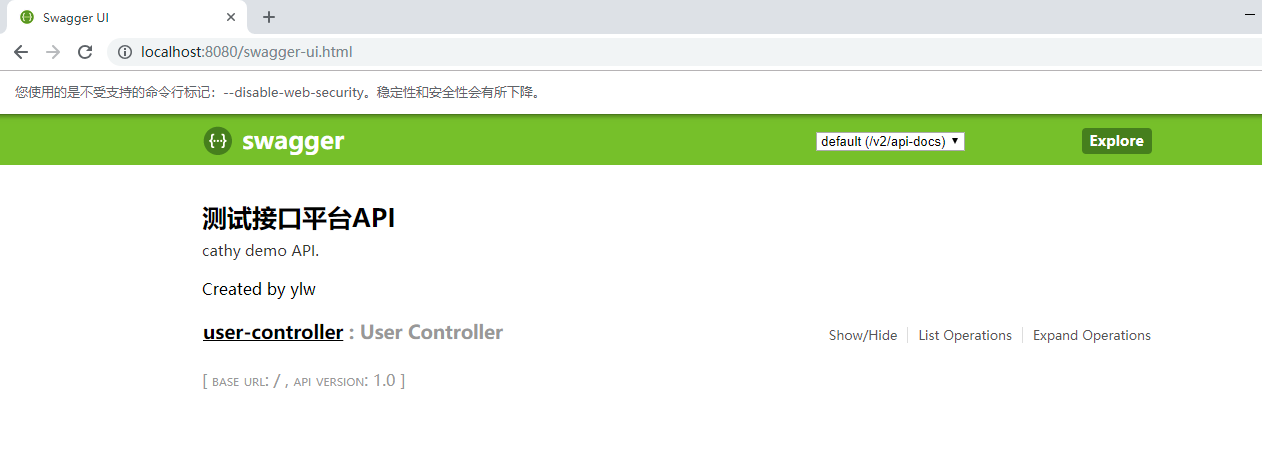
最后,访问http://localhost:8080/swagger-ui.html
springboot整合swagger笔记的更多相关文章
- SpringBoot 整合swagger
springBoot 整合swagger 1.pom.xml 配置 <dependency> <groupId>io.springfox</groupId> < ...
- SpringBoot整合Swagger和Actuator
前言 本篇文章主要介绍的是SpringBoot整合Swagger(API文档生成框架)和SpringBoot整合Actuator(项目监控)使用教程. SpringBoot整合Swagger 说明:如 ...
- 【SpringBoot | Swagger】SpringBoot整合Swagger
SpringBoot整合Swagger 1. 什么是Swagger Swagger 是一个规范和完整的框架,用于生成.描述.调用和可视化 RESTful 风格的 Web 服务.简单说就是项目跑起来了, ...
- springboot整合swagger。完爆前后端调试
web接口开发时在调试阶段最麻烦的就是参数调试,前端需要咨询后端.后端有时候自己也不是很了解.这时候就会造成调试一次接口就需要看一次代码.Swagger帮我们解决对接的麻烦 springboot接入s ...
- SpringBoot整合Swagger实战
源码地址:https://github.com/laolunsi/spring-boot-examples 目前SpringBoot常被用于开发Java Web应用,特别是前后端分离项目.为方便前后端 ...
- SpringBoot整合Swagger测试api构建
@Author:SimpleWu 什么是Swagger? Swagger是什么:THE WORLD'S MOST POPULAR API TOOLING 根据官网的介绍: Swagger Inspec ...
- SpringBoot整合swagger
Swagger使用 Swagger有什么用? swagger是一个流行的API开发框架,这个框架以“开放API声明”(OpenAPI Specification,OAS)为基础, 对整个API的开发周 ...
- springboot入门系列(二):SpringBoot整合Swagger
上一篇<简单搭建SpringBoot项目>讲了简单的搭建SpringBoot 项目,而 SpringBoot 和 Swagger-ui 搭配在持续交付的前后端开发中意义重大,Swagger ...
- SpringBoot整合Swagger初探
当下的Web项目大都采用前后端分离+分布式微服务的架构.前后端分离式的开发中,前端开发人员要与后端开发人员协商通信接口,约定接口规范.因此对于开发人员来说能够维持一份及时更新且完整全面的API文档会大 ...
随机推荐
- python函数名称空间与作用域、闭包
一.命名空间概念 1.命名空间(name space) 名称空间是存放名字的地方. 若变量x=1,1存放在内存中,命名空间是存放名字x.x与1绑定关系的地方. 2.名称空间加载顺序 python te ...
- JavaScirpt(JS)——DOM文档对象模型
一.HTML DOM介绍 HTML DOM 是 W3C 标准(是 HTML 文档对象模型的英文缩写,Document Object Model for HTML). HTML DOM 定义了用于 HT ...
- Hadoop fs命令(转)
最近使用hive做一些etl工作,除了日常sql的编写,了解hadoop及hive的一些底层原理性质的东西包括调优非常有必要,一次hive调优就把原来的零散文件做了合并.首先记下hadoop常用的命令 ...
- Dynamics CRM GBK编码
Dynamics CRM用文本汉字为条件去请求数据时,传过去的竟然是GBK编码⊙_⊙ 下面这段代码解决了我的问题,这是拷贝自网上一位大神的博客: http://qq100002656.blog.163 ...
- php nginx 获取header信息
nginx中可能没有getallheaders函数 因此编写新函数 function NginxGetAllHeaders(){//获取请求头 $headers = []; foreach ($_SE ...
- LAMP环境基本配置
CentOS 7.0 LAMP环境搭建 Apache: 安装: yum -y install httpd 设为开机启动: systemctl start httpd.service systemctl ...
- ABAP正则表达式 vs SPLIT INTO
需求: 把如下通过"/"连接起来的三个字符串分别解析出来. 传统的做法见下图第98行的function module SKWF_UTIL_IO_FIND_BY_KEY: 这个fun ...
- ubuntu桌面
gnome-desktop-item-edit ~/Desktop/ --create-new
- OC block声明和使用
#import "Button.h" typedef int (^MySum) (int, int); void test() { // 定义了一个block,这个block返回值 ...
- 十天精通CSS3
课程地址:http://www.imooc.com/learn/33 第1章 初识CSS3 CSS3课程列出第一站,先带领大家进入CSS3的世界,探索CSS3的魅力! 你做好准备了吗? 第2章 边框 ...