
Communication with each role instance in Azure
Use WCF Communication with role instance in azure
1)In worker role build WCF Service
 public override void Run()

        {

            // This is a sample worker implementation. Replace with your logic.

            Trace.TraceInformation("WorkerRole1 entry point called", "Information");

            while (true)

            {

                Thread.Sleep();

                Trace.TraceInformation("Working", "Information");

            }

        }

        private ServiceHost serviceHost;

        private void CreateServiceHost()

        {

            serviceHost = new ServiceHost(typeof(WcfService));

            NetTcpBinding binding = new NetTcpBinding(SecurityMode.None);

            //  RoleInstanceEndpoint externalEndPoint = RoleEnvironment.CurrentRoleInstance.InstanceEndpoints["WcfEndpoint"];

            string ip = RoleEnvironment.CurrentRoleInstance.InstanceEndpoints["WcfEndpoint"].IPEndpoint.Address.ToString();

            int tcpport = RoleEnvironment.CurrentRoleInstance.InstanceEndpoints["WcfEndpoint"].IPEndpoint.Port;

            string endpoint = String.Format("net.tcp://{0}:{1}/LoanCalculator", ip, tcpport);

            //#region insert Instance Information to azure table

            //InstanceInformation instance = new InstanceInformation();

            //instance.IP = endpoint;

            //instance.Port = tcpport;

            //// cpu

            //System.Diagnostics.PerformanceCounter PC = new System.Diagnostics.PerformanceCounter();

            ////  instance.CPURate=PC.

            //#endregion

            serviceHost.AddServiceEndpoint(typeof(IWcfService), binding, endpoint);

            try

            {

               // ServiceLib.AzureTableMethod.InSertInstanceInformation("wcfTable", instance);

                serviceHost.Open();

            }

            catch

            {

            }

        }

        public override bool OnStart()

        {

            // Set the maximum number of concurrent connections

           // ServicePointManager.DefaultConnectionLimit = 12;

            ServicePointManager.DefaultConnectionLimit = ;

            CreateServiceHost();

            // For information on handling configuration changes

            // see the MSDN topic at http://go.microsoft.com/fwlink/?LinkId=166357.

            return base.OnStart();

        }
2)In Web role build WCF Client
   protected void Page_Load(object sender, EventArgs e)

        {

        }

        protected void Button1_Click(object sender, EventArgs e)

        {

            // http://jambor.cloudapp.net/

            //  string serviceUrl = "net.tcp://jambor.cloudapp.net/LoanCalculator";

            // string serviceUrl = String.Format("net.tcp://{0}:{1}/LoanCalculator", "127.0.0.1", "8082");

            //string serviceUrl = "net.tcp://207.46.129.69:8082/LoanCalculator";

            string address = RoleEnvironment.Roles["WorkerRole1"].Instances[].InstanceEndpoints["WcfEndpoint"].IPEndpoint.Address.ToString();

            int tcpport = RoleEnvironment.Roles["WorkerRole1"].Instances[].InstanceEndpoints["WcfEndpoint"].IPEndpoint.Port;

             //  string d=   TextBox2.Text;

            string serviceUrl = string.Format("net.tcp://{0}:{1}/LoanCalculator", address, tcpport);

            NetTcpBinding binding = new NetTcpBinding(SecurityMode.None);

            ChannelFactory< IWcfChannel> ChannelFactory = new ChannelFactory<IWcfChannel>(binding, new EndpointAddress(serviceUrl));

            IWcfChannel sss = ChannelFactory.CreateChannel();

            string oldString = TextBox1.Text;

            if (!string.IsNullOrEmpty(oldString.ToString()))

            {

                Label1.Text = sss.ReverseString(oldString);

            }

        }
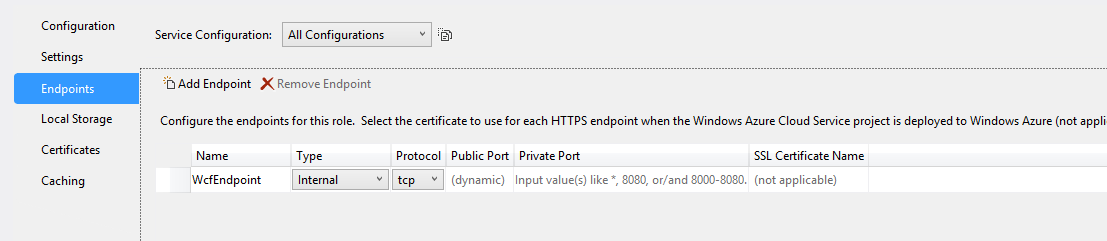
PS: If we need to Use role communication we need to add new endpoint and set type as Internal as following screenshot:
http://www.cnblogs.com/threestone/archive/2012/03/05/2379395.html (之后找到不错的文章)
Communication with each role instance in Azure的更多相关文章
- Windows Azure Cloud Service (10) Role的生命周期
<Windows Azure Platform 系列文章目录> 在上一章内容中,我们提到了Windows Azure会依次调用角色(Role)实例的OnStart()方法和Run()方法. ...
- Windows Azure Cloud Service (11) PaaS之Web Role, Worker Role(上)
<Windows Azure Platform 系列文章目录> 本文是对Windows Azure Platform (六) Windows Azure应用程序运行环境内容的补充. 我们知 ...
- Windows Azure Cloud Service (12) PaaS之Web Role, Worker Role, Azure Storage Queue(下)
<Windows Azure Platform 系列文章目录> 本章DEMO部分源代码,请在这里下载. 在上一章中,笔者介绍了我们可以使用Azure PaaS的Web Role和Worke ...
- Windows Azure Cloud Service (42) 使用Azure In-Role Cache缓存(1)Co-located Role
<Windows Azure Platform 系列文章目录> Update 2016-01-12 https://azure.microsoft.com/zh-cn/documentat ...
- Windows Azure Cloud Service (43) 使用Azure In-Role Cache缓存(2)Dedicated Role
<Windows Azure Platform 系列文章目录> Update 2016-01-12 https://azure.microsoft.com/zh-cn/documentat ...
- [Windows Azure] Building worker role B (email sender) for the Windows Azure Email Service application - 5 of 5.
Building worker role B (email sender) for the Windows Azure Email Service application - 5 of 5. This ...
- [Windows Azure] Building worker role A (email scheduler) for the Windows Azure Email Service application - 4 of 5.
Building worker role A (email scheduler) for the Windows Azure Email Service application - 4 of 5. T ...
- [Windows Azure] Building the web role for the Windows Azure Email Service application - 3 of 5
Building the web role for the Windows Azure Email Service application - 3 of 5. This is the third tu ...
- [Windows Azure] .NET Multi-Tier Application Using Storage Tables, Queues, and Blobs - 1 of 5
.NET Multi-Tier Application Using Storage Tables, Queues, and Blobs - 1 of 5 This tutorial series sh ...
随机推荐
- leetcode318
public class Solution { public int MaxProduct(string[] words) { ) { ; } int len = words.Length; int[ ...
- ubuntu下编译ffmpeg并用eclipse调试
一.下载ffnpeg源码 下载地址:http://ffmpeg.org/download.html 二.解决版本问题 可能之前你编译过ffmpeg,或者装过相关的库,那都要先卸载掉,否则用的时候会报一 ...
- Idea搭建Scala开发环境的注意事项
Idea搭建Scala开发环境的注意事项 1.下载ideaIC-2017.3.tar.gz 2.解压安装idea 3.File->setting->plugins 下载2个插件scala. ...
- 【原创】11. MYSQL++ 之 Quoting 与 Escaping
1. 综述 其实一看到这两个单词的时候我有点莫名其妙,可能英语没有学好,我的理解就是quoting是“引用”的意思,而Escaping是“逃脱”的意思.后来在看到了作者的TUTORIAL之后才大致明白 ...
- 在TFS中获取项目,获取最新和上传(迁入)
一.在TFS中获取项目: (1)team (2)connect to team.... (3)选择服务地址,然后close (4)然后映射本地文件夹下载项目 (5)mapped添加映射,在map下就可 ...
- SqlServer-geography && Spatial result
说起geography(地理)这个类型,我感觉好陌生,以前真的没有见过,今天在查询某个Address表的时候,却发现了新大陆——Spatial result(空间的结果). (1)表的结构 (2)查询 ...
- grid search 超参数寻优
http://scikit-learn.org/stable/modules/grid_search.html 1. 超参数寻优方法 gridsearchCV 和 RandomizedSearchC ...
- Luogu 2886 [USACO07NOV]牛继电器Cow Relays
BZOJ 1706权限题. 倍增$floyd$. 首先这道题有用的点最多只有$200$个,先离散化. 设$f_{p, i, j}$表示经过$2^p$条边从$i$到$j$的最短路,那么有转移$f_{p, ...
- Luogu 3899 [湖南集训]谈笑风生
BZOJ 3653权限题. 这题方法很多,但我会的不多…… 给定了$a$,我们考虑讨论$b$的位置: 1.$b$在$a$到根的链上,那么这样子$a$的子树中的每一个结点(除了$a$之外)都是可以成为$ ...
- Entity Framework Tutorial Basics(43):Download Sample Project
Download Sample Project: Download sample project for basic Entity Framework tutorials. Sample projec ...