
结对编程 四则运算(java)(胡大华 黄绪明)
Github项目地址
https://github.com/yogurt1998/Myapp
项目需求
题目:
实现一个自动生成小学四则运算题目的命令行程序
功能
1.使用-n 参数控制生成题目的个数
2.使用-r 参数控制题目中数值(自然数、真分数和真分数分母)的范围
3.生成的题目中计算过程不能产生负数
4. 生成的题目中如果存在形如e1 ÷ e2的子表达式,那么其结果应是真分数。
5. 每道题目中出现的运算符个数不超过3个。
6. 程序一次运行生成的题目不能重复,即任何两道题目不能通过有限次交换+和×左右的算术表达式变换为同一道题目。
7.生成的题目存入执行程序的当前目录下的Exercises.txt文件
8.在生成题目的同时,计算出所有题目的答案,并存入执行程序的当前目录下的Answers.txt文件
9. 程序应能支持一万道题目的生成。
10. 程序支持对给定的题目文件和答案文件,判定答案中的对错并进行数量统计,输入参数如下:
Myapp.exe -e <exercisefile>.txt -a <answerfile>.txt
统计结果输出到文件Grade.txt,格式如下:
Correct: 5 (1, 3, 5, 7, 9)
Wrong: 5 (2, 4, 6, 8, 10)
PSP表格
|
PSP2.1 |
Personal Software Process Stages |
预估耗时(分钟) |
实际耗时(分钟) |
|
Planning |
计划 |
30 |
30 |
|
· Estimate |
· 估计这个任务需要多少时间 |
15 |
20 |
|
Development |
开发 |
||
|
· Analysis |
· 需求分析 (包括学习新技术) |
120 |
150 |
|
· Design Spec |
· 生成设计文档 |
30 |
40 |
|
· Design Review |
· 设计复审 (和同事审核设计文档) |
20 |
30 |
|
· Coding Standard |
· 代码规范 (为目前的开发制定合适的规范) |
20 |
30 |
|
· Design |
· 具体设计 |
60 |
90 |
|
· Coding |
· 具体编码 |
1000 |
1200 |
|
· Code Review |
· 代码复审 |
60 |
90 |
|
· Test |
· 测试(自我测试,修改代码,提交修改) |
30 |
60 |
|
Reporting |
报告 |
30 |
40 |
|
· Test Report |
· 测试报告 |
60 |
60 |
|
· Size Measurement |
· 计算工作量 |
20 |
20 |
|
· Postmortem & Process Improvement Plan |
· 事后总结, 并提出过程改进计划 |
40 |
40 |
|
合计 |
1535 |
1900 |
设计实现过程
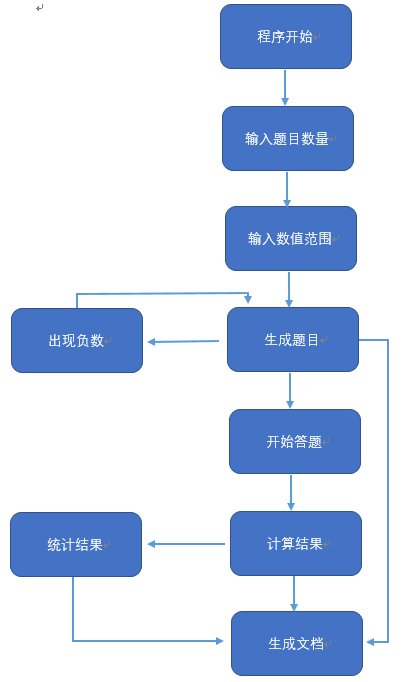
设计思路
先用随机函数得到随机生成题目,为了方便计算转为后缀表达式,用堆栈的方式计算答案,用一个布尔值来判断是否可用。
利用Scanner类获取键盘输入值并判断。
用一个while循环来生成多道题目。
用字符流输入到文件中。
代码说明
1. 用随机函数randon()生产随机数以及运算符组成题目
// 生成四则运算式

	public Exercise createFormula(int n) {

		String question1 = null;

		String num1, num2, num3, num4; // 四个运算数

		String char1, char2, char3; // 三个运算符

		char1 = randomChar();

		char2 = randomChar();

		char3 = randomChar();

		num1 = (int)(Math.random()*2) == 0 ? Integer.toString((int)Math.round(Math.random()*(n))) : createScore(n);

		num2 = (int)(Math.random()*2) == 0 ? Integer.toString((int)Math.round(Math.random()*(n))) : createScore(n);

		num3 = (int)(Math.random()*2) == 0 ? Integer.toString((int)Math.round(Math.random()*(n))) : createScore(n);

		num4 = (int)(Math.random()*2) == 0 ? Integer.toString((int)Math.round(Math.random()*(n))) : createScore(n);

		String question2 = num1 + ' ' + char1 + ' ' + num2;

		String question3[] = {question2 + ' ' + char2 + ' ' + num3,

				'(' + question2 + ')' + ' ' + char2 + ' ' + num3,

				num1 + ' ' + char1 + ' ' + '(' + num2 + ' ' + char2 + ' ' + num3 + ')'};

		String question4[] = {question3[(int)(Math.random()*3)] + ' ' + char3 + ' ' + num4,

				'(' + question3[(int)(Math.random()*3)] + ')' + ' ' + char3 + ' ' + num4,

				num4 + ' ' + char3 + ' ' + '(' + question3[(int)(Math.random()*3)] + ')',

				'(' + question2 + ')' + ' ' + char2 + ' ' + num3 + ' ' + char3 + ' ' + num4,

				question2 + ' ' + char2 + ' ' + '(' + num3 + ' ' + char3 + ' ' + num4 + ')',

				num1 + ' ' + char1 + ' ' + '(' + num2 + ' ' + char2 + ' ' + num3 + ')' + ' ' + char3 + ' ' + num4};

		switch ((int)(Math.random()*3)) {

		case 0:

			question1 = question2;

			break;

		case 1:

			question1 = question3[(int)(Math.random()*3)];

			break;

		case 2:

			question1 = question4[(int)(Math.random()*6)];

			break;

		default:

			break;

		}

		Exercise exercise = new Exercise(num1, num2, num3, num4, char1, char2, char3, question1);

		return exercise;

	}

	// 分数生成器

	public String createScore(int n) {

		int upNum, downNum;

		do {

			upNum = (int)Math.round(Math.random()*(n));

			downNum = (int)Math.round(Math.random()*(n-1)+1);

		} while (upNum / downNum > n);

		return upNum > downNum ?  upNum / (downNum - upNum % downNum) + "'" + (upNum % downNum) + "/" + downNum

				: upNum + "/" + downNum;

	}

	// 随机运算符

	private String randomChar() {

		int key = (int)(Math.random()*4);

		switch (key) {

		case 0:

			return "+";

		case 1:

			return "-";

		case 2:

			return "×";

		case 3:

			return "÷";

		default:

			break;

		}

		return "";

	}
2. 读取和计算题目
1. 将String 类型的题目按运算数、运算符、括号转换为ArrayList<String>;
// String转为list

    private ArrayList<String> stringsToList(String s) {

        ArrayList<String> list = new ArrayList<>();

        StringBuilder temp = new StringBuilder();

        for (int i = 0; i < s.length(); ++i) {

            char c = s.charAt(i);

            if((c >= '0' && c <= '9') || c == '\'' || c == '/') {

                temp.append(c);

            } else {

                String string = temp.toString();

                if (!string.isEmpty()) {

                    list.add(string);

                }

                temp = new StringBuilder();

            }

            if (i == s.length()-1) {

                String string = temp.toString();

                if (!string.isEmpty()) {

                    list.add(string);

                }

            }

            if (isOperator(c))

                list.add(c + "");

            if (c == '(' || c == ')')

                list.add(c + "");

        }

        return list;

    }
2.将中缀表达式变为后缀表达式
// 中缀表达式转为后缀表达式

    private ArrayList<String> changeToPostfixEx(ArrayList<String> list) {

        Stack<String> stack = new Stack<String>();

        ArrayList<String> pList = new ArrayList<String>();

        int level = -1;

        for (int i = 0; i < list.size(); ++i) {

            String aList = list.get(i);

            if (!sIsOperator(aList) && !aList.equals("(") && !aList.equals( ")")) {

                pList.add(aList);

            } else if (aList.equals("(")) {

                stack.push(aList);

                level = 0;

            } else if (aList.equals( ")")){

                while (!stack.peek().equals("(")) {

                    pList.add(stack.pop());

                }

                stack.pop();

                if (stack.empty())

                    level = -1;

                else {

                    level = getLevel(stack.peek());

                }

            } else if (getLevel(aList) > level) {

                stack.push(aList);

                if (level != 0)

                    level = getLevel(stack.peek());

            } else {

                while (!stack.empty() && getLevel(aList) <= level) {

                    pList.add(stack.pop());

                }

                stack.push(aList);

                level = getLevel(stack.peek());

            }

        }

        while (!stack.empty()) {

            pList.add(stack.pop());

        }

        return pList;

     }
3. 计算后缀表达式得到答案
// 计算后缀表达式

    private Score calculateHEx(ArrayList<String> list) {

        boolean beUse = true; // 是否使用

        Stack<String> stack = new Stack<>();

            for (int i = 0; i < list.size(); ++i) {

                if (!sIsOperator(list.get(i))) {

                    stack.push(list.get(i));

                } else {

                    Score result = new Score();

                    String resultS = null;

                    switch (list.get(i)) {

                    case "+":

                        String a1 = stack.pop();

                        String a2 = stack.pop();

                        result = addScore(a2, a1);

                        resultS = result.up + "/" + result.down;

                        stack.push(resultS);

                        break;

                    case "-":

                        String a3 = stack.pop();

                        String a4 = stack.pop();

                        result = subtractScore(a4, a3);

                        resultS = result.up + "/" + result.down;

                        stack.push(resultS);

                        break;

                    case "×":

                        String a5 = stack.pop();

                        String a6 = stack.pop();

                        result = mulScore(a6, a5);

                        resultS = result.up + "/" + result.down;

                        stack.push(resultS);

                        break;

                    case "÷":

                        String a7 = stack.pop();

                        String a8 = stack.pop();

                        result = divScore(a8, a7);

                        resultS = result.up + "/" + result.down;

                        stack.push(resultS);

                        break;

                    default:

                        break;

                    }

                    beUse = result.canBeUse;

                }

                if (!beUse)

                    break;

            }

        Score result = new Score();

        result.canBeUse = beUse;

        if (result.canBeUse) {

            String endResult = stack.pop();

            result.changeScore(endResult);

            list.add(endResult);

            simplifyScore(result);

        }

        return result;

    }
4.Score类表示所有的数,并用canBeUse属性表示是否可用。
import java.util.ArrayList;

import javax.naming.InitialContext;

public class Score {

    int up;

    int down;

    boolean canBeUse = true; // ËãʽÊÇ·ñ¿ÉÓÃ

    public Score() {

        // TODO Auto-generated constructor stub

    }

    public void changeScore(String s) {

        boolean isBig = false;

        boolean isHave = false;

        ArrayList<String> list = new ArrayList<>();

        StringBuilder temp = new StringBuilder();

        for (int i = 0; i < s.length(); ++i) {

            char c = s.charAt(i);

            if (c == '/')

                isHave = true;

            if (c == '\'')

                isBig = true;

            if (c >= '0' && c <= '9') {

                temp.append(c);

            } else {

                list.add(temp.toString());

                temp = new StringBuilder();

            }

            if (i == s.length() - 1) {

                if (!temp.toString().isEmpty()) {

                    list.add(temp.toString());

                }

            }

        }

        if (list.isEmpty()) {

            canBeUse = false;

        } else {

            if (!isBig && !isHave) {

                this.up = Integer.parseInt(list.get(0));

                this.down = 1;

            } else if (isBig) {

                this.up = Integer.parseInt(list.get(0))

                        * Integer.parseInt(list.get(2)) + Integer.parseInt(list.get(1));

                this.down = Integer.parseInt(list.get(2));

            } else if (isHave && !isBig){

                this.up = Integer.parseInt(list.get(0));

                this.down = Integer.parseInt(list.get(1));

            }

        }

    }

}
3. IO输出
用fileWrite()和BufferWrite();
public class IO {

    public void writeExercise(String context, int flag) {

        File exerFile = new File("D:\\test\\Exercise.txt");

        File answerFile = new File("D:\\test\\Answer.txt");

        if (flag == 0) {

            writeIn(context, exerFile);

        } else {

            writeIn(context, answerFile);

        }

    }

    private void writeIn(String context, File file) {

        FileWriter fileWriter;

        BufferedWriter brout;

        try {

            fileWriter = new FileWriter(file, true);

            brout = new BufferedWriter(fileWriter);

            brout.write(context);

            brout.flush();

            brout.close();

        } catch (IOException e) {

            // TODO Auto-generated catch block

            e.printStackTrace();

        }

    }

}
4. 主函数
import java.util.Scanner;

import javax.swing.CellEditor;

public class main {

    public static void main(String[] args) {

        // TODO Auto-generated method stub

        String order = null;

        int exNum = 0, valueNum = 1;

        while (valueNum <= 1) {

            System.out.println("输入命令:1. 使用 -n 参数控制生成题目的个数     2. 使用 -r 参数控制题目中数值(自然数、真分数和真分数分母)的范围");

            Scanner scanner = new Scanner(System.in);

            if (scanner.hasNext()) {

                order = scanner.next();

            }

            if (scanner.hasNextLine()) {

                if (order.equals("-n")) {

                    exNum = scanner.nextInt();

                } else if (order.equals("-r")) {

                    valueNum = scanner.nextInt();

                } else {

                    System.out.println("请输入正确的命令参数:1. 使用 -n 参数控制生成题目的个数     2. 使用 -r 参数控制题目中数值(自然数、真分数和真分数分母)的范围");

                }

            }

            if (valueNum <= 1) {

                System.err.println("请输入正确的命令参数:1. 使用 -n 参数控制生成题目的个数     2. 使用 -r 参数控制题目中数值(自然数、真分数和真分数分母)的范围");

            }

        }

        int i = 0;

        int j = 0;

        IO io = new IO();

        while (j < exNum) {

            Func func = new Func();

            Exercise exercise = func.createFormula(valueNum - 1);

            Score answer = func.calculateExercise(exercise.aQuestion);

            String endAnswer = null;

            if (answer.canBeUse) {

                if (answer.down == 1) {

                    endAnswer = answer.up + "";

                    io.writeExercise(++j + ".  " + exercise.aQuestion + " = " + "\r\n", 0);

                    io.writeExercise(j + ".  " + endAnswer + "\r\n", 1);

                } else if (answer.up > answer.down) {

                    endAnswer = answer.up / (answer.down - answer.up % answer.down) + "'" + answer.up % answer.down + "/"  + answer.down;

                    io.writeExercise(++j + ".  " + exercise.aQuestion + " = " + "\r\n", 0);

                    io.writeExercise(j + ".  " + endAnswer + "\r\n", 1);

                }

            } else {

                continue;

            }

        }

    }

}
测试运行
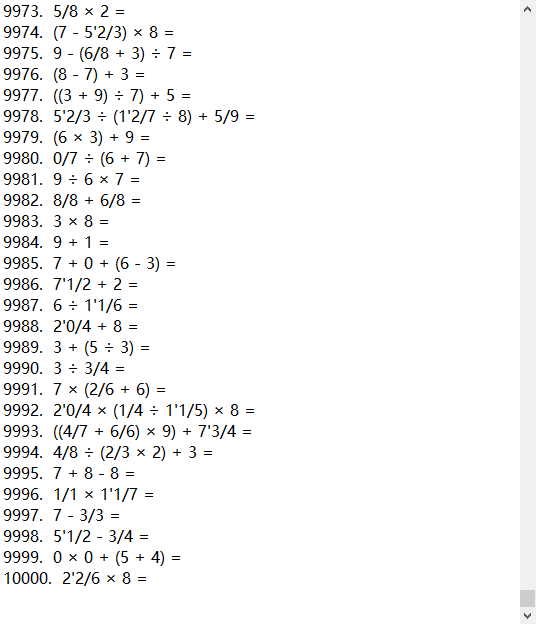
题目:
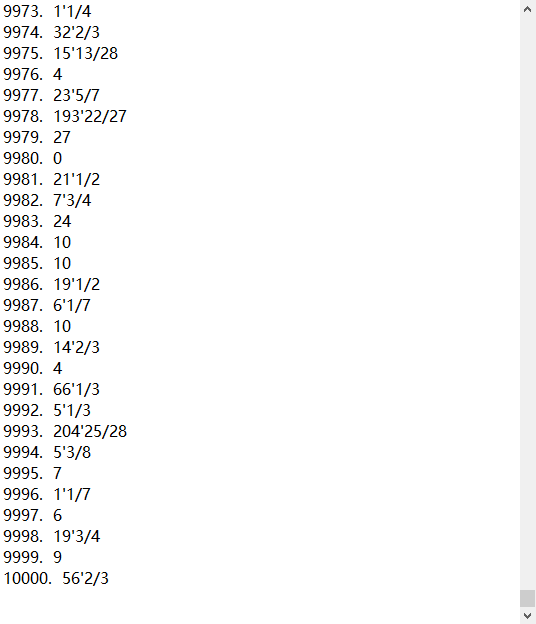
答案:
项目小结
此次的结对编程,胡大华同学负责表达式的生成、计算,程序框架的设计,我负责IO生成文件、编写博文。
刚拿到题目的时候,我们的对题目只有一点模糊的想法,经过不断地写代码实现,逐渐发现不同的问题,遇到过各种问题和BUG,经过不断的学习和查找资料,最终解决问题。
这次的结对编程,让我体会到了合作的力量,同时也认识到了自己数据结构方面知识的不足,今后会多加学习这方面的知识,完善自己的不足。
结对编程 四则运算(java)(胡大华 黄绪明)的更多相关文章
- 结对编程四则运算--JAVA实现(徐静、林文敏)
Github项目地址 项目相关要求 -n 参数控制生成题目的个数 (√) Myapp.exe -n 10 // 将生成10个题目 -r 参数控制题目中数值(自然数.真分数和真分数分母)的范围 (√) ...
- 结对编程--四则运算(Java)梅进鹏 欧思良
结对编程--四则运算(Java)梅进鹏 欧思良 Github项目地址:https://github.com/MeiJinpen/Arithmetic 功能要求 题目:实现一个自动生成小学四则运算题目的 ...
- Java结对编程四则运算一周小结
Java结对编程四则运算一周小结 需求分析 对于四则运算来说最主要的就是要计算出产生的式子(字符串的形式). 设计思路 总体可将这个项目分解为几个部分:产生式子,计算式子,判断对错并记录: 具体的思路 ...
- 20175226 2018-2019-2《java程序设计》结对编程-四则运算(第一周-阶段总结)
结对编程-四则运算(第一周-阶段总结) 需求分析 实现一个四则运算程序,要求: 自动随机生成小学四则运算题目(加,减,乘,除) 支持整数.真分数且支持多项式 能够利用栈的思想,将中缀转换为后缀表达式 ...
- 20175305张天钰Java结对编程四则运算(二)
Java结对编程四则运算(二) 一.题目描述及要求 Git提交粒度不要太粗,建议一个文件/一个类/一个函数/一个功能/一个bug修复都进行提交,不能一天提交一次,更不能一周一次,参考Commit Me ...
- 20175305张天钰Java结对编程四则运算
Java结对编程四则运算 一.题目描述:如何对表达式进行求值运算呢 1.中缀表达式与后缀表达式(娄老师讲解) 中缀表达式就是运算符号在运算数中间的表达式,比如1+2,顾名思义,后缀表达式就是运算符在运 ...
- 结对编程--四则运算(Java)萧英杰 夏浚杰
结对编程--四则运算(Java)萧英杰 夏浚杰 Github项目地址 功能要求 题目:实现一个自动生成小学四则运算题目的命令行程序 使用 -n 参数控制生成题目的个数(实现) 使用 -r 参数控制题目 ...
- 王译潇20162314 实验报告三plus结对编程四则运算第一阶段
北京电子科技学院BESTI实验报告 课程:程序设计与数据结构 班级: 1623 姓名: 王译潇 学号:20162314 指导教师:娄佳鹏老师.王志强老师 实验日期:2017年5月12号 实验密级: 非 ...
- 结对编程-四则运算生成器(java实现)
结对伙伴:陈振华 项目要求 1.题目:实现一个自动生成小学四则运算题目的命令行程序. 2.需求: 1. 使用 -n 参数控制生成题目的个数 2. 使用 -r 参数控制题目中数值(自然数.真分数和真 ...
随机推荐
- 用css来写一个背景图片的切换
代码如下: <!DOCTYPE HTML> <htmllang="en-US"> <head> <meta charset="U ...
- WebSocket :Nginx+WebSocket内部路由策略推送服务器的实现(附可生产环境应用代码)
1.项目背景 前几天写了一篇WebSocket推送的博客:WebSocket :用WebSocket实现推送你必须考虑的几个问题 支持的连接数大概几千个,具体数量依赖于tomcat能并发的线程数,但很 ...
- Avro之二:入门demo
一.使用avro-maven插件为avsc文件生成对应的java类: 在项目的pom.xml中增加依赖及插件如下: <dependency> <groupId>org.apac ...
- tp5下通过composer实现日志记录功能
tp5实现日志记录 1.安装 psr/log composer require psr/log 它的作用就是提供一套接口,实现正常的日志功能! 我们可以来细细的分析一下,LoggerInterface ...
- python开发mysql:mysql安装(windows)&密码找回&存储引擎简介&库表的增删改查
一,mysql安装 下载地址 https://dev.mysql.com/downloads/file/?id=471342 解压后,将目录C:\mysql-5.7.19-winx64\bin添加到计 ...
- swift一次 Attempt to present on whose view is not in the window hierarchy的解决方法
做的是二维码扫描,扫描后识别为URL的话就跳转到webview 加载网页,用的是代理传值的方式.扫描到了 值传递到主页 扫描窗体退出,检测值是否是http://开头 是网页就跳转. 问题出在传值到主界 ...
- MFC 打开外部EXE文件的三种方法
目前知道三种方式:WinExec,ShellExecute ,CreateProcess,别人已经总结的很好了<vc中调用其他应用程序的方法(函数) winexec,shellexecute , ...
- Hbase 一次表异常,有一张表 无法count scan 一直显示重连
z_activeagent z_weekstore z_wstest zz_monthstore row(s) in 0.5240 seconds => ["KYLIN_02YJ3NJ ...
- ubuntu 14.04 安装压缩包版mysql
既有环境: 1)下载MySQL Community Server 5.6.17 压缩版(mysql-5.6.17-linux-glibc2.5-x86_64.tar.gz) 2)安装目录: /opt/ ...
- Python和其他语言的区别 (简单精辟啊 手打)
首先是简单 读和写非常容易 免费 免费且开源 社区为专业人士和初学者提供知识和经验的分享交流平台 兼容性 与多平台兼容 面向对象 支持面向对象编程 php面向网络 函数库 python 社区创建了丰富 ...