
On the nightmare that is JSON Dates. Plus, JSON.NET and ASP.NET Web API
Ints are easy. Strings are mostly easy. Dates? A nightmare. They always will be. There's different calendars, different formats. Did you know it's 2004 in the Ethiopian Calendar? Yakatit 26, 2004, in fact. I spoke to a German friend once about how much 9/11 affected me and he said, "yes, November 9th was an amazing day in Germany, also."
Dates are hard.
If I take a simple model:
|
1
2
3
4
5
6
7
8
9
10
11
12
13
14
|
public class Post{ public int ID { get; set; } [StringLength(60)][Required] public string Title { get; set; } [StringLength(500)] [DataType(DataType.MultilineText)] [AllowHtml] public string Text { get; set; } public DateTime PublishedAt { get; set; }} |
And I make a quick ASP.NET Web API controller from VS11 Beta (snipped some stuff for simplicity):
|
1
2
3
4
5
6
7
8
9
10
11
12
13
14
15
16
17
|
public class PostAPIController : ApiController{ private BlogContext db = new BlogContext(); // GET /api/post public IEnumerable<Post> Get() { return db.Posts.ToList(); } // GET /api/post/5 public Post Get(int id) { return db.Posts.Where(p => p.ID == id).Single(); } ...snip...} |
And hit /api/post with this Knockout View Model and jQuery.
|
1
2
3
4
5
6
7
8
9
10
11
12
13
14
15
16
17
18
19
|
$(function () { $("#getPosts").click(function () { // We're using a Knockout model. This clears out the existing posts. viewModel.posts([]); $.get('/api/PostAPI', function (data) { // Update the Knockout model (and thus the UI) // with the posts received back // from the Web API call. viewModel.posts(data); }); }); viewModel = { posts: ko.observableArray([]) }; ko.applyBindings(viewModel);}); |
And this super basic template:
|
1
2
3
4
5
6
7
8
9
10
11
|
<li class="comment"> <header> <div class="info"> <strong><span data-bind="text: Title"></span></strong> </div> </header> <div class="body"> <p data-bind="date: PublishedAt"></p> <p data-bind="text: Text"></p> </div></li> |
I am saddened as the date binding doesn't work, because the date was serialized by default like this. Here's the JSON on the wire.
|
1
2
3
4
5
6
7
8
9
10
11
|
[{ "ID": 1, "PublishedAt": "\/Date(1330848000000-0800)\/", "Text": "Best blog post ever", "Title": "Magical Title"}, { "ID": 2, "PublishedAt": "\/Date(1320825600000-0800)\/", "Text": "No, really", "Title": "You rock"}] |
Eek! My eyes! That's milliseconds since the beginning of the Unix Epoch WITH a TimeZone. So, converting in PowerShell looks like:
PS C:\> (new-object DateTime(1970,1,1,0,0,0,0)).AddMilliseconds(1330848000000).AddHours(-8)

Sunday, March 04, 2012 12:00:00 AM
Yuck. Regardless, it doesn't bind with KnockoutJS either. I could add a bindingHandler for dates like this:
|
1
2
3
4
5
6
7
8
9
10
|
ko.bindingHandlers.date = { init: function (element, valueAccessor, allBindingsAccessor, viewModel) { var jsonDate = valueAccessor(); var value = new Date(parseInt(jsonDate.substr(6))); var ret = value.getMonth() + 1 + "/" + value.getDate() + "/" + value.getFullYear(); element.innerHTML = ret; }, update: function (element, valueAccessor, allBindingsAccessor, viewModel) { }}; |
That works, but it's horrible and I hate myself. It's lousy parsing and it doesn't even take the TimeZone into consideration. This is a silly format for a date to be in on the wire.

I was talking to some folks on Twitter in the last few days and said that all this is silly and JSON dates should be ISO 8601, and we should all move on. James Newton-King the author of JSON.NET answered by making ISO 8601 the default in his library. We on the web team will be including JSON.NET as the default JSON Serializer in Web API when it releases, so that'll be nice.
I mentioned this to Raffi from Twitter a few weeks back and he agreeds. He tweeted back to me
@shanselman if (when) we ship a v2 API, you can almost bet its going to be 8601 /cc @twitterAPI @johnsheehan
— Raffi Krikorian (@raffi) March 4, 2012
He also added "please don't do what the @twitterAPI does (ruby strings)." What does that look like? Well, see for yourself: https://www.twitter.com/statuses/public_timeline.json in a random public timeline tweet...snipped out the boring stuff...
|
1
2
3
4
5
6
7
8
9
10
|
{ "id_str": "176815815037952000", "user": { "id": 455349633,...snip... "time_zone": null }, "id": 176815815037952000, "created_at": "Mon Mar 05 23:45:50 +0000 2012"} |
Yes, so DON'T do it that way. Let's just do it the JavaScript 1.8.5/ECMASCript 5th way and stop talking about it. Here's Firefox, Chrome and IE.
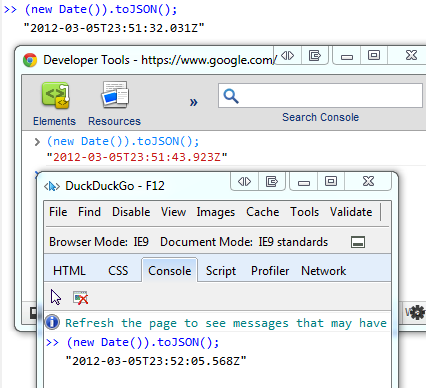
We're going to do this by default in ASP.NET Web API when it releases. (We aren't doing this now in Beta) You can see how to swap out the serializer to JSON.NET on Henrik's blog. You can also check out the Thinktecture.Web.Http convenience methods that bundles some useful methods for ASP.NET Web API.
Today with the Beta, I just need to update my global.asax and swap out the JSON Formatter like this (see Henrik's blog for the full code):
|
1
2
3
4
|
// Create Json.Net formatter serializing DateTime using the ISO 8601 formatJsonSerializerSettings serializerSettings = new JsonSerializerSettings();serializerSettings.Converters.Add(new IsoDateTimeConverter());GlobalConfiguration.Configuration.Formatters[0] = new JsonNetFormatter(serializerSettings); |
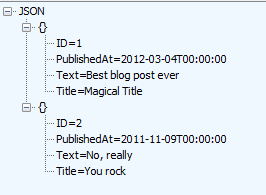
When we ship, none of this will be needed as it should be the default which is much nicer. JSON.NET will be the default serializer AND Web API will use ISO 8601 on the wire as the default date format for JSON APIs.
Hope this helps.
On the nightmare that is JSON Dates. Plus, JSON.NET and ASP.NET Web API的更多相关文章
- Replace JSON.NET with ServiceStack.Text in ASP.NET Web API
Because ServiceStack.Text performs much better I recently stumbled across a comparison of JSON seria ...
- ASP.NET WEB API 返回JSON 出现2个双引号问题
前言 在使用ASP.NET WEB API时,我想在某个方法返回JSON格式的数据,于是首先想到的就是手动构建JSON字符串,如:"{\"result\" ...
- 【ASP.NET Web API教程】6.2 ASP.NET Web API中的JSON和XML序列化
谨以此文感谢关注此系列文章的园友!前段时间本以为此系列文章已没多少人关注,而不打算继续下去了.因为文章贴出来之后,看的人似乎不多,也很少有人对这些文章发表评论,而且几乎无人给予“推荐”.但前几天有人询 ...
- Asp.Net Web API 2第十三课——ASP.NET Web API中的JSON和XML序列化
前言 阅读本文之前,您也可以到Asp.Net Web API 2 系列导航进行查看 http://www.cnblogs.com/aehyok/p/3446289.html 本文描述ASP.NET W ...
- ASP.NET Web API中的JSON和XML序列化
ASP.NET Web API中的JSON和XML序列化 前言 阅读本文之前,您也可以到Asp.Net Web API 2 系列导航进行查看 http://www.cnblogs.com/aehyok ...
- ASP.NET Web API 2.1支持Binary JSON(Bson)
ASP.NET Web API 2.1内建支持XML.Json.Bson.form-urlencoded的MiME type,今天重点介绍下Bson.BSON是由10gen开发的一个数据格式,目前主要 ...
- 使用Jil序列化JSON提升Asp.net web api 性能
JSON序列化无疑是Asp.net web api 里面性能提升最重要的一环. 在Asp.net web api 里面我们可以插入自定义的MediaTypeFormatter(媒体格式化器), 说白了 ...
- ASP.NET Web API 如何通过程序控制返回xml还是json
雖然 ASP.NET Web API 內建支援 JSON 與 XML 兩種輸出格式,並依據瀏覽器端送出的 Accept 標頭自動決定回應的內容格式,不過有時候我們的確也需要讓程式來控制要回應哪種格式, ...
- 解决ASP.NET Web API Json对象循环参考错误
前言 一般我们在开法 ASP.NET Web API 时,如果是使用 Entity Framework 技术来操作数据库的话,当两个 Entity 之间包含导览属性(Navigation Proper ...
随机推荐
- 【brew使用技巧】fix links
brew link --overwrite python
- 有关Botton的用法(二)
关于设置listener监听onClicked事件的步骤分析 Steps: 1.tell android you are interested in listening to a button cli ...
- 重装系统, i tell you
博客网站: https://blog.csdn.net/ca1m0921/article/details/79313050 装机例子1: http://www.xitongcheng.com/jiao ...
- shell中字体变色
在linux中给字体使用数字代码变色 字体颜色代码:重置0 ,黑色30,红色31,绿色32,黄色33,蓝色34,洋红35,青色36,浅灰37 效果代码:1m加粗 2m加下划线 5m闪动效果 7m ...
- 求分数1+1/2+1/3+.....+1/n的值
总结:自己理解错了的有以下几点: 1.s初始化的值是0.但数据类型最好定位double双精度类型 2.for循环里面的i<n.不要忘了等号,因为i作为分母,不能为0,所以从1开始, 3.在mai ...
- NOIP 2008 立体图 (字符串+模拟)
立体图 时间限制: 1 Sec 内存限制: 50 MB提交: 2 解决: 0[提交][状态][讨论版][命题人:外部导入] 题目描述 小渊是个聪明的孩子,他经常会给周围的小朋友们讲些自己认为有趣的 ...
- C#简单操作app.config文件
即将操作的app.config文件内容如下 <?xml version="1.0" encoding="utf-8"?> <configura ...
- Cassandra学习六 一些知识点
http://www.flyml.net/2016/09/08/cassandra-tutorial-java-api-example/ Cassandra对查询的支持很弱,只支持主键列及索引列的查询 ...
- Py修行路 python基础 (三)字典
names=["zhang"]names2=["jack","jie"]names.clear()print(names) #清空整个列表 ...
- Java面向对象-面向对象编程之基本概念
面向对象这个概念,每本书上的说法定义很多. 我自己根据我的经验,自己归档总结了下, 所谓面向对象,就是 以基于对象的思维去分析和解决问题,万物皆对象: 面向对象经常和面向过程放一起讨论: 这里举例, ...