
[Spring-Cloud-Alibaba] Sentinel 规则持久化
在之前的练习中,只要应用重启,就需要重新配置,这样在我们实际的项目是非常不实用的,那么有没有办法把我们配置的规则保存下来呢?答案是YES,那么接下来,给大家来介绍如何将Sentinel规则持久化。
Document: 传送门
- File Datasource(文件存储)
- Pull 模式
- Push 模式
- Nacos configuration
- Apollo
File Datasource
Pull 模式
原理:
扩展写数据源(WritableDataSource), 客户端主动向某个规则管理中心定期轮询拉取规则,这个规则中心可以是 RDBMS、文件 等
pull 模式的数据源(如本地文件、RDBMS 等)一般是可写入的。使用时需要在客户端注册数据源:将对应的读数据源注册至对应的 RuleManager,将写数据源注册至 transport 的WritableDataSourceRegistry中。
过程如下:
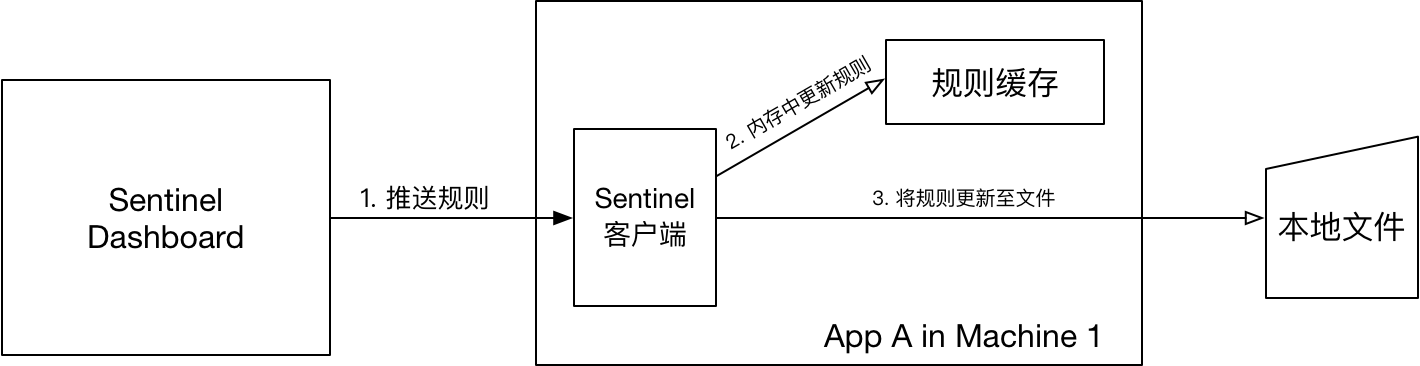
Pull Demo
Step 1: 添加配置
    <dependency>

        <groupId>com.alibaba.csp</groupId>

        <artifactId>sentinel-datasource-extension</artifactId>

    </dependency>
Step 2: 编写持久化代码,实现
com.alibaba.csp.sentinel.init.InitFunc- 代码参考自:传送门
import com.alibaba.csp.sentinel.command.handler.ModifyParamFlowRulesCommandHandler;

import com.alibaba.csp.sentinel.datasource.*;

import com.alibaba.csp.sentinel.init.InitFunc;

import com.alibaba.csp.sentinel.slots.block.authority.AuthorityRule;

import com.alibaba.csp.sentinel.slots.block.authority.AuthorityRuleManager;

import com.alibaba.csp.sentinel.slots.block.degrade.DegradeRule;

import com.alibaba.csp.sentinel.slots.block.degrade.DegradeRuleManager;

import com.alibaba.csp.sentinel.slots.block.flow.FlowRule;

import com.alibaba.csp.sentinel.slots.block.flow.FlowRuleManager;

import com.alibaba.csp.sentinel.slots.block.flow.param.ParamFlowRule;

import com.alibaba.csp.sentinel.slots.block.flow.param.ParamFlowRuleManager;

import com.alibaba.csp.sentinel.slots.system.SystemRule;

import com.alibaba.csp.sentinel.slots.system.SystemRuleManager;

import com.alibaba.csp.sentinel.transport.util.WritableDataSourceRegistry;

import com.alibaba.fastjson.JSON;

import com.alibaba.fastjson.TypeReference;

import java.io.File;

import java.io.IOException;

import java.util.List;

/**

 * FileDataSourceInit for : 自定义Sentinel存储文件数据源加载类

 *

 * @author <a href="mailto:magicianisaac@gmail.com">Isaac.Zhang | 若初</a>

 * @since 2019/7/21

 */

public class FileDataSourceInit implements InitFunc {

    @Override

    public void init() throws Exception {

        // TIPS: 如果你对这个路径不喜欢,可修改为你喜欢的路径

        String ruleDir = System.getProperty("user.home") + "/sentinel/rules";

        String flowRulePath = ruleDir + "/flow-rule.json";

        String degradeRulePath = ruleDir + "/degrade-rule.json";

        String systemRulePath = ruleDir + "/system-rule.json";

        String authorityRulePath = ruleDir + "/authority-rule.json";

        String hotParamFlowRulePath = ruleDir + "/param-flow-rule.json";

        this.mkdirIfNotExits(ruleDir);

        this.createFileIfNotExits(flowRulePath);

        this.createFileIfNotExits(degradeRulePath);

        this.createFileIfNotExits(systemRulePath);

        this.createFileIfNotExits(authorityRulePath);

        this.createFileIfNotExits(hotParamFlowRulePath);

        // 流控规则

        ReadableDataSource<String, List<FlowRule>> flowRuleRDS = new FileRefreshableDataSource<>(

                flowRulePath,

                flowRuleListParser

        );

        // 将可读数据源注册至FlowRuleManager

        // 这样当规则文件发生变化时,就会更新规则到内存

        FlowRuleManager.register2Property(flowRuleRDS.getProperty());

        WritableDataSource<List<FlowRule>> flowRuleWDS = new FileWritableDataSource<>(

                flowRulePath,

                this::encodeJson

        );

        // 将可写数据源注册至transport模块的WritableDataSourceRegistry中

        // 这样收到控制台推送的规则时,Sentinel会先更新到内存,然后将规则写入到文件中

        WritableDataSourceRegistry.registerFlowDataSource(flowRuleWDS);

        // 降级规则

        ReadableDataSource<String, List<DegradeRule>> degradeRuleRDS = new FileRefreshableDataSource<>(

                degradeRulePath,

                degradeRuleListParser

        );

        DegradeRuleManager.register2Property(degradeRuleRDS.getProperty());

        WritableDataSource<List<DegradeRule>> degradeRuleWDS = new FileWritableDataSource<>(

                degradeRulePath,

                this::encodeJson

        );

        WritableDataSourceRegistry.registerDegradeDataSource(degradeRuleWDS);

        // 系统规则

        ReadableDataSource<String, List<SystemRule>> systemRuleRDS = new FileRefreshableDataSource<>(

                systemRulePath,

                systemRuleListParser

        );

        SystemRuleManager.register2Property(systemRuleRDS.getProperty());

        WritableDataSource<List<SystemRule>> systemRuleWDS = new FileWritableDataSource<>(

                systemRulePath,

                this::encodeJson

        );

        WritableDataSourceRegistry.registerSystemDataSource(systemRuleWDS);

        // 授权规则

        ReadableDataSource<String, List<AuthorityRule>> authorityRuleRDS = new FileRefreshableDataSource<>(

                flowRulePath,

                authorityRuleListParser

        );

        AuthorityRuleManager.register2Property(authorityRuleRDS.getProperty());

        WritableDataSource<List<AuthorityRule>> authorityRuleWDS = new FileWritableDataSource<>(

                authorityRulePath,

                this::encodeJson

        );

        WritableDataSourceRegistry.registerAuthorityDataSource(authorityRuleWDS);

        // 热点参数规则

        ReadableDataSource<String, List<ParamFlowRule>> hotParamFlowRuleRDS = new FileRefreshableDataSource<>(

                hotParamFlowRulePath,

                hotParamFlowRuleListParser

        );

        ParamFlowRuleManager.register2Property(hotParamFlowRuleRDS.getProperty());

        WritableDataSource<List<ParamFlowRule>> paramFlowRuleWDS = new FileWritableDataSource<>(

                hotParamFlowRulePath,

                this::encodeJson

        );

        ModifyParamFlowRulesCommandHandler.setWritableDataSource(paramFlowRuleWDS);

    }

    /**

     * 流控规则对象转换

     */

    private Converter<String, List<FlowRule>> flowRuleListParser = source -> JSON.parseObject(

            source,

            new TypeReference<List<FlowRule>>() {

            }

    );

    /**

     * 降级规则对象转换

     */

    private Converter<String, List<DegradeRule>> degradeRuleListParser = source -> JSON.parseObject(

            source,

            new TypeReference<List<DegradeRule>>() {

            }

    );

    /**

     * 系统规则对象转换

     */

    private Converter<String, List<SystemRule>> systemRuleListParser = source -> JSON.parseObject(

            source,

            new TypeReference<List<SystemRule>>() {

            }

    );

    /**

     * 授权规则对象转换

     */

    private Converter<String, List<AuthorityRule>> authorityRuleListParser = source -> JSON.parseObject(

            source,

            new TypeReference<List<AuthorityRule>>() {

            }

    );

    /**

     * 热点规则对象转换

     */

    private Converter<String, List<ParamFlowRule>> hotParamFlowRuleListParser = source -> JSON.parseObject(

            source,

            new TypeReference<List<ParamFlowRule>>() {

            }

    );

    /**

     * 创建目录

     *

     * @param filePath

     */

    private void mkdirIfNotExits(String filePath) {

        File file = new File(filePath);

        if (!file.exists()) {

            file.mkdirs();

        }

    }

    /**

     * 创建文件

     *

     * @param filePath

     * @throws IOException

     */

    private void createFileIfNotExits(String filePath) throws IOException {

        File file = new File(filePath);

        if (!file.exists()) {

            file.createNewFile();

        }

    }

    private <T> String encodeJson(T t) {

        return JSON.toJSONString(t);

    }

}
Step 3: 启用上述代码
resource 目录下创建
resources/META-INF/services目录并创建文件com.alibaba.csp.sentinel.init.InitFunc,内容为:com.sxzhongf.sharedcenter.configuration.sentinel.datasource.FileDataSourceInit
Pull 优缺点
- 优点
- 简单,无任何依赖
- 没有额外依赖
- 缺点
- 不保证一致性(规则是使用
FileRefreshableDataSource定时更新,会有延迟) - 实时性不保证(规则是使用
FileRefreshableDataSource定时更新) - 拉取过于频繁也可能会有性能问题
- 由于文件存储于本地,容易丢失
- 不保证一致性(规则是使用
- 参考资料:
Push 模式
推荐通过控制台设置规则后将规则推送到统一的规则中心,客户端实现
ReadableDataSource接口端监听规则中心实时获取变更,流程如下:
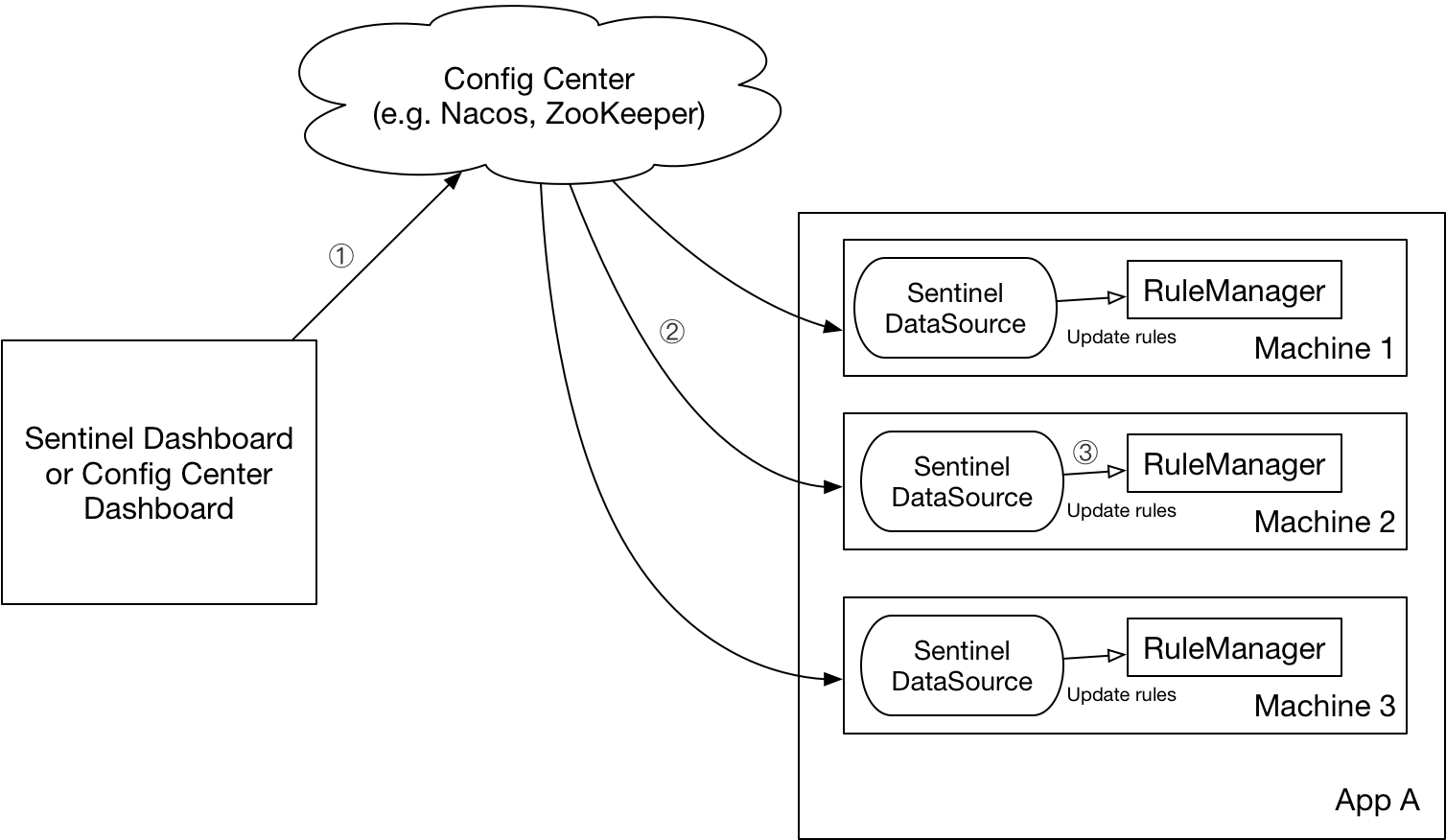
实现原理
- 控制台推送规则到Nacos/远程配置中心
- Sentinel client 舰艇Nacos配置变化,更新本地缓存
shared_center service 加工
- 添加依赖
  <dependency>

      <groupId>com.alibaba.csp</groupId>

      <artifactId>sentinel-datasource-nacos</artifactId>

  </dependency>
- 添加配置
spring:

  cloud:

    sentinel:

      datasource:

        sxzhongf_flow:

          nacos:

            server-addr: localhost:8848

            dataId: ${spring.application.name}-flow-rules

            groupId: SENTINEL_GROUP

            # 规则类型,取值见:org.springframework.cloud.alibaba.sentinel.datasource.RuleType

            rule_type: flow

        sxzhongf_degrade:

          nacos:

            server-addr: localhost:8848

            dataId: ${spring.application.name}-degrade-rules

            groupId: SENTINEL_GROUP

            rule-type: degrade
Sentinel dashboard 加工
Dashboard 规则改造主要通过2个接口:
com.alibaba.csp.sentinel.dashboard.rule.DynamicRuleProvider&com.alibaba.csp.sentinel.dashboard.rule.DynamicRulePublisherDownload Sentinel Source Code
修改原
sentinel-dashboard项目下的POM文件<!-- for Nacos rule publisher sample -->
<dependency>
<groupId>com.alibaba.csp</groupId>
<artifactId>sentinel-datasource-nacos</artifactId>
<!--注释掉原文件中的scope,让其不仅在test的时候生效-->
<!--<scope>test</scope>-->
</dependency>
偷懒模式:复制
sentinel-dashboard项目下test下的nacos包(src/test/java/com/alibaba/csp/sentinel/dashboard/rule/nacos到src/main/java/com/alibaba/csp/sentinel/dashboard/rule下修改controller中的默认provider & publisher
com.alibaba.csp.sentinel.dashboard.controller.v2.FlowControllerV2中@Autowired
// @Qualifier("flowRuleDefaultProvider")
@Qualifier("flowRuleNacosProvider")
private DynamicRuleProvider<List<FlowRuleEntity>> ruleProvider;
@Autowired
// @Qualifier("flowRuleDefaultPublisher")
@Qualifier("flowRuleNacosPublisher")
private DynamicRulePublisher<List<FlowRuleEntity>> rulePublisher;
打开
/Sentinel-1.6.2/sentinel-dashboard/src/main/webapp/resources/app/scripts/directives/sidebar/sidebar.html文件,修改代码:<!--<li ui-sref-active="active">-->
<!--<a ui-sref="dashboard.flow({app: entry.app})">-->
<!--<i class="glyphicon glyphicon-filter"></i> 流控规则 V1</a>-->
<!--</li>--> --- 改为 <li ui-sref-active="active">
<a ui-sref="dashboard.flow({app: entry.app})">
<i class="glyphicon glyphicon-filter"></i> NACOS 流控规则 V1</a>
</li>
Dashboard中要修改的代码已经好了。
重新启动 Sentinel-dashboard
mvn clean package -DskipTests测试效果
Sentinel 添加流控规则:
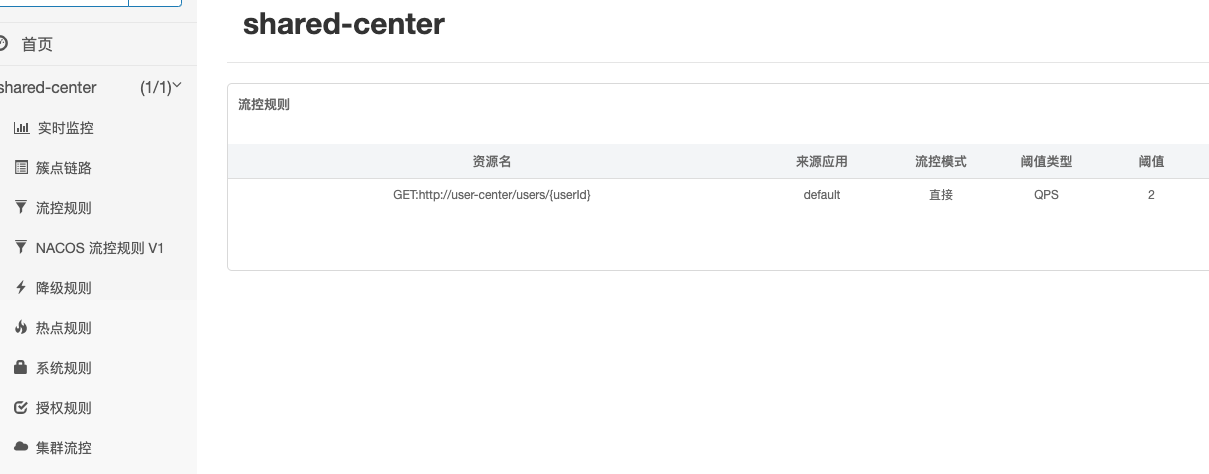
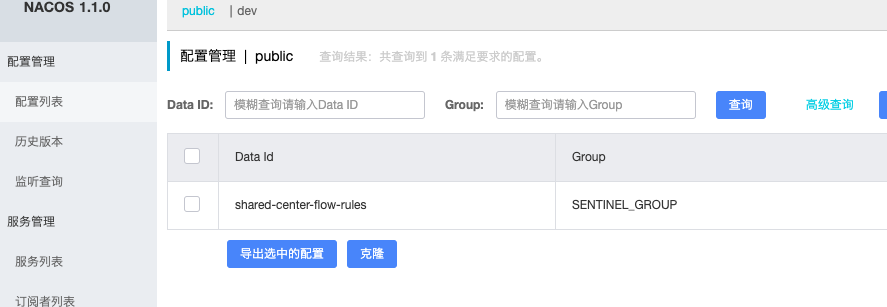
Nacos 查看同步的配置:
[Spring-Cloud-Alibaba] Sentinel 规则持久化的更多相关文章
- Spring Cloud Alibaba | Sentinel:分布式系统的流量防卫兵动态限流规则
Spring Cloud Alibaba | Sentinel:分布式系统的流量防卫兵动态限流规则 前面几篇文章较为详细的介绍了Sentinel的使用姿势,还没看过的小伙伴可以访问以下链接查看: &l ...
- Spring Cloud Alibaba | Sentinel: 分布式系统的流量防卫兵初探
目录 Spring Cloud Alibaba | Sentinel: 分布式系统的流量防卫兵初探 1. Sentinel 是什么? 2. Sentinel 的特征: 3. Sentinel 的开源生 ...
- Spring Cloud Alibaba | Sentinel: 服务限流基础篇
目录 Spring Cloud Alibaba | Sentinel: 服务限流基础篇 1. 简介 2. 定义资源 2.1 主流框架的默认适配 2.2 抛出异常的方式定义资源 2.3 返回布尔值方式定 ...
- Spring Cloud Alibaba | Sentinel: 服务限流高级篇
目录 Spring Cloud Alibaba | Sentinel: 服务限流高级篇 1. 熔断降级 1.1 降级策略 2. 热点参数限流 2.1 项目依赖 2.2 热点参数规则 3. 系统自适应限 ...
- Spring Cloud Alibaba | Sentinel:分布式系统的流量防卫兵基础实战
Spring Cloud Alibaba | Sentinel:分布式系统的流量防卫兵基础实战 Springboot: 2.1.8.RELEASE SpringCloud: Greenwich.SR2 ...
- Spring Cloud Alibaba | Sentinel:分布式系统的流量防卫兵进阶实战
Spring Cloud Alibaba | Sentinel:分布式系统的流量防卫兵进阶实战 在阅读本文前,建议先阅读<Spring Cloud Alibaba | Sentinel:分布式系 ...
- Spring Cloud Alibaba Sentinel对Feign的支持
Spring Cloud Alibaba Sentinel 除了对 RestTemplate 做了支持,同样对于 Feign 也做了支持,如果我们要从 Hystrix 切换到 Sentinel 是非常 ...
- Spring Cloud Alibaba Sentinel对RestTemplate的支持
Spring Cloud Alibaba Sentinel 支持对 RestTemplate 的服务调用使用 Sentinel 进行保护,在构造 RestTemplate bean的时候需要加上 @S ...
- 0.9.0.RELEASE版本的spring cloud alibaba sentinel限流、降级处理实例
先看服务提供方的,我们在原来的sentinel实例(参见0.9.0.RELEASE版本的spring cloud alibaba sentinel实例)上加上限流.降级处理,三板斧只需在最后那一斧co ...
- 0.9.0.RELEASE版本的spring cloud alibaba sentinel实例
sentinel即哨兵,相比hystrix断路器而言,它的功能更丰富.hystrix仅支持熔断,当服务消费方调用提供方发现异常后,进入熔断:sentinel不仅支持异常熔断,也支持响应超时熔断,另外还 ...
随机推荐
- SharePoint Add-in Model (App Model) 介绍 – 概念、托管方式、开发语言
SharePoint Add-in Model 是自 2013 版本以来引入的新的扩展性开发模型, SharePoint 开发者可以利用这种新模型来实现往常利用场解决方案 (Farm Solution ...
- Delphi访问活动目录(使用COM,活动目录Active Directory是用于Windows Server的目录服务)
活动目录Active Directory是用于Windows Server的目录服务,它存储着网络上各种对象的有关信息,并使该信息易于管理员和用户查找及使用.Active Directory使用结构化 ...
- 反汇编分析__stdcall和__cdecl的异同
C++代码如下:.h头文件 #pragma once#ifdef DLLTestAPI#else#define DLLTestAPI _declspec(dllimport)#endifint DLL ...
- 使用C#的HttpWebRequest模拟登陆访问人人网
使用任何语言做模拟登陆或者抓取访问页面,无外乎以下思路: 第一 启用一个web访问会话方法或者实例化一个web访问类,如.net中的HttpWebRequest:第二 模拟POST或者GET方式提交的 ...
- FireMonkey下的异形窗体拖动(需要使用FmxHandleToHwnd函数转化一下句柄)
DelphiXE2 Firemoney FMX 的窗体不只是为windows的, 所以很多功能都没有了. 最常见的就是拖拽了 先看 VCL时代 一个经典拖动代码 ReleaseCapture(); S ...
- linux 磁盘控件找到大文件
df -lh Used:已经使用的空间 Avail:可以使用的空间 Mounted on:挂载的目录 然后找到大文件 du是linux下用看查看磁盘的命令 下面我们先一个目录的来查看空间占用情况 du ...
- http 报错码对应的错误原因
转:http://blog.csdn.net/cutbug/article/details/4024818 1xx - 信息提示这些状态代码表示临时的响应.客户端在收到常规响应之前,应准备接收一个或多 ...
- 使用Scrapy爬取图片入库,并保存在本地
使用Scrapy爬取图片入库,并保存在本地 上 篇博客已经简单的介绍了爬取数据流程,现在让我们继续学习scrapy 目标: 爬取爱卡汽车标题,价格以及图片存入数据库,并存图到本地 好了不多说,让我们实 ...
- java统计文本中单词出现的个数
package com.java_Test; import java.io.File; import java.util.HashMap; import java.util.Iterator; imp ...
- sqlserver/mysql按天,按小时,按分钟统计连续时间段数据
文 | 子龙 有技术,有干货,有故事的斜杠青年 一,写在前面的话 最近公司需要按天,按小时查看数据,可以直观的看到时间段的数据峰值.接到需求,就开始疯狂百度搜索,但是搜索到的资料有很多都不清楚,需要自 ...