
使用C#的HttpWebRequest模拟登陆访问人人网
使用任何语言做模拟登陆或者抓取访问页面,无外乎以下思路:
第一 启用一个web访问会话方法或者实例化一个web访问类,如.net中的HttpWebRequest;
第二 模拟POST或者GET方式提交的数据;
第三 模拟请求的头;
第四 提交请求并获得响应,及对响应做我们所需要的处理。
这里我们以人人网的登录为例,将涉及到POST以及GET两种请求方式。
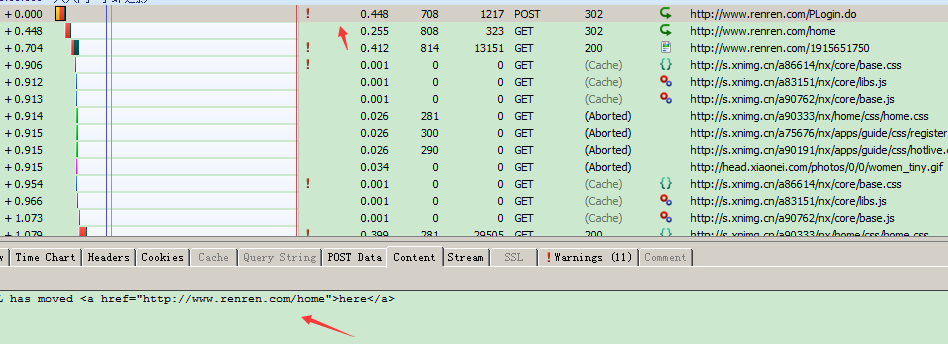
大家使用抓包工具(IE调试工具/httpwatch)都是可以的,我这里采用httpwatch,登陆人人网的时候(www.renren.com),一共做了一个POST请求以及两个GET请求,如下图:

post了一个后,第一个返回状态值是200的一般就是登录后的首页地址,有些网页需要跳转的比较多一些,但是方法都是一样的,
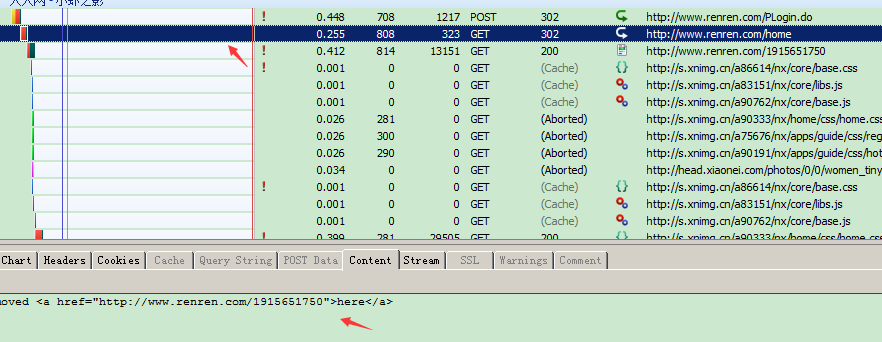
观察这三个请求的详细信息,不难看出这里都是顺序的,第一个GET请求的地址由POST的响应得到,而第二个GET请求的地址又由第一个GET的响应得到。
每次请求与下一次请求之间的联系就是每次请求后返回的Cookies数据,前一次的返回Cookie数据需要同下一次请求一同发送到服务器,这也是C#模拟网站登陆的关键。
这里需要注意几点:
一、选择需要post的地址,可以通过工具查看获得,也可以通过查看网页源代码获得。

二、content可以查看返回的内容,或者是包含下一跳的链接地址。到最后一定是首页的网页内容。

先来模拟第一个POST请求
- HttpWebRequest request = null;
- HttpWebResponse response = null;
- string gethost = string.Empty;
- CookieContainer cc = new CookieContainer();
- string Cookiesstr = string.Empty;
- try
- {
- //第一次POST请求
- string postdata =“”email=adm13956587&password=786954887&icode=&origURL=http%3A%2F%2Fwww.renren.com%2Fhome&domain=renren.com&key_id=1&captcha_type=web_login" //模拟请求数据,httpwatch中点击stream,就可以直接复制了
- string LoginUrl="http://www.renren.com/PLogin.do";
- request = (HttpWebRequest)WebRequest.Create(LoginUrl);//实例化web访问类
- request.Method = "POST";//数据提交方式为POST
- //模拟头
- request.ContentType = "application/x-www-form-urlencoded";
- byte[] postdatabytes = Encoding.UTF8.GetBytes(postdata);
- request.ContentLength = postdatabytes.Length;
- request.AllowAutoRedirect = false;
- request.CookieContainer = cc;
- request.KeepAlive = true;
- //提交请求
- Stream stream;
- stream = request.GetRequestStream();
- stream.Write(postdatabytes, 0, postdatabytes.Length);
- stream.Close();
- //接收响应
- response = (HttpWebResponse)request.GetResponse();
- //保存返回cookie
- response.Cookies = request.CookieContainer.GetCookies(request.RequestUri);
- CookieCollection cook = response.Cookies;
- string strcrook = request.CookieContainer.GetCookieHeader(request.RequestUri);
- Cookiesstr = strcrook;
- //从返回的stream当中取第一次GET跳转地址: The URL has moved <a href="http://www.renren.com/home">here</a>
- StreamReader sr = new StreamReader(response.GetResponseStream(), Encoding.UTF8);
- string content = sr.ReadToEnd();
- response.Close();
- string[] substr = content.Split(new char[] { '"' });
- gethost = substr[1]; //http://www.renren.com/home
- }
- catch (Exception)
- {
- //第一次POST出错;
- }
注释写的很详细了,在这就不再分析,也许有人对request = (HttpWebRequest)WebRequest.Create(LoginUrl)有疑问,可以去google一下HttpWebRequest和WebRequest的区别,简单来说WebRequest是一个抽象类,不能直接实例化,需要被继承,而HttpWebRequest继承自WebRequest。
再模拟第一个和第二个GET请求
- try
- {
- request = (HttpWebRequest)WebRequest.Create(gethost);
- request.Method = "GET";
- request.KeepAlive = true;
- request.Headers.Add("Cookie:" + Cookiesstr);
- request.CookieContainer = cc;
- request.AllowAutoRedirect = false;
- response = (HttpWebResponse)request.GetResponse();
- //设置cookie
- Cookiesstr = request.CookieContainer.GetCookieHeader(request.RequestUri);
- //取再次跳转链接 The URL has moved <a href="http://www.renren.com/1915651750">here</a>
- StreamReader sr = new StreamReader(response.GetResponseStream(), Encoding.UTF8);
- string ss = sr.ReadToEnd();
- string[] substr = ss.Split(new char[] { '"' });
- gethost = substr[1]; //http://www.renren.com/1915651750
- request.Abort();
- sr.Close();
- response.Close();
- }
- catch (Exception)
- {
- //第一次GET出错
- }
- try
- {
- //第二次GET请求
- request = (HttpWebRequest)WebRequest.Create(gethost);
- request.Method = "GET";
- request.KeepAlive = true;
- request.Headers.Add("Cookie:" + Cookiesstr);
- request.CookieContainer = cc;
- request.AllowAutoRedirect = false;
- response = (HttpWebResponse)request.GetResponse();
- //设置cookie
- Cookiesstr = request.CookieContainer.GetCookieHeader(request.RequestUri);
StreamReader sr = new StreamReader(response.GetResponseStream(), Encoding.UTF8);
string ss = sr.ReadToEnd();
- webBrowser1.Navigate("about:blank");
webBrowser1.Document.OpenNew(true);
webBrowser1.Document.Write(ss);
- request.Abort();
- response.Close();
- }
- catch (Exception)
- {
- //第二次GET出错
- }
GET与POST请求大同小异,这里便不再累述。三次请求结束,保存好你的cookie string,每次请求的时候都赋给请求的头部,你就处于登录状态了。
使用C#的HttpWebRequest模拟登陆访问人人网的更多相关文章
- 使用C#的HttpWebRequest模拟登陆访问人人网(转)
无论使用任何语言做模拟登陆或者抓取访问页面,无外乎以下思路:第一 启用一个web访问会话方法或者实例化一个web访问类,如.net中的HttpWebRequest:第二 模拟POST或者GET方式提交 ...
- c# 使用 HttpWebRequest模拟登陆
c# 使用 HttpWebRequest模拟登陆(附带验证码) 分类: C# .net2010-06-04 00:50 35647人阅读 评论(43) 收藏 举报 c#exceptionstreams ...
- c# 使用 HttpWebRequest模拟登陆(附带验证码)
在C#中,可以使用HttpWebRequest进行相关的模拟登陆,登陆后进行相关的操作,比如抓取数据,页面分析,制作相关登陆助手等等. 先说下流程 1.使用httpwebrequest先进入你要登录的 ...
- 转:使用C#的HttpWebRequest模拟登陆网站
这篇文章是有关模拟登录网站方面的. 实现步骤: 启用一个web会话 发送模拟数据请求(POST或者GET) 获取会话的CooKie 并根据该CooKie继续访问登录后的页面,获取后续访问的页面数据. ...
- 使用HttpWebRequest模拟登陆阿里巴巴(alibaba、httpwebrequest、login)
前言 其实老喜欢取经,偶尔也得分享下.关于阿里巴巴国际站的登陆,过程有点复杂但是算不上难.一不小心少个东西倒也挺麻烦的. 主要是看下请求类HttpClient基本请求封装使用,AliClient模拟浏 ...
- 使用C#的HttpWebRequest模拟登陆网站
很久没有写新的东西了,今天在工作中遇到的一个问题,感觉很有用,有种想记下来的冲动. 这篇文章是有关模拟登录网站方面的. 实现步骤: 启用一个web会话 发送模拟数据请求(POST或者GET) 获取会话 ...
- HttpWebRequest 模拟浏览器访问网站
最近抓网页时报错: 要么返回 The remote server returned an error: (442)要么返回: 非法访问,您的行为已被WAF系统记录! 想了想,就当是人家加了抓网页的东西 ...
- HttpWebRequest模拟登陆,存储Cookie以便登录请求后使用
[一篮饭特稀原创,转载请注明出自http://www.cnblogs.com/wanghafan/p/3284481.html] PostLogin :登录,并保存Cookie 1 public st ...
- C#如何HttpWebRequest模拟登陆,获取服务端返回Cookie以便登录请求后使用
public static string GetCookie(string requestUrlString, Encoding encoding, ref CookieContainer cooki ...
随机推荐
- hadoop 3.x 完全分布式集群搭建/异常处理/测试
共计三台虚拟机分别为hadoop002(master,存放namenode),hadoop003(workers,datanode以及resourcemanage),hadoop004(workers ...
- 在CentOS系统上将deb包转换为rpm包
转载自 http://www.heminjie.com/system/linux/1487.html deb文件格式本是ubuntu/debian系统下的安装文件,那么我想要在redhat/cento ...
- Xamarin.Forms开发APP
Xamarin.Forms+Prism(1)—— 开发准备 准备: 1.VS2017(推荐)或VS2015: 2.JDK 1.8以上: 3.Xamarin.Forms 最新版: 4.Prism 扩展, ...
- CentOS查看系统信息和资源使用已经升级系统的命令
1.查看系统版本: 1)cat /etc/redhat-release 2)uname -a 2.查看资源使用: top 3.升级所有包同时也升级软件和系统内核: yum -y update
- Android Studio ERROR: x86 emulation currently requires hardware acceleration!报错解决傻瓜教程~
很早之前就碰到过Android Studio模拟器无法启动的问题,今天终于尝试去解决了下,下面将我解决的方法记录下. 模拟器报错信息为: emulator: ERROR: x86 emulation ...
- 一个2013届毕业生(踏上IT行业)的迷茫(4)
等了大概三个月,终于到9月份了,以前没有出过远门,这次要去西安上学,一个人父母还是不放心,带了几件衣服就和父亲匆匆去坐火车,这一路有多少个第一次啊,第一次和父亲一块坐车.第一次坐火车.第一次出县城.第 ...
- events(事件): 基础1
1 所有能触发事件的对象都是 EventEmitter 类的实例. 这些对象开放了一个 eventEmitter.on() 函数,允许将一个或多个函数绑定到会被对象触发的命名事件上. 事件名称通 ...
- webpack之font-awesome
1.安装font-awesome和font-awesome-loader及依赖 git:https://github.com/shakacode/font-awesome-loader npm ins ...
- js之美
http://fxck.it/post/72326363595 大部分脚本语言里字面量都要快一些,因为解析[]比解析new Array()步骤少的多 关于Object可以用constructor注入的 ...
- WPF 的毛玻璃效果
原文:WPF 的毛玻璃效果 版权声明:本文为博主原创文章,未经博主允许不得转载. https://blog.csdn.net/koloumi/article/details/76917519 其实很简 ...