
SpringBoot学习笔记3
十六:自定义拦截器
参考文档
16.1 编写拦截器类
extends WebMvcConfigurerAdapter 并重写WebMvcConfigurerAdapter,如下:
 package com.wu.interceptor;

 import javax.servlet.http.HttpServletRequest;

 import javax.servlet.http.HttpServletResponse;

 import org.springframework.context.annotation.Configuration;

 import org.springframework.web.servlet.HandlerInterceptor;

 import org.springframework.web.servlet.ModelAndView;

 import org.springframework.web.servlet.config.annotation.InterceptorRegistry;

 import org.springframework.web.servlet.config.annotation.WebMvcConfigurerAdapter;

 @Configuration//声明这是一个配置

 public class MyInterceptor extends WebMvcConfigurerAdapter {

     @Override

     public void addInterceptors(InterceptorRegistry registry) {

         //以内部类的创建拦截器

         HandlerInterceptor interceptor=new HandlerInterceptor() {

             @Override

             public boolean preHandle(HttpServletRequest arg0, HttpServletResponse arg1, Object arg2) throws Exception {

                 System.out.println("自定义拦截器");

                 //返回true时放行

                 return true;

             }

             @Override

             public void postHandle(HttpServletRequest arg0, HttpServletResponse arg1, Object arg2, ModelAndView arg3)

                     throws Exception {

             }

             @Override

             public void afterCompletion(HttpServletRequest arg0, HttpServletResponse arg1, Object arg2, Exception arg3)

                     throws Exception {

             }

         };

         //注册拦截器并设置拦截路径

         registry.addInterceptor(interceptor).addPathPatterns("/**");

     }

 }
MyInterceptor.java
注意:需要在拦截器类上添加 @Configuration,声明这是一个配置类,还需要在启动类中需要扫描到该类,如以下所示:
 package com.wu.app;

 import org.springframework.boot.SpringApplication;

 import org.springframework.boot.autoconfigure.SpringBootApplication;

 //@EnableAutoConfiguration

 //@ComponentScan("com.wu.controller")//默认扫描的是当前包和当前包的子包

 @SpringBootApplication(scanBasePackages={"com.wu.controller","com.wu.interceptor"})

 public class SpringApplications {

         //程序启动入口

         public static void main(String []args){

             SpringApplication.run(SpringApplications.class, args);

         }

 }
在启动类中添加扫描到拦截器类的包路径
16.2 测试定义的拦截器是否生效
编写Controller类简单测试刚刚定义的拦截器是否有效,如下:
 package com.wu.controller;

 import org.springframework.web.bind.annotation.RequestMapping;

 import org.springframework.web.bind.annotation.RestController;

 @RestController

 public class TestController {

     @RequestMapping("/test")

     public String test(){

         System.out.println("这是一个测试");

         return "test";

     }

 }
TestController.java
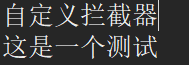
在控制台中可以看到输出顺序:
十七:全局异常处理器的简单实现
参考文档
17.1 编写异常处理器类
 package com.wu.controller;

 import java.util.HashMap;

 import java.util.Map;

 import org.springframework.web.bind.annotation.ExceptionHandler;

 import org.springframework.web.bind.annotation.RestControllerAdvice;

 @RestControllerAdvice

 public class GlobalExceptionHandler {

     @ExceptionHandler(Exception.class)

     public Map<String,Object> handleException(Exception e){

         Map<String,Object> map=new HashMap<>();

         map.put("errorCode","500");

         map.put("Msg",e.toString());

         return map;

     }

 }
GlobalExceptionHandler.java
17.2 编写测试类
 package com.wu.controller;

 import org.springframework.web.bind.annotation.RequestMapping;

 import org.springframework.web.bind.annotation.RestController;

 @RestController

 public class TestController {

     @RequestMapping("/test")

     public String test(){

         int a=1/0;

         return "test";

     }

 }
TestController.java
测试结果:

十八:SpringBoot中的异步调用
18.1 相关知识
参考文档:Java中的Future,Future接口
Future接口的作用:
- 代表异步计算的执行结果;
- 用于可取消的task;(比使用interrupt实现取消要方便 )
18.2在Service层中编写异步测试类
 package com.wu.service;

 import java.util.concurrent.Future;

 public interface AsyncService {

     Future<String> doTask1()throws Exception;

     Future<String> doTask2()throws Exception;

     Future<String> doTask3()throws Exception;

 }
AsyncService.java
 package com.wu.service;

 import java.util.Random;

 import java.util.concurrent.Future;

 import org.springframework.scheduling.annotation.Async;

 import org.springframework.scheduling.annotation.AsyncResult;

 import org.springframework.stereotype.Service;

 @Service

 public class AsyncServiceImp implements AsyncService {

     @Async

     @Override

     public Future<String> doTask1() throws Exception {

         System.out.println("任务一开始");

         long start=System.currentTimeMillis();

         Thread.sleep(new Random().nextInt(10000));

         long end =System.currentTimeMillis();

         System.out.println("任务一结束时间:"+(end-start)+"ms");

         return new AsyncResult<String>("任务一结束");

     }

     @Async

     @Override

     public Future<String> doTask2() throws Exception {

         System.out.println("任务二开始");

         long start=System.currentTimeMillis();

         Thread.sleep(new Random().nextInt(10000));

         long end =System.currentTimeMillis();

         System.out.println("任务二结束时间:"+(end-start)+"ms");

         return new AsyncResult<String>("任务二结束");

     }

     @Async

     @Override

     public Future<String> doTask3() throws Exception {

         System.out.println("任务三开始");

         long start=System.currentTimeMillis();

         Thread.sleep(new Random().nextInt(10000));

         long end =System.currentTimeMillis();

         System.out.println("任务三结束时间:"+(end-start)+"ms");

         return new AsyncResult<String>("任务三结束");

     }

 }
AsyncServiceImp.java
 package com.wu.controller;

 import java.util.concurrent.Future;

 import org.springframework.beans.factory.annotation.Autowired;

 import org.springframework.web.bind.annotation.RequestMapping;

 import org.springframework.web.bind.annotation.RestController;

 import com.wu.service.AsyncService;

 import com.wu.service.AsyncServiceImp;

 @RestController

 public class TestController {

     @Autowired

     private AsyncService asyncService =new AsyncServiceImp();

     @RequestMapping("/async")

     public String testAsync() throws Exception{

         long start=System.currentTimeMillis();

         Future<String> task1 = asyncService.doTask1();

         Future<String> task2 = asyncService.doTask2();

         Future<String> task3 = asyncService.doTask3();

         //判断三个任务是否结束

         while(true){

             if(task1.isDone()&&task2.isDone()&&task3.isDone()){

                 break;

             }

             //当前线程停一会再判断

             Thread.sleep(1000);

         }

         long end =System.currentTimeMillis();

         return "总耗时:"+(end-start)+"ms";

     }

 }
TestController.java
 package com.wu.app;

 import org.springframework.boot.SpringApplication;

 import org.springframework.boot.autoconfigure.SpringBootApplication;

 import org.springframework.scheduling.annotation.EnableAsync;

 @SpringBootApplication(scanBasePackages={"com.wu.controller","com.wu.service"})

 @EnableAsync//启用异步调用

 public class SpringApplications {

         //程序启动入口

         public static void main(String []args){

             SpringApplication.run(SpringApplications.class, args);

         }

 }
启动类中也需要配置扫描和启动异步
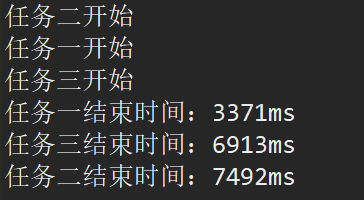
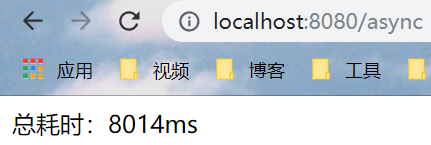
18.3 显示结果
18.4 总结
在需要异步加载的方法上加上注解 @Async
在启动类中需要扫描相应的包,和启动异步调用 @EnableAsync
十九:SpringBoot整合Jsp
19.1 前言
SpringBoot官方不推荐使用Jsp,因为Jsp相对于一些模板引擎,性能较低,官方推荐使用Thymeleaf
19.2 创建war工程,并添加相应依赖
注意:SpringBoot整合Jsp需要创建的是war工程
 <project xmlns="http://maven.apache.org/POM/4.0.0" xmlns:xsi="http://www.w3.org/2001/XMLSchema-instance" xsi:schemaLocation="http://maven.apache.org/POM/4.0.0 http://maven.apache.org/xsd/maven-4.0.0.xsd">

   <modelVersion>4.0.0</modelVersion>

   <parent>

     <groupId>com.wu</groupId>

     <artifactId>SpringBoot_Parent</artifactId>

     <version>0.0.1-SNAPSHOT</version>

   </parent>

   <artifactId>SpringBoot_Child4</artifactId>

   <packaging>war</packaging>

   <dependencies>

       <dependency>

           <groupId>org.springframework.boot</groupId>

           <artifactId>spring-boot-starter-web</artifactId>

       </dependency>

      <!-- 添加servlet依赖模块 -->

         <dependency>

             <groupId>javax.servlet</groupId>

             <artifactId>javax.servlet-api</artifactId>

             <scope>provided</scope>

         </dependency>

         <!-- 添加jstl标签库依赖模块 -->

         <dependency>

             <groupId>javax.servlet</groupId>

             <artifactId>jstl</artifactId>

         </dependency>

         <!--添加tomcat依赖模块.-->

         <dependency>

             <groupId>org.springframework.boot</groupId>

             <artifactId>spring-boot-starter-tomcat</artifactId>

             <scope>provided</scope>

         </dependency>

         <!-- 使用jsp引擎,springboot内置tomcat没有此依赖 -->

         <dependency>

             <groupId>org.apache.tomcat.embed</groupId>

             <artifactId>tomcat-embed-jasper</artifactId>

             <scope>provided</scope>

         </dependency>

    </dependencies>

 </project>
pom.xml
 spring.mvc.view.prefix=/

 spring.mvc.view.suffix=.jsp
application.properties
 package com.wu.controller;

 import org.springframework.stereotype.Controller;

 import org.springframework.web.bind.annotation.RequestMapping;

 @Controller

 public class TestJspController {

     @RequestMapping("/test")

     public String test(){

         return "test";

     }

 }
TestJspController.jsp
 package com.wu.app;

 import org.springframework.boot.SpringApplication;

 import org.springframework.boot.autoconfigure.SpringBootApplication;

 import org.springframework.scheduling.annotation.EnableAsync;

 @SpringBootApplication(scanBasePackages={"com.wu.controller"})

 public class SpringApplications {

         //程序启动入口

         public static void main(String []args){

             SpringApplication.run(SpringApplications.class, args);

         }

 }
启动类
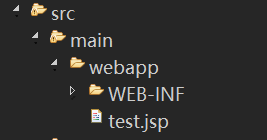
test.jsp文件所在位置:
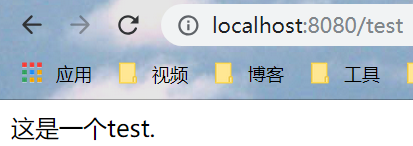
19.3 简单测试结果
二十:SpringBoot整合Freemarker
20.0 参考文档1 Freemarker基本语法入门
20.1 在pom.xml中加入相关依赖
       <!-- Freemarker -->

       <dependency>

           <groupId>org.springframework.boot</groupId>

           <artifactId>spring-boot-starter-freemarker</artifactId>

       </dependency>
Freemarker依赖
20.2 简单应用
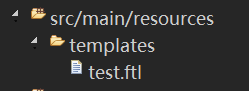
SpringBoot默认读取的是src/main/resources/templates
如:
 <html>

 <head>

 <title>Welcome!</title>

 </head>

 <body>

 ${name}

 </body>

 </html>
test.ftl
 package com.wu.controller;

 import org.springframework.stereotype.Controller;

 import org.springframework.ui.Model;

 import org.springframework.web.bind.annotation.RequestMapping;

 @Controller

 public class TestFreemarkerController {

     @RequestMapping("/test")

     public String test(Model model){

         model.addAttribute("name","這是一個測試。");

         return "test";

     }

 }
TestFreemarkerController.java
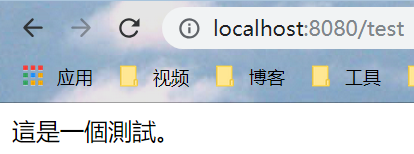
记得在启动类中扫描相应的包,之后启动,结果如下:
20.3 SpringBoot与Freemarker相关的配置可以在application.properties配置
 # 是否允许HttpServletRequest属性覆盖(隐藏)控制器生成的同名模型属性。

 spring.freemarker.allow-request-override=false

 # 是否允许HttpSession属性覆盖(隐藏)控制器生成的同名模型属性。

 spring.freemarker.allow-session-override=false

 # 是否启用模板缓存。

 spring.freemarker.cache=false

 # 模板编码。

 spring.freemarker.charset=UTF-8

 # 是否检查模板位置是否存在。

 spring.freemarker.check-template-location=true

 # Content-Type value.

 spring.freemarker.content-type=text/html

 # 是否启用freemarker

 spring.freemarker.enabled=true

 # 设定所有request的属性在merge到模板的时候,是否要都添加到model中.

 spring.freemarker.expose-request-attributes=false

 # 是否在merge模板的时候,将HttpSession属性都添加到model中

 spring.freemarker.expose-session-attributes=false

 # 设定是否以springMacroRequestContext的形式暴露RequestContext给Spring’s macro library使用

 spring.freemarker.expose-spring-macro-helpers=true

 # 是否优先从文件系统加载template,以支持热加载,默认为true

 spring.freemarker.prefer-file-system-access=true

 # 设定模板的后缀.

 spring.freemarker.suffix=.ftl

 # 设定模板的加载路径,多个以逗号分隔,默认:

 spring.freemarker.template-loader-path=classpath:/templates/

 # 设定FreeMarker keys.

 spring.freemarker.settings.template_update_delay=0

 spring.freemarker.settings.default_encoding=UTF-8

 spring.freemarker.settings.classic_compatible=true

 SpringBoot整合Freemarker的相关属性配置
SpringBoot中Freemarker的属性配置
二十一:SpringBoot整合Thymeleaf
21.0 Thymeleaf的常用语法解析 参考文档2
21.1 在pom.xml中加入相关依赖
      <!-- Thymeleaf -->

       <dependency>

          <groupId>org.springframework.boot</groupId>

          <artifactId>spring-boot-starter-thymeleaf</artifactId>

       </dependency>
Thymeleaf的依赖
21.2 简单应用
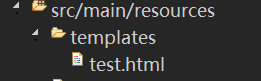
默认读取的是src/main/resources/templates/
如:
 <!DOCTYPE html>

 <html>

 <head>

 <meta charset="UTF-8">

 <title>Thymeleaf_Test</title>

 </head>

 <body>

 <span th:text="${name}"></span>

 </body>

 </html>
test.html
 package com.wu.controller;

 import org.springframework.stereotype.Controller;

 import org.springframework.ui.Model;

 import org.springframework.web.bind.annotation.RequestMapping;

 @Controller

 public class TestThymeleafController {

     @RequestMapping("/test")

     public String test(Model model){

         model.addAttribute("name","这也是一个测试!");

         return "test";

     }

 }
TestThymeleafController.java
 #关闭thymeleaf缓存,开发时使用,否者不能实时显示

 spring.thymeleaf.cache=false

 #检查模板是否纯在,然后再呈现

 spring.thymeleaf.check-template-location=true

 #content-type的值

 spring.thymeleaf.content-type=text/html

 #启用MVC Thymeleaf视图分辨率

 spring.thymeleaf.enabled=true

 #编码格式

 spring.thymeleaf.encoding=UTF-8

 #前缀,此为默认

 spring.thymeleaf.prefix=classpath:/templates/

 #后缀,常用.html

 spring.thymeleaf.suffix=.html

 #模板编码,thymeleaf对html的标签约束非常严格,所有的标签必须有开有闭,比如<br></br>或者<br/>是可以的,但是<br>会报错,配置spring.thymeleaf.mode=LEGACYHTML5 目的就是为了解决这个问题,可以使页面松校验。

 spring.thymeleaf.mode=LEGACYHTML5
在application.properties中可以配置Thymeleaf的相关属性
在启动类中启动,查看

报错,原因:在全局配置中配置了spring.thymeleaf.mode=LEGACYHTML5,是非严格检查,需要加入nekohtml的依赖,如:
       <!-- nekohtml -->

       <dependency>

           <groupId>net.sourceforge.nekohtml</groupId>

           <artifactId>nekohtml</artifactId>

           <version>1.9.15</version>

       </dependency>
nekohtml的依赖
之后重新启动,查看结果如下:

二十二:SpringBoot实现定时任务调用
22.1 spring-boot-quartz 推荐参考
22.2 spring-boot-scheduler
编写任务类:
 package com.wu.job;

 import org.springframework.scheduling.annotation.Scheduled;

 import org.springframework.stereotype.Component;

 @Component

 public class MyJob {

     @Scheduled(fixedRate=2000)//每两秒执行一次

     public void run(){

         System.out.println("执行作业");

     }

 }
MyJob.java
在启动类中开启任务调度
 package com.wu.app;

 import org.springframework.boot.SpringApplication;

 import org.springframework.boot.autoconfigure.SpringBootApplication;

 import org.springframework.scheduling.annotation.EnableAsync;

 import org.springframework.scheduling.annotation.EnableScheduling;

 @SpringBootApplication(scanBasePackages={"com.wu.job"})

 @EnableScheduling//开启任务调度

 public class SpringApplications {

         //程序启动入口

         public static void main(String []args){

             SpringApplication.run(SpringApplications.class, args);

         }

 }
启动类
结果:每隔2秒打印一次(v_v)
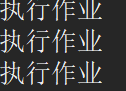
注意:在需要定时任务调度的方法上添加@Scheduled 注解;在启动类上加上 @EnableScheduling 并扫描方法所在类的包
SpringBoot学习笔记3的更多相关文章
- SpringBoot学习笔记
SpringBoot个人感觉比SpringMVC还要好用的一个框架,很多注解配置可以非常灵活的在代码中运用起来: springBoot学习笔记: .一.aop: 新建一个类HttpAspect,类上添 ...
- Springboot学习笔记(六)-配置化注入
前言 前面写过一个Springboot学习笔记(一)-线程池的简化及使用,发现有个缺陷,打个比方,我这个线程池写在一个公用服务中,各项参数都定死了,现在有两个服务要调用它,一个服务的线程数通常很多,而 ...
- SpringBoot学习笔记(14):使用SpringBootAdmin管理监控你的应用
SpringBoot学习笔记(14):使用SpringBootAdmin管理监控你的应用 Spring Boot Admin是一个管理和监控Spring Boot应用程序的应用程序.本文参考文档: 官 ...
- SpringBoot学习笔记(3):静态资源处理
SpringBoot学习笔记(3):静态资源处理 在web开发中,静态资源的访问是必不可少的,如:Html.图片.js.css 等资源的访问. Spring Boot 对静态资源访问提供了很好的支持, ...
- SpringBoot学习笔记(2):引入Spring Security
SpringBoot学习笔记(2):用Spring Security来保护你的应用 快速开始 本指南将引导您完成使用受Spring Security保护的资源创建简单Web应用程序的过程. 参考资料: ...
- SpringBoot学习笔记(7):Druid使用心得
SpringBoot学习笔记(7):Druid使用心得 快速开始 添加依赖 <dependency> <groupId>com.alibaba</groupId> ...
- SpringBoot学习笔记(4):与前端交互的日期格式
SpringBoot学习笔记(4):与前端交互的日期格式 后端模型Date字段解析String 我们从前端传回来表单的数据,当涉及时间.日期等值时,后端的模型需将其转换为对应的Date类型等. 我们可 ...
- SpringBoot学习笔记(4):添加自定义的过滤器
SpringBoot:学习笔记(4)——添加自定义的过滤器 引入自定义过滤器 SpringBoot提供的前端控制器无法满足我们产品的需求时,我们需要添加自定义的过滤器. SpringBoot添加过滤器 ...
- SpringBoot学习笔记(13):日志框架
SpringBoot学习笔记(13):日志框架——SL4J 快速开始 说明 SpringBoot底层选用SLF4J和LogBack日志框架. SLF4J的使用 SpringBoot的底层依赖关系 1. ...
- SpringBoot学习笔记(12):计划任务
SpringBoot学习笔记(12):计划任务 计划任务 在企业的实践生产中,可能需要使用一些定时任务,如月末.季末和年末需要统计各种各样的报表,每周自动备份数据等. 在Spring中使用定时任务 1 ...
随机推荐
- firemonkey 手机屏幕自适应程序问题
我是新手.在我才学了2个星期的时候,那个白痴老板说什么手机屏幕自适应程序,我当时不能理解呀,觉得用Delphi的布局设计不就行了吗.结果他说:我就是想让控件内容什么的放在小屏幕手机上也不出来.我就说, ...
- 完美解决iis下JWplayer提示Error loading media: File could not be played错误
最近开发项目需要使用JWplayer插件播放视频,但是无论换那个版本.换什么样的视频总是提示Error loading media: File could not be played错误,废了好大的劲 ...
- win2003浏览器提示是否需要将当前访问的网站添加到自己信任的站点中去
Win2003的操作系统,的确比其它操作系统在安全上增加了不少,这是为用户所考虑的.当然,既然提供了安全性,尤其是在上网的时候,可以禁止某些活动脚本的显示,这样,就可以多方面的避免在使用Win2003 ...
- axios和vuex
0.babel 将es6代码转换成各个浏览器都能识别的代码 一.axios 1.官方网站 https://www.kancloud.cn/yunye/axios/234845 2.引用: (1)cdn ...
- 08 JS的事件流的概念(重点)
在学习jQuery的事件之前,大家必须要对JS的事件有所了解.看下文 事件的概念 HTML中与javascript交互是通过事件驱动来实现的,例如鼠标点击事件.页面的滚动事件onscroll等等,可以 ...
- 【入门】WebRTC知识点概览 | 内有技术干货免费下载
什么是WebRTC WebRTC 即Web Real-Time Communication(网页实时通信)的缩写,是一个支持网页浏览器之间进行实时数据传输(包括音频.视频.数据流)的技术.经过多年的发 ...
- Spring Bean 生命周期之“我从哪里来?” 懂得这个很重要
Spring bean 的生命周期很容易理解.实例化 bean 时,可能需要执行一些初始化以使其进入可用 (Ready for Use)状态.类似地,当不再需要 bean 并将其从容器中移除时,可能需 ...
- Xshell连接WSL
Xshell连接WSL Windows的Windows Subsystem for Linux很好用, 可以直接使用Linux的CLI模式, 对于开发来说很友好. 安装 Windows 10系统上, ...
- Jenkins+Python+GitLab持续集成
创建任务 登录Jenkins,点击左侧列表的新建选项.输入任务名称,选择构建一个自由风格的软件项目,点击确定. 配置 在任务配置界面,可以设置General标签中的丢弃旧的构建选项,设置保持构建的天数 ...
- 如何将 qsys 子模块设置为参数可调的方式给另外的qsys 调用
Intel FPGA Quartus 软件中的 Qsys工具 也就是 Platform Designer 系统集成工具,可以 图形化界面操作 使用系统自带ip,自定义ip 系统自动生成 ip 间的连接 ...