
NET Framework项目移植到NET Core上遇到的一系列坑
原文:NET Framework项目移植到NET Core上遇到的一系列坑
版权声明:本文为博主原创文章,遵循CC 4.0 BY-SA版权协议,转载请附上原文出处链接和本声明。
目录
8.webconfig的配置移植到appsettings.json
13.使用session和解决sessionID一直变化的问题
1.获取请求的参数
NET Framework版本:
-
Request["xxx"];
-
Request.Files[0];
NET Core版本:
-
Request.Form["xxx"];
-
Request.Form.Files[0];
2.获取完整的请求路径
NET Framework版本:
Request.RequestUri.ToString();
NET Core版本:
-
//先添加引用
-
using Microsoft.AspNetCore.Http.Extensions;
-
//再调用
-
Request.GetDisplayUrl();
3.获取域名
NET Framework版本:
HttpContext.Current.Request.Url.Authority
NET Core版本:
HttpContext.Request.Host.Value
4.编码
NET Framework版本:
-
System.Web.HttpContext.Current.Server.UrlEncode("<li class=\"test\"></li>")
-
"%3cli+class%3d%22test%22%3e%3c%2fli%3e"
-
System.Web.HttpContext.Current.Server.UrlDecode("%3cli+class%3d%22test%22%3e%3c%2fli%3e")
-
"<li class=\"test\"></li>"
NET Core版本:
-
//两种方法,建议用System.Web.HttpUtility
-
System.Web.HttpUtility.UrlEncode("<li class=\"test\"></li>");
-
"%3cli+class%3d%22test%22%3e%3c%2fli%3e"
-
System.Web.HttpUtility.UrlDecode("%3cli+class%3d%22test%22%3e%3c%2fli%3e");
-
"<li class=\"test\"></li>"
-
-
System.Net.WebUtility.UrlEncode("<li class=\"test\"></li>")
-
"%3Cli+class%3D%22test%22%3E%3C%2Fli%3E"
-
System.Net.WebUtility.UrlDecode("%3Cli+class%3D%22test%22%3E%3C%2Fli%3E")
-
"<li class=\"test\"></li>"
-
System.Net.WebUtility.UrlDecode("%3cli+class%3d%22test%22%3e%3c%2fli%3e")
-
"<li class=\"test\"></li>"
-


5.文件上传的保存方法
NET Framework版本:
-
var file = Request.Files[0];
-
//blockFullPath指保存的物理路径
-
file.SaveAs(blockFullPath);
NET Core版本:
-
var file = Request.Form.Files[0];
-
//blockFullPath指保存的物理路径
-
using (FileStream fs = new FileStream(blockFullPath, FileMode.CreateNew))
-
{
-
file.CopyTo(fs);
-
fs.Flush();
-
}
6.获取物理路径
NET Framework版本:
-
//作为一个全局变量获取物理路径的方法
-
public string ffmpegPathc = System.Web.Hosting.HostingEnvironment.MapPath("~/Content/ffmpeg/ffmpeg.exe");
-
//获取在控制器的构造函数里直接调用Server.MapPath
-
ffmpegPathc = Server.MapPath("~/Content/ffmpeg/ffmpeg.exe");
NET Core版本:
从ASP.NET Core RC2开始,可以通过注入 IHostingEnvironment 服务对象来取得Web根目录和内容根目录的物理路径。代码如下:
-
[Area("Admin")]
-
public class FileUploadController : Controller
-
{
-
private readonly IHostingEnvironment _hostingEnvironment;
-
-
public string ffmpegPathc = "";//System.Web.Hosting.HostingEnvironment.MapPath("~/Content/ffmpeg/ffmpeg.exe");
-
-
public FileUploadController(IHostingEnvironment hostingEnvironment)
-
{
-
_hostingEnvironment = hostingEnvironment;
-
ffmpegPathc = _hostingEnvironment.WebRootPath + "/Content/ffmpeg/ffmpeg.exe";
-
}
-
}
这样写每个控制器就都要写一个构造函数,很麻烦,所以可以把它抽离出来,写个公共类去调用。代码如下:
先自定义一个静态类:
-
using Microsoft.AspNetCore.Hosting;
-
using Microsoft.Extensions.DependencyInjection;
-
using System;
-
-
namespace GDSMPlateForm
-
{
-
public static class HttpHelper
-
{
-
public static IServiceProvider ServiceProvider { get; set; }
-
-
public static string GetServerPath(string path)
-
{
-
return ServiceProvider.GetRequiredService<IHostingEnvironment>().WebRootPath + path;
-
}
-
}
-
}
然后 在startup类下的Configure 方法下:
HttpHelper.ServiceProvider = app.ApplicationServices;
startup下的ConfigureServices放下注册方法(这一步必不可少,但是这里可以不写,因为IHostingEnvironment 是微软默认已经帮你注册了,如果是自己的服务,那么必须注册)。
services.AddSingleton<IHostingEnvironment, HostingEnvironment>();
最后获取物理路径就可以这样直接调用了:
public string ffmpegPathc = HttpHelper.GetServerPath("/Content/ffmpeg/ffmpeg.exe");
7.返回Json属性大小写问题
NET Core返回Json属性默认都会自动转为小写,但项目之前Json属性有些是大写的,所以需要配置成不转化为小写的形式。
Startup.cs的ConfigureServices方法下添加一行代码:
-
//Startup需要添加引用
-
using Newtonsoft.Json.Serialization;
-
//返回Json属性默认大小写
-
services.AddMvc().AddJsonOptions(o => { o.SerializerSettings.ContractResolver = new DefaultContractResolver(); });
8.webconfig的配置移植到appsettings.json
NET Framework版本:
直接可以读取webconfig配置文件:
string format = System.Configuration.ConfigurationManager.AppSettings["format"].ToString();
NET Core版本:
NET Core不再支持web.config,取而代之的是appsettings.json,所以需要把一些配置移植过去。
例如web.config下的一些配置
-
<appSettings>
-
<add key="ismdb" value="" />
-
<add key="webpath" value="" />
-
<add key="format" value="jpg,jpeg,png,gif,bmp,tif,svg/mp3,wav/mp4,avi,mpg,wmv,mkv,rmvb,mov,flv/zip/.ppt,.pptx" />
-
<add key="imagesize" value="5242880" />
-
<!--1024 * 1024 * 5 -->
-
<add key="musicsize" value="20971520" />
-
<!--1024 * 1024 * 20 -->
-
<add key="mediasize" value="20971520" />
-
<!--1024 * 1024 * 20 -->
-
<add key="packagesize" value="0" />
-
<add key="pptsize" value="0" />
-
</appSettings>
移植到appsettings.json
-
{
-
"Logging": {
-
"IncludeScopes": false,
-
"LogLevel": {
-
"Default": "Warning"
-
}
-
},
-
"webpath": "",
-
"format": "jpg,jpeg,png,gif,bmp,tif,svg/mp3,wav/mp4,avi,mpg,wmv,mkv,rmvb,mov,flv/zip/.ppt,.pptx",
-
"imagesize": "5242880",
-
"musicsize": "20971520",
-
"mediasize": "20971520",
-
"packagesize": "0",
-
"pptsize": "0"
-
}
然后编写一个类去调用这个appsettings.json
-
using Microsoft.Extensions.Configuration;
-
using System.IO;
-
-
namespace GDSMPlateForm
-
{
-
public class RConfigureManage
-
{
-
public static string GetConfigure(string key)
-
{
-
-
//添加 json 文件路径
-
var builder = new ConfigurationBuilder().SetBasePath(Directory.GetCurrentDirectory()).AddJsonFile("appsettings.json");
-
//创建配置根对象
-
var configurationRoot = builder.Build();
-
-
//取配置根下的 name 部分
-
string secvalue = configurationRoot.GetSection(key).Value;
-
return secvalue;
-
}
-
}
-
}
调用的方式:
string format = RConfigureManage.GetConfigure("format");
9.设置区域块MVC的路由器和访问区域块的视图
NET Framework版本:
NET Framework新建一个区域会自带一个类设置路由器的,如图:
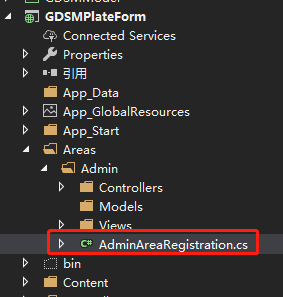
-
using System.Web.Mvc;
-
-
namespace GDSMPlateForm.Areas.Admin
-
{
-
public class AdminAreaRegistration : AreaRegistration
-
{
-
public override string AreaName
-
{
-
get
-
{
-
return "Admin";
-
}
-
}
-
-
public override void RegisterArea(AreaRegistrationContext context)
-
{
-
context.MapRoute(
-
"Admin_default",
-
"Admin/{controller}/{action}/{id}",
-
new { action = "Index", id = UrlParameter.Optional }
-
);
-
}
-
}
-
}
NET Core版本:
NET Core新建一个区域不会自带一个类用于设置路由器,所以需要在Startup类的Configure方法里多加一条路由器设置
-
app.UseMvc(routes =>
-
{
-
routes.MapRoute(
-
name: "areas",
-
template: "{area:exists}/{controller=Home}/{action=Index}/{id?}"
-
);
-
});
然后需要在每个控制器下添加一个标签,指定该控制器属于哪个区域的,如图:

不加的话访问不到区域的视图,报404错误。
10.NetCore访问静态资源文件
NET Framework版本:
NET Framework可以在webconfig下配置这些静态资源文件
-
<staticContent>
-
<mimeMap fileExtension="." mimeType="image/svg+xml" />
-
<mimeMap fileExtension=".properties" mimeType="application/octet-stream" />
-
</staticContent>
NET Core版本:
NET Core并没有webconfig,所以需要在Startup类的Configure方法里自己配置。
NET Core项目默认的资源文件存在wwwroot下,可以通过app.UseStaticFiles方法自己定义资源文件的路径还有类型。
-
var provider = new FileExtensionContentTypeProvider();
-
provider.Mappings[".properties"] = "application/octet-stream";
-
app.UseStaticFiles(new StaticFileOptions
-
{
-
FileProvider = new PhysicalFileProvider(
-
Path.Combine(Directory.GetCurrentDirectory(), "wwwroot", "Content")),
-
RequestPath = "/Content",
-
ContentTypeProvider = provider
-
});
11.MVC调用子页视图
NET Framework版本:
@Html.Action("UserBackView", "UserManage")
NET Core版本:
NET Core不再支持Html.Action(),不过可以手动自己去实现它。
自定义一个静态类 HtmlHelperViewExtensions,命名空间设置为 Microsoft.AspNetCore.Mvc.Rendering。网上找的一个类,复制过来就行了,如下:
-
using Microsoft.AspNetCore.Html;
-
using Microsoft.AspNetCore.Http;
-
using Microsoft.AspNetCore.Mvc.Infrastructure;
-
using Microsoft.AspNetCore.Routing;
-
using Microsoft.Extensions.DependencyInjection;
-
using System;
-
using System.IO;
-
using System.Threading.Tasks;
-
-
namespace Microsoft.AspNetCore.Mvc.Rendering
-
{
-
public static class HtmlHelperViewExtensions
-
{
-
public static IHtmlContent Action(this IHtmlHelper helper, string action, object parameters = null)
-
{
-
var controller = (string)helper.ViewContext.RouteData.Values["controller"];
-
-
return Action(helper, action, controller, parameters);
-
}
-
-
public static IHtmlContent Action(this IHtmlHelper helper, string action, string controller, object parameters = null)
-
{
-
var area = (string)helper.ViewContext.RouteData.Values["area"];
-
-
return Action(helper, action, controller, area, parameters);
-
}
-
-
public static IHtmlContent Action(this IHtmlHelper helper, string action, string controller, string area, object parameters = null)
-
{
-
if (action == null)
-
throw new ArgumentNullException("action");
-
-
if (controller == null)
-
throw new ArgumentNullException("controller");
-
-
-
var task = RenderActionAsync(helper, action, controller, area, parameters);
-
-
return task.Result;
-
}
-
-
private static async Task<IHtmlContent> RenderActionAsync(this IHtmlHelper helper, string action, string controller, string area, object parameters = null)
-
{
-
// fetching required services for invocation
-
var serviceProvider = helper.ViewContext.HttpContext.RequestServices;
-
var actionContextAccessor = helper.ViewContext.HttpContext.RequestServices.GetRequiredService<IActionContextAccessor>();
-
var httpContextAccessor = helper.ViewContext.HttpContext.RequestServices.GetRequiredService<IHttpContextAccessor>();
-
var actionSelector = serviceProvider.GetRequiredService<IActionSelector>();
-
-
// creating new action invocation context
-
var routeData = new RouteData();
-
foreach (var router in helper.ViewContext.RouteData.Routers)
-
{
-
routeData.PushState(router, null, null);
-
}
-
routeData.PushState(null, new RouteValueDictionary(new { controller = controller, action = action, area = area }), null);
-
routeData.PushState(null, new RouteValueDictionary(parameters ?? new { }), null);
-
-
//get the actiondescriptor
-
RouteContext routeContext = new RouteContext(helper.ViewContext.HttpContext) { RouteData = routeData };
-
var candidates = actionSelector.SelectCandidates(routeContext);
-
var actionDescriptor = actionSelector.SelectBestCandidate(routeContext, candidates);
-
-
var originalActionContext = actionContextAccessor.ActionContext;
-
var originalhttpContext = httpContextAccessor.HttpContext;
-
try
-
{
-
var newHttpContext = serviceProvider.GetRequiredService<IHttpContextFactory>().Create(helper.ViewContext.HttpContext.Features);
-
if (newHttpContext.Items.ContainsKey(typeof(IUrlHelper)))
-
{
-
newHttpContext.Items.Remove(typeof(IUrlHelper));
-
}
-
newHttpContext.Response.Body = new MemoryStream();
-
var actionContext = new ActionContext(newHttpContext, routeData, actionDescriptor);
-
actionContextAccessor.ActionContext = actionContext;
-
var invoker = serviceProvider.GetRequiredService<IActionInvokerFactory>().CreateInvoker(actionContext);
-
await invoker.InvokeAsync();
-
newHttpContext.Response.Body.Position = 0;
-
using (var reader = new StreamReader(newHttpContext.Response.Body))
-
{
-
return new HtmlString(reader.ReadToEnd());
-
}
-
}
-
catch (Exception ex)
-
{
-
return new HtmlString(ex.Message);
-
}
-
finally
-
{
-
actionContextAccessor.ActionContext = originalActionContext;
-
httpContextAccessor.HttpContext = originalhttpContext;
-
if (helper.ViewContext.HttpContext.Items.ContainsKey(typeof(IUrlHelper)))
-
{
-
helper.ViewContext.HttpContext.Items.Remove(typeof(IUrlHelper));
-
}
-
}
-
}
-
}
-
}
然后在Startup中的 ConfigureServices 方法添加:
-
services.AddSingleton<IHttpContextAccessor, HttpContextAccessor();
-
services.AddSingleton<IActionContextAccessor, ActionContextAccessor>();
这样就可以像NET Framework版本一样去调用子页面视图了:
@Html.Action("UserBackView", "UserManage")
12.过滤器
NET Framework版本
NET Framework版本上Global.asax中Application_Start方法可以做很多配置,过滤器也是其中一种。
-
protected void Application_Start()
-
{
-
AreaRegistration.RegisterAllAreas();
-
FilterConfig.RegisterGlobalFilters(GlobalFilters.Filters);//全局过滤器集合
-
RouteConfig.RegisterRoutes(RouteTable.Routes);
-
BundleConfig.RegisterBundles(BundleTable.Bundles);
-
}
-
-
public class FilterConfig
-
{
-
public static void RegisterGlobalFilters(GlobalFilterCollection filters)
-
{
-
filters.Add(new HandleErrorAttribute());
-
filters.Add(new LoginCheckFilterAttribute() { IsCheck = true });//自定义一个过滤器
-
}
-
}
-
-
//继承过滤器基类并重写方法
-
public class LoginCheckFilterAttribute : ActionFilterAttribute
-
{
-
//表示是否检查
-
public bool IsCheck { get; set; }
-
//Action方法执行之前执行此方法
-
public override void OnActionExecuting(ActionExecutingContext filterContext)
-
{
-
base.OnActionExecuting(filterContext);
-
if (IsCheck)
-
{
-
//添加自己的逻辑
-
}
-
}
-
}
NET Core版本:
NET Core不在支持Global.asax,很多配置写在Startup里。过滤器的添加方法如下:
-
public void ConfigureServices(IServiceCollection services)
-
{
-
services.AddMvc(options =>
-
{
-
options.Filters.Add(typeof(AuthorizationFilters));// 自定义一个类AuthorizationFilters,添加身份验证过滤器
-
});
-
}
-
-
/// <summary>
-
/// 身份认证类继承IAuthorizationFilter接口
-
/// </summary>
-
public class AuthorizationFilters :IAuthorizationFilter
-
{
-
/// <summary>
-
/// 请求验证,当前验证部分不要抛出异常,ExceptionFilter不会处理
-
/// </summary>
-
/// <param name="context">请求内容信息</param>
-
public void OnAuthorization(AuthorizationFilterContext context)
-
{
-
//写自己的逻辑
-
}
-
}
13.使用session和解决sessionID一直变化的问题
NET Core版本:
在Startup类里添加session配置
-
public void ConfigureServices(IServiceCollection services)
-
{
-
services.AddDistributedMemoryCache();
-
services.AddSession(option =>
-
{ //设置session过期时间
-
option.IOTimeout = TimeSpan.FromHours(1);
-
option.IdleTimeout = TimeSpan.FromHours(1);
-
});
-
services.AddMvc();
-
}
-
-
public void Configure(IApplicationBuilder app, IHostingEnvironment env, IServiceProvider svp)
-
{
-
app.UseSession();//必须在app.UseMvc之前,否则报错
-
app.UseMvc(routes =>
-
{
-
routes.MapRoute(
-
name: "default",
-
template: "{controller=Home}/{action=Index}/{id?}");
-
});
-
}
配置完成后session就可以使用了,不过当Session保存有值,id才不会改变,没有值每次刷新都会变,可以给在使用session时可以给session随便赋个值以保证sessionid不会一直变化。
-
HttpContext.Session.Set("login", Encoding.UTF8.GetBytes("login"));
-
string sessionid = HttpContext.Session.Id;
14.MD5加密
NET Framework版本:
-
//参数str类型是string
-
System.Web.Security.FormsAuthentication.HashPasswordForStoringInConfigFile(str, "MD5");
NET Core版本:用以下这个方法替换了
-
/// <summary>
-
/// 32位MD5加密
-
/// </summary>
-
/// <param name="input"></param>
-
/// <returns></returns>
-
private static string Md5Hash(string input)
-
{
-
MD5CryptoServiceProvider md5Hasher = new MD5CryptoServiceProvider();
-
byte[] data = md5Hasher.ComputeHash(Encoding.Default.GetBytes(input));
-
StringBuilder sBuilder = new StringBuilder();
-
for (int i = 0; i < data.Length; i++)
-
{
-
sBuilder.Append(data[i].ToString("x2"));
-
}
-
return sBuilder.ToString();
-
}
15.Path.Combine()
该方法是路径拼接,在NET Framework版本和NET Core版本同样支持,不过用Path.Combine拼接出来的路径是这样的:xxxx\\xxxx,用的是“\\”,这种路径在Window系统上可以正常运行,但是在Linux上是无法定位到准确的路径的。Linux上的路径是这样的:xxxx/xxxx。所以当我们用Path.Combine这个方法时最好再配合一个替换方法:
Path.Combine(path1,path2).Replace("\\","/");
16.DateTime
donet core 2.1 DateTime.Now.ToString() 方法在不同平台返回的时间格式不一样,即使使用ToString("yyyy/MM/dd")希望转成'2019/04/18'这种格式,但在Centos7平台下它还是变成了‘2019-04-18’这样,可以考虑用Replace方法去替换。
NET Framework项目移植到NET Core上遇到的一系列坑的更多相关文章
- NET Framework项目移植到NET Core上遇到的一系列坑(2)
目录 获取请求的参数 获取完整的请求路径 获取域名 编码 文件上传的保存方法 获取物理路径 返回Json属性大小写问题 webconfig的配置移植到appsettings.json 设置区域块MVC ...
- NET Framework项目移植到NET Core上踩的坑(1)
本文章向大家介绍NET Framework项目移植到NET Core上遇到的一系列坑,主要包括NET Framework项目移植到NET Core上遇到的一系列坑使用实例.应用技巧.基本知识点总结和需 ...
- 在Visual Studio中将现有.NET Framework项目迁移至.NET Core 1.1 Preview 1
1)下载安装包含 .NET Core 1.1 Preview 1 的 SDK:Windows x64 安装包(下载地址列表) 2)下载最新 VS 2015 NuGet 插件:https://dist. ...
- 如何移植.NET Framework项目至.NET Core?
公司的项目一直采用.NET框架来开发Web项目.目前基础类库均为.NET Framework 4.6.2版本.Caching, Logging,DependencyInjection,Configur ...
- 开源纯C#工控网关+组态软件(十)移植到.NET Core
一. 引子 写这个开源系列已经十来篇了.自从十年前注册博客园以来,关注了张善友.老赵.xiaotie.深蓝色右手等一众大牛,也围观了逗比的吉日嘎啦.精密顽石等形形色色的园友.然而整整十年一篇文章都 ...
- 通俗易懂,什么是.NET?什么是.NET Framework?什么是.NET Core? .Net Web开发技术栈
通俗易懂,什么是.NET?什么是.NET Framework?什么是.NET Core? 什么是.NET?什么是.NET Framework?本文将从上往下,循序渐进的介绍一系列相关.NET的概念 ...
- .NET项目迁移到.NET Core操作指南
为什么要从.NET迁移到.NET Core? .NET Core提供的特性 .NET Core性能提升 .NET如何迁移到.NET Core? 迁移工作量评估(API兼容性分析) 迁移方案制定 通过类 ...
- (转)项目迁移_.NET项目迁移到.NET Core操作指南
原文地址:https://www.cnblogs.com/heyuquan/p/dotnet-migration-to-dotnetcore.html 这篇文章,汇集了大量优秀作者写的关于" ...
- .Net Core上用于代替System.Drawing的类库
目前.Net Core上没有System.Drawing这个类库,想要在.Net Core上处理图片得另辟蹊径. 微软给出了将来取代System.Drawing的方案,偏向于使用一个单独的服务端进行各 ...
随机推荐
- CA-RNN论文读取
***CA-RNN: Using Context-Aligned Recurrent Neural Networks for Modeling Sentence Similarity(CA-RNN:使 ...
- 区块链学习笔记:D03 区块链在各行业领域的应用(一)
今天主要是学习了区块链在金融和供应链领域的应用,重点体现了区块链多方参与.透明可信.防篡改防抵赖的技术优势 区块链的应用场景最早是在金融行业应用较多,后续逐步扩展到传统行业,如:供应链.政务服务.物联 ...
- eclipse m2eclipse 从Maven的本地库中读取依赖库
在Mac pro的终端中执行命令 mvn package 后,已经把该工程所需要的依赖库(dependancies)下载到本地库,但在把该工程 import 到 eclipse中时,发现m2eclip ...
- php mysql_connect 在同一host下多数据库mysql_select_db()的bug .
操作方法 创建两个数据库test1 test2 同一个host下面 分别在两个数据库中创建表 -- ---------------------------- -- Table structure fo ...
- 机器学习python*(深度学习)核心技术实战
Python实战及机器学习(深度学习)技术 一,时间地点:2020年01月08日-11日 北京(机房上课,每人一台电脑进行实际案例操作,赠送 U盘拷贝资料及课件和软件)二.课程目标:1.python基 ...
- iOS 日志获取和实时浏览器显示日志
https://juejin.im/entry/576252855bbb500063e51c7d iOS 日志获取和实时浏览器显示日志
- “Unknown class XXViewController in Interface Builder file.”问题处理
在静态库中写了一个XXViewController类,然后在主工程的xib中,将xib的类指定为XXViewController,程序运行时,报了如下错误: “Unknown class XXView ...
- BZOJ 3108: [cqoi2013]图的逆变换
3108: [cqoi2013]图的逆变换 Time Limit: 10 Sec Memory Limit: 128 MBSubmit: 627 Solved: 415[Submit][Statu ...
- UVA-136Ugly numbers
Ugly numbers are numbers whose only prime factors are 2, 3 or 5. The sequence 1, 2, 3, 4, 5, 6, 8, 9 ...
- 【Go入门学习】理解区分数组和切片
一.前言 学过 Go 的都知道在 Go 语言中有四种复合数据类型:数组.切片(Slice).哈希表(Map)和结构体(Struct),而很多 Go 初学者也很容易把数组和切片弄混淆,所以要怎么把这两个 ...