
SpringCloud -创建统一的依赖管理
场景
Spring Cloud 为开发者提供了在分布式系统(配置管理,服务发现,熔断,路由,微代理,控制总线,一次性 Token,全居琐,Leader 选举,分布式 Session,集群状态)中快速构建的工具,使用 Spring Cloud 的开发者可以快速的启动服务或构建应用、同时能够快速和云平台资源进行对接。
注:
博客:
https://blog.csdn.net/badao_liumang_qizhi
关注公众号
霸道的程序猿
获取编程相关电子书、教程推送与免费下载。
实现
在目录下新建一个目录hello-spring-cloud ,然后使用IDEA打开这个目录。
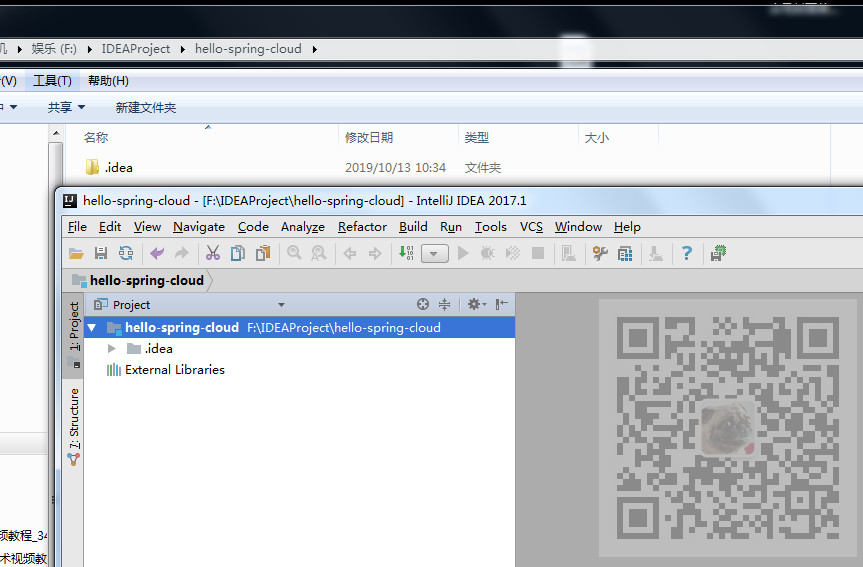
这个文件夹是用来放所有工程的,所以在IDEA上右击目录继续新建目录。
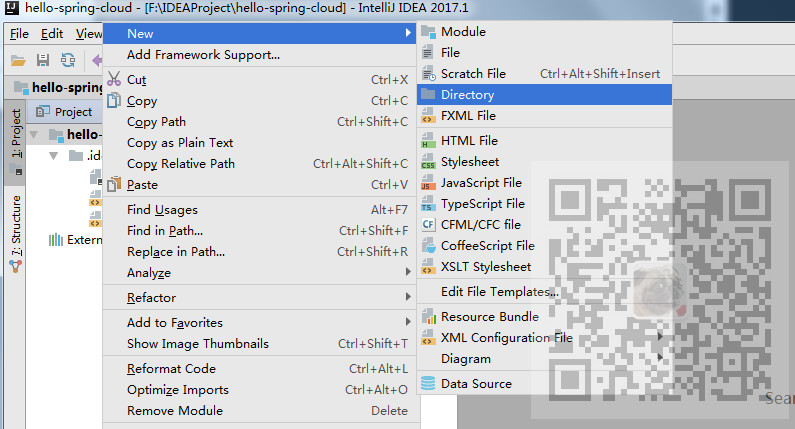
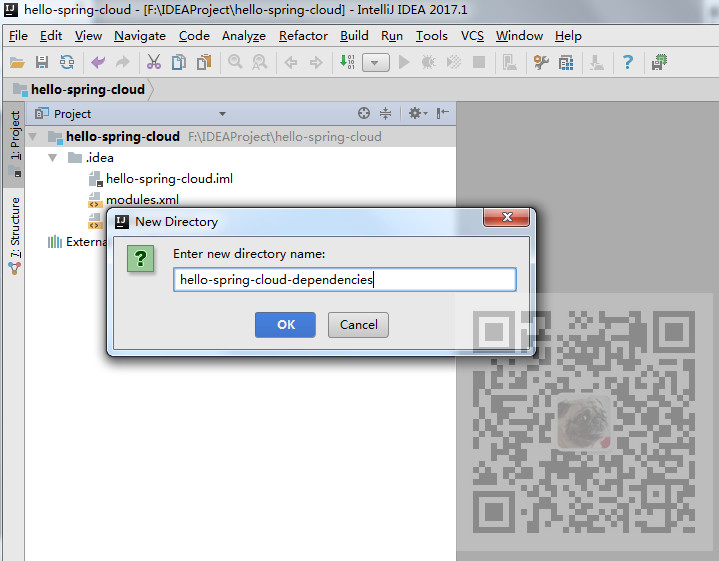
为统一的依赖管理项目取名字。
新建完成后再新建File--pom.xml
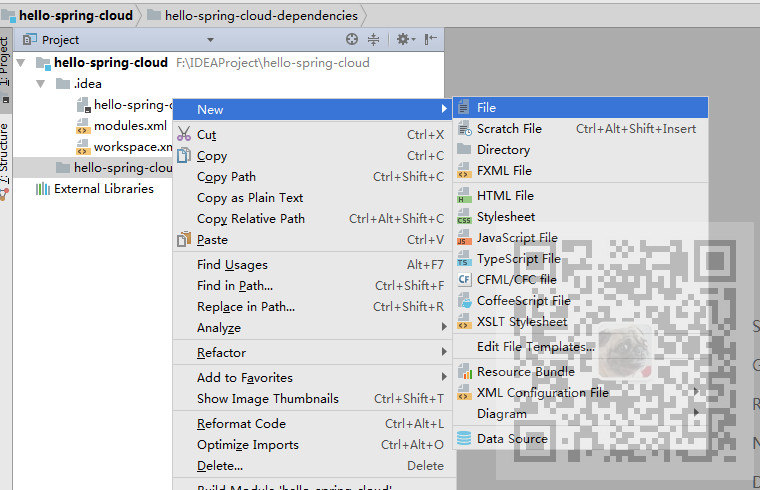
复制如下代码:
<?xml version="1.0" encoding="UTF-8"?>

<project xmlns="http://maven.apache.org/POM/4.0.0" xmlns:xsi="http://www.w3.org/2001/XMLSchema-instance"

         xsi:schemaLocation="http://maven.apache.org/POM/4.0.0 http://maven.apache.org/xsd/maven-4.0.0.xsd">

    <modelVersion>4.0.0</modelVersion>

    <parent>

        <groupId>org.springframework.boot</groupId>

        <artifactId>spring-boot-starter-parent</artifactId>

        <version>2.0.3.RELEASE</version>

    </parent>

    <groupId>com.badao</groupId>

    <artifactId>hello-spring-cloud-dependencies</artifactId>

    <version>1.0.0-SNAPSHOT</version>

    <packaging>pom</packaging>

    <name>hello-spring-cloud-dependencies</name>

    <url>https://blog.csdn.net/badao_liumang_qizhi</url>

    <inceptionYear>2019-Now</inceptionYear>

    <properties>

        <!-- Environment Settings -->

        <java.version>1.8</java.version>

        <project.build.sourceEncoding>UTF-8</project.build.sourceEncoding>

        <project.reporting.outputEncoding>UTF-8</project.reporting.outputEncoding>

        <!-- Spring Settings -->

        <spring-cloud.version>Finchley.RC1</spring-cloud.version>

    </properties>

    <dependencyManagement>

        <dependencies>

            <dependency>

                <groupId>org.springframework.cloud</groupId>

                <artifactId>spring-cloud-dependencies</artifactId>

                <version>${spring-cloud.version}</version>

                <type>pom</type>

                <scope>import</scope>

            </dependency>

        </dependencies>

    </dependencyManagement>

    <build>

        <plugins>

            <!-- Compiler 插件, 设定 JDK 版本 -->

            <plugin>

                <groupId>org.apache.maven.plugins</groupId>

                <artifactId>maven-compiler-plugin</artifactId>

                <configuration>

                    <showWarnings>true</showWarnings>

                </configuration>

            </plugin>

            <!-- 打包 jar 文件时,配置 manifest 文件,加入 lib 包的 jar 依赖 -->

            <plugin>

                <groupId>org.apache.maven.plugins</groupId>

                <artifactId>maven-jar-plugin</artifactId>

                <configuration>

                    <archive>

                        <addMavenDescriptor>false</addMavenDescriptor>

                    </archive>

                </configuration>

                <executions>

                    <execution>

                        <configuration>

                            <archive>

                                <manifest>

                                    <!-- Add directory entries -->

                                    <addDefaultImplementationEntries>true</addDefaultImplementationEntries>

                                    <addDefaultSpecificationEntries>true</addDefaultSpecificationEntries>

                                    <addClasspath>true</addClasspath>

                                </manifest>

                            </archive>

                        </configuration>

                    </execution>

                </executions>

            </plugin>

            <!-- resource -->

            <plugin>

                <groupId>org.apache.maven.plugins</groupId>

                <artifactId>maven-resources-plugin</artifactId>

            </plugin>

            <!-- install -->

            <plugin>

                <groupId>org.apache.maven.plugins</groupId>

                <artifactId>maven-install-plugin</artifactId>

            </plugin>

            <!-- clean -->

            <plugin>

                <groupId>org.apache.maven.plugins</groupId>

                <artifactId>maven-clean-plugin</artifactId>

            </plugin>

            <!-- ant -->

            <plugin>

                <groupId>org.apache.maven.plugins</groupId>

                <artifactId>maven-antrun-plugin</artifactId>

            </plugin>

            <!-- dependency -->

            <plugin>

                <groupId>org.apache.maven.plugins</groupId>

                <artifactId>maven-dependency-plugin</artifactId>

            </plugin>

        </plugins>

        <pluginManagement>

            <plugins>

                <!-- Java Document Generate -->

                <plugin>

                    <groupId>org.apache.maven.plugins</groupId>

                    <artifactId>maven-javadoc-plugin</artifactId>

                    <executions>

                        <execution>

                            <phase>prepare-package</phase>

                            <goals>

                                <goal>jar</goal>

                            </goals>

                        </execution>

                    </executions>

                </plugin>

                <!-- YUI Compressor (CSS/JS压缩) -->

                <plugin>

                    <groupId>net.alchim31.maven</groupId>

                    <artifactId>yuicompressor-maven-plugin</artifactId>

                    <version>1.5.1</version>

                    <executions>

                        <execution>

                            <phase>prepare-package</phase>

                            <goals>

                                <goal>compress</goal>

                            </goals>

                        </execution>

                    </executions>

                    <configuration>

                        <encoding>UTF-8</encoding>

                        <jswarn>false</jswarn>

                        <nosuffix>true</nosuffix>

                        <linebreakpos>30000</linebreakpos>

                        <force>true</force>

                        <includes>

                            <include>**/*.js</include>

                            <include>**/*.css</include>

                        </includes>

                        <excludes>

                            <exclude>**/*.min.js</exclude>

                            <exclude>**/*.min.css</exclude>

                        </excludes>

                    </configuration>

                </plugin>

            </plugins>

        </pluginManagement>

        <!-- 资源文件配置 -->

        <resources>

            <resource>

                <directory>src/main/java</directory>

                <excludes>

                    <exclude>**/*.java</exclude>

                </excludes>

            </resource>

            <resource>

                <directory>src/main/resources</directory>

            </resource>

        </resources>

    </build>

    <repositories>

        <repository>

            <id>aliyun-repos</id>

            <name>Aliyun Repository</name>

            <url>http://maven.aliyun.com/nexus/content/groups/public</url>

            <releases>

                <enabled>true</enabled>

            </releases>

            <snapshots>

                <enabled>false</enabled>

            </snapshots>

        </repository>

        <repository>

            <id>sonatype-repos</id>

            <name>Sonatype Repository</name>

            <url>https://oss.sonatype.org/content/groups/public</url>

            <releases>

                <enabled>true</enabled>

            </releases>

            <snapshots>

                <enabled>false</enabled>

            </snapshots>

        </repository>

        <repository>

            <id>sonatype-repos-s</id>

            <name>Sonatype Repository</name>

            <url>https://oss.sonatype.org/content/repositories/snapshots</url>

            <releases>

                <enabled>false</enabled>

            </releases>

            <snapshots>

                <enabled>true</enabled>

            </snapshots>

        </repository>

        <repository>

            <id>spring-snapshots</id>

            <name>Spring Snapshots</name>

            <url>https://repo.spring.io/snapshot</url>

            <snapshots>

                <enabled>true</enabled>

            </snapshots>

        </repository>

        <repository>

            <id>spring-milestones</id>

            <name>Spring Milestones</name>

            <url>https://repo.spring.io/milestone</url>

            <snapshots>

                <enabled>false</enabled>

            </snapshots>

        </repository>

    </repositories>

    <pluginRepositories>

        <pluginRepository>

            <id>aliyun-repos</id>

            <name>Aliyun Repository</name>

            <url>http://maven.aliyun.com/nexus/content/groups/public</url>

            <releases>

                <enabled>true</enabled>

            </releases>

            <snapshots>

                <enabled>false</enabled>

            </snapshots>

        </pluginRepository>

    </pluginRepositories>

</project>
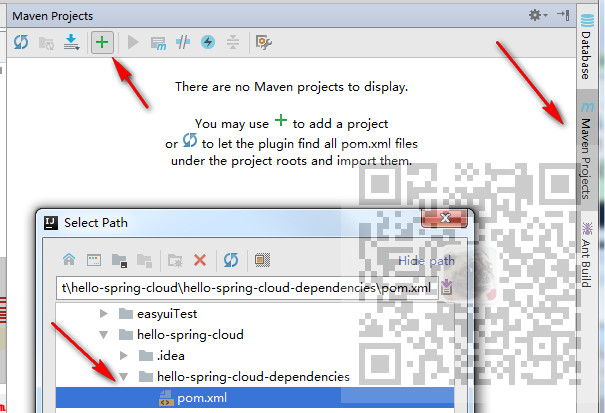
然后将pom.xml添加到托管
SpringCloud -创建统一的依赖管理的更多相关文章
- Android 统一配置依赖管理
Android Studio中默认就是使用Gradle来构建管理工程的,当我们在工程构建过程中创建了多个Module时,就可能存在一个问题,那就是每个Module以及Module中一些公用库的依赖存在 ...
- 【spring-boot 源码解析】spring-boot 依赖管理
关键词:spring-boot 依赖管理.spring-boot-dependencies.spring-boot-parent 问题 maven 工程,依赖管理是非常基本又非常重要的功能,现在的工程 ...
- 多个SpringMVC项目配置统一管理(来自于springCloud的统一配置思路)
因公司项目分多个系统进行开发,而系统架构几乎完全一样,所以同样的配置文件会存在不同的系统中 当其中的某些配置需要修改时,就需要依次把所有系统中相关的配置都修改掉 纯耗时且没技术含量的体力活 所以借鉴S ...
- SpringBoot2.x的依赖管理
前提 这篇文章是<SpringBoot2.x入门>专辑的第1篇文章,使用的SpringBoot版本为2.3.1.RELEASE,JDK版本为1.8. 主要梳理一下SpringBoot2.x ...
- Composer : php依赖管理工具
原始时代 我记得在当时用php的时候还没有composer,只有个pear,但是不好用呀,还不如直接在互联网上到处复制代码了,更快更不容易出错,当时也没有github这么好的社区工具了 总结如下 代码 ...
- Maven01——简介、安装配置、入门程序、项目构建和依赖管理
1 Maven的简介 1.1 什么是maven 是apache下的一个开源项目,是纯java开发,并且只是用来管理java项目的 Svn eclipse maven量级 1.2 Maven好处 同 ...
- Gradle 1.12用户指南翻译——第五十章. 依赖管理
本文由CSDN博客貌似掉线翻译,其他章节的翻译请参见:http://blog.csdn.net/column/details/gradle-translation.html翻译项目请关注Github上 ...
- Maven 学习总结(三) 之 依赖管理
聚合 为了要一次构建多个项目,而不是到每个模块目录下分别执行mvn命令.maven聚合这一特性就是为该需求服务的.为此我们需要创建一个额外的模块aggregator, 然后通过该模块构建整个项目的所有 ...
- SpringBoot系列三:SpringBoot基本概念(统一父 pom 管理、SpringBoot 代码测试、启动注解分析、配置访问路径、使用内置对象、项目打包发布)
声明:本文来源于MLDN培训视频的课堂笔记,写在这里只是为了方便查阅. 1.了解SpringBoot的基本概念 2.具体内容 在之前所建立的 SpringBoot 项目只是根据官方文档实现的一个基础程 ...
随机推荐
- python 正确字符串处理(自己踩过的坑)
不管是谁,只要处理过由用户提交的调查数据,就能明白这种乱七八糟的数据是怎么一回事.为了得到一组能用于分析工作的格式统一的字符串,需要做很多事情:去除空白符.删除各种标点符号.正确的大写格式等.做法之一 ...
- 设置属性节点(setAttribute())
setAttribute():方法将为给定元素节点添加一个新的属性值或是改变它的现有属性值: element.setAttribute(attriibuteName,attributeValue); ...
- 程序员的算法课(20)-常用的图算法:最小生成树(MST)
版权声明:本文为博主原创文章,遵循CC 4.0 BY-SA版权协议,转载请附上原文出处链接和本声明. 本文链接:https://blog.csdn.net/m0_37609579/article/de ...
- python函数-参数
python函数-参数 实验室 # 演示形参是可变类型 def register(name, hobby, hobby_list=[]): hobby_list.append(hobby) print ...
- xmlhttp.readyState的值及解释
xmlhttp.readyState的值及解释: 0:请求未初始化(还没有调用 open()). 1:请求已经建立,但是还没有发送(还没有调用 send()). 2:请求已发送,正在处理中(通常现在可 ...
- hashtable基础
- 第四章 开始Unity Shader学习之旅(1)
1. 一个最简单的顶点/片元着色器 现在,我们正式开始学习如何编写Unity Shader,更准确的说是,学习如何编写顶点/片元着色器 2.顶点/片元着色器的基本结构 我们在以前已经讲过了Unity ...
- Java判断字符串相等"=="和"equal"详解
在初学Java时,可能会经常碰到下面的代码: public static void main(String[] args) { //两种声明方式,有所差别 String s1="hello& ...
- c, ANSI C, embedded c, after IKM online assessment
C programming language was developed in 1972 by Dennis Ritchie at bell laboratories of AT&T (Ame ...
- 【原创】002 | 搭上SpringBoot事务源码分析专车
前言 如果这是你第二次看到师长,说明你在觊觎我的美色! 点赞+关注再看,养成习惯 没别的意思,就是需要你的窥屏^_^ 专车介绍** 该趟专车是开往Spring Boot事务源码分析的专车 专车问题 为 ...