
Ubuntu 16.04上anaconda安装和使用教程,安装jupyter扩展等 | anaconda tutorial on ubuntu 16.04
本文首发于个人博客https://kezunlin.me/post/23014ca5/,欢迎阅读最新内容!
anaconda tutorial on ubuntu 16.04
Guide
versions:
- ubuntu 16.04
- conda 4.6.14
- python 3.7.3 (default)
- python 3.5.6 (env)
Install Conda
download Anaconda3-2019.03-Linux-x86_64.sh from here
bash ./Anaconda3-2019.03-Linux-x86_64.sh
output
[/home/kezunlin/anaconda3] >>>

PREFIX=/home/kezunlin/anaconda3

installing: python-3.7.3-h0371630_0 ...

Python 3.7.3

...

installing: scikit-image-0.14.2-py37he6710b0_0 ...

installing: scikit-learn-0.20.3-py37hd81dba3_0 ...

installing: astropy-3.1.2-py37h7b6447c_0 ...

installing: statsmodels-0.9.0-py37h035aef0_0 ...

installing: seaborn-0.9.0-py37_0 ...

installing: anaconda-2019.03-py37_0 ...

installation finished.

Do you wish the installer to initialize Anaconda3

by running conda init? [yes|no]

If you'd prefer that conda's base environment not be activated on startup,

   set the auto_activate_base parameter to false:

conda config --set auto_activate_base false

Thank you for installing Anaconda3!
conda config --set auto_activate_base false
check version
conda --version

conda 4.6.11

conda update conda

conda --version

conda 4.6.14
Managing Environments
create new env
When you begin using conda, you already have a default environment named base. You don't want to put programs into your base environment, though. Create separate environments to keep your programs isolated from each other.
(base) kezunlin@ke:~$ conda --version

conda 4.6.14

(base) kezunlin@ke:~$ conda create --name snowflakes biopython

(base) kezunlin@ke:~$ conda activate snowflakes

(snowflakes) kezunlin@ke:~$

(snowflakes) kezunlin@ke:~$ conda deactivate

(base) kezunlin@ke:~$
conda activateonly works on conda 4.6 and later versions.
list envs
conda info --envs

# conda environments:

#

base                  *  /home/kezunlin/anaconda3

snowflakes               /home/kezunlin/anaconda3/envs/snowflakes
~/.conda/environments.txt
/home/kezunlin/anaconda3

/home/kezunlin/anaconda3/envs/snowflakes

/home/kezunlin/anaconda3/envs/py35
Managing Python
When you create a new environment, conda installs the same Python version you used when you downloaded and installed Anaconda. If you want to use a different version of Python, for example Python 3.5, simply create a new environment and specify the version of Python that you want.
conda create --name snakes python=3.5

conda activate py35

conda info --envs

# conda environments:

#

base                     /home/kezunlin/anaconda3

py35                  *  /home/kezunlin/anaconda3/envs/py35

snowflakes               /home/kezunlin/anaconda3/envs/snowflakes

(base) kezunlin@ke:~$ python --version

Python 3.7.3

(base) kezunlin@ke:~$ conda activate py35

(py35) kezunlin@ke:~$ python --version

Python 3.5.6 :: Anaconda, Inc.
Managing packages
list packages
(base) kezunlin@ke:~$ conda activate py35

(py35) kezunlin@ke:~$

(py35) kezunlin@ke:~$ conda list

# packages in environment at /home/kezunlin/anaconda3/envs/py35:

#

# Name                    Version                   Build  Channel

ca-certificates           2019.1.23                     0

certifi                   2018.8.24                py35_1

libedit                   3.1.20181209         hc058e9b_0
search
conda search beautifulsoup4

...

beautifulsoup4                 4.6.3          py27_0  pkgs/main

beautifulsoup4                 4.6.3          py35_0  pkgs/main

beautifulsoup4                 4.6.3          py36_0  pkgs/main

beautifulsoup4                 4.6.3          py37_0  pkgs/main

beautifulsoup4                 4.7.1          py27_1  pkgs/main

beautifulsoup4                 4.7.1          py36_1  pkgs/main

beautifulsoup4                 4.7.1          py37_1  pkgs/main
install
conda install beautifulsoup4
conda config
conda config --set show_channel_urls yes

conda config --show
Tools
Jupyter notebook
install jupyter
conda create -n py35 python=3.5

conda activate py35

conda install jupyter
install kernel
python -m ipykernel install --user --name=py35

Installed kernelspec py35 in /home/kezunlin/.local/share/jupyter/kernels/py35
jupyterdepends onnotebookandipykernel
also see tensorflow jupyter notebook kenel
run jupyter
jupyter notebook
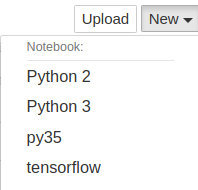
now we can see py35 kernel appears.
tensorflow-gpu/keras
conda activate py35

conda install tensorflow-gpu keras
test
 >>>import tensorflow as tf

 >>>import keras as K

 Using TensorFlow backend.
.keras/keras.json
{

    "epsilon": 1e-07,

    "floatx": "float32",

    "image_data_format": "channels_last",

    "backend": "tensorflow"

}
pytorch
see pytorch tutorial on ubuntu 16.04
Reference
History
- 20190524: created.
Copyright
- Post author: kezunlin
- Post link: https://kezunlin.me/post/23014ca5/
- Copyright Notice: All articles in this blog are licensed under CC BY-NC-SA 3.0 unless stating additionally.
Ubuntu 16.04上anaconda安装和使用教程,安装jupyter扩展等 | anaconda tutorial on ubuntu 16.04的更多相关文章
- ubuntu 16.04上源码编译dlib教程 | compile dlib on ubuntu 16.04
本文首发于个人博客https://kezunlin.me/post/c6ead512/,欢迎阅读! compile dlib on ubuntu 16.04 Series Part 1: compil ...
- Ubuntu 18.04上安装 phpMyAdmin
我们将安装 phpMyAdmin 在 Ubuntu18.04 上配合 Apache 一起工作. 在安装 phpMyAdmin 之前需要已经安装了LAMP栈并提供了web页面. 如果没有安装可以参照 U ...
- 在 Ubuntu 14.04/15.04 上配置 Node JS v4.0.0
大家好,Node.JS 4.0 发布了,这个流行的服务器端 JS 平台合并了 Node.js 和 io.js 的代码,4.0 版就是这两个项目结合的产物——现在合并为一个代码库.这次最主要的变化是 N ...
- 在ubuntu18.04上安装EOS
在ubuntu18.04上安装EOS 在ubuntu18.04上安装EOS的目的: 把交易所的eos转到eos主网,防止交易所跑路或者交易所被黑客攻击 在不联网的安全环境下,用eos官方的命令行工具, ...
- 如何在 Ubuntu Linux 16.04上安装开源的 Discourse 论坛
导读 Discourse 是一个开源的论坛,它可以以邮件列表.聊天室或者论坛等多种形式工作.它是一个广受欢迎的现代的论坛工具.在服务端,它使用 Ruby on Rails 和 Postgres 搭建, ...
- 如何在Ubuntu 16.04上安装配置Redis
如何在Ubuntu 16.04上安装配置Redis Redis是一个内存中的键值存储,以其灵活性,性能和广泛的语言支持而闻名.在本指南中,我们将演示如何在Ubuntu 16.04服务器上安装和配置Re ...
- 在 Ubuntu 16.04上安装 vsFTPd
在 Ubuntu 16.04上安装 vsFTPd Ubuntu vsFTPd 关于 vsFTPd vsFTPd 代表 Very Secure File Transfer Protocol Daemon ...
- (译)综合指南:通过Ubuntu 16.04上从Source构建来安装支持GPU的Caffe2
(译)综合指南:通过Ubuntu 16.04上从Source构建来安装支持GPU的Caffe2 译者注: 原文来自:https://tech.amikelive.com/node-706/compre ...
- Ubuntu 16.04上安装并配置Postfix作为只发送SMTP服务器
如果大家已经在使用第三方邮件服务方案发送并收取邮件,则无需运行自己的邮件服务器.然而,如果大家管理一套云服务器,且其中安装的应用需要发送邮件通知,那么运行一套本地只发送SMTP服务器则更为理想. 如何 ...
随机推荐
- 多线程通信的两种方式? (可重入锁ReentrantLock和Object)
(一)Java中线程协作的最常见的两种方式: (1)利用Object的wait().notify()和notifyAll()方法及synchronized (2)使用Condition.Reentra ...
- element-admin中echarts图标宽度无法修改
默认示例 <template> <div> <el-row :gutter="0"> <el-col :xs="24" ...
- 数据类型和特殊类型-C#
参考地址:https://blog.csdn.net/qiaoquan3/article/details/51380992 1.集合set:纯粹的数据集合 2.线性结构:一对一的,数组 3.树形结构: ...
- RiscV汇编介绍(1)-编译过程
从c/c++源文件,到可以执行文件,需要以下几个步骤: 预处理/编译 汇编 链接 下面我们以hello world程序为例,展示整个编译链接过程. 1. 编写hello.c代码 #include &l ...
- postgreSQL数据库的初探
kali是黑客的强大武器,还有一个也是哦——Metasploit postgreSQL数据库是Metasploit的默认数据库哦! 启动postgresql: service postgresql s ...
- iOS 高效的分页加载(TableView、CollectionView)
一.tableview的分页加载的代码对比 没有优化之前的代码如下 [strongSelf.tableView.mj_footer endRefreshing]: [strongSelf.articl ...
- XCode保存问题
1. 确认下证书是不是开发证书,如果是发布证书就会出现这样的提示. 2. 证书失效了,去开发者中心重新生成一个. 3. 包标识符不与描述文件包含的包标识符不一致,按照它的提示换一下就好了,最好不要点 ...
- ABP进阶教程11 - 小结
点这里进入ABP进阶教程目录 效果预览 至此,ABP进阶教程的查询/分页/排序/导出/打印示例已完成,效果如下 登录 首页 办公室信息 院系信息 课程信息 教职员信息 学生信息 新增 修改 删除 查询 ...
- [PHP] Ubuntu快速安装起PHP7.4
先安装一下这个命令 add-apt-repositoryapt-get install software-properties-common 添加第三方源:add-apt-repository ppa ...
- 目标检测中的pooling操作
1.SPPnet池化过程 假设这个feature map的尺寸是M*N*256,将这个feature map的每一个channel以4*4,2*2和1*1来划分格子,每个格子里面做max poolin ...