
Keras(三)backend 兼容 Regressor 回归 Classifier 分类 原理及实例
原文链接:http://www.one2know.cn/keras4/
backend 兼容
- backend,即基于什么来做运算
Keras 可以基于两个Backend,一个是 Theano,一个是 Tensorflow - 查看当前backend
import keras
输出:
Using Theano Backend.
或者
Using TensorFlow backend. - 修改backend
找到~/.keras/keras.json文件,在文件内修改,每次import的时候,keras就会检查这个文件
{   # 后端为theano

	"image_dim_ordering": "tf",

	"epsilon": 1e-07,

	"floatx": "float32",

	"backend": "theano"

}

{   # 后端为tensorflow

	"image_dim_ordering": "tf",

	"epsilon": 1e-07,

	"floatx": "float32",

	"backend": "tensorflow"

}
但这样修改后,import的时候会出现错误信息,可以在terminal中直接输入临时环境变量执行:
KERAS_BACKEND=tensorflow python3 -c "from keras import backend"
最好是在python代码中import keras前加入一个环境变量修改的语句,这种方法仅在这个脚本生效:
import os
os.environ['KERAS_BACKEND']='theano' # os.environ['KERAS_BACKEND']='tensorflow'
Regressor 回归
- 神经网络可以用来模拟回归问题,给出一组数据,用一条线来对数据进行拟合,并可以预测新输入 x 的输出值
- 导入模块并创建数据
models.Sequential用来一层一层的去建立神经层
layers.Dense意思是这个神经层是全连接层
import numpy as np

np.random.seed(1)

from keras.models import Sequential

from keras.layers import Dense

import matplotlib.pyplot as plt

# 创建一组数据

x = np.linspace(-1,1,200)

np.random.shuffle(x)

y = 0.5 * x + np.random.normal(0,0.05,(200,))

plt.scatter(x,y)

plt.show()

x_train,y_train = x[:160],y[:160]

x_test,y_test = x[160:],y[160:]
输出:
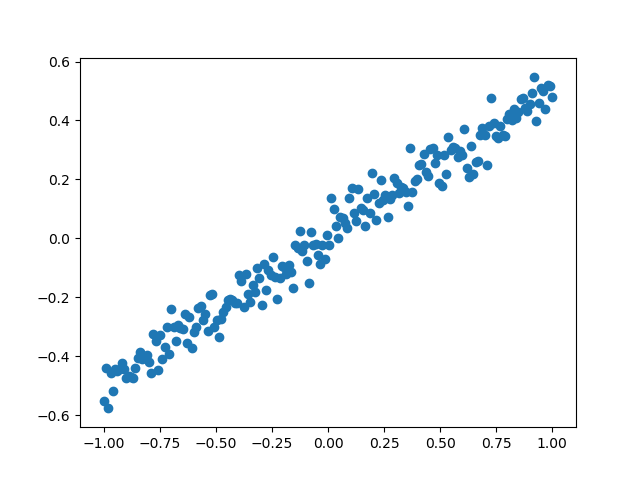
- 建立模型
用 Sequential 建立 model,再用model.add添加神经层,添加的是Dense全连接神经层
参数有两个,一个是输入数据和输出数据的维度,本代码的例子中 x 和 y 是一维的
model = Sequential()

model.add(Dense(input_dim=1,output_dim=1))
- 激活模型
参数中,误差函数loss用的是mse均方误差;优化器optimizer用的是sgd随机梯度下降法
model.compile(loss='mse', optimizer='sgd')
- 训练模型
训练的时候用 model.train_on_batch 一批一批的训练 x_train, y_train。默认的返回值是cost,每100步输出一下结果
print('Training -------------')

for step in range(301):

    cost = model.train_on_batch(x_train,y_train) # 返回训练损失

    if step % 100 == 0:

        print('train cost',cost)
输出:
train cost 0.39069265

train cost 0.10105395

train cost 0.027371023

train cost 0.008624705
- 检验模型
用到的函数是 model.evaluate,输入测试集的x和y, 输出 cost,weights 和 biases。其中 weights 和 biases 是取在模型的第一层 model.layers[0] 学习到的参数(一共就一层)
print('\nTesting ------------')

cost = model.evaluate(x_test, y_test, batch_size=40)

print('test cost:', cost)

W, b = model.layers[0].get_weights()

print('Weights=', W, '\nbiases=', b)
输出:
Testing ------------

40/40 [==============================] - 0s 900us/step

test cost: 0.011580094695091248

Weights= [[0.64299107]]

biases= [0.00309446]
- 可视化结果
y_pred = model.predict(x_test)

plt.scatter(x_test, y_test)

plt.plot(x_test, y_pred)

plt.show()
输出:
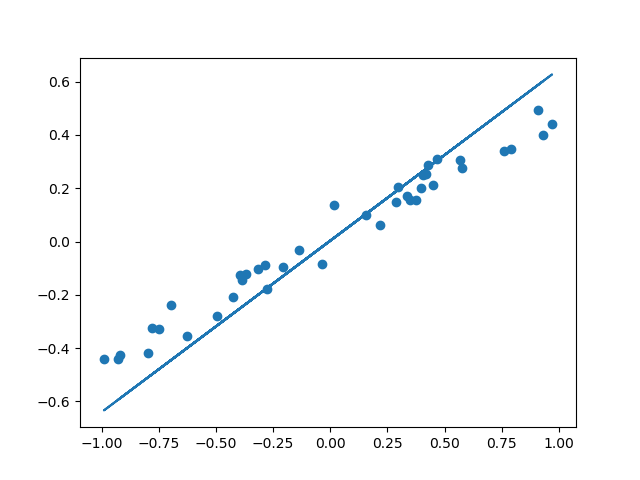
- 整体代码
import numpy as np

np.random.seed(1)

from keras.models import Sequential

from keras.layers import Dense

import matplotlib.pyplot as plt

# 创建一组数据

x = np.linspace(-1,1,200)

np.random.shuffle(x)

y = 0.5 * x + np.random.normal(0,0.05,(200,))

plt.scatter(x,y)

plt.show()

x_train,y_train = x[:160],y[:160]

x_test,y_test = x[160:],y[160:]

model = Sequential()

model.add(Dense(input_dim=1,output_dim=1))

model.compile(loss='mse', optimizer='sgd')

# 分批训练模型

print('Training -------------')

for step in range(301):

    cost = model.train_on_batch(x_train,y_train) # 返回训练损失

    if step % 100 == 0:

        print('train cost',cost)

# 测速

print('\nTesting ------------')

cost = model.evaluate(x_test, y_test, batch_size=40)

print('test cost:', cost)

W, b = model.layers[0].get_weights()

print('Weights=', W, '\nbiases=', b)

# 可视化

y_pred = model.predict(x_test)

plt.scatter(x_test, y_test)

plt.plot(x_test, y_pred)

plt.show()
Classifier 分类
- 以数据集MNIST构建一个分类神经网路
- 数据预处理
Keras 自身就有 MNIST 这个数据包,再分成训练集和测试集。x 是一张张图片,y 是每张图片对应的标签,即它是哪个数字。
输入的 x 变成 60,000×784(28x28的矩阵) 的数据,然后除以 255 进行标准化,因为每个像素都是在 0 到 255 之间的,标准化之后就变成了 0 到 1 之间。
对于 y,要用到 Keras 改造的 numpy 的一个函数 np_utils.to_categorical,把 y 变成了 one-hot 的形式,即之前 y 是一个数值, 在 0-9 之间,现在是一个大小为 10 的向量,它属于哪个数字,就在哪个位置为 1,其他位置都是 0。
from keras.datasets import mnist

from keras.utils import np_utils

(x_train,y_train),(x_test,y_test) = mnist.load_data()

x_train = x_train.reshape(x_train.shape[0],-1)/255 # 标准化

x_test = x_test.reshape(x_test.shape[0],-1)/255

y_train = np_utils.to_categorical(y_train,num_classes=10)

y_test = np_utils.to_categorical(y_test,num_classes=10)

print(x_train[0].shape)

print(y_train[:3])
输出:
(784,)

[[0. 0. 0. 0. 0. 1. 0. 0. 0. 0.]

 [1. 0. 0. 0. 0. 0. 0. 0. 0. 0.]

 [0. 0. 0. 0. 1. 0. 0. 0. 0. 0.]]
- 建立神经网路
相关的包:
models.Sequential用来一层一层一层的去建立神经层
layers.Dense意思是这个神经层是全连接层
layers.Activation激励函数
optimizers.RMSprop优化器采用 RMSprop,加速神经网络训练方法 - 建立模型
在回归网络中用到的是 model.add 一层一层添加神经层,今天的方法是直接在模型的里面加多个神经层。好比一个水管,一段一段的,数据是从上面一段掉到下面一段,再掉到下面一段
第一段就是加入 Dense 神经层。32 是输出的维度,784 是输入的维度。 第一层传出的数据有 32 个 feature,传给激励单元,激励函数用到的是 relu 函数。 经过激励函数之后,就变成了非线性的数据。 然后再把这个数据传给下一个神经层,这个 Dense 我们定义它有 10 个输出的 feature。同样的,此处不需要再定义输入的维度,因为它接收的是上一层的输出。 接下来再输入给下面的 softmax 函数,用来分类
接下来用 RMSprop 作为优化器,它的参数包括学习率等,可以通过修改这些参数来看一下模型的效果
import numpy as np

np.random.seed(1)

from keras.models import Sequential

from keras.layers import Dense,Activation

from keras.optimizers import RMSprop

model = Sequential([

    Dense(32,input_dim=784),

    Activation('relu'),

    Dense(10),

    Activation('softmax')

])

# 优化器

rmsprop = RMSprop(lr=0.001,rho=0.9,epsilon=1e-08,decay=0.0)

# 激活模型

model.compile(optimizer=rmsprop,loss='categorical_crossentropy',metrics=['accuracy'])
- 训练网络
这里用到的是 fit 函数,把训练集的 x 和 y 传入之后,nb_epoch 表示把整个数据训练多少次,batch_size 每批处理32个
print('Training --------------')

model.fit(x_train,y_train,epochs=2,batch_size=32)
- 测试模型
接下来就是用测试集来检验一下模型,方法和回归网络中是一样的,运行代码之后,可以输出 accuracy 和 loss。
print('\nTesting --------------')

loss,accuracy = model.evaluate(x_test,y_test)

print('test loss:',loss)

print('test accuracy:',accuracy)
输出:
test loss: 0.19889679334759713

test accuracy: 0.9396
- 完整代码
from keras.datasets import mnist

from keras.utils import np_utils

from keras.models import Sequential

from keras.layers import Dense,Activation

from keras.optimizers import RMSprop

(x_train,y_train),(x_test,y_test) = mnist.load_data()

x_train = x_train.reshape(x_train.shape[0],-1)/255 # 标准化

x_test = x_test.reshape(x_test.shape[0],-1)/255

y_train = np_utils.to_categorical(y_train,num_classes=10)

y_test = np_utils.to_categorical(y_test,num_classes=10)

print(x_train[0].shape)

print(y_train[:3])

# 创建模型

model = Sequential([

    Dense(32,input_dim=784),Activation('relu'),

    Dense(10),Activation('softmax'),

])

# 优化器

rmsprop = RMSprop(lr=0.001,rho=0.9,epsilon=1e-08,decay=0.0)

# 激活模型

model.compile(optimizer=rmsprop,loss='categorical_crossentropy',metrics=['accuracy'])

# 训练

print('Training --------------')

model.fit(x_train,y_train,epochs=2,batch_size=32)

# 测试

print('\nTesting --------------')

loss,accuracy = model.evaluate(x_test,y_test)

print('test loss:',loss)

print('test accuracy:',accuracy)
Keras(三)backend 兼容 Regressor 回归 Classifier 分类 原理及实例的更多相关文章
- Keras(五)LSTM 长短期记忆模型 原理及实例
LSTM 是 long-short term memory 的简称, 中文叫做 长短期记忆. 是当下最流行的 RNN 形式之一 RNN 的弊端 RNN没有长久的记忆,比如一个句子太长时开头部分可能会忘 ...
- Factorization Machines 学习笔记(三)回归和分类
近期学习了一种叫做 Factorization Machines(简称 FM)的算法,它可对随意的实值向量进行预測.其主要长处包含: 1) 可用于高度稀疏数据场景:2) 具有线性的计算复杂度.本文 ...
- Keras官方中文文档:keras后端Backend
所属分类:Keras Keras后端 什么是"后端" Keras是一个模型级的库,提供了快速构建深度学习网络的模块.Keras并不处理如张量乘法.卷积等底层操作.这些操作依赖于某种 ...
- 02-15 Logistic回归(鸢尾花分类)
目录 Logistic回归(鸢尾花分类) 一.导入模块 二.获取数据 三.构建决策边界 四.训练模型 4.1 C参数与权重系数的关系 五.可视化 更新.更全的<机器学习>的更新网站,更有p ...
- Sklearn中的回归和分类算法
一.sklearn中自带的回归算法 1. 算法 来自:https://my.oschina.net/kilosnow/blog/1619605 另外,skilearn中自带保存模型的方法,可以把训练完 ...
- matlab-逻辑回归二分类(Logistic Regression)
逻辑回归二分类 今天尝试写了一下逻辑回归分类,把代码分享给大家,至于原理的的话请戳这里 https://blog.csdn.net/laobai1015/article/details/7811321 ...
- 《转》Logistic回归 多分类问题的推广算法--Softmax回归
转自http://ufldl.stanford.edu/wiki/index.php/Softmax%E5%9B%9E%E5%BD%92 简介 在本节中,我们介绍Softmax回归模型,该模型是log ...
- keras实现简单性别识别(二分类问题)
keras实现简单性别识别(二分类问题) 第一步:准备好需要的库 tensorflow 1.4.0 h5py 2.7.0 hdf5 1.8.15.1 Keras 2.0.8 opencv-p ...
- 基于CART的回归和分类任务
CART 是 classification and regression tree 的缩写,即分类与回归树. 博主之前学习的时候有用过决策树来做预测的小例子:机器学习之决策树预测--泰坦尼克号乘客数据 ...
随机推荐
- CSS和html如何结合起来——选择符及优先级
1.选择符 兼容性 统配选择符 * 元素选择符 body 类选择符 .class id选择符 #id 包含原则符 p strong (所有 ...
- HashMap、Hash Table、ConcurrentHashMap
这个这个...本王最近由于开始找实习工作了,所以就在牛客网上刷一些公司的面试题,大多都是一些java,前端HTML,js,jquery,以及一些好久没有碰的算法题,说实话,有点难受,其实在我不知道的很 ...
- JAVA并发编程之倒计数器CountDownLatch
CountDownLatch 的使用场景:在主线程中开启多线程去并行执行任务,并且主线程需要等待所有子线程执行完毕后汇总返回结果. 我把源码中的英文注释全部删除,写上自己的注释.就剩下 70 行不到的 ...
- 探秘最小生成树&&洛谷P2126题解
我在这里就讲两种方法 Prim 和 Kruscal Kruscal kruscal的本质其实是 排序+并查集 ,是生成树中避圈法的推广 算法原理如下 (1)将连通带权图G=<n,m>的各条 ...
- openjdk:8u22-jre-alpine在java开发中的NullPointerException错误解决方案
问题描述 ** 在SpringBoot项目中使用了Ureport报表组件, 打包发布部署到docker中启动报错 ** java.lang.NullPointerException at sun.aw ...
- 从SpringBoot构建十万博文聊聊缓存穿透
前言 在博客系统中,为了提升响应速度,加入了 Redis 缓存,把文章主键 ID 作为 key 值去缓存查询,如果不存在对应的 value,就去数据库中查找 .这个时候,如果请求的并发量很大,就会对后 ...
- LayDate使用
layDate非常愿意和您成为工作伙伴.她致力于成为全球最用心的web日期支撑,为国内外所有从事web应用开发的同仁提供力所能及的动力.她基于原生JavaScript精心雕琢,兼容了包括IE6在内的所 ...
- H5中的history方法Api介绍
最近公司在做一个微信公众号,看了项目源码,看到项目中用到了history的Api来进行控制浏览器的历史记录及前进/后退键: 下面来跟大家一起来捋捋history的Api方法和使用: history.p ...
- 基于jmeter+perfmon的稳定性测试记录
1. 引子 最近承接了项目中一些性能测试的任务,因此决定记录一下,将测试的过程和一些心得收录下来. 说起来性能测试算是软件测试行业内,有些特殊的部分.这部分的测试活动,与传统的测试任务差别是比较大的, ...
- 聊一聊 SpringBoot 自动配置的原理
解析思路 我们建立好一个SpringBoot的工程后,我们将从启动类,SpringBootApplication开始进行探究. 开始解析 首先我们建立一个 Springboot的工程.找到启动类,我们 ...