
【Maven】Nexus配置和使用
Nexus安装
nexus安装,可以参照:【Maven】Nexus(Maven仓库私服)下载与安装
Nexus简单说明
- 用途:指定私服的中央地址、将自己的Maven项目指定到私服地址、从私服下载中央库的项目索引、从私服仓库下载依赖组件、将第三方项目jar上传到私服供其他项目组使用
- 仓库:
hosted 类型的仓库,内部项目的发布仓库
releases 内部的模块中release模块的发布仓库
snapshots 发布内部的SNAPSHOT模块的仓库
3rd party 第三方依赖的仓库,这个数据通常是由内部人员自行下载之后发布上去
proxy 类型的仓库,从远程中央仓库中寻找数据的仓库
group 类型的仓库,组仓库用来方便我们开发人员进行设置的仓库

Nexus配置
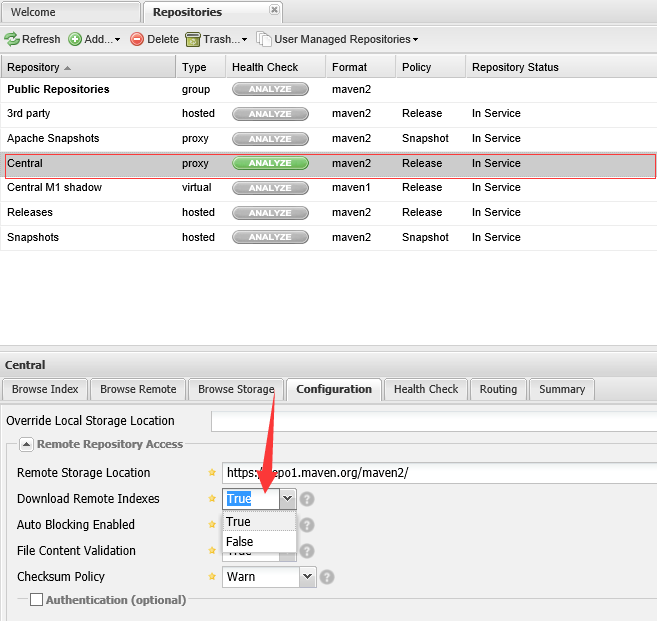
nexus配置大部分使用默认配置即可,主要是配置一个项目索引
选择Central仓库,设置Download Remote Indexes:True
Nexus使用
- 项目使用nexus私服的jar包,在项目的pom.xml文件中指定私服仓库
 <repositories>

     <repository>

         <id>nexus</id>

         <name>nexus</name>

         <url>http://192.168.1.103:8081/nexus/content/groups/public/</url>

         <releases>

             <enabled>true</enabled>

         </releases>

         <snapshots>

             <enabled>true</enabled>

         </snapshots>

     </repository>

</repositories> - 项目使用nexus私服的插件,在项目的pom.xml文件中指定插件仓库
 <pluginRepositories>

     <pluginRepository>

         <id>nexus</id>

         <name>nexus</name>

         <url>http://192.168.1.103:8081/nexus/content/groups/public/</url>

         <releases>

             <enabled>true</enabled>

         </releases>

         <snapshots>

             <enabled>true</enabled>

         </snapshots>

     </pluginRepository>

</pluginRepositories> - 如果想本机所有的maven项目都使用私服的组件,可以在maven的设置文件settings.xml中添加属性,并激活
 <profiles>

     <profile>

         <id>nexusProfile</id>

         <repositories>

             <repository>

                 <id>nexus</id>

                 <name>nexus</name>

                 <url>http://192.168.1.103:8081/nexus/content/groups/public/</url>

                 <releases>

                     <enabled>true</enabled>

                 </releases>

                 <snapshots>

                     <enabled>true</enabled>

                 </snapshots>

             </repository>

         </repositories>

     </profile>

 </profiles>

 <!-- 激活 -->

 <activeProfiles>

     <activeProfile>nexusProfile</activeProfile>

</activeProfiles> - 项目发布到私服,maven项目使用命令:mvn clean deploy;需要在pom文件中配置一下代码;
 <distributionManagement>

         <repository>

             <id>user-release</id>

             <name>User Project Release</name>

             <url>http://192.168.1.103:8081/nexus/content/repositories/releases/</url>

         </repository>

         <snapshotRepository>

             <id>user-snapshots</id>

             <name>User Project SNAPSHOTS</name>

             <url>http://192.168.1.103:8081/nexus/content/repositories/snapshots/</url>

         </snapshotRepository>

     </distributionManagement>
注意还需要配置mvn发布的权限,否则会报401错误,在settings.xml中配置权限,其中id要与pom文件中的id一致
 <server>

     <id>user-release</id>

     <username>admin</username>

     <password>admin123</password>

 </server>

 <server>

     <id>user-snapshots</id>

     <username>admin</username>

     <password>admin123</password>

 </server>
发布成功后,可以在nexus中看到

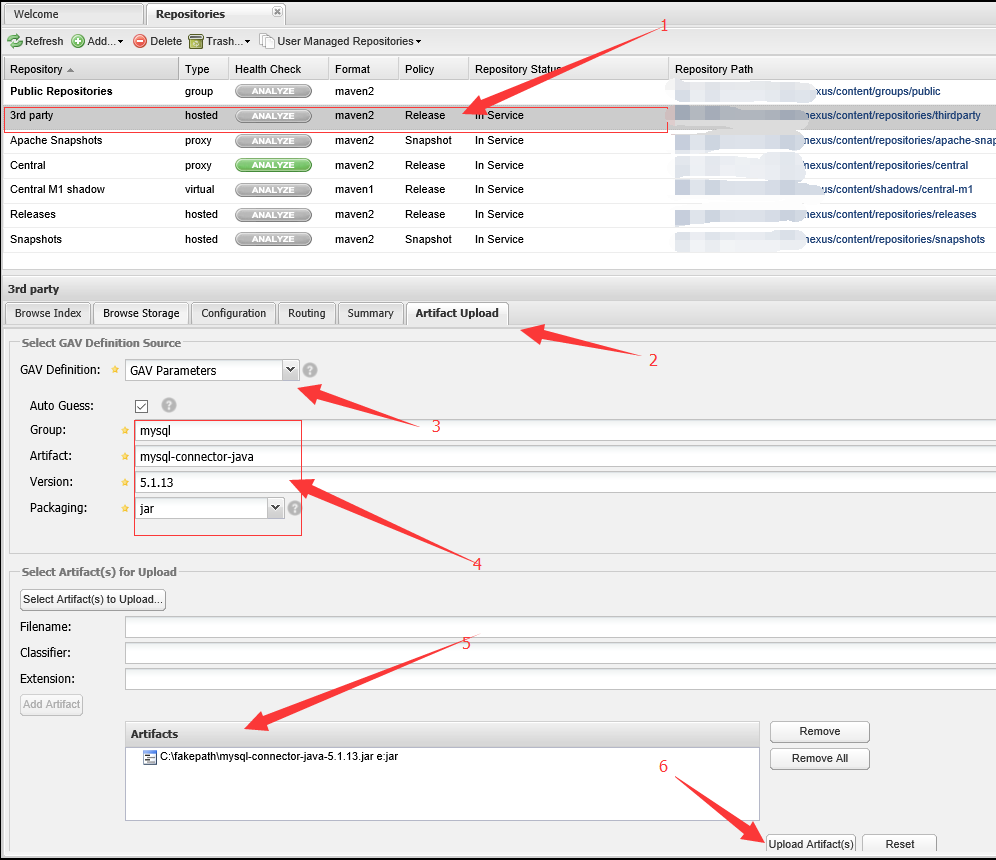
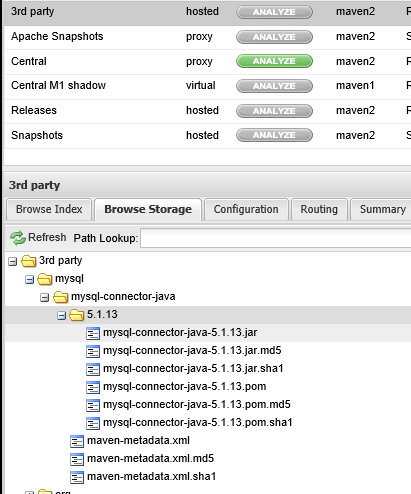
- 上传第三方的jar包,选择3rd party-->Artifact Upload--> 选择GAV方式-->填好构建参数-->增加jar包-->上传,在Browse Storeage查看
【Maven】Nexus配置和使用的更多相关文章
- maven+nexus配置本地私有仓库
以下是settting.xml的配置 <?xml version="1.0" encoding="UTF-8"?> <settings> ...
- Maven nexus安装、配置和使用
简介 Nexus 可以代理并缓存 Maven 构件,当 Maven 需要下载构件的时候,就不需要反复的请求中央仓库. 有些公司都不提供外网给项目组人员,因此就不能使用 Maven 访问 ...
- 架构(二)Maven安装以及Nexus配置
一 Maven安装配置 1.1 下载 http://mirrors.tuna.tsinghua.edu.cn/apache/maven/maven-3/3.5.4/binaries/apache-ma ...
- 使用Nexus配置Maven私有仓库
使用Nexus配置Maven私有仓库 作者:尹正杰 版权声明:原创作品,谢绝转载!否则将追究法律责任. 一.安装配置Nexus 1>.下载nexus 下载地址:https://www.sonat ...
- Nexus Repository3安装和maven,npm配置(Linux)
Nexus Repository下载 根据操作系统选择指定版本,本文针对Linux安装,其他的安装过程可能有所差异. https://help.sonatype.com/repomanager3/do ...
- 使用Maven+Nexus+Jenkins+Svn+Tomcat+Sonar搭建持续集成环境(二)
前言 上一篇随笔Maven+Nexus+Jenkins+Svn+Tomcat+Sonar搭建持续集成环境(一)介绍maven和nexus的环境搭建,以及如何使用maven和nexus统一管理库 ...
- 使用Maven+Nexus+Jenkins+Svn+Tomcat+Sonar搭建持续集成环境(一)
前言 但凡一个略有规模的项目都需要一个持续集成环境的支撑,为什么需要持续集成环境,我们来看一个例子.假如一个项目,由A.B两位程序员来协作开发,A负责前端模块,B负责后端模块,前端依赖后端.A ...
- 国内可用maven repository 配置
国内可用maven repository 配置 发表于2016/1/4 23:08:04 10235人阅读 分类: maven 鉴于一些原因,从maven中央仓库download依赖包时,被各种折磨 ...
- maven的安装,maven库配置和Eclipse插件的安装
maven的安装,maven库配置和Eclipse插件的安装 1.下载并解压maven 2.配置环境变量 3.配置maven配置文件 1.下载链接 Downloading Apache Maven 2 ...
随机推荐
- HP服务器安装配置教程
使用iLO远程管理HP系列服务器 http://blog.51cto.com/wangchunhai/837529
- form表单提交参数封装
function getFormValues(element,options) { var data = {}; if(element == null || element == undefined) ...
- leetcode324
class Solution { public void wiggleSort(int[] nums) { int[] temp = Arrays.copyOfRange(nums, 0, nums. ...
- Declaration terminated incorrectly 讨厌 这样就不可以了
#include "vcl.fctreeview.hpp"#include "RM_Class.hpp"#include "RM_Common.hpp ...
- 前端-CSS-10-定位
<!-- 定位有三种: 1.相对定位 2.绝对定位 3.固定定位 这三种定位,每种定位都暗藏玄机,所以我们要一一单讲 position:relative; position:absolute; ...
- Java使用poi从数据库读取数据生成Excel表格
想要使用POI操作以xsl结尾的Excel,首先要下载poi相关的jar包,用到的jar有: poi-3.9.jar poi-ooxml-3.9.jar poi-ooxml-schemas-3.9.j ...
- 第二次安装docker时,报Transaction check error的解决方法
如果在yum安装软件的时候,出现了Transaction check error:这种情况,说明rpm软件包出现了冲突,解决方法是: vi /etc/yum.repos.d/epel.repo 将en ...
- webserive学习记录1-jdk自带webservice
最近在看webservice有视频,想年后找工作时增加点资本,视频终于看完了,自己又增加了些东西,现在就把视频中学到的和自己发现的东西总结一下. java jdk中自带一个轻量级的webservice ...
- asp.net cors solution
I have a simple actionmethod, that returns some json. It runs on ajax.example.com. I need to access ...
- 如何将int整型转换成String字符串类型
自动类型转换适用于兼容类型之间从小范围到大范围数据的转换. nt转换成String int i = 10; int b=1: System.out.pritnln(a + b); 里面靠近字符串,所以 ...