
winform 自定义控件:半透明Loading控件
winform 自定义控件:半透明Loading控件
by wgscd
date:2015-05-05
效果:
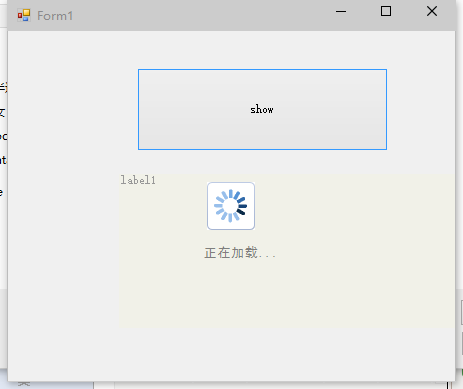
using System;
using System.Drawing;
using System.Windows.Forms;
using System.ComponentModel;
using System.Threading;
namespace wgscd
{
/// <summary>
/// 自定义控件:半透明控件
/// </summary>
[ToolboxBitmap(typeof(MyLoadingCtl))]
public class MyLoadingCtl : System.Windows.Forms.Control
{
private bool _transparentBG = true;//是否使用透明
private int _alpha = 125;//设置透明度
private SolidBrush fontBrush= new SolidBrush(Color.FromArgb(206,94,94,94));
private System.ComponentModel.Container components = new System.ComponentModel.Container();
public MyLoadingCtl()
: this(125, true)
{
}
/// <summary>
/// 显示遮罩层
/// </summary>
/// <param name="form">要显示的父窗体</param>
public void ShowLoading(Form form)
{
try
{
// SetStyle(System.Windows.Forms.ControlStyles.Opaque, true);
base.CreateControl();
form.Controls.Add(this);
// this._alpha = Alpha;
// if (isShowLoadingImage)
//{
// PictureBox pictureBox_Loading = new PictureBox();
// pictureBox_Loading.BackColor = System.Drawing.Color.White;
// pictureBox_Loading.Image = 加载中.Properties.Resources.loading;
// pictureBox_Loading.Name = "pictureBox_Loading";
// pictureBox_Loading.Size = new System.Drawing.Size(48, 48);
// pictureBox_Loading.SizeMode = System.Windows.Forms.PictureBoxSizeMode.AutoSize;
// Point Location = new Point(this.Location.X + (this.Width - pictureBox_Loading.Width) / 2, this.Location.Y + (this.Height - pictureBox_Loading.Height) / 2);//居中
// pictureBox_Loading.Location = Location;
// pictureBox_Loading.Anchor = AnchorStyles.None;
// this.Controls.Add(pictureBox_Loading);
//}
this.Dock = DockStyle.Fill;
this.BringToFront();
this.Enabled = true;
this.Visible = true;
Refresh();
Invalidate();
}
catch { }
}
public MyLoadingCtl(int Alpha, bool IsShowLoadingImage)
{
SetStyle(System.Windows.Forms.ControlStyles.Opaque, true);
base.CreateControl();
this._alpha = Alpha;
if (IsShowLoadingImage)
{
PictureBox pictureBox_Loading = new PictureBox();
pictureBox_Loading.BackColor = System.Drawing.Color.White;
pictureBox_Loading.Image = 加载中.Properties.Resources.loading;
pictureBox_Loading.Name = "pictureBox_Loading";
pictureBox_Loading.Size = new System.Drawing.Size(48, 48);
pictureBox_Loading.SizeMode = System.Windows.Forms.PictureBoxSizeMode.AutoSize;
Point Location = new Point(this.Location.X + (this.Width - pictureBox_Loading.Width) / 2, this.Location.Y + (this.Height - pictureBox_Loading.Height) / 2);//居中
pictureBox_Loading.Location = Location;
pictureBox_Loading.Anchor = AnchorStyles.None;
this.Controls.Add(pictureBox_Loading);
Invalidate();
}
}
protected override void Dispose(bool disposing)
{
if (disposing)
{
if (!((components == null)))
{
components.Dispose();
}
}
base.Dispose(disposing);
}
/// <summary>
/// 自定义绘制窗体
/// </summary>
/// <param name="e"></param>
protected override void OnPaint(System.Windows.Forms.PaintEventArgs e)
{
float vlblControlWidth;
float vlblControlHeight;
Pen labelBorderPen;
SolidBrush labelBackColorBrush;
if (_transparentBG)
{
Color drawColor = Color.FromArgb(this._alpha, this.BackColor);
labelBorderPen = new Pen(drawColor, 0);
labelBackColorBrush = new SolidBrush(drawColor);
}
else
{
labelBorderPen = new Pen(this.BackColor, 0);
labelBackColorBrush = new SolidBrush(this.BackColor);
}
base.OnPaint(e);
vlblControlWidth = this.Size.Width;
vlblControlHeight = this.Size.Height;
e.Graphics.DrawRectangle(labelBorderPen, 0, 0, vlblControlWidth, vlblControlHeight);
e.Graphics.FillRectangle(labelBackColorBrush, 0, 0, vlblControlWidth, vlblControlHeight);
e.Graphics.DrawString("正在加载...",new Font("黑体",10), fontBrush, vlblControlWidth/2-30, vlblControlHeight/2+40);
}
protected override CreateParams CreateParams//v1.10
{
get
{
CreateParams cp = base.CreateParams;
cp.ExStyle |= 0x00000020; //0x20; // 开启 WS_EX_TRANSPARENT,使控件支持透明
return cp;
}
}
/*
* [Category("MyLoadingCtl"), Description("是否使用透明,默认为True")]
* 一般用于说明你自定义控件的属性(Property)。
* Category用于说明该属性属于哪个分类,Description自然就是该属性的含义解释。
*/
[Category("MyLoadingCtl"), Description("是否使用透明,默认为True")]
public bool TransparentBG
{
get
{
return _transparentBG;
}
set
{
_transparentBG = value;
this.Invalidate();
}
}
[Category("MyLoadingCtl"), Description("设置透明度")]
public int Alpha
{
get
{
return _alpha;
}
set
{
_alpha = value;
this.Invalidate();
}
}
}
}
/*
外部窗体调用:
public Form1()
{
InitializeComponent();
bgWorker.DoWork += BgWorker_DoWork;
bgWorker.RunWorkerCompleted += BgWorker_RunWorkerCompleted;
}
BackgroundWorker bgWorker = new BackgroundWorker();
wgscd.MyLoadingCtl loadingCtl = new wgscd.MyLoadingCtl(162,true);//定义加载控件
private void BgWorker_DoWork(object sender, DoWorkEventArgs e)
{
System.Threading.Thread.Sleep(3333);
}
private void BgWorker_RunWorkerCompleted(object sender, RunWorkerCompletedEventArgs e)
{
loadingCtl.Hide();
}
private void btnShow_Click(object sender, EventArgs e)
{
//显示加载动画
loadingCtl.ShowLoading(this);
Application.DoEvents();
bgWorker.RunWorkerAsync();
}
*/
用到是loading GIF图片:

再来些


winform 自定义控件:半透明Loading控件的更多相关文章
- (一)c#Winform自定义控件-基类控件
前提 入行已经7,8年了,一直想做一套漂亮点的自定义控件,于是就有了本系列文章. 开源地址:https://gitee.com/kwwwvagaa/net_winform_custom_control ...
- C# 自定义控件VS用户控件
1 自定义控件与用户控件区别 WinForm中, 用户控件(User Control):继承自 UserControl,主要用于开发 Container 控件,Container控件可以添加其他Con ...
- WPF实现炫酷Loading控件
Win8系统的Loading效果还是很不错的,网上也有人用CSS3等技术实现,研究了一下,并打算用WPF自定义一个Loading控件实现类似的效果,并可以让用户对Loading的颗粒(Particle ...
- 自定义控件VS用户控件
自定义控件VS用户控件 2015-06-16 1 自定义控件与用户控件区别 WinForm中, 用户控件(User Control):继承自 UserControl,主要用于开发 Container ...
- 富客户端 wpf, Winform 多线程更新UI控件
前言 在富客户端的app中,如果在主线程中运行一些长时间的任务,那么应用程序的UI就不能正常相应.因为主线程要负责消息循环,相应鼠标等事件还有展现UI. 因此我们可以开启一个线程来格外处理需要长时间的 ...
- [转] WinForm实现移除控件某个事件的方法
原文 WinForm实现移除控件某个事件的方法 本文实例讲述了WinForm实现移除控件某个事件的方法,供大家参考借鉴一下.具体功能代码如下: 主要功能部分代码如下: /// <summary& ...
- Winform中修改WebBrowser控件User-Agent的方法(已经测试成功)
using System; using System.Collections.Generic; using System.Linq; using System.Text; using System.W ...
- WPF中嵌入WinForm中的webbrowser控件
原文:WPF中嵌入WinForm中的webbrowser控件 使用VS2008创建WPF应用程序,需使用webbrowser.从工具箱中添加WPF组件中的webbrowser发现其中有很多属性事件不能 ...
- C# winform项目中ListView控件使用CheckBoxes属性实现单选功能
C# winform项目中ListView控件使用CheckBoxes属性实现单选功能 在做项目时需要使用ListView控件的CheckBoxes属性显示,还要在点击行时自动选中CheckBoxes ...
随机推荐
- 聊聊 getClientRects 和 getBoundingClientRect 方法
开始表演 今天来聊一下两个相似的方法,它们就是:getBoundingClientRect().getClientRects(). 只见它们俩手拉手地登上了舞台,一个鞠躬,便开始滔滔不绝起来. 自述 ...
- JQuery-学习。
jQuery是一套跨浏览器的JavaScript库,简化HTML与JavaScript之间的操作.由约翰·雷西格(John Resig)在2006年1月的BarCamp NYC上发布第一个版本.目前是 ...
- git repo代码部署策略及工具
一般在项目或者产品开发流程中,先是开发人员在本地做好开发及测试,其中可能包含很多用于测试用的目录以及源代码文件,在部署前往往会有一个build过程.web项目最终build产生出优化生产环境下减少ht ...
- Sqlserver2014 迁移数据库
由于当初安装sqlserver 的时候选择默认安装的路径,导致现在c盘爆满,安装不了其它软件.因此想到了迁移数据库,网上搜索了一些简介,但是缺少一些步骤,导致数据库附加的时候失败.现总结如下: 1.将 ...
- 【转载】 C语言命令行小猪佩奇
// ASCII Peppa Pig by Milo Yip #include <math.h> #include <stdio.h> #include <stdlib. ...
- PHP中抽象方法、抽象类和接口的用法
在类中,没有方法体的方法就是抽象方法. abstract 可见性 function 方法名称(参数1,.....); // 如果没有显示地指定可见性,则默认为public 如: public ...
- [EffectiveC++]item26:尽可能延后变量定义式的出现时间
- n=n+1 放在print(s)的前/后的影响
# 1+2+3+4+5+6+.....+100 = ? #关键在于,当n为时,才print(s) n = 1s = 0while n < 101: s = s + n if n ==100: # ...
- html5 js 游戏的一篇博客 貌似不错
http://blog.csdn.net/lufy_legend/article/details/8888787
- 最新版本2018.1.1webstorm安装、汉化、破解教程
一.安装(下载与激活) 1.官网下载安装包https://www.jetbrains.com/webstorm/ 2.开始安装 3.选择安装目录,点击下一步 4.勾选64位,点击下一步 5.继续下一步 ...