
在windows的IDEA运行Presto
After building Presto for the first time, you can load the project into your IDE and run the server. We recommend using IntelliJ IDEA. Because Presto is a standard Maven project, you can import it into your IDE using the root pom.xml file
既然Presto的github首页推荐我们在IDEA运行服务器,那么我们就用IDEA来吧。
1、克隆项目 & checkout 版本
git clone https://github.com/prestodb/presto.git
git checkout 0.207
这里注意应该直接克隆项目,而不是下载代码导入IDEA,否则在后面构建程序的时候可能会出现关于git-comment-id-plugin的错误。
2、生成anltr4代码
在运行项目的时候,出现例如在presto-parser模块Cannot resolve symbol 'SqlBaseParser缺少代码的错误,这是因为源码不带anltr4的生成代码。可以在根目录运行生成anltr4代码的命令。
mvn antlr4:antlr4
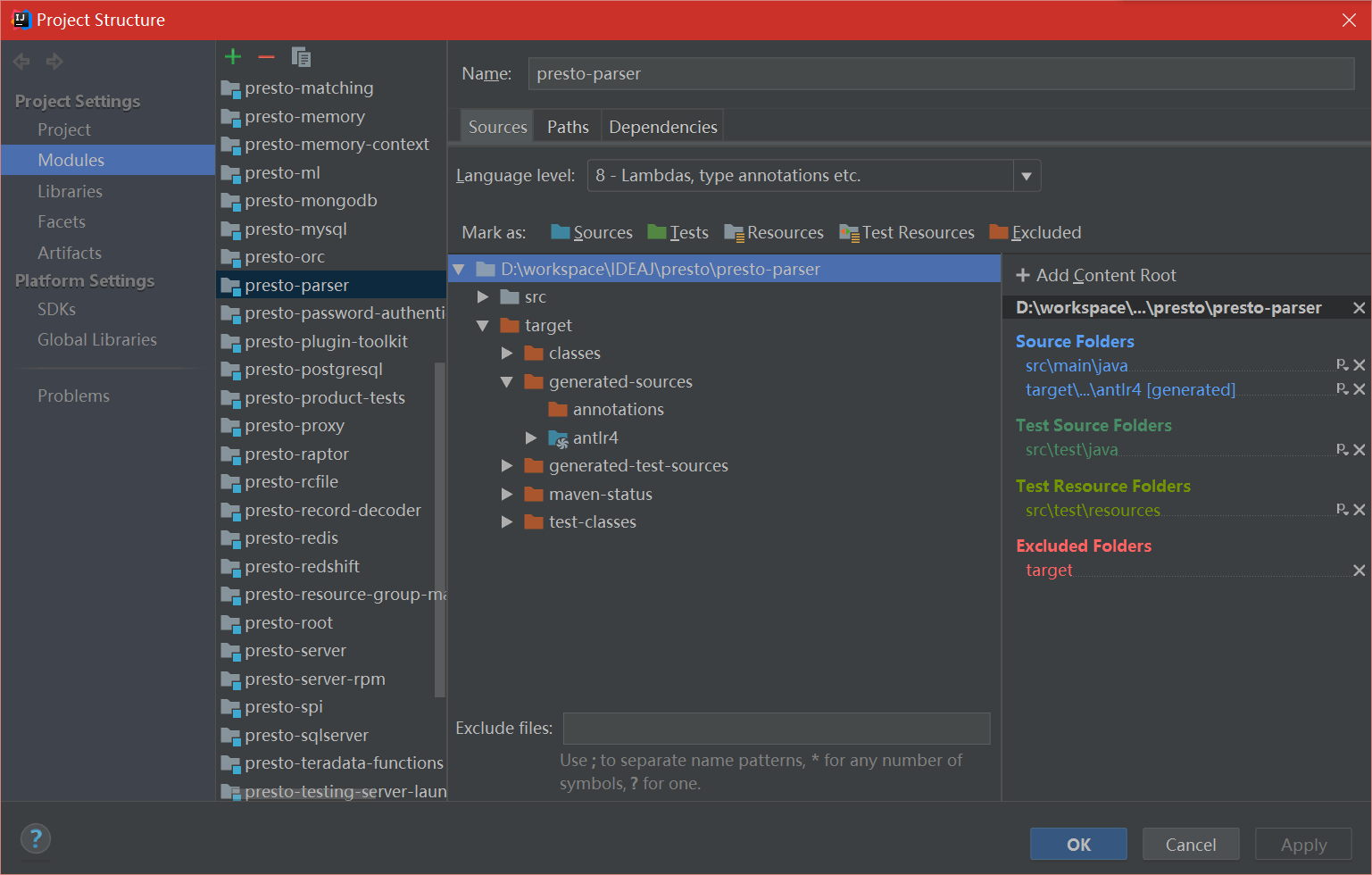
在执行命令完成后,错误依旧没有消失,我们可以看看项目的结构。File -> Project Structure -> Modules -> presto-parser,将presto-parser的target -> generated-sources ->anltr4设置为Sources
3、设置Presto环境
Requirements
- Mac OS X or Linux
- Java 8 Update 92 or higher (8u92+), 64-bit. Both Oracle JDK and OpenJDK are supported.
- Maven 3.3.9+ (for building)
- Python 2.4+ (for running with the launcher script)
官网好像不支持windows,不过没关系,我们动些手脚让windows也能运行。
Presto comes with sample configuration that should work out-of-the-box for development. Use the following options to create a run configuration:
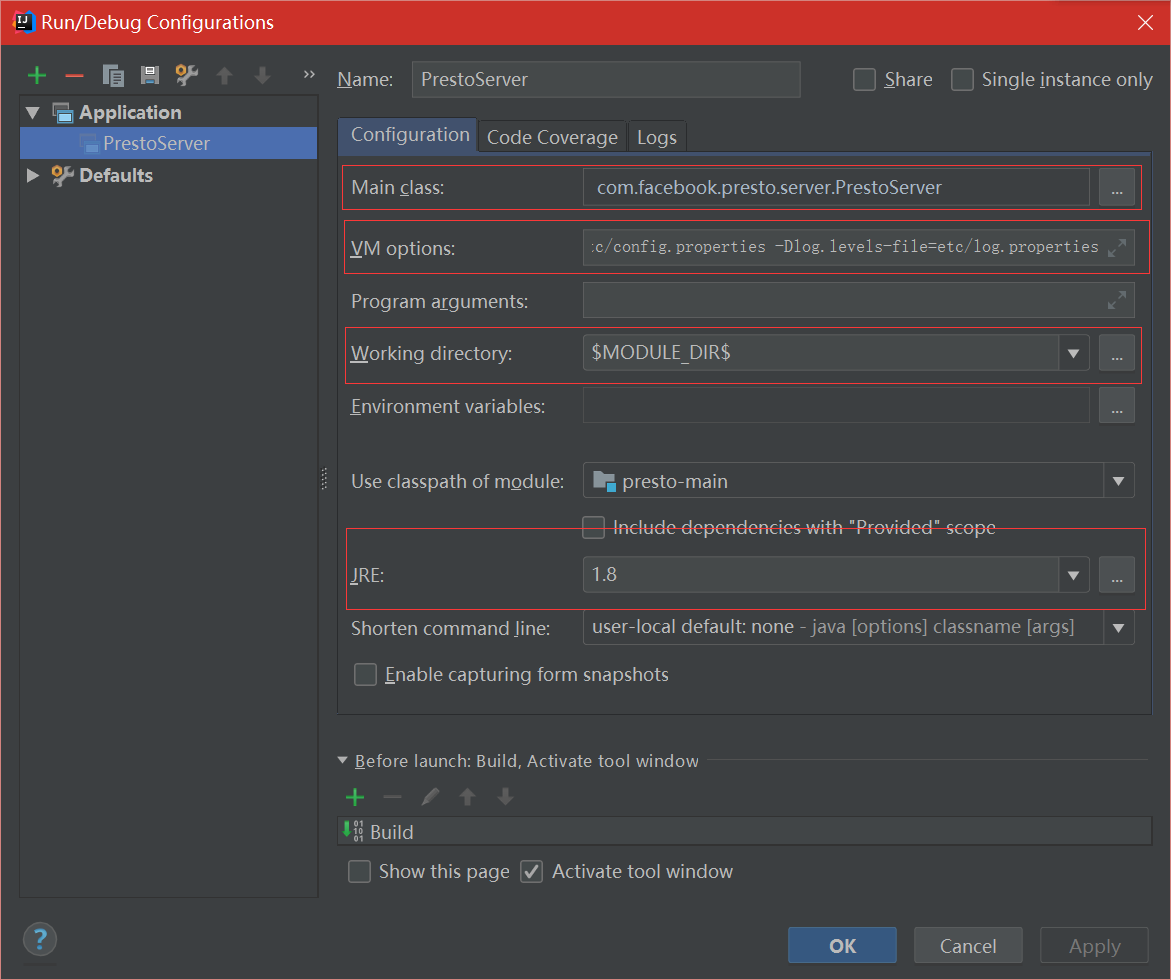
- Main Class: com.facebook.presto.server.PrestoServer
- VM Options: -ea -XX:+UseG1GC -XX:G1HeapRegionSize=32M -XX:+UseGCOverheadLimit -XX:+ExplicitGCInvokesConcurrent -Xmx2G -Dconfig=etc/config.properties -Dlog.levels-file=etc/log.properties
- Working directory: $MODULE_DIR$
- Use classpath of module: presto-main
按照下图设置好,就行:
4、修改文件
注释presto-main模块PrestoSystemRequirements的代码,相关代码片段用IDEA搜索功能查找
failRequirement("Presto requires Linux or Mac OS X (found %s)", osName);
修改文件描述符大小限制(手动改成10000):
private static OptionalLong getMaxFileDescriptorCount()

    {

        try {

            MBeanServer mbeanServer = ManagementFactory.getPlatformMBeanServer();

            //Object maxFileDescriptorCount = mbeanServer.getAttribute(ObjectName.getInstance(OPERATING_SYSTEM_MXBEAN_NAME), "MaxFileDescriptorCount");

            Object maxFileDescriptorCount = 10000;

            return OptionalLong.of(((Number) maxFileDescriptorCount).longValue());

        }

        catch (Exception e) {

            return OptionalLong.empty();

        }

    }
下面a/b步骤可以根据目的选一个,a步不包含任何插件,可以快速调试接口。b步包含完整插件,有完整的功能:
a、接下来,把PluginManager的插件注释掉,
        /*for (File file : listFiles(installedPluginsDir)) {

            if (file.isDirectory()) {

                loadPlugin(file.getAbsolutePath());

            }

        }

        for (String plugin : plugins) {

            loadPlugin(plugin);

        }*/
把etc/catalog的配置文件全部改名为.properties.bak。
b、下载presto-server-0.207.tar.gz文件,解压到任意目录,把这里边的plugin目录作为IDEA工程的plugin目录,需要打开文件PluginManagerConfig.java,做如下修改:
//    private File installedPluginsDir = new File("plugin");

    private File installedPluginsDir = new File("D:\\presto-server-0.207\\plugin");
etc/catalog的配置文件根据需要改名为.properties.bak。
最后运行PrestoServer。
参考文献:
https://github.com/prestodb/presto
https://blog.csdn.net/sinat_27545249/article/details/72852148
在windows的IDEA运行Presto的更多相关文章
- 以Windows服务方式运行.NET Core程序
在之前一篇博客<以Windows服务方式运行ASP.NET Core程序>中我讲述了如何把ASP.NET Core程序作为Windows服务运行的方法,而今,我们又遇到了新的问题,那就是: ...
- 如何在Windows 10上运行Docker和Kubernetes?
如何在Windows 10上运行Docker和Kubernetes? 在Windows上学习Docker和Kubernetes,开始的时候会让你觉得无从下手.最起码安装好这些软件都不是一件容易的事情. ...
- [转帖]以Windows服务方式运行ASP.NET Core程序
以Windows服务方式运行ASP.NET Core程序 原作者blog: https://www.cnblogs.com/guogangj/p/9198031.htmlaspnet的blog 需要持 ...
- [转帖]以Windows服务方式运行.NET Core程序
以Windows服务方式运行.NET Core程序 原作者blog:https://www.cnblogs.com/guogangj/p/10093102.html 里面使用了NSSM 工具 但是自己 ...
- 连表查询都用Left Join吧 以Windows服务方式运行.NET Core程序 HTTP和HTTPS的区别 ASP.NET SignalR介绍 asp.net—WebApi跨域 asp.net—自定义轻量级ORM C#之23中设计模式
连表查询都用Left Join吧 最近看同事的代码,SQL连表查询的时候很多时候用的是Inner Join,而我觉得对我们的业务而言,99.9%都应该使用Left Join(还有0.1%我不知道在 ...
- webstorm git 怎么断开版本控制 webstorm git for windows 禁止 自动运行
也是无语啊,今天装了下最新版本的webstorm , 发现特别卡,老动不动就卡死, 看了下进程, 牛X 啊, git for windows 一直蹭蹭蹭的疯狂增长,一开始的一点到后来的庞然大物. ...
- windows bat文件运行中文乱码
windows bat文件运行中文乱码 CreationTime--2018年7月17日08点51分 Author:Marydon 1.情景展示 运行bat文件,里面的中文提示显示乱码 2.问题剖 ...
- 在windows环境下运行compass文件出现的错误提示解决方案
在windows环境下运行compass文件出现的错误提示解决方案 例如:经常在项目中运行grunt命令编译scss文件的时候,会出现下面的错误提示 (Encoding::CompatibilityE ...
- windows程序内部运行机制
Windows程序内部运行机制 2007-10-21 19:52 1010人阅读 评论(0) 收藏 举报 windowsvc++applicationcallbackwinapistructure W ...
随机推荐
- js 算法
var str=‘abscdf’; function solution(str){ var arr=new Array(); if(str.length%2==0){ for(i=0;i<str ...
- Delphi 获取Ip地址的方法总结
通过注册表获取或修改Ip 想到Windows会把系统网卡相关信息存入注册表,肯定可通过注册表读取具体ip信息.大致思路是找HKEY_LOCAL_MACHINE\SOFTWARE\Microsoft\W ...
- 将博客搬至CSDN和和自己的网站
将博客同步一份到CSDN去, CSDN博客地址:https://blog.csdn.net/klkfl ---------------- 分割线 2018-10-7 自己用typecho 搭建了一个博 ...
- [转帖] 固定硬盘接口 U.2和M.2
U.2接口 U.2接口别称SFF-8639,是由固态硬盘形态工作组织(SSD Form Factor Work Group)推出的接口规范.U.2不但能支持SATA-Express规范,还能兼容SAS ...
- C#全局钩子和局部钩子记录
源自:https://blog.csdn.net/programvae/article/details/80292076 最近碰巧要使用键盘钩子,于是在网上搜索了一番,发现大多数博客的文章都是雷同的, ...
- html select options & vue h render
html select options & vue h render https://developer.mozilla.org/en-US/docs/Web/HTML/Element/opt ...
- Java Junit测试框架
Java Junit测试框架 1.相关概念 Ø JUnit:是一个开发源代码的Java测试框架,用于编写和运行可重复的测试.它是用于单元测试框架体系xUnit的一个实例(用于java语言).主要 ...
- BZOJ5127 数据校验
第一眼看错题以为只是要求区间值域连续,那莫队一发维护形成的值域段数量就行了. 原题这个条件相当于区间内相邻数差的绝对值不超过1.所以只要对这个做个前缀和就……完了? #include<iostr ...
- BZOJ3243 NOI2013向量内积(随机化)
考虑奇技淫巧. 首先是k=2.对向量维护一个前缀和,每次将当前向量与前缀和点乘.如果点乘结果不等于i-1&1,说明当前向量至少和之前的某个向量的数量积是2的倍数,暴力找就可以了.当然等于i-1 ...
- 题解 P3870 【[TJOI2009]开关】
这个题我愣是交了好几遍没有过...... 后来@_皎月半洒花dalao告诉我说要^儿子节点的tag,然后就明白了...... 行吧,先上题面: 题目描述 现有N(2 ≤ N ≤ 100000)盏灯排成 ...