
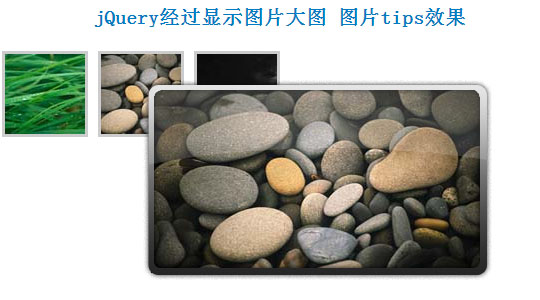
jQuery制作鼠标经过显示图片大图,生成图片tips效果
一般tips都是文字,这个可以支持图片,很漂亮:
<script type="text/javascript">

    // Load this script once the document is ready

    $(document).ready(function () {

        // Get all the thumbnail

        $('div.thumbnail-item').mouseenter(function(e) {

            // Calculate the position of the image tooltip

            x = e.pageX - $(this).offset().left;

            y = e.pageY - $(this).offset().top;

            // Set the z-index of the current item,

            // make sure it's greater than the rest of thumbnail items

            // Set the position and display the image tooltip

            $(this).css('z-index','15')

            .children("div.tooltip")

            .css({'top': y + 10,'left': x + 20,'display':'block'});

        }).mousemove(function(e) {

            // Calculate the position of the image tooltip

            x = e.pageX - $(this).offset().left;

            y = e.pageY - $(this).offset().top;

            // This line causes the tooltip will follow the mouse pointer

            $(this).children("div.tooltip").css({'top': y + 10,'left': x + 20});

        }).mouseleave(function() {

            // Reset the z-index and hide the image tooltip

            $(this).css('z-index','1')

            .children("div.tooltip")

            .animate({"opacity": "hide"}, "fast");

        });

    });

    </script>
CSS文件如下:
<style>

.thumbnail-item {

    /* position relative so that we can use position absolute for the tooltip */

    position: relative;

    float: left;

    margin: 0px 5px;

}

.thumbnail-item a {

    display: block;

}

.thumbnail-item img.thumbnail {

    border:3px solid #ccc;

}

.tooltip {

    /* by default, hide it */

    display: none;

    /* allow us to move the tooltip */

    position: absolute;

    /* align the image properly */

    padding: 8px 0 0 8px;

}

    .tooltip span.overlay {

        /* the png image, need ie6 hack though */

        background: url(images/overlay.png) no-repeat;

        /* put this overlay on the top of the tooltip image */

        position: absolute;

        top: 0px;

        left: 0px;

        display: block;

        width: 350px;

        height: 200px;

    }

    </style>
HTML代码:
<div class="thumbnail-item">

        <a href="#"><img src="data:images/small1.jpg" class="thumbnail"/></a>

        <div class="tooltip">

            <img src="data:images/big1.jpg" alt="" width="330" height="185" />

            <span class="overlay"></span>

        </div>

    </div>

    <div class="thumbnail-item">

        <a href="#"><img src="data:images/small2.jpg" class="thumbnail"/></a>

        <div class="tooltip">

            <img src="data:images/big2.jpg" alt="" width="330" height="185" />

            <span class="overlay"></span>

        </div>

    </div>

    <div class="thumbnail-item">

        <a href="#"><img src="data:images/small3.jpg" class="thumbnail"/></a>

        <div class="tooltip">

            <img src="data:images/big3.jpg" alt="" width="330" height="185" />

            <span class="overlay"></span>

        </div>

    </div>
jQuery制作鼠标经过显示图片大图,生成图片tips效果的更多相关文章
- 杠杠做的全屏随鼠标滚动显示图片,类似于PPT效果
图片有22张,是一张张加载的,耐心点,鼠标一直尝试向下滚就行了. 图片来自<天空之境:乌尤尼盐沼>,一个好美好美的地方 引个流,欢迎去我的博客看看:http://blog.cxycs.co ...
- jQuery实现鼠标划过展示大图的方法
这篇文章主要介绍了jQuery实现鼠标划过展示大图的方法,实例分析了jQuery操作鼠标事件及图片处理的技巧,具有一定参考借鉴价值,需要的朋友可以参考下 本文实例讲述了jQuery实现鼠标划过展示大图 ...
- jQuery实现鼠标悬停显示提示信息窗口的方法
<!DOCTYPE html PUBLIC "-//W3C//DTD XHTML 1.0 Transitional//EN" "http://www.w3.org/ ...
- jQuery - 制作点击显示二级菜单效果
<!DOCTYPE html> <html> <head lang="en"> <meta charset="UTF-8&quo ...
- JS实现 鼠标放上去 图片自动放大的效果
前段时间做项目,要实现,一张图片,鼠标放上去图片自动变大的效果,虽然难度不大,但当时也想了一段时间,当时没时间记录一下,现在有时间了,写篇博客把代码给记录一下: 效果如下: 代码如下: <!DO ...
- wpf image控件循环显示图片 以达到动画效果 问题及解决方案
1>最初方案: 用wpf的image控件循环显示图片,达到动画效果,其实就是在后台代码动态改变Image.Source的值,关键代码: ; i < ; i++)//六百张图片 { Bitm ...
- jQuery实现鼠标移入切换图片
初始效果: 鼠标移入效果: 首先添加jQuery库,我这边直接引用百度CDN地址 <script src="https://apps.bdimg.com/libs/jquery/2.1 ...
- jquery easyui鼠标右击显示自定义的菜单
1.datagrid表格中,对某一行鼠标右击,显示出如下的自定义的菜单: 在html页面中写: <div id="menu" class="easyui-menu& ...
- Qt5制作鼠标悬停显示Hint的ToolTip
在日常生活中的使用的软件中,我们经常会遇到这样的情况. 我们在网页上,有些网页链接的文字(比如文章标题,知乎问题标题,百度的词条等)因为太长了,而显示不出来,但是鼠标悬停在上面的时候就可以显示出来. ...
随机推荐
- C++ socket网络爬虫(1)
C++写的socket网络爬虫,代码会在最后一次讲解中提供给大家,同时我也会在写的同时不断的对代码进行完善与修改 我首先向大家讲解如何将网页中的内容,文本,图片等下载到电脑中. 我会教大家如何将百度首 ...
- n位格雷曼实现
参考: 格雷码的实现 问题:产生n位元的所有格雷码. 格雷码(Gray Code)是一个数列集合,每个数使用二进位来表示,假设使用n位元来表示每个数字,任两个数之间只有一个位元值不同. 例如以下为 ...
- vue 实战报错解决方案
最近做项目,遇到一个问题 列表滚动,上拉加载功能 采用了better-scroll 插件,将better-scroll 封装成组件,采用父组件传递值给子组件的方式,子组件 采用$emit 方式 通知父 ...
- [BUAA_SE_2017]代码复审-Week2
代码复审 CheckList 1.概要部分 代码能符合需求和规格说明么? 符合,经过-c及-s合法参数测试,程序均能生成.求解相应数独. 代码设计是否有周全的考虑? 对于非法输入,程序处理不够周全. ...
- 通过分析java heap dump解决生产问题
最近在生产环境遇到一个问题,正常情况下,ECS CPU始终保持在10%以下,内存也只占用40%左右,但是连续2天出现了CPU占用100%的情况,然后系统卡住.看阿里云的ECS监控,能看到CPU飙到了1 ...
- QQ分享-定制分享卡片
一般H5页面在进行分享的时候,都会生成一个分享卡片,但是这些卡片的生成是很多时候是我们是想要生成的卡片, 对于QQ,我们只需要在html页面里加如3个标签即可,如下: <meta itempro ...
- BZOJ2878 NOI2012迷失游乐园(树形dp+环套树+概率期望)
考虑树的部分分怎么做.令f[i]为i向子树内走的期望路径长度,转移比较显然.算答案时先把其父亲的答案弄好就可以统计自己的答案了. 环套树也类似.树里直接dp,对环上点暴力考虑环上的每条路径,算完后再在 ...
- P2231 [HNOI2002]跳蚤
题目描述 Z城市居住着很多只跳蚤.在Z城市周六生活频道有一个娱乐节目.一只跳蚤将被请上一个高空钢丝的正中央.钢丝很长,可以看作是无限长.节目主持人会给该跳蚤发一张卡片.卡片上写有N+1个自然数.其中最 ...
- NIO - 三大组件
NIO 概述 NIO有三个核心组件: 通道(Channels) 缓存(Buffers) 选择器(Selectors) 实际上,NIO的组件和类远不止这三个,但这个三个组件是核心.至于其它组件,例如Pi ...
- Mininet 系列实验(五)
实验内容 实现一个单个交换机的拓扑,添加一个交换机,和N个主机到网络中.交换机和主机之间的每个链路能够设置带宽.延迟时间.以及丢包率.创建一个包含一个交换机和四个主机的网络,使用iperf测试主机之间 ...