
25 The Go image/draw package go图片/描绘包:图片/描绘包的基本原理
The Go image/draw package go图片/描绘包:图片/描绘包的基本原理
29 September 2011
Introduction
Package image/draw defines only one operation: drawing a source image onto a destination image, through an optional mask image. This one operation is surprisingly versatile and can perform a number of common image manipulation tasks elegantly and efficiently.
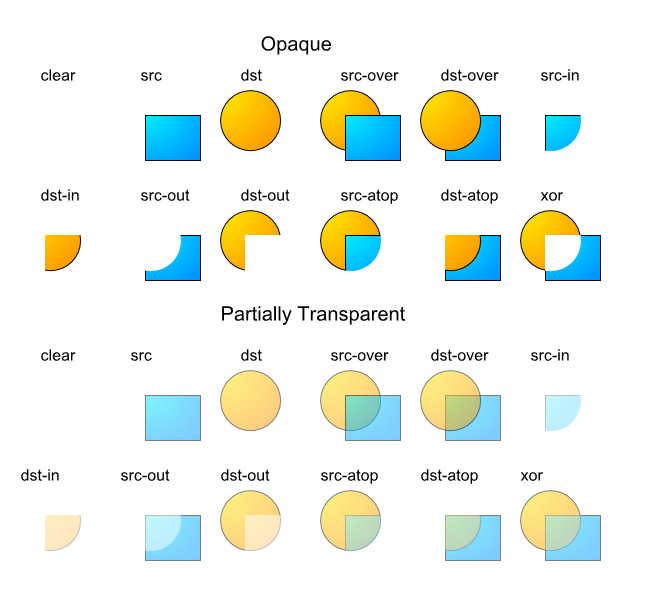
Composition is performed pixel by pixel in the style of the Plan 9 graphics library and the X Render extension. The model is based on the classic "Compositing Digital Images" paper by Porter and Duff, with an additional mask parameter: dst = (src IN mask) OP dst. For a fully opaque mask, this reduces to the original Porter-Duff formula: dst = src OP dst. In Go, a nil mask image is equivalent to an infinitely sized, fully opaque mask image.
The Porter-Duff paper presented 12 different composition operators, but with an explicit mask, only 2 of these are needed in practice: source-over-destination and source. In Go, these operators are represented by the Over and Src constants. The Over operator performs the natural layering of a source image over a destination image: the change to the destination image is smaller where the source (after masking) is more transparent (that is, has lower alpha). The Src operator merely copies the source (after masking) with no regard for the destination image's original content. For fully opaque source and mask images, the two operators produce the same output, but the Src operator is usually faster.
Geometric Alignment
Composition requires associating destination pixels with source and mask pixels. Obviously, this requires destination, source and mask images, and a composition operator, but it also requires specifying what rectangle of each image to use. Not every drawing should write to the entire destination: when updating an animating image, it is more efficient to only draw the parts of the image that have changed. Not every drawing should read from the entire source: when using a sprite that combines many small images into one large one, only a part of the image is needed. Not every drawing should read from the entire mask: a mask image that collects a font's glyphs is similar to a sprite. Thus, drawing also needs to know three rectangles, one for each image. Since each rectangle has the same width and height, it suffices to pass a destination rectangle r and two points sp and mp: the source rectangle is equal to r translated so that r.Min in the destination image aligns with sp in the source image, and similarly for mp. The effective rectangle is also clipped to each image's bounds in their respective co-ordinate space.

The DrawMask function takes seven arguments, but an explicit mask and mask-point are usually unnecessary, so the Draw function takes five:
// Draw calls DrawMask with a nil mask.

func Draw(dst Image, r image.Rectangle, src image.Image, sp image.Point, op Op)

func DrawMask(dst Image, r image.Rectangle, src image.Image, sp image.Point,

 mask image.Image, mp image.Point, op Op)
The destination image must be mutable, so the image/draw package defines a draw.Image interface which has a Set method.
type Image interface {

    image.Image

    Set(x, y int, c color.Color)

}
Filling a Rectangle
To fill a rectangle with a solid color, use an image.Uniform source. The ColorImage type re-interprets a Color as a practically infinite-sized Image of that color. For those familiar with the design of Plan 9's draw library, there is no need for an explicit "repeat bit" in Go's slice-based image types; the concept is subsumed by Uniform.
// image.ZP is the zero point -- the origin.

draw.Draw(dst, r, &image.Uniform{c}, image.ZP, draw.Src)
To initialize a new image to all-blue:
m := image.NewRGBA(image.Rect(0, 0, 640, 480))

blue := color.RGBA{0, 0, 255, 255}

draw.Draw(m, m.Bounds(), &image.Uniform{blue}, image.ZP, draw.Src)
To reset an image to transparent (or black, if the destination image's color model cannot represent transparency), use image.Transparent, which is an image.Uniform:
draw.Draw(m, m.Bounds(), image.Transparent, image.ZP, draw.Src)

Copying an Image
To copy from a rectangle sr in the source image to a rectangle starting at a point dp in the destination, convert the source rectangle into the destination image's co-ordinate space:
r := image.Rectangle{dp, dp.Add(sr.Size())}

draw.Draw(dst, r, src, sr.Min, draw.Src)
Alternatively:
r := sr.Sub(sr.Min).Add(dp)

draw.Draw(dst, r, src, sr.Min, draw.Src)
To copy the entire source image, use sr = src.Bounds().

Scrolling an Image
Scrolling an image is just copying an image to itself, with different destination and source rectangles. Overlapping destination and source images are perfectly valid, just as Go's built-in copy function can handle overlapping destination and source slices. To scroll an image m by 20 pixels:
b := m.Bounds()

p := image.Pt(0, 20)

// Note that even though the second argument is b,

// the effective rectangle is smaller due to clipping.

draw.Draw(m, b, m, b.Min.Add(p), draw.Src)

dirtyRect := b.Intersect(image.Rect(b.Min.X, b.Max.Y-20, b.Max.X, b.Max.Y))

Converting an Image to RGBA
The result of decoding an image format might not be an image.RGBA: decoding a GIF results in an image.Paletted, decoding a JPEG results in a ycbcr.YCbCr, and the result of decoding a PNG depends on the image data. To convert any image to an image.RGBA:
b := src.Bounds()

m := image.NewRGBA(image.Rect(0, 0, b.Dx(), b.Dy()))

draw.Draw(m, m.Bounds(), src, b.Min, draw.Src)

Drawing Through a Mask
To draw an image through a circular mask with center p and radius r:
type circle struct {

    p image.Point

    r int

}

func (c *circle) ColorModel() color.Model {

    return color.AlphaModel

}

func (c *circle) Bounds() image.Rectangle {

    return image.Rect(c.p.X-c.r, c.p.Y-c.r, c.p.X+c.r, c.p.Y+c.r)

}

func (c *circle) At(x, y int) color.Color {

    xx, yy, rr := float64(x-c.p.X)+0.5, float64(y-c.p.Y)+0.5, float64(c.r)

    if xx*xx+yy*yy < rr*rr {

        return color.Alpha{255}

    }

    return color.Alpha{0}

}

    draw.DrawMask(dst, dst.Bounds(), src, image.ZP, &circle{p, r}, image.ZP, draw.Over)

Drawing Font Glyphs
To draw a font glyph in blue starting from a point p, draw with an image.ColorImage source and an image.Alpha mask. For simplicity, we aren't performing any sub-pixel positioning or rendering, or correcting for a font's height above a baseline.
src := &image.Uniform{color.RGBA{0, 0, 255, 255}}

mask := theGlyphImageForAFont()

mr := theBoundsFor(glyphIndex)

draw.DrawMask(dst, mr.Sub(mr.Min).Add(p), src, image.ZP, mask, mr.Min, draw.Over)

Performance
The image/draw package implementation demonstrates how to provide an image manipulation function that is both general purpose, yet efficient for common cases. The DrawMask function takes arguments of interface types, but immediately makes type assertions that its arguments are of specific struct types, corresponding to common operations like drawing one image.RGBA image onto another, or drawing an image.Alpha mask (such as a font glyph) onto an image.RGBA image. If a type assertion succeeds, that type information is used to run a specialized implementation of the general algorithm. If the assertions fail, the fallback code path uses the generic At and Setmethods. The fast-paths are purely a performance optimization; the resultant destination image is the same either way. In practice, only a small number of special cases are necessary to support typical applications.
By Nigel Tao
Related articles
- HTTP/2 Server Push
- Introducing HTTP Tracing
- Generating code
- Introducing the Go Race Detector
- Go maps in action
- go fmt your code
- Organizing Go code
- Debugging Go programs with the GNU Debugger
- The Go image package
- The Laws of Reflection
- Error handling and Go
- "First Class Functions in Go"
- Profiling Go Programs
- Spotlight on external Go libraries
- A GIF decoder: an exercise in Go interfaces
- Introducing Gofix
- Godoc: documenting Go code
- Gobs of data
- C? Go? Cgo!
- JSON and Go
- Go Slices: usage and internals
- Go Concurrency Patterns: Timing out, moving on
- Defer, Panic, and Recover
- Share Memory By Communicating
- JSON-RPC: a tale of interfaces
25 The Go image/draw package go图片/描绘包:图片/描绘包的基本原理的更多相关文章
- ios中摄像头/相册获取图片,压缩图片,上传服务器方法总结
相册 iphone的相册包含摄像头胶卷+用户计算机同步的部分照片.用户可以通过UIImagePickerController类提供的交互对话框来从相册中选择图像.但是,注意:相册中的图片机器路径无法直 ...
- Java 遍历文件下jpg图片并解析图片
package filetest; import java.io.File; import java.io.FilenameFilter; import java.io.IOException; ...
- 【Android】获取手机中已安装apk文件信息(PackageInfo、ResolveInfo)(应用图片、应用名、包名等)
众所周知,通过PackageManager可以获取手机端已安装的apk文件的信息,具体代码如下 PackageManager packageManager = this.getPackageManag ...
- MySQL数据库写入图片并读取图片显示到JLabel上的详解
相较于Oracle,MySQL作为一个轻量级的开源的数据库,可谓是大大简化了我们的操作.这次我就来写一个关于数据库存入图片,获取图片的例子吧,也为了今后的复习使用.(我们一般采取存入路径的方式,而不是 ...
- java多图片上传--前端实现预览--图片压缩 、图片缩放,区域裁剪,水印,旋转,保持比例。
java多图片上传--前端实现预览 前端代码: https://pan.baidu.com/s/1cqKbmjBSXOhFX4HR1XGkyQ 解压后: java后台: <!--文件上传--&g ...
- java关于图片处理修改图片大小
最近做了一个关于图片浏览的内容.因为图片都是一些证件的资料的扫描件所以比较大,对系统的影响也是非常之大的,有很大可能直接把系统干死.那么我是这么处理的,给大家分享一下.如果大家有好的方案的话一定要早点 ...
- spring mvc 图片上传,图片压缩、跨域解决、 按天生成文件夹 ,删除,限制为图片代码等相关配置
spring mvc 图片上传,跨域解决 按天生成文件夹 ,删除,限制为图片代码,等相关配置 fs.root=data/ #fs.root=/home/dev/fs/ #fs.root=D:/fs/ ...
- iOS 使用AFN 进行单图和多图上传 摄像头/相册获取图片,压缩图片
图片上传时必要将图片进行压缩,不然会上传失败 首先是同系统相册选择图片和视频.iOS系统自带有UIImagePickerController,可以选择或拍摄图片视频,但是最大的问题是只支持单选,由于项 ...
- Java图片上查找图片算法
之前用按键精灵写过一些游戏辅助,里面有个函数叫FindPic,就是在屏幕范围查找给定的一张图片,返回查找到的坐标位置. 现在,Java来实现这个函数类似的功能. 算法描述: 屏幕截图,得到图A,(查找 ...
随机推荐
- Find Common Characters - LeetCode
目录 题目链接 注意点 解法 小结 题目链接 Find Common Characters - LeetCode 注意点 不能单纯的以字母出现的次数来判断是否是公共的字母 解法 解法一:将第一个字符串 ...
- 设置debian6源
debian6真的太老了,个人喜欢追新,因为新版本用起来少很多乱七八糟的问题,不过线上有机器跑的这个版本,SO... 1.修改源文件,注释掉不可用的源,添加可用的源 # vim /etc/apt/so ...
- 解题:APIO 2014 序列分割
题面 拆开式子我们发现切割顺序不影响答案,所以可以设计出一个$dp[i][j]$表示到$i$为止切了$j$刀的最大收益之类的,然后做个前缀和就可以转移了. $dp[i][j]=min(dp[i][j] ...
- Python Opencv 色彩平衡
在平衡良好的照片中,最亮的颜色应该是白色和最暗的黑色. 因此,我们可以通过缩放每个R,G和B通道的直方图来移除图像中的色偏,使得它们跨越完整的0-255比例 网上只有C的代码 修改为Python代码 ...
- Chapter5 (语句) --C++Prime笔记
1.指用是一个只含有一个单独的分号的语句. 什么时候用到:语法上需要一条语句但是逻辑上不需要. 2.复合语句是指用花括号括起来的语句和声明的序列,又被称为块. 3.悬垂else :规定else与离它最 ...
- lower_bound/upper_bound example
http://www.cplusplus.com/reference/algorithm/upper_bound/左闭右开 Return iterator to lower bound Returns ...
- 01 C++ 多线程入门实例
1.可复用的完整实例 #include <iostream> #include <thread> #include <mutex> using namespace ...
- python【文件操作:修改文件】
- 【转载】14个你可能不知道的 JavaScript 调试技巧
了解你的工具可以极大的帮助你完成任务.尽管 JavaScript 的调试非常麻烦,但在掌握了技巧 (tricks) 的情况下,你依然可以用尽量少的的时间解决这些错误 (errors) 和问题 (bug ...
- VIM各种快捷应用
vim +n filename 打开文件,光标直接跳转到第n行 w 移动光标到下一个单词的词首, b 移动光标到上一个单词的词首 e 移动光标到下一个单词的结尾, ge 移动光标到上 ...