
怎么样快速完整备份和压缩 很大的 sqlserver 1TB 数据库 -摘自网络
How to increase SQL Database Full Backup speed using compression and Solid State Disks
The SQL 2008 Database backup compression feature (which was introduced as a SQL2008 Enterprise Edition only feature) will become available in the SQL2008 R2 Standard Edition also (SQL 2008 R2 Editions). I’m using the compression feature for quite some time now and really love it; it saves significant amounts of disk space and increases the backup throughput. And when such a great feature is available I would recommend you to use it! In the following walk through I will show you some simple tricks to speed up the backup throughput.
How fast can we run a Full Backup on a single database with a couple of billion rows of data, occupying a couple hundred Gigabytes of disk space, spread across multiple Filegroups?
Of course your server will use some extra CPU cycles to compress the data on the fly and will use the maximum available IO bandwidth. For that purpose I tested on some serious hardware with plenty of both: a 96 core Unisys ES7000 model 7600R with 2 DSI Solid State Disk units who deliver a total of 6+ GB/sec IO throughput.
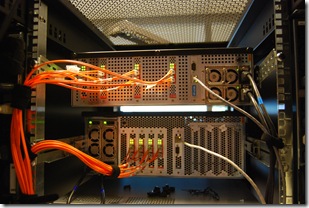
Getting started with Database Backup Compression
Database backup compression is disabled by default and it can be enabled through the SSMS GUI or by adding the word “COMPRESSION” to a T-SQL backup query.
Through SSMS, when you -right click- the database which you would like to backup, under –Tasks- , -Back Up…-, -Options-, at the bottom , you will find the Compression feature. (see pictures)
After you have selected the “Compress Backup” option, click the –Script- Option to generate the TSQL statement. Please note that the word COMPRESSION is all you need to enable the feature from your backup query statement.
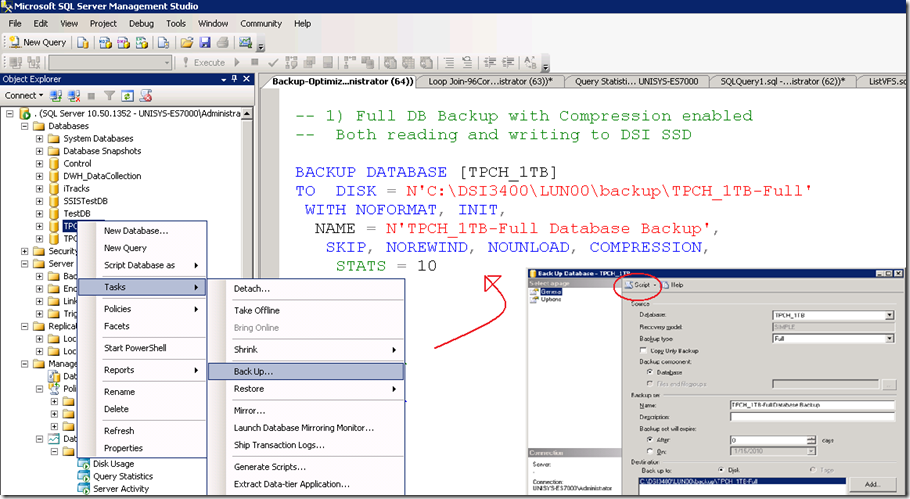
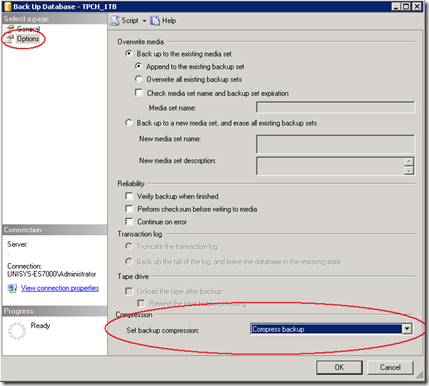
To enable backup compression feature for all your databases as the default option, change the default with the following sp_configure command:
GO
EXEC sp_configure backup compression default, '1';
RECONFIGURE WITH OVERRIDE
Step1 : Measure the “Out of the box” throughput
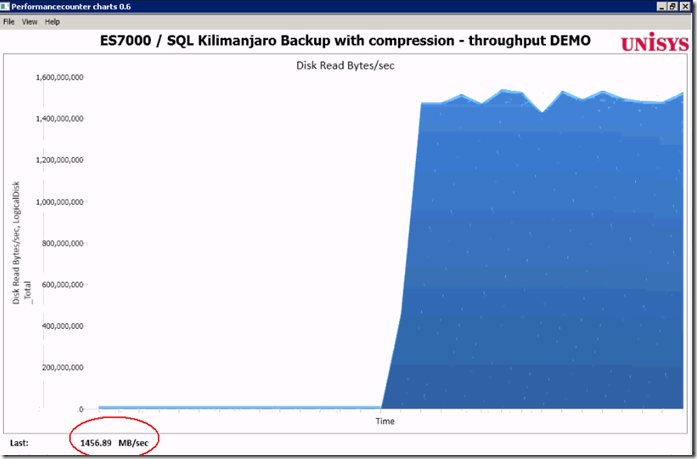
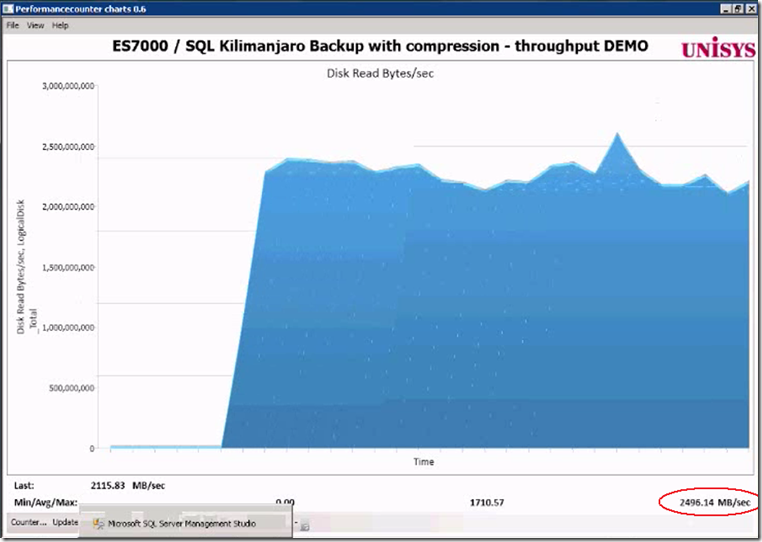
By running the above query, as a result, more than 1400 MByte/sec is read on average from both the DSI Solid State disks. That’s like reading all data from 2 full cd-rom’s each second. Not bad!
Waitstats
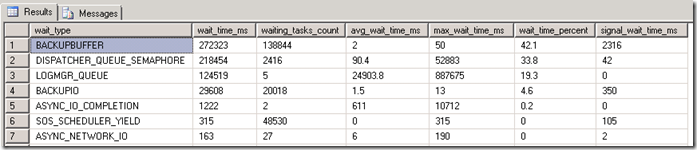
The SQL Waitstats show that the number 1 wait_type is BACKUPBUFFER.
The MSDN explanation for the BACKUPBUFFER wait_type is interesting: “the backup task is waiting for data or is waiting for a buffer in which to store data. This type is not typical, except when a task is waiting for a tape mount”. ehhh ok… since we are not using tapes , it means that this is not typical ! Let’s see what we can find out about the buffers.
Traceflag
To get more insights in the backup settings there are 2 interesting traceflags. With these traceflags enabled the actual backup parameters are logged into the SQL “Errorlog “.
DBCC TRACEON (3213, –1)
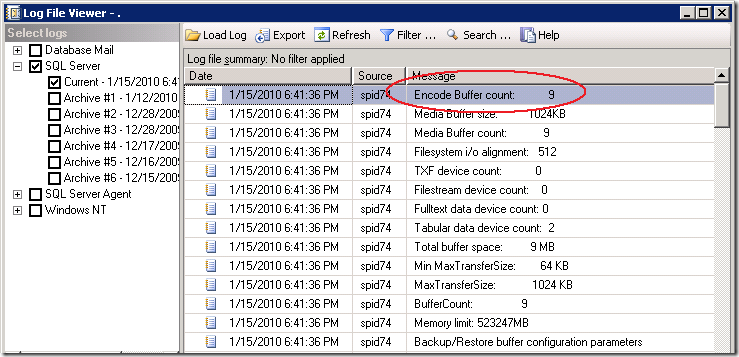
The Errorlog show that our backup was using 9 Buffers and allocated 9 Megabyte of buffer space.
9 MByte seems a relative low value to me to queue up all the destination backup file data and smells like an area where we can get some improvement, (especially since we have we have 16 x 4Gbit fiber cables and 6+ GigaByte/sec of IO bandwidth waiting to get saturated ;-) ).
Step2: Increase throughput by adding more destination files
A feature that not many people know is the option to specify multiple file destinations to increase the throughput:
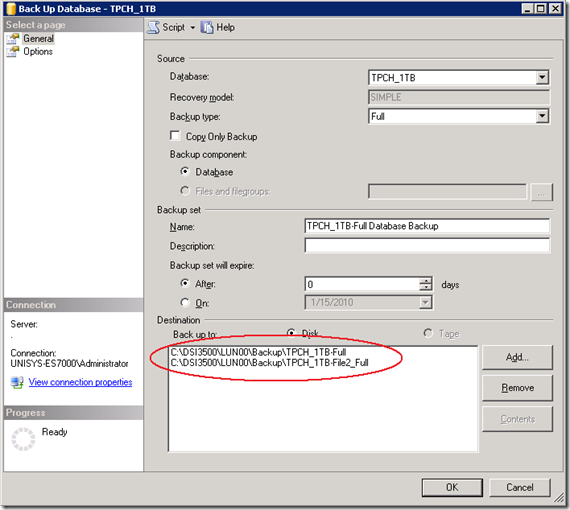
To add multiple Backup destination files in the query, add them like this:
DBCC TRACEON (3605, –1)
DBCC TRACEON (3213, –1)
BACKUP DATABASE [TPCH_1TB]
TO
DISK = N'C:\DSI3400\LUN00\backup\TPCH_1TB-Full',
DISK = N'C:\DSI3500\LUN00\backup\File2',
DISK = N'C:\DSI3500\LUN00\backup\File3',
DISK = N'C:\DSI3500\LUN00\backup\File4',
DISK = N'C:\DSI3500\LUN00\backup\File5',
DISK = N'C:\DSI3400\LUN00\backup\File6',
DISK = N'C:\DSI3500\LUN00\backup\File7',
DISK = N'C:\DSI3500\LUN00\backup\File8',
DISK = N'C:\DSI3500\LUN00\backup\File9'
WITH NOFORMAT, INIT,NAME = N'TPCH_1TB-Full Database Backup',
SKIP, NOREWIND, NOUNLOAD, COMPRESSION, STATS = 10
DBCC TRACEOFF(3605, –1)
DBCC TRACEOFF(3213, –1)
Result of adding 8 more destination files: the throughput increases from 1.4 GB/sec up to 2.2- 2.4 GB/sec.
That’s a quick win to remember!
The SQL Errrorlog with the buffer configuration parameters shows that extra buffers are added automatically.
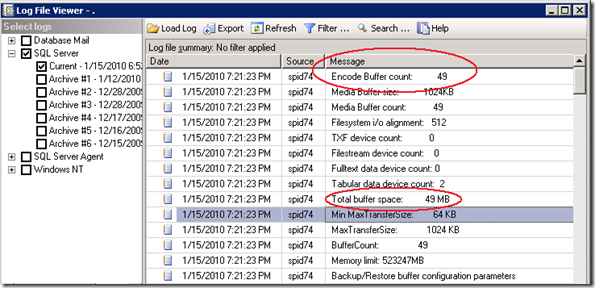
Step3 : Set Backup parameters options
The Backup/Restore buffer configuration parameters show some interesting parameters and values!
Time to start reading the ehh documentation! When you highlight the word ‘Backup’ and you hit <Shift-F1> you can read more on the topic; there are 2 Data Transfer Options listed :
BUFFERCOUNT and MAXTRANSFERSIZE.
BUFFERCOUNT : specifies the total number of I/O buffers to be used for the backup operation.
The total space that will be used by the buffers is determined by: buffercount * maxtransfersize.
The output shows this is correct; with 49 buffers * 1024 KB = 49 MB total buffer space is in use.
MAXTRANSFERSIZE : specifies the largest unit of transfer in bytes to be used between SQL Server and the backup media.
The possible values are multiples of 64 KB ranging up to 4194304 bytes (4 MB). The default is 1 MB.
a 3rd option is listed under the section Media Set Options:
BLOCKSIZE : specifies the physical block size, in bytes. The supported sizes are 512, 1024, 2048, 4096, 8192, 16384, 32768, and 65536 (64 KB) bytes.The default is 65536 for tape devices and 512 otherwise.
Trial and Measure approach
By using the famous “Trial and Measure” approach, I found that the selecting the maximum value for Blocksize (65535) and doubling the MAXTRANSFERSIZE to (2097152) works best. also a BUFFERCOUNT of 2200 , allocating a buffer of 4400 MB total works best to get the maximum throughput;
DBCC TRACEON (3605, –1)
DBCC TRACEON (3213, –1)
BACKUP DATABASE [TPCH_1TB]TO
DISK = N'C:\DSI3400\LUN00\backup\TPCH_1TB-Full',
DISK = N'C:\DSI3500\LUN00\backup\File2',
DISK = N'C:\DSI3500\LUN00\backup\File3',
DISK = N'C:\DSI3500\LUN00\backup\File4',
DISK = N'C:\DSI3500\LUN00\backup\File5',
DISK = N'C:\DSI3400\LUN00\backup\File6',
DISK = N'C:\DSI3500\LUN00\backup\File7',
DISK = N'C:\DSI3500\LUN00\backup\File8',
DISK = N'C:\DSI3500\LUN00\backup\File9'
WITH NOFORMAT, INIT,NAME = N'TPCH_1TB-Full Database Backup',
SKIP, NOREWIND, NOUNLOAD, COMPRESSION,STATS = 10
— Magic:
,BUFFERCOUNT = 2200
,BLOCKSIZE = 65536
,MAXTRANSFERSIZE=2097152
GO
DBCC TRACEOFF(3605, –1)
DBCC TRACEOFF(3213, –1)
Result: the average throughput is more then doubled, and the maximum peak throughput is up to 3939 MB/sec !
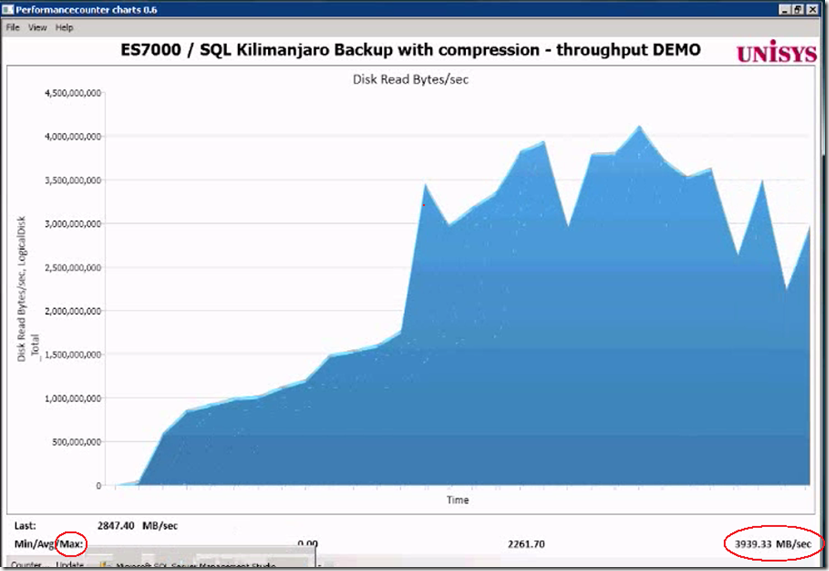
BLOCKSIZE
An interesting observation is that I was more less expecting to see that by changing theBLOCKSIZE would also show up in the log, but it doesn’t .
Also the “Filesystem I/O alignment” value remained the same:
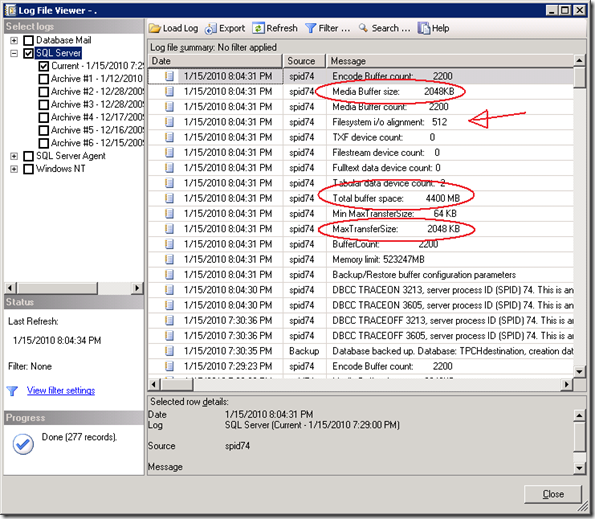
By coincidence, (I forgot to delete the backup files when adding some more destination files,) I found out that the blocksize value does make a change by looking at the error message:
Cannot use the backup file 'C:\DSI3500\LUN00\dummy-FULL_backup_TPCH_1TB_2' because
it was originally formatted with sector size 65536
and is now on a device with sector size 512.
Msg 3013, Level 16, State 1, Line 4
BACKUP DATABASE is terminating abnormally.
By specifying a large 64KB sector size instead of the default 512 bytes typically shows an 5-6% improvement in backup throughput.
BACKUP to DISK = ‘NUL’
To estimate and check how fast you can read the data from a database or Filegroup there is a special option you can use to backup to: DISK = ‘NUL’. You only need 1 of those !
FILEGROUP = 'SSD3500_0',
FILEGROUP = 'SSD3500_1'
TO DISK = 'NUL'
WITH COMPRESSION
, NOFORMAT, INIT, SKIP, NOREWIND, NOUNLOAD
, BUFFERCOUNT = 2200
, BLOCKSIZE = 65536
, MAXTRANSFERSIZE=2097152
Wrap-Up
Backup compression is a great feature to use. It will save you disk capacity and reduce the time needed to backup your data. SQL can leverage the IO bandwidth of Solid State storage well but to achieve maximum throughput you need to do some tuning. By adding multiple backup destination files and specifying the BUFFERCOUNT, BLOCKSIZE and MAXTRANSFERSIZE parameters you can typically double the backup throughput, which means reducing the backup time-taken by half!
怎么样快速完整备份和压缩 很大的 sqlserver 1TB 数据库 -摘自网络的更多相关文章
- MariaDB之基于Percona Xtrabackup备份大数据库[完整备份与增量备份]
MariaDB之基于Percona Xtrabackup备份大数据库[完整备份与增量备份] 1.Xtrabackup的安装 percona-xtrabackup-2.2.3-4982.el6.x86_ ...
- Percona Xtrabackup备份mysql大数据库(完整备份与增量备份)
Percona Xtrabackup备份mysql大数据库(完整备份与增量备份) 文章目录 [隐藏] Xtrabackup简介 Xtrabackup安装 Xtrabackup工具介绍 inno ...
- Percona Xtrabackup备份mysql全库及指定数据库(完整备份与增量备份)
原文地址:http://www.tuicool.com/articles/RZRnq2 Xtrabackup简介 Percona XtraBackup是开源免费的MySQL数据库热备份软件,它能对In ...
- postgresql-定时备份,压缩备份
crontab -e 在最后添加: # backup database at 22:00 every day 0 22 * * * thunisoft /home/eric/bin/backup-db ...
- Percona备份mysql全库及指定数据库(完整备份与增量备份)
Percona Xtrabackup备份mysql全库及指定数据库(完整备份与增量备份) Xtrabackup简介 Percona XtraBackup是开源免费的MySQL数据库热备份软件,它能对I ...
- 快速幂取模(当数很大时,相乘long long也会超出的解决办法)
当几个数连续乘最后取模时,可以将每个数字先取模,最后再取模,即%对于*具有结合律.但是如果当用来取模的数本身就很大,采取上述方法就不行了.这个时候可以借鉴快速幂取模的方法,来达到大数相乘取模的效果. ...
- Linux完整备份工具 - dump, restore(现在基本不用这两个)
dump 其实 dump 的功能颇强,他除了可以备份整个文件系统之外,还可以制定等级喔!什么意思啊! 假设你的 /home 是独立的一个文件系统,那你第一次进行过 dump 后,再进行第二次 dump ...
- 阿里云 如何减少备份使用量? mysql数据库的完整备份、差异备份、增量备份
RDS for MySQL备份.SQL审计容量相关问题_MYSQL使用_技术运维问题_云数据库 RDS 版-阿里云 https://help.aliyun.com/knowledge_detail/4 ...
- sql server 数据库备份,完整备份,差异备份,自动备份说明
Sql server 设置完整备份,差异备份说明 在数据库管理器中,选择要备份的数据库,右键找到“备份” 然后可以按照备份的方式进行备份. 关于文件的还原,作以下补充说明: 步骤为: 1.在需要还原的 ...
随机推荐
- 算法(第四版)学习笔记之java实现希尔排序
希尔排序思想:使数组中随意间隔为h的元素都是有序的. 希尔排序是插入排序的优化.先对数组局部进行排序,最后再使用插入排序将部分有序的数组排序. 代码例如以下: /** * * @author seab ...
- readonly 和 disable的区别
Readonly和Disabled它们都能够做到使用户不能够更改表单域中的内容.但是它们之间有着微小的差别,总结如下: Readonly只针对input(text / password)和textar ...
- Intent跳转到系统应用中的拨号界面、联系人界面、短信界面及其他
现在开发中的功能需要直接跳转到拨号.联系人.短信界面等等,查找了很多资料,自己整理了一下. 首先,我们先看拨号界面,代码如下: Intent intent =new Intent(); intent. ...
- 绕过Web授权和认证之篡改HTTP请求
一.什么是HTTP请求 超文本传输协议(HTTP)提供了多种请求方法来与web服务器沟通.当然,大多数方法的初衷是帮助开发者在开发或调试过程中部署和测试HTTP应用.如果服务器配置不当,这些请求方法可 ...
- linux 用户管理,用户权限管理,用户组管理
linux 用户管理,用户权限管理,用户组管理 一:ls -l 命令 解释 第个d表示是目录,如果是文件是-,如果是连接是l 第2到4个 rwx 表示创建者的操作权限 r 读,w 写,x 执行 第5到 ...
- Oracle体系结构二(学习笔记)
- 输出python的help结果到文件中
1.命令行方式: python -c "import sys; help(sys.exit)" > help.txt 2.函数代码的方式输出 def help_output( ...
- CSS实现水平垂直居中方式
1.定位 核心代码实现请看示例代码中的注释: <!DOCTYPE html> <html lang="zh"> <head> <meta ...
- web页面中可以包含多个对象
# encoding=utf-8 #python 2.7.10 #xiaodeng #web页面中可以包含多个对象 #HTTP权威指南 10页 #应用程序完成一项任务时通常会发布多个http事务.如: ...
- Web文件管理、私有云存储管理工具 DzzOffice
DzzOffice-大桌子办公系统本身是一款图形化,简单易用的网盘管理软件.可以实现将企业的局域网服务器.企业私有云存储.企业租用的公有云存储(如阿里云OSS).企业员工的私有云存储(如百度网盘.Dr ...