
C# 读取Excel,一波华丽的操作
C# 读取Excel,其实有很多方法。但是今天要来一波华丽的操作。
先看效果:
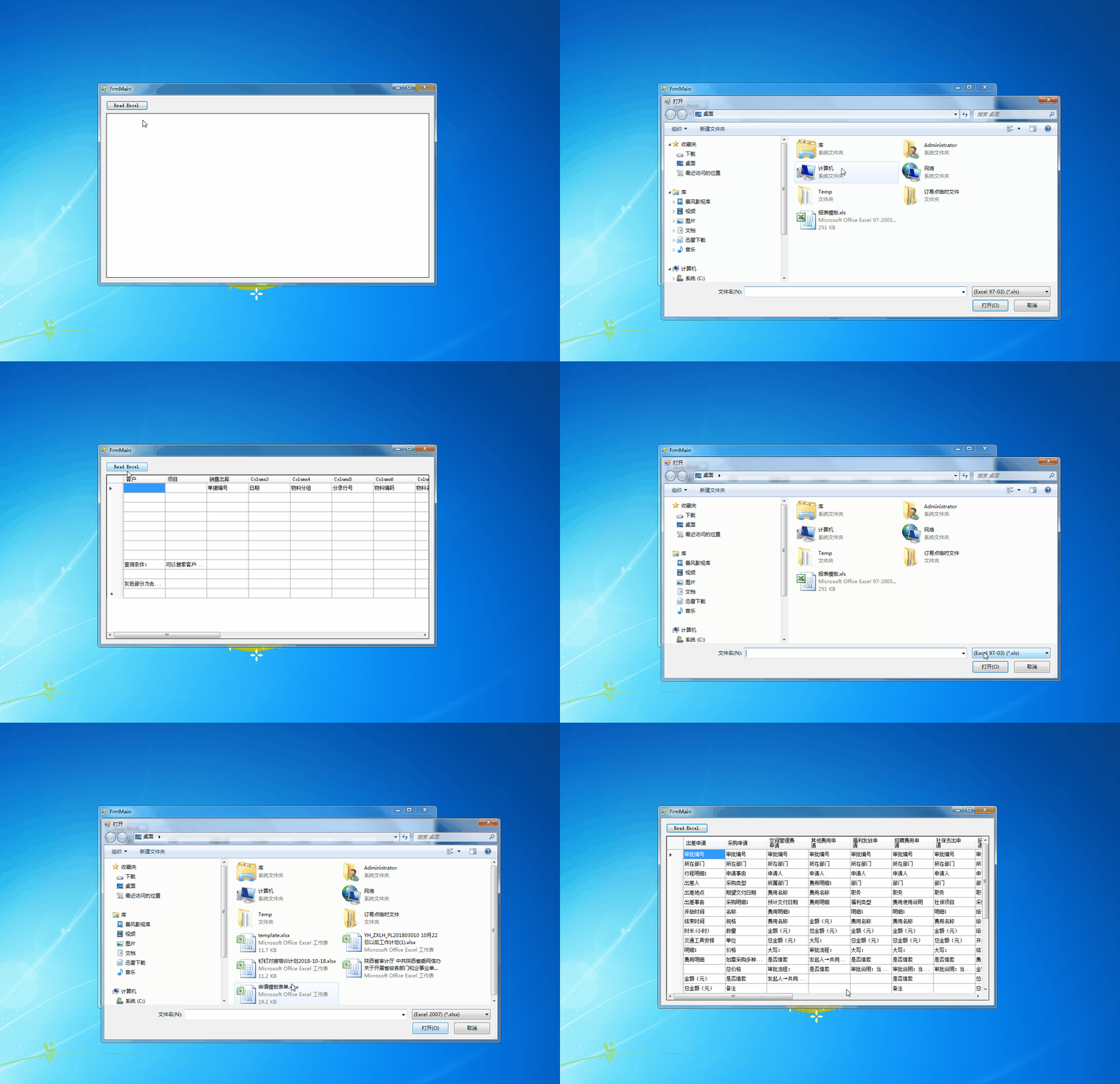
以上这波操作使用了 ExcelDataReader 和 ExcelDataReader.DataSet 完成的。
ExcelDataReader 是一个快速读取 Excel 的 C# 库。使用简单,读取速度比较快,感觉比 NPOI 快一点。但是遗憾的是只能读 Excel 没有写的操作。
以上这波操作的全部代码:
using ExcelDataReader;

using System;

using System.IO;

using System.Windows.Forms;

namespace ExcelFastRead

{

    public partial class FrmMain : Form

    {

        public FrmMain()

        {

            InitializeComponent();

        }

        private void button1_Click(object sender, EventArgs e)

        {

            OpenFileDialog dialog = new OpenFileDialog();

            dialog.Filter = "(Excel 97-03)|*.xls|(Excel 2007)|*.xlsx|ALL|*.*";

            if (DialogResult.OK != dialog.ShowDialog())

            {

                return;

            }

            string strFileName = dialog.FileName;

            if (string.IsNullOrWhiteSpace(strFileName))

            {

                return;

            }

            using (var stream = File.Open(strFileName, FileMode.Open, FileAccess.Read))

            {

                // Auto-detect format, supports:

                //  - Binary Excel files (2.0-2003 format; *.xls)

                //  - OpenXml Excel files (2007 format; *.xlsx)

                using (var reader = ExcelReaderFactory.CreateReader(stream))

                {

                    // Choose one of either 1 or 2:

                    // 1. Use the reader methods

                    do

                    {

                        while (reader.Read())

                        {

                            // reader.GetDouble(0);

                        }

                    } while (reader.NextResult());

                    ExcelDataSetConfiguration configuration = new ExcelDataSetConfiguration()

                    {

                        // Gets or sets a value indicating whether to set the DataColumn.DataType

                        // property in a second pass.

                        //UseColumnDataType = true,

                        // Gets or sets a callback to obtain configuration options for a DataTable.

                        ConfigureDataTable = (tableReader) => new ExcelDataTableConfiguration()

                        {

                            // Gets or sets a value indicating the prefix of generated column names.

                            //EmptyColumnNamePrefix = "Column",

                            // Gets or sets a value indicating whether to use a row from the

                            // data as column names.

                            UseHeaderRow = true,

                            // Gets or sets a callback to determine which row is the header row.

                            // Only called when UseHeaderRow = true.

                            //ReadHeaderRow = (rowReader) => {

                            //    // F.ex skip the first row and use the 2nd row as column headers:

                            //    rowReader.Read();

                            //},

                            // Gets or sets a callback to determine whether to include the

                            // current row in the DataTable.

                            //FilterRow = (rowReader) => {

                            //    return true;

                            //},

                            // Gets or sets a callback to determine whether to include the specific

                            // column in the DataTable. Called once per column after reading the

                            // headers.

                            //FilterColumn = (rowReader, columnIndex) => {

                            //    return true;

                            //}

                        }

                    };

                    var result = reader.AsDataSet(configuration);

                    // 2. Use the AsDataSet extension method

                    //var result = reader.AsDataSet();

                    dgvList.DataSource = result.Tables[];

                    // The result of each spreadsheet is in result.Tables

                }

            }

        }

    }

}
ExcelDataReader.DataSet nuget包管理
C# 读取Excel,一波华丽的操作的更多相关文章
- C#操作Excel(2)-- 打开-读取Excel文档
由于要为某软件实现导出Excel功能,故有此文. 本文的开发环境是Visual Studio 2010 ,C#, Excel 2007. 新建C#工程后打开Solution Explorer,可以看到 ...
- c# .Net :Excel NPOI导入导出操作教程之读取Excel文件信息及输出
c# .Net :Excel NPOI导入导出操作教程之读取Excel文件信息及输出 using NPOI.HSSF.UserModel;using NPOI.SS.UserModel;using S ...
- C#操作Excel文件(读取Excel,写入Excel)
看到论坛里面不断有人提问关于读取excel和导入excel的相关问题.闲暇时间将我所知道的对excel的操作加以总结,如今共享大家,希望给大家可以给大家带了一定的帮助.另外我们还要注意一些简单的问题1 ...
- c#dev操作读取excel方法
一:使用spreadsheetControl1 方法 1:打开excel; private void barButtonItem1_ItemClick(object sender, DevExpres ...
- C# 操作Excel基础篇(读取Excel、写入Excel)
注意事项:Excel的数据表中最多只能储存65535行数据,超出后,需要将数据分割开来进行储存.同时对于Excel中的乱码象限,是由于编码的错误方式导致引起的! 一.读取Excel数据表,获得Data ...
- 接口自动化--读取Excel操作(openpyxl)
上次我们已经将requests库封装成我们想要的样子了,我们的接口自动化已经完成了最开始的一步了,接下来我们需要完成我们相应的其他模块的封装,下面简单介绍下我们在接口自动化需要用到的模块吧在接口自动化 ...
- python(读取excel操作-xlrd模块)
一.安装xlrd模块 到python官网下载http://pypi.python.org/pypi/xlrd模块安装,前提是已经安装了python 环境. 或者在cmd窗口 pip install ...
- python(读取 excel 操作 xlrd 模块)
一.安装 xlrd 模块 到 python 官网下载 http://pypi.python.org/pypi/xlrd 模块安装,前提是已经安装了 python 环境. 或者在 cmd 窗口 pip ...
- Java 用jxl读取excel并保存到数据库(此方法存在局限,仅限本地电脑操作,放在服务器上的项目,需要把文件上传到服务器,详细信息,见我的别的博客)
项目中涉及到读取excel中的数据,保存到数据库中,用jxl做起来比较简单. 基本的思路: 把excel放到固定盘里,然后前段页面选择文件,把文件的名字传到后台,再利用jxl进行数据读取,把读取到的数 ...
随机推荐
- 【英宝通Unity4.0公开课学习 】(三)脚本使用
清明出去放松了一天. 看了下大姑爷,然后去大姑家吃了个午饭,下午三点左右出去找煤球耍,在他们学校和良乡镇逛了一下.当时感觉离北京好远好远啊... 其实不得不说现在的交通确实很方便,到哪都要不了几天,如 ...
- ftp使用(图文详解)
41,准备: FileZilla_Server-v0.9.41.rar 2.安装,可以全部默认下一步 这里装在了E盘 3安装成功添加用户 添加用户名yanan 选择share folders选择要共享 ...
- OC 线程操作 - GCD使用 -线程通讯, 延迟函数和一次性代码
- (void)touchesBegan:(NSSet<UITouch *> *)touches withEvent:(UIEvent *)event{ // [self downImag ...
- Redis阅读目录
一.Redis简介 点击链接查看:https://www.cnblogs.com/hwlong/p/9325986.html 二.Redis安装及基本配置 点击链接查看:https://www.cnb ...
- 【原创】有关Silverlight中自动生成的类中 没有WCF层edmx模型新加入的对象 原因分析。
前端页面层: 编译老是不通过,报如下如所示错误: -- 然后下意识的查了下 生成的cs文件,没有搜到根据edmx 生成的 对应的类. 结果整理: 1.尽管在 edmx 模 ...
- 02 请求库之 requests模块
requests模块 一 介绍 #介绍:使用requests可以模拟浏览器的请求,比起之前用到的urllib,requests模块的api更加便捷(本质就是封装了urllib3) #注意:requ ...
- Codeforces 600A. Extract Numbers 模拟
A. Extract Numbers time limit per test: 2 seconds memory limit per test: 256 megabytes input: standa ...
- 【附源文件】日记类App原型制作分享-Grid Diary
Grid Diary是一款非常受文艺青年喜爱的记录应用,它设计简单,内容却非常丰富.它不再是单调的文字记录,界面的设计非常与众不同,由许多格子拼凑而成,每一个格子里面还带有一个问题,十分有趣.提到格子 ...
- 软工1816 · 作业(八)项目UML设计
团队信息 队员姓名与学号 学号 姓名 博客链接 124 王彬(组长) 点击这里 206 赵畅 点击这里 215 胡展瑞 点击这里 320 李恒达 点击这里 131 佘岳昕 点击这里 431 王源 点击 ...
- 《完全版线段树》——notonlysuccess
转载自:NotOnlySuccess的博客 [完全版]线段树 很早前写的那篇线段树专辑至今一直是本博客阅读点击量最大的一片文章,当时觉得挺自豪的,还去pku打广告,但是现在我自己都不太好意思去看那篇文 ...