
kinaba 安装踩坑: FATAL Error: [elasticsearch.url]: definition for this key is missing
操作系统:Linux
kibana 版本: 7.4.0
1. 在/etc/yum.repos.d/ 下新建 kibana.repo 配置 yum 源地址 内容如下:
[root@localhost yum.repos.d]# cat kibana.repo

[kibana-.x]

name=Kibana repository for .x packages

baseurl=https://artifacts.elastic.co/packages/7.x/yum

gpgcheck=

gpgkey=https://artifacts.elastic.co/GPG-KEY-elasticsearch

enabled=

autorefresh=

type=rpm-md
2. 安装 kibana
sudo yum install kibana
3. 安装完成之后,kibana 的相关目录如下所示:
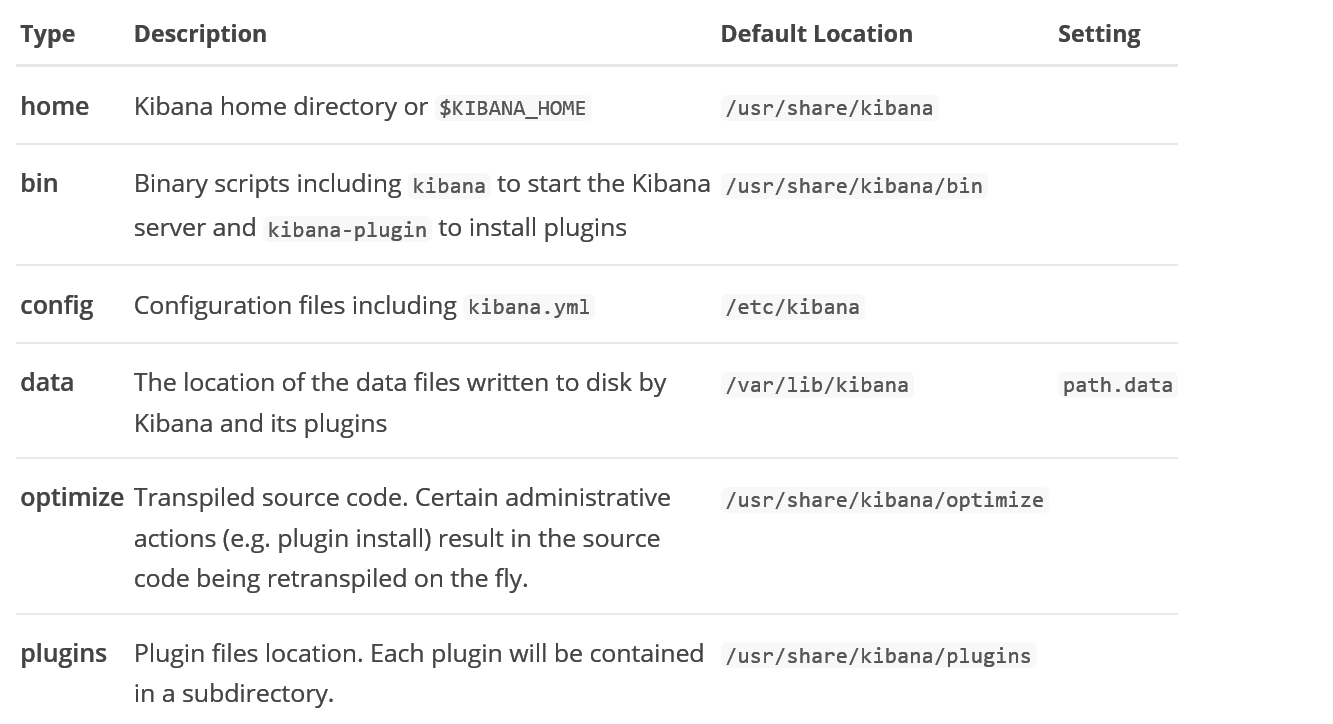
4. 修改配置文件 ,主要是添加 elasticsearch 的信息:
server.port:

server.host: "127.0.0.1"

server.name: "tanklog"

elasticsearch.url: "http://127.0.0.1:9200"
5. 启动 kibana (由于 root 用户不能直接启动 kibana,可以新建一个用户专门用来管理 kibana,或者在启动命令后追加 --allow-root)
/usr/share/kibana/bin/kibana --allow-root
6. 然后会报错如下:
FATAL Error: [elasticsearch.url]: definition for this key is missing
7. 经过一波操作之后,发现需要将 url 换成 hosts,配置文件需要设置为如下所示:
需要用: elasticsearch.hosts, 而不是: elasticsearch.url
server.port:

server.host: "127.0.0.1"

server.name: tanklog

elasticsearch.hosts: ["http://localhost:9200/"]

# elasticsearch.url: "http://localhost:9200"
8. kibana 本身没问题,启动成功时会出现如下日志:
[root@localhost kibana]#  /usr/share/kibana/bin/kibana --allow-root

  log   [::50.254] [info][plugins-system] Setting up [] plugins: [security,translations,inspector,data]

  log   [::50.263] [info][plugins][security] Setting up plugin

  log   [::50.266] [warning][config][plugins][security] Generating a random key for xpack.security.encryptionKey. To prevent sessions from being invalidated on restart, please set xpack.security.encryptionKey in kibana.yml

  log   [::50.266] [warning][config][plugins][security] Session cookies will be transmitted over insecure connections. This is not recommended.

  log   [::50.325] [info][plugins][translations] Setting up plugin

  log   [::50.326] [info][data][plugins] Setting up plugin

  log   [::50.328] [info][plugins-system] Starting [] plugins: [security,translations,data]

  log   [::15.769] [warning][plugin] Skipping non-plugin directory at /usr/share/kibana/src/legacy/core_plugins/metric_vis

  log   [::15.832] [warning][plugin] Skipping non-plugin directory at /usr/share/kibana/src/legacy/core_plugins/table_vis

  log   [::15.833] [warning][plugin] Skipping non-plugin directory at /usr/share/kibana/src/legacy/core_plugins/tagcloud

  log   [::15.910] [warning][plugin] Skipping non-plugin directory at /usr/share/kibana/src/legacy/core_plugins/vega

  log   [::17.487] [info][status][plugin:kibana@7.4.] Status changed from uninitialized to green - Ready

  log   [::17.494] [info][status][plugin:elasticsearch@7.4.] Status changed from uninitialized to yellow - Waiting for Elasticsearch

  log   [::17.496] [info][status][plugin:xpack_main@7.4.] Status changed from uninitialized to yellow - Waiting for Elasticsearch

  log   [::17.508] [info][status][plugin:telemetry@7.4.] Status changed from uninitialized to green - Ready

  log   [::17.511] [info][status][plugin:graph@7.4.] Status changed from uninitialized to yellow - Waiting for Elasticsearch

  log   [::17.525] [info][status][plugin:monitoring@7.4.] Status changed from uninitialized to green - Ready

  log   [::17.529] [info][status][plugin:spaces@7.4.] Status changed from uninitialized to yellow - Waiting for Elasticsearch

  log   [::17.563] [info][status][plugin:security@7.4.] Status changed from uninitialized to green - Ready

  log   [::17.565] [info][status][plugin:searchprofiler@7.4.] Status changed from uninitialized to yellow - Waiting for Elasticsearch

  log   [::17.568] [info][status][plugin:ml@7.4.] Status changed from uninitialized to yellow - Waiting for Elasticsearch

  log   [::17.635] [info][status][plugin:tilemap@7.4.] Status changed from uninitialized to yellow - Waiting for Elasticsearch

  log   [::17.638] [info][status][plugin:watcher@7.4.] Status changed from uninitialized to yellow - Waiting for Elasticsearch

  log   [::17.654] [info][status][plugin:grokdebugger@7.4.] Status changed from uninitialized to yellow - Waiting for Elasticsearch

  log   [::17.660] [info][status][plugin:dashboard_mode@7.4.] Status changed from uninitialized to green - Ready

  log   [::17.662] [info][status][plugin:logstash@7.4.] Status changed from uninitialized to yellow - Waiting for Elasticsearch

  log   [::17.670] [info][status][plugin:beats_management@7.4.] Status changed from uninitialized to yellow - Waiting for Elasticsearch

  log   [::17.689] [info][status][plugin:apm_oss@7.4.] Status changed from uninitialized to green - Ready

  log   [::17.727] [info][status][plugin:apm@7.4.] Status changed from uninitialized to green - Ready

  log   [::17.729] [info][status][plugin:code@7.4.] Status changed from uninitialized to green - Ready

  log   [::17.731] [info][status][plugin:data@7.4.] Status changed from uninitialized to green - Ready

  log   [::17.733] [info][status][plugin:visualizations@7.4.] Status changed from uninitialized to green - Ready

  log   [::17.740] [info][status][plugin:interpreter@7.4.] Status changed from uninitialized to green - Ready

  log   [::17.742] [info][status][plugin:tile_map@7.4.] Status changed from uninitialized to green - Ready

  log   [::17.746] [info][status][plugin:task_manager@7.4.] Status changed from uninitialized to green - Ready

  log   [::17.751] [info][status][plugin:maps@7.4.] Status changed from uninitialized to yellow - Waiting for Elasticsearch

  log   [::17.770] [info][status][plugin:canvas@7.4.] Status changed from uninitialized to green - Ready

  log   [::17.776] [info][status][plugin:license_management@7.4.] Status changed from uninitialized to green - Ready

  log   [::17.779] [info][status][plugin:cloud@7.4.] Status changed from uninitialized to green - Ready

  log   [::17.781] [info][status][plugin:index_management@7.4.] Status changed from uninitialized to yellow - Waiting for Elasticsearch

  log   [::17.799] [info][status][plugin:console@7.4.] Status changed from uninitialized to green - Ready
9. 由于我的 elasticsearch 版本是7.3.2, 与 kibana 版本不一致,所以启动过程中出现了 error, 需要升级 elasticsearch 版本为 7.4.0
g   [::18.088] [info][status][plugin:table_vis@7.4.] Status changed from uninitialized to green - Ready

  log   [::18.090] [info][status][plugin:tagcloud@7.4.] Status changed from uninitialized to green - Ready

  log   [::18.092] [info][status][plugin:vega@7.4.] Status changed from uninitialized to green - Ready

  log   [::18.096] [warning][browser-driver][reporting] Enabling the Chromium sandbox provides an additional layer of protection.

  log   [::19.041] [error][status][plugin:xpack_main@7.4.] Status changed from yellow to red - This version of Kibana requires Elasticsearch v7.4.0 on all nodes. I found the following incompatible nodes in your cluster: v7.3.2 @ 192.168.1.27: (192.168.1.27)

  log   [::19.042] [error][status][plugin:graph@7.4.] Status changed from yellow to red - This version of Kibana requires Elasticsearch v7.4.0 on all nodes. I found the following incompatible nodes in your cluster: v7.3.2 @ 192.168.1.27: (192.168.1.27)
升级 elasticsearch 版本
sudo yum -y install elasticsearch-oss
10. 启动 kibana,查看日志信息,发现有很多 warn
[warning][config][plugins][security] Generating a random key for xpack.security.encryptionKey. To prevent sessions from being invalidated on restart, please set xpack.security.encryptionKey in kibana.yml
根据 warn 提示,在 kibana.yml 里面添加缺失的属性内容
xpack.reporting.encryptionKey: "a_random_string"

xpack.security.encryptionKey: "something_at_least_32_characters"
启动 kibana,且将启动日志收集到指定文件
/usr/share/kibana/bin/kibana --allow-root > /var/lib/kibana/kibana.log &
访问
kinaba 安装踩坑: FATAL Error: [elasticsearch.url]: definition for this key is missing的更多相关文章
- kinaba 安装踩坑: FATAL Error: [elasticsearch.url]: definition for this key is missing 转
安装 https://www.jianshu.com/p/875457cb8da6 操作系统:Linux kibana 版本: 7.4.0 1. 在/etc/yum.repos.d/ 下新建 ...
- Android Studio安装踩坑
title: Android Studio安装踩坑 date: 2018-09-07 19:31:32 updated: tags: [Android,Android Studio,坑] descri ...
- Nextcloud fpm 版在 Dokcer 下安装踩坑
安装 首先到 https://registry.hub.docker.com/_/nextcloud 获取 Nextcloud 的示例 docker-compose version: '2' volu ...
- Symfony没有安装依赖_PHP Fatal error: require(): Failed opening required
$ php bin/console server:run PHP Warning: require(D:\home\workspace\pd\app/../vendor/autoload.php): ...
- VNPY - windows 安装踩坑记录
twisted requires PyHamcrest>=, which is not ins grin requires argparse>=1.1, which is not inst ...
- python2用pip进行安装时报错Fatal error in launcher: Unable to create process using '"'
win7下python3和python2共存环境 用pip安装一个包执行pip2 install xxx的时候报错Fatal error in launcher: Unable to create p ...
- ubuntu 16.04 + eigen3 安装(解决 fatal error: Eigen/Core: No such file or directory)
1.安装 sudo apt-get install libeigen3-dev 2. 解决 fatal error: Eigen/Core: No such file or directory 当调用 ...
- deepin 安装scrapy安装出错:fatal error: Python.h 的解决办法
环境deepin Linux 15.7 Python3.6.5 今天重新装了deepin系统,需要重新安装scrapy,直接pip了一下,没成. 报错:fatal error: Python.h: 没 ...
- 全文搜索引擎 Elasticsearch 安装踩坑记录
一.安装 Elastic 需要 Java 8 环境.如果你的机器还没安装 Java 安装完 Java,就可以跟着官方文档安装 Elastic.直接下载压缩包比较简单. $ wget https://a ...
随机推荐
- POJ-2661Factstone Benchmark
Factstone Benchmark Time Limit: 1000MS Memory Limit: 65536K Total Submissions: 5577 Accepted: 25 ...
- 在进行机器学习建模时,为什么需要验证集(validation set)?
在进行机器学习建模时,为什么需要评估集(validation set)? 笔者最近有一篇文章被拒了,其中有一位审稿人提到论文中的一个问题:”应该在验证集上面调整参数,而不是在测试集“.笔者有些不明白为 ...
- 前端之:js
JavaScript概述 ECMAScript和JavaScript的关系 1996年11月,JavaScript的创造者--Netscape公司,决定将JavaScript提交给国际标准化组织ECM ...
- CSS常用布局方式-两列布局、三列布局
CSS基础 2.几种布局方式1)table布局 当年主流的布局方式,第一种是通过table tr td布局 示例: <style type="text/css"> ta ...
- es6中find方法
find() 方法返回数组中满足提供的测试函数的第一个元素的值.否则返回 undefined. , , , , ]; var found = array1.find(function(element) ...
- 队列解密QQ号
队列解密QQ号 本篇博客主要是<啊哈!算法>的读书笔记,这里做一下记录. 问题场景: 给定一串 QQ 号,631758924,从其中解密出真实的 QQ 号. 解密规则:首先将第一个数删除, ...
- rsync 服务端和客户端 简单配置
环境:Centos 6.9 两台服务器,A(192.168.223.129) 和 B(192.168.223.130).A 作为服务端,B作为客户端从A服务器同步目录.把A的/usr/src 目录下的 ...
- 基于VLC库C#开发可播放摄像头及任意格式视频的播放器
前言 本文主要讲述,在WPF中,借助Vlc.DotNet调用VLC类库,实现视频播功能,下面我们先来做开发前的准备工作. 准备工作 首先,我们创建一个项目WpfVLC,然后,进入Neget搜索Vlc. ...
- oracle_day1
本节内容: 1:oracle的服务 2:oracle 11 G 的新功能 3:数据库的三大范式 1:oracle的服务 安装完oracle 想要使用oracle 必须要启动的两个服务. 要是还想要使用 ...
- 02-人脸识别-基于MTCNN,框选人脸区域-detect_face
(本系列随笔持续更新) 这部分代码是基于参考中的链接,修改后适用于TensorFlow1.6.0版本的代码.由于TensorFlow的频繁更新,所以不一定支持后续新或者就版本,特此说明. 程序的最初版 ...