
kinaba 安装踩坑: FATAL Error: [elasticsearch.url]: definition for this key is missing
操作系统:Linux
kibana 版本: 7.4.0
1. 在/etc/yum.repos.d/ 下新建 kibana.repo 配置 yum 源地址 内容如下:
[root@localhost yum.repos.d]# cat kibana.repo

[kibana-.x]

name=Kibana repository for .x packages

baseurl=https://artifacts.elastic.co/packages/7.x/yum

gpgcheck=

gpgkey=https://artifacts.elastic.co/GPG-KEY-elasticsearch

enabled=

autorefresh=

type=rpm-md
2. 安装 kibana
sudo yum install kibana
3. 安装完成之后,kibana 的相关目录如下所示:
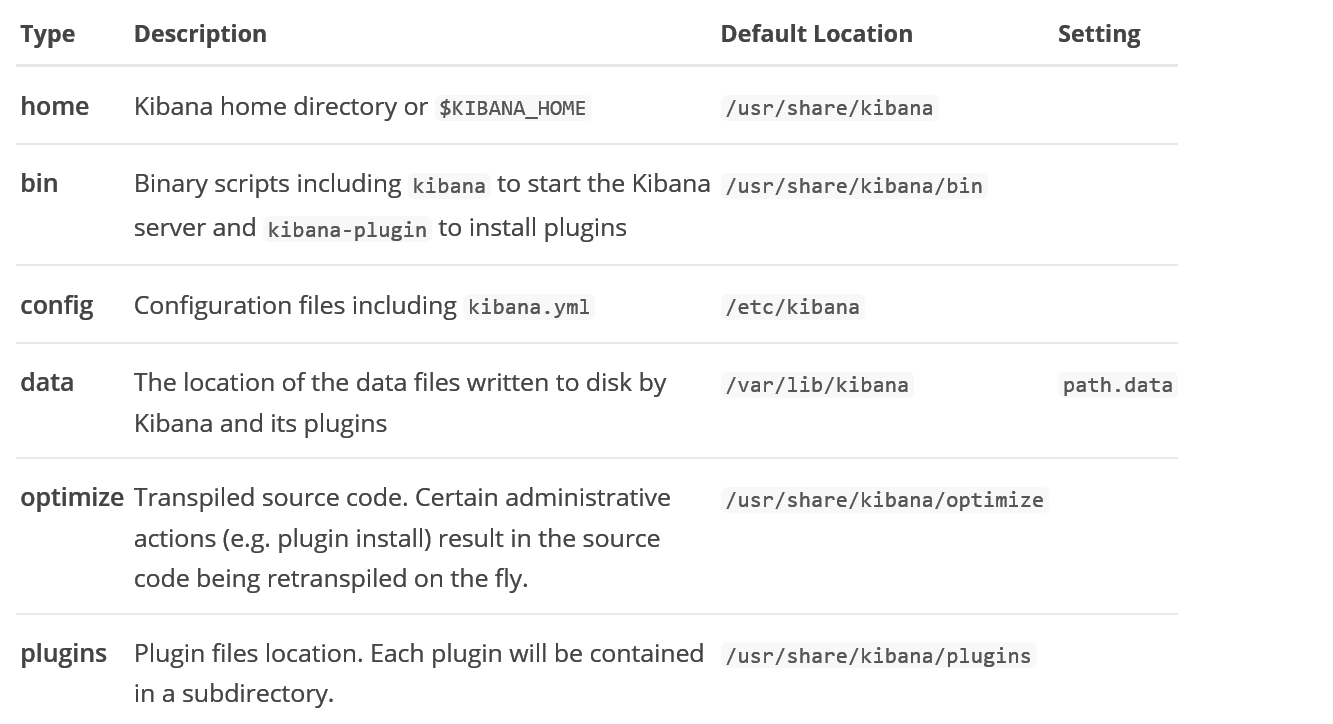
4. 修改配置文件 ,主要是添加 elasticsearch 的信息:
server.port:

server.host: "127.0.0.1"

server.name: "tanklog"

elasticsearch.url: "http://127.0.0.1:9200"
5. 启动 kibana (由于 root 用户不能直接启动 kibana,可以新建一个用户专门用来管理 kibana,或者在启动命令后追加 --allow-root)
/usr/share/kibana/bin/kibana --allow-root
6. 然后会报错如下:
FATAL Error: [elasticsearch.url]: definition for this key is missing
7. 经过一波操作之后,发现需要将 url 换成 hosts,配置文件需要设置为如下所示:
需要用: elasticsearch.hosts, 而不是: elasticsearch.url
server.port:

server.host: "127.0.0.1"

server.name: tanklog

elasticsearch.hosts: ["http://localhost:9200/"]

# elasticsearch.url: "http://localhost:9200"
8. kibana 本身没问题,启动成功时会出现如下日志:
[root@localhost kibana]#  /usr/share/kibana/bin/kibana --allow-root

  log   [::50.254] [info][plugins-system] Setting up [] plugins: [security,translations,inspector,data]

  log   [::50.263] [info][plugins][security] Setting up plugin

  log   [::50.266] [warning][config][plugins][security] Generating a random key for xpack.security.encryptionKey. To prevent sessions from being invalidated on restart, please set xpack.security.encryptionKey in kibana.yml

  log   [::50.266] [warning][config][plugins][security] Session cookies will be transmitted over insecure connections. This is not recommended.

  log   [::50.325] [info][plugins][translations] Setting up plugin

  log   [::50.326] [info][data][plugins] Setting up plugin

  log   [::50.328] [info][plugins-system] Starting [] plugins: [security,translations,data]

  log   [::15.769] [warning][plugin] Skipping non-plugin directory at /usr/share/kibana/src/legacy/core_plugins/metric_vis

  log   [::15.832] [warning][plugin] Skipping non-plugin directory at /usr/share/kibana/src/legacy/core_plugins/table_vis

  log   [::15.833] [warning][plugin] Skipping non-plugin directory at /usr/share/kibana/src/legacy/core_plugins/tagcloud

  log   [::15.910] [warning][plugin] Skipping non-plugin directory at /usr/share/kibana/src/legacy/core_plugins/vega

  log   [::17.487] [info][status][plugin:kibana@7.4.] Status changed from uninitialized to green - Ready

  log   [::17.494] [info][status][plugin:elasticsearch@7.4.] Status changed from uninitialized to yellow - Waiting for Elasticsearch

  log   [::17.496] [info][status][plugin:xpack_main@7.4.] Status changed from uninitialized to yellow - Waiting for Elasticsearch

  log   [::17.508] [info][status][plugin:telemetry@7.4.] Status changed from uninitialized to green - Ready

  log   [::17.511] [info][status][plugin:graph@7.4.] Status changed from uninitialized to yellow - Waiting for Elasticsearch

  log   [::17.525] [info][status][plugin:monitoring@7.4.] Status changed from uninitialized to green - Ready

  log   [::17.529] [info][status][plugin:spaces@7.4.] Status changed from uninitialized to yellow - Waiting for Elasticsearch

  log   [::17.563] [info][status][plugin:security@7.4.] Status changed from uninitialized to green - Ready

  log   [::17.565] [info][status][plugin:searchprofiler@7.4.] Status changed from uninitialized to yellow - Waiting for Elasticsearch

  log   [::17.568] [info][status][plugin:ml@7.4.] Status changed from uninitialized to yellow - Waiting for Elasticsearch

  log   [::17.635] [info][status][plugin:tilemap@7.4.] Status changed from uninitialized to yellow - Waiting for Elasticsearch

  log   [::17.638] [info][status][plugin:watcher@7.4.] Status changed from uninitialized to yellow - Waiting for Elasticsearch

  log   [::17.654] [info][status][plugin:grokdebugger@7.4.] Status changed from uninitialized to yellow - Waiting for Elasticsearch

  log   [::17.660] [info][status][plugin:dashboard_mode@7.4.] Status changed from uninitialized to green - Ready

  log   [::17.662] [info][status][plugin:logstash@7.4.] Status changed from uninitialized to yellow - Waiting for Elasticsearch

  log   [::17.670] [info][status][plugin:beats_management@7.4.] Status changed from uninitialized to yellow - Waiting for Elasticsearch

  log   [::17.689] [info][status][plugin:apm_oss@7.4.] Status changed from uninitialized to green - Ready

  log   [::17.727] [info][status][plugin:apm@7.4.] Status changed from uninitialized to green - Ready

  log   [::17.729] [info][status][plugin:code@7.4.] Status changed from uninitialized to green - Ready

  log   [::17.731] [info][status][plugin:data@7.4.] Status changed from uninitialized to green - Ready

  log   [::17.733] [info][status][plugin:visualizations@7.4.] Status changed from uninitialized to green - Ready

  log   [::17.740] [info][status][plugin:interpreter@7.4.] Status changed from uninitialized to green - Ready

  log   [::17.742] [info][status][plugin:tile_map@7.4.] Status changed from uninitialized to green - Ready

  log   [::17.746] [info][status][plugin:task_manager@7.4.] Status changed from uninitialized to green - Ready

  log   [::17.751] [info][status][plugin:maps@7.4.] Status changed from uninitialized to yellow - Waiting for Elasticsearch

  log   [::17.770] [info][status][plugin:canvas@7.4.] Status changed from uninitialized to green - Ready

  log   [::17.776] [info][status][plugin:license_management@7.4.] Status changed from uninitialized to green - Ready

  log   [::17.779] [info][status][plugin:cloud@7.4.] Status changed from uninitialized to green - Ready

  log   [::17.781] [info][status][plugin:index_management@7.4.] Status changed from uninitialized to yellow - Waiting for Elasticsearch

  log   [::17.799] [info][status][plugin:console@7.4.] Status changed from uninitialized to green - Ready
9. 由于我的 elasticsearch 版本是7.3.2, 与 kibana 版本不一致,所以启动过程中出现了 error, 需要升级 elasticsearch 版本为 7.4.0
g   [::18.088] [info][status][plugin:table_vis@7.4.] Status changed from uninitialized to green - Ready

  log   [::18.090] [info][status][plugin:tagcloud@7.4.] Status changed from uninitialized to green - Ready

  log   [::18.092] [info][status][plugin:vega@7.4.] Status changed from uninitialized to green - Ready

  log   [::18.096] [warning][browser-driver][reporting] Enabling the Chromium sandbox provides an additional layer of protection.

  log   [::19.041] [error][status][plugin:xpack_main@7.4.] Status changed from yellow to red - This version of Kibana requires Elasticsearch v7.4.0 on all nodes. I found the following incompatible nodes in your cluster: v7.3.2 @ 192.168.1.27: (192.168.1.27)

  log   [::19.042] [error][status][plugin:graph@7.4.] Status changed from yellow to red - This version of Kibana requires Elasticsearch v7.4.0 on all nodes. I found the following incompatible nodes in your cluster: v7.3.2 @ 192.168.1.27: (192.168.1.27)
升级 elasticsearch 版本
sudo yum -y install elasticsearch-oss
10. 启动 kibana,查看日志信息,发现有很多 warn
[warning][config][plugins][security] Generating a random key for xpack.security.encryptionKey. To prevent sessions from being invalidated on restart, please set xpack.security.encryptionKey in kibana.yml
根据 warn 提示,在 kibana.yml 里面添加缺失的属性内容
xpack.reporting.encryptionKey: "a_random_string"

xpack.security.encryptionKey: "something_at_least_32_characters"
启动 kibana,且将启动日志收集到指定文件
/usr/share/kibana/bin/kibana --allow-root > /var/lib/kibana/kibana.log &
访问
kinaba 安装踩坑: FATAL Error: [elasticsearch.url]: definition for this key is missing的更多相关文章
- kinaba 安装踩坑: FATAL Error: [elasticsearch.url]: definition for this key is missing 转
安装 https://www.jianshu.com/p/875457cb8da6 操作系统:Linux kibana 版本: 7.4.0 1. 在/etc/yum.repos.d/ 下新建 ...
- Android Studio安装踩坑
title: Android Studio安装踩坑 date: 2018-09-07 19:31:32 updated: tags: [Android,Android Studio,坑] descri ...
- Nextcloud fpm 版在 Dokcer 下安装踩坑
安装 首先到 https://registry.hub.docker.com/_/nextcloud 获取 Nextcloud 的示例 docker-compose version: '2' volu ...
- Symfony没有安装依赖_PHP Fatal error: require(): Failed opening required
$ php bin/console server:run PHP Warning: require(D:\home\workspace\pd\app/../vendor/autoload.php): ...
- VNPY - windows 安装踩坑记录
twisted requires PyHamcrest>=, which is not ins grin requires argparse>=1.1, which is not inst ...
- python2用pip进行安装时报错Fatal error in launcher: Unable to create process using '"'
win7下python3和python2共存环境 用pip安装一个包执行pip2 install xxx的时候报错Fatal error in launcher: Unable to create p ...
- ubuntu 16.04 + eigen3 安装(解决 fatal error: Eigen/Core: No such file or directory)
1.安装 sudo apt-get install libeigen3-dev 2. 解决 fatal error: Eigen/Core: No such file or directory 当调用 ...
- deepin 安装scrapy安装出错:fatal error: Python.h 的解决办法
环境deepin Linux 15.7 Python3.6.5 今天重新装了deepin系统,需要重新安装scrapy,直接pip了一下,没成. 报错:fatal error: Python.h: 没 ...
- 全文搜索引擎 Elasticsearch 安装踩坑记录
一.安装 Elastic 需要 Java 8 环境.如果你的机器还没安装 Java 安装完 Java,就可以跟着官方文档安装 Elastic.直接下载压缩包比较简单. $ wget https://a ...
随机推荐
- redis命令之 ----List(列表)
BLPOP BRPOP BRPOPLPUSH LINDEX LINDEX key index 返回列表 key 中,下标为 index 的元素. 下标(index)参数 start 和 stop 都以 ...
- JAVAWeb入门之JSP基础知识
也是到了考试周,很多课都结了,准备去学点新东西.随后就开始自学JAVAWeb. 要学习JAVAWeb,首先需下面的知识: a) HTML/CSS/JS(前端页面),XML,JSON,vue ...
- abstract,virtual,override
1.abstract 可以修饰类和方法,修饰方法时只声明不实现: 2.继承实现abstract类必须通过override实现abstract声明的方法,而virtual方法可选择override(重写 ...
- 实战Rest API接口测试
一.Android App API接口测试 1.如何学好Android App API接口测试 postman可以用来实现API接口自动化测试,但是也有弊端,无法实现接口测试数据的参数化,为了达到接口 ...
- Electron使用时拦截HTTP请求的解决方案
背景 最近在做一个Web和Electron共用一份代码的工程,由于使用到了第三方的库(我们是在线地图),该库的认证方式是请求时加key,并且它在后台会校验referer. 于是问题就来了,Electr ...
- 单点登录,系统B如何辨别用户已登录系统A
首先系统A去访问受限资源,跳转到sso认证中心https://login.sso.com/login?redirectURL=https://www.a.com/center,用户登录成功之后,sso ...
- debian apt-get 代理
一:在 /etc/apt/目录下建立 apt.conf 文件增加如下 Acquire::http::Proxy "http://proxyxxxxxxx:port"; 注意格式:最 ...
- shell编写for例子
1.批量打包sh文件 #!/bin/bash -name "*.sh"` do tar -czvf $i.tgz $i done 2.批量解压文件 #!/bin/bash -nam ...
- 201871010115 马北 《面向对象程序设计(java)》 第6-7周学习总结
项目 内容 <面向对象程序设计(java)> https://home.cnblogs.com/u/nwnu-daizh/ 这个作业的要求在哪里 https://www.cnblogs.c ...
- 201871010133-赵永军《面向对象程序设计(java)》第十一周学习总结
201871010133-赵永军<面向对象程序设计(java)>第十一周学习总结 项目 内容 这个作业属于哪个课程 https://www.cnblogs.com/nwnu-daizh/ ...