
Pygame 贪吃蛇
代码
#-*-encoding=utf-8-*-

# Wormy(a Nibbles clone)

# By Al Sweigart al@inventwithpython.com

# http://inventwithpython.com/pygame

# Copied by Lei Song@1743207528@qq.com

import random,pygame,sys

from pygame.locals import *

FPS = 15

WINDOWWIDTH = 640

WINDOWHEIGHT = 480

CELLSIZE = 20 # 指一个单独的格子的尺寸

assert WINDOWWIDTH%CELLSIZE == 0,'Window width must be a multiple of cell size.' # 断言,窗口宽度必须是一个格子尺寸的整数倍

assert WINDOWHEIGHT%CELLSIZE == 0,'Window height must be a multiple of cell size.' # 断言,窗口高度必须是一个格子尺寸的整数倍

CELLWIDTH = int(WINDOWWIDTH /CELLSIZE)

CELLHEIGHT = int (WINDOWHEIGHT/CELLSIZE)

#          R G B

WHITE = (255,255,255)

BLACK = (0,0,0)

RED = (255,0,0)

GREEN = (0,255,0)

DARKGREEN = (0,155,0)

DARKGRAY = (40,40,40)

BGCOLOR = BLACK

UP = 'up'

DOWN = 'down'

LEFT = 'left'

RIGHT = 'right'

HEAD = 0 # syntactic sugar:index of the worm's head 语法糖,头部为0

def main():

    global FPSCLOCK,DISPLAYSURF,BASICFONT

    pygame.init() # 初始化

    FPSCLOCK = pygame.time.Clock()

    DISPLAYSURF = pygame.display.set_mode((WINDOWWIDTH,WINDOWHEIGHT))

    BASICFONT = pygame.font.Font('freesansbold.ttf',18)

    pygame.display.set_caption('Wormy')

    showStartScreen()

    while True:

        runGame()

        showGameOverScreen()

def runGame():

    # 确定一个随机的开始点

    startx = random.randint(5,CELLWIDTH - 6)

    starty = random.randint(5,CELLHEIGHT - 6)

    wormCoords = [{'x':startx,'y':starty},

                  {'x':startx-1,'y':starty},

                  {'x':startx-2,'y':starty}]#存储了身体,初始长度为3

    direction = RIGHT

    # 把苹果置于一个随机处

    apple = getRandomLocation()

    while True:# main game loop

        for event in pygame.event.get():# event handling loop

            if event.type==QUIT:

                terminate()

            elif event.type == KEYDOWN:# 按下键盘,wasd或者箭头

                if(event.key == K_LEFT or event.key == K_a)and direction != RIGHT:# 不能直接回头撞自己

                    direction = LEFT

                elif(event.key == K_RIGHT or event.key == K_d)and direction != LEFT:

                    direction = RIGHT

                elif(event.key == K_UP or event.key == K_w)and direction != DOWN:

                    direction = UP

                elif(event.key == K_DOWN or event.key == K_s)and direction != UP:

                    direction = DOWN

                elif event.key == K_ESCAPE:

                    terminate()

    # 检查它是否碰到自己或撞墙

        if wormCoords[HEAD]['x']==-1 or wormCoords[HEAD]['x']==CELLWIDTH or wormCoords[HEAD]['y']==-1 or wormCoords[HEAD]['y']==CELLHEIGHT:

            return# game over

        for wormBody in wormCoords[1:]:

            if wormBody['x']==wormCoords[HEAD]['x'] and wormBody['y']==wormCoords[HEAD]['y']:

                return# game over

    # 检查它是否恰到苹果

        if wormCoords[HEAD]['x']==apple['x'] and wormCoords[HEAD]['y']==apple['y']:

            apple = getRandomLocation()

        else:

            del wormCoords[-1]# 删除尾部

        # 如何做出移动的动画效果呢?方法是在蛇头前不断添加一个格子

        if direction == UP:

            newHead = {'x':wormCoords[HEAD]['x'],'y':wormCoords[HEAD]['y']-1}# 因为向下为正

        elif direction == DOWN:

            newHead = {'x':wormCoords[HEAD]['x'],'y':wormCoords[HEAD]['y']+1}

        elif direction == LEFT:

            newHead = {'x':wormCoords[HEAD]['x']-1,'y':wormCoords[HEAD]['y']}

        elif direction == RIGHT:

            newHead = {'x':wormCoords[HEAD]['x']+1,'y':wormCoords[HEAD]['y']}

        wormCoords.insert(0,newHead)# 加新头

        # 绘制屏幕Drawing the Screen

        DISPLAYSURF.fill(BGCOLOR)

        drawGrid()

        drawWorm(wormCoords)

        drawApple(apple)

        drawScore(len(wormCoords)-3)

        pygame.display.update()# 这一句draws the display Surface to the actual computer screen

        FPSCLOCK.tick(FPS/4)

# 绘制“Press a key”文本到屏幕上

def drawPressKeyMsg():

    pressKeySurf = BASICFONT.render('Press a key to play.',True,DARKGRAY)

    pressKeyRect = pressKeySurf.get_rect()

    pressKeyRect.topleft = (WINDOWWIDTH-200,WINDOWHEIGHT-30)

    DISPLAYSURF.blit(pressKeySurf,pressKeyRect)

#这个函数将被showStartScreen()和showGameOverScreen()两个函数调用

def checkForKeyPress():

    if len(pygame.event.get(QUIT))>0:# 返回一个列表,列表里是在事件队列中所有QUIT的事件,若无QUIT事件则返回空列表[]

        terminate()

    keyUpEvents = pygame.event.get(KEYUP)

    if len(keyUpEvents)==0:

        return None

    if keyUpEvents[0].key == K_ESCAPE:# 按了Esc键

        terminate()

    return keyUpEvents[0].key

# 开始屏幕

def showStartScreen():

    titleFont = pygame.font.Font('freesansbold.ttf',100)

    titleSurf1 = titleFont.render('Wormy!',True,WHITE,DARKGREEN)# 白字,墨绿背景

    titleSurf2 = titleFont.render('Wormy!',True,GREEN)# 绿字,透明背景

    degrees1 = 0

    degrees2 = 0

    while True:

        DISPLAYSURF.fill(BGCOLOR)

        rotatedSurf1 = pygame.transform.rotate(titleSurf1,degrees1)# 不会改变titleSurf1,而是返回一个新的Surface,上面画着旋转后的图像

        rotatedRect1 = rotatedSurf1.get_rect()

        rotatedRect1.center = (WINDOWWIDTH/2,WINDOWHEIGHT/2)

        DISPLAYSURF.blit(rotatedSurf1,rotatedRect1)

        # 新的矩形往往比原先的大。旋转的角度逆时针为正,顺时针为负。pygame会把你传的大于等于360°的度数不断减去360°直到其小于360°

        rotatedSurf2 = pygame.transform.rotate(titleSurf2,degrees2)

        rotatedRect2 = rotatedSurf2.get_rect()

        rotatedRect2.center = (WINDOWWIDTH/2,WINDOWHEIGHT/2)

        DISPLAYSURF.blit(rotatedSurf2,rotatedRect2)

        # 我们之所以不直接旋转rotatedSurf1和2是因为:1.旋转后的图形会失真,就像一张照片复印后再复印后不会与原来完全一样。不过如果旋转的角度为90°的倍数则不会出现这个问题。2.旋转后的矩形会变大,最终会超出pygame的承受范围

        drawPressKeyMsg()

        if checkForKeyPress():

            pygame.event.get()# 清空事件队列

            return

        pygame.display.update()

        FPSCLOCK.tick(FPS)

        degrees1 += 3# 每帧转3°

        degrees2 += 7# 每帧转7°

def terminate():

    pygame.quit()

    sys.exit()

def getRandomLocation():

    return {'x':random.randint(0,CELLWIDTH-1),'y':random.randint(0,CELLHEIGHT - 1)}

    # 决定苹果出现的位置

def showGameOverScreen():

    gameOverFont = pygame.font.Font('freesansbold.ttf',150)

    gameSurf = gameOverFont.render('Game',True,WHITE)

    overSurf = gameOverFont.render('Over',True,WHITE)

    gameRect = gameSurf.get_rect()

    overRect = overSurf.get_rect()

    gameRect.midtop = (WINDOWWIDTH/2,10)

    overRect.midtop = (WINDOWWIDTH/2,gameRect.height+10+25)

    DISPLAYSURF.blit(gameSurf,gameRect)

    DISPLAYSURF.blit(overSurf,overRect)

    drawPressKeyMsg()

    pygame.display.update()

    pygame.time.wait(500)# 500毫秒,也就是半秒

    checkForKeyPress()# 清空事件队列中的任何按键

    while True:

        if checkForKeyPress():

            pygame.event.get()# 清空事件队列

            return

def drawScore(score):

    scoreSurf = BASICFONT.render('Score:%s'%(score),True,WHITE)

    scoreRect = scoreSurf.get_rect()

    scoreRect.topleft = (WINDOWWIDTH-120,10)

    DISPLAYSURF.blit(scoreSurf,scoreRect)

def drawWorm(wormCoords):

    for coord in wormCoords:

        x = coord['x']*CELLSIZE

        y = coord['y']*CELLSIZE

        wormSegmentRect = pygame.Rect(x,y,CELLSIZE,CELLSIZE)

        pygame.draw.rect(DISPLAYSURF,DARKGREEN,wormSegmentRect)

        wormInnerSegmentRect = pygame.Rect(x+4,y+4,CELLSIZE-8,CELLSIZE-8)

        pygame.draw.rect(DISPLAYSURF,GREEN,wormInnerSegmentRect)

def drawApple(coord):

    x = coord['x']*CELLSIZE

    y = coord['y']*CELLSIZE

    appleRect = pygame.Rect(x,y,CELLSIZE,CELLSIZE)

    pygame.draw.rect(DISPLAYSURF,RED,appleRect)

def drawGrid():

    for x in range(0,WINDOWWIDTH,CELLSIZE):# draw vertical lines

        pygame.draw.line(DISPLAYSURF,DARKGRAY,(x,0),(x,WINDOWHEIGHT))

    for y in range(0,WINDOWHEIGHT,CELLSIZE):# draw horizontal lines

        pygame.draw.line(DISPLAYSURF,DARKGRAY,(0,y),(WINDOWWIDTH,y))

if __name__=='__main__':

    main()
遇到的问题
在参考的源代码中,有下面这样一段(apple打错了,打成了apply):
            # check if worm has eaten an apply

        if wormCoords[HEAD]['x'] == apple['x'] and wormCoords[HEAD]['y'] == apple['y']:

            # don't remove worm's tail segment

            apple = getRandomLocation() # set a new apple somewhere

        else:

             del wormCoords[-1] # remove worm's tail segment

        # move the worm by adding a segment in the direction it is moving

        if direction == UP:

            newHead = {'x': wormCoords[HEAD]['x'], 'y': wormCoords[HEAD]['y'] - 1}

        elif direction == DOWN:

            newHead = {'x': wormCoords[HEAD]['x'], 'y': wormCoords[HEAD]['y'] + 1}

        elif direction == LEFT:

            newHead = {'x': wormCoords[HEAD]['x'] - 1, 'y': wormCoords[HEAD]['y']}

        elif direction == RIGHT:

            newHead = {'x': wormCoords[HEAD]['x'] + 1, 'y': wormCoords[HEAD]['y']}

        wormCoords.insert(0, newHead)
这段代码的第一个 if-else 意思是,如果蛇恰到了苹果,就重新生成一个苹果的位置,否则删去蛇尾的一个方块。下面的四句 if 和 elif 则是根据蛇运动的不同方向为蛇添加一个新的头部方块。
我一想,这不是多余了吗?为什么每次都要添加头部,在吃不到苹果的时候才删除尾部呢,直接在吃到苹果的时候添加头部不就简单了吗?于是下面是我一开始写的代码:
        # 检查它是否恰到苹果

        if wormCoords[HEAD]['x']==apple['x'] and wormCoords[HEAD]['y']==apple['y']:

            apple = getRandomLocation()

            if direction == UP:

                newHead = {'x':wormCoords[HEAD]['x'],'y':wormCoords[HEAD]['y']-1}# 因为向下为正

            elif direction == DOWN:

                newHead = {'x':wormCoords[HEAD]['x'],'y':wormCoords[HEAD]['y']+1}

            elif direction == LEFT:

                newHead = {'x':wormCoords[HEAD]['x']-1,'y':wormCoords[HEAD]['y']}

            elif direction == RIGHT:

                newHead = {'x':wormCoords[HEAD]['x']+1,'y':wormCoords[HEAD]['y']}

            wormCoords.insert(0,newHead)# 加新头
没想到,运行后开始游戏后蛇完全不动弹!成了一张静止的图片!这是为什么呢?
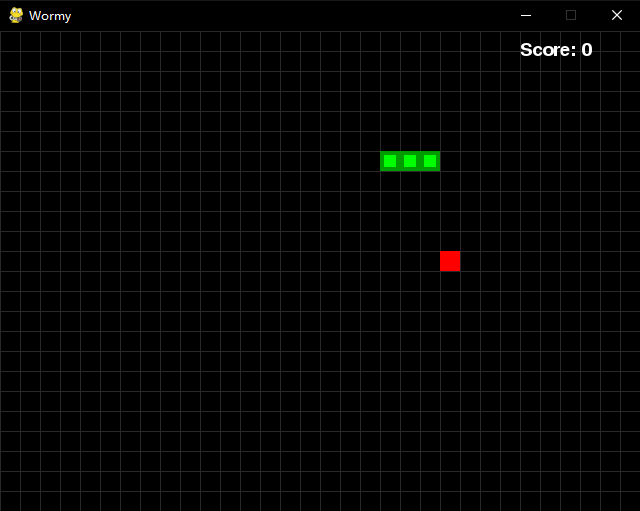
于是我开始思考,那么蛇到底是怎么移动起来的呢?原来,答案就在上面这段源代码中。蛇“移动”的方式是不断向蛇头添加小块同时删除尾部小块,在吃到苹果时才不删除尾部,这样就能做出“移动”的效果啦。
参考
Pygame 贪吃蛇的更多相关文章
- 初入pygame——贪吃蛇
一.问题利用pygame进行游戏的编写,做一些简单的游戏比如贪吃蛇,连连看等,后期做完会把代码托管. 二.解决 1.环境配置 python提供一个pygame的库来进行游戏的编写.首先是安装pygam ...
- pygame编写贪吃蛇
一直想用pygame做一个小游戏的,可是因为拖延症的缘故一直没有动,结果那天看到了一个12岁的国际友人小盆友用pygame做的一款塔防游戏,突然感觉已经落后超级远了,所以心血来潮做小游戏了.高中陪伴我 ...
- pygame写贪吃蛇
python小白尝试写游戏.. 学了点pygame不知道那什么练手好,先拿贪吃蛇开刀吧. 一个游戏可以粗略的分为两个部分: 数据(变量) 处理数据(函数,方法) 设计变量 首先预想下,画面的那些部分需 ...
- 用python+pygame写贪吃蛇小游戏
因为python语法简单好上手,前两天在想能不能用python写个小游戏出来,就上网搜了一下发现了pygame这个写2D游戏的库.了解了两天再参考了一些资料就开始写贪吃蛇这个小游戏. 毕竟最开始的练手 ...
- pygame试水,写一个贪吃蛇
最近学完python基础知识,就想着做一个游戏玩玩,于是就在https://www.pygame.org/docs/学着做了个贪吃蛇游戏. 首先要导入模块. import pygame import ...
- Python实战练习_贪吃蛇 (pygame的初次使用)
正如标题所写的那样,我将一步步的完成本次实战练习——贪吃蛇.废话不多说,感兴趣的伙伴可以一同挑战一下. 首先说明本次实战中我的配备: 开发环境:python 3.7: 开发工具:pycharm2019 ...
- Pygame模块实现功能超赞的贪吃蛇
import pygame import random import sys import pygame.freetype import re import datetime pygame.ini ...
- 程序游戏推荐(C语言贪吃蛇,python天天酷跑(需要安装pygame),js是狠人就坚持30s)
下面是下载位置,我把他们上传到我的文件下了. C语言贪吃蛇:https://files.cnblogs.com/files/ITXiaoAng/%E8%B4%AA%E5%90%83%E8%9B%87. ...
- 多线程的Python 教程--“贪吃蛇”
本指南的里代码可以在这里下载: threadworms.py ,或者从 GitHub.代码需要 Python 3 或 Python 2 ,同时也需要安装 Pygame . 点击查看大版本图片 ...
随机推荐
- 图解HTTP(三)
第七章 确保Web安全的HTTPS 1.HTTP的不足 通信使用明文(不加密),内容可能被监听 不验证通信方的身份,因此可能遭遇伪装 无法验证报文的完整性,所以有可能已遭篡改 2.通信加密 通信的加密 ...
- 【vue】vue生命周期---精简易懂-----【XUEBIG】
主要的生命周期函数分类: - 创建期间的生命周期函数:(只会调用一次) + beforeCreate:实例刚在内存中被创建出来,此时,还没有初始化好 data 和 methods 属 ...
- PYTHON 文件读写、坐标寻址、查找替换
读文件 打开文件(文件需要存在) #打开文件 f = open("data.txt","r") #设置文件对象 print(f)#文件句柄 f.close() ...
- rsyslog传输指定目录下的全部日志数据
准备: 两台Linux电脑 server(A):10.1.75.177 client(B):10.1.75.229 目的: 将B上的/usr/local/record目录下的所有日志数据传输到A的/v ...
- windows下binlog问题解决
1.先确定mysql是否开启了binlog show binary logs; 默认情况下是不开启的 2.如何开启 在my.ini配置下添加两个参数 # Binary Logginglog-bin=m ...
- Python,for循环小例子--99乘法表
一.99乘法表 for i in range(1, 10): for j in range(1, i + 1): print('%sx%s=%s ' % (j, i, j * i), end='') ...
- 《深入理解 Java 虚拟机》读书笔记:Java 内存区域与内存溢出异常
前言 最近开始看这本书,记得前段时间拿起这本书的时候,心情是相当沉重的!当时的剧本是这样的-- 内景.家里 - 下午 我(画外):唉,有点无聊啊!(偶然撇过书架)这么多书得看到什么时候啊,要不要拿一本 ...
- 阿里云云计算助理工程师认证(ACA)
经过两天的学习(观看视频,阅读官方帮助文档),完成了初级云计算认证. 本次考试难度相对较低,考察内容较为初级 考点主要考察学员是否真正的动手实验过,不局限于视频中讲解的内容,较多的考点为视频中操作演示 ...
- Linux代理服务器使用
1. 介绍 代理(即网络代理)是一种特殊的网络服务, 允许一个网络终端(客户端)通过这个服务与另一个终端(服务器)进行非直接连接,从而提供服务. 其中, 提供代理的网络终端称为代理服务器(Proxy ...
- 《Coderxiaoban团队》第三次作业:团队项目的原型设计
<XXX团队>第三次作业:团队项目的原型设计 项目 内容 这个作业属于哪个课程 任课教师博客主页链接 这个作业的要求在哪里 实验七 团队作业3:团队项目原型设计与开发 团队名称 Coder ...