
Android-----RadioButton单选使用(实现简单温度转换)
废话少说,直接上代码:
xml布局文件代码:
 <?xml version="1.0" encoding="utf-8"?>

 <LinearLayout

     xmlns:android="http://schemas.android.com/apk/res/android"

     xmlns:tools="http://schemas.android.com/tools"

     android:layout_width="match_parent"

     android:layout_height="wrap_content"

     android:orientation="vertical"

     tools:context="com.hs.example.exampleapplication.RadioButtonMain">

     <LinearLayout

         android:layout_width="match_parent"

         android:layout_height="wrap_content"

         android:orientation="horizontal"

         android:gravity="center">

         <TextView

             android:layout_width="wrap_content"

             android:layout_height="match_parent"

             android:gravity="center"

             android:text="输入温度:"/>

         <RadioGroup

             android:id="@+id/unit"

             android:layout_width="wrap_content"

             android:layout_height="wrap_content"

             android:orientation="horizontal">

             <RadioButton

                 android:id="@+id/unitF"

                 android:layout_width="wrap_content"

                 android:layout_height="wrap_content"

                 android:textSize="22sp"

                 android:text="华氏"/>

             <RadioButton

                 android:id="@+id/unitC"

                 android:layout_width="wrap_content"

                 android:layout_height="wrap_content"

                 android:textSize="22sp"

                 android:text="摄氏"/>

             <RadioButton

                 android:id="@+id/unitK"

                 android:layout_width="wrap_content"

                 android:layout_height="wrap_content"

                 android:textSize="22sp"

                 android:text="绝对"/>

         </RadioGroup>

     </LinearLayout>

     <EditText

         android:id="@+id/value"

         android:layout_width="match_parent"

         android:layout_height="wrap_content"

         android:maxLength=""

         android:singleLine="true"

         android:inputType="numberDecimal"/>

     <LinearLayout

         android:layout_width="match_parent"

         android:layout_height="wrap_content"

         android:orientation="vertical">

         <TextView

             android:id="@+id/degF"

             android:layout_width="match_parent"

             android:layout_height="wrap_content"

             android:layout_weight=""

             android:gravity="center"

             android:textSize="45sp"

             android:maxLines=""

             android:text="@string/charF"/>

         <TextView

             android:id="@+id/degC"

             android:layout_width="match_parent"

             android:layout_height="wrap_content"

             android:layout_weight=""

             android:gravity="center"

             android:textSize="45sp"

             android:maxLines=""

             android:text="@string/charC"/>

         <TextView

             android:id="@+id/degK"

             android:layout_width="match_parent"

             android:layout_height="wrap_content"

             android:layout_weight=""

             android:gravity="center"

             android:textSize="45sp"

             android:maxLines=""

             android:text="K"/>

     </LinearLayout>

 </LinearLayout>
Java代码:
 public class RadioButtonMain extends AppCompatActivity implements RadioGroup.OnCheckedChangeListener,TextWatcher{

     RadioGroup unit;

     EditText value;

     @Override

     protected void onCreate(Bundle savedInstanceState) {

         super.onCreate(savedInstanceState);

         setContentView(R.layout.activity_radiobutton_main);

         unit = this.findViewById(R.id.unit);

         unit.setOnCheckedChangeListener(this);

         value = this.findViewById(R.id.value);

         value.addTextChangedListener(this);

     }

     @Override

     public void beforeTextChanged(CharSequence charSequence, int i, int i1, int i2) {

     }

     @Override

     public void onTextChanged(CharSequence charSequence, int i, int i1, int i2) {

     }

     @Override

     public void afterTextChanged(Editable editable) {

         calc();

     }

     @Override

     public void onCheckedChanged(RadioGroup radioGroup, int i) {

         calc();

     }

     protected void calc(){

         TextView degF = this.findViewById(R.id.degF);

         TextView degC = this.findViewById(R.id.degC);

         TextView degK = this.findViewById(R.id.degK);

         double f,c,k;

         if(unit.getCheckedRadioButtonId() == R.id.unitF){

             f = Double.parseDouble(value.getText().toString());

             c = (f-)*/;         //华氏度转摄氏度

             k = c + 273.15;         //绝对 = 摄氏度 + 273.15

         }else if(unit.getCheckedRadioButtonId() == R.id.unitC){

             c = Double.parseDouble(value.getText().toString());

             f = c*/+;           //摄氏度转华氏度

             k = c + 273.15;

         }else{

             k = Double.parseDouble(value.getText().toString());

             c = k - 273.15;

             f = c*/+;

         }

         degC.setText(String.format("%.1f",c)+getResources().getString(R.string.charC));

         degF.setText(String.format("%.1f",f)+getResources().getString(R.string.charF));

         degK.setText(String.format("%.2f",k)+"K");

     }

 }
运行效果:
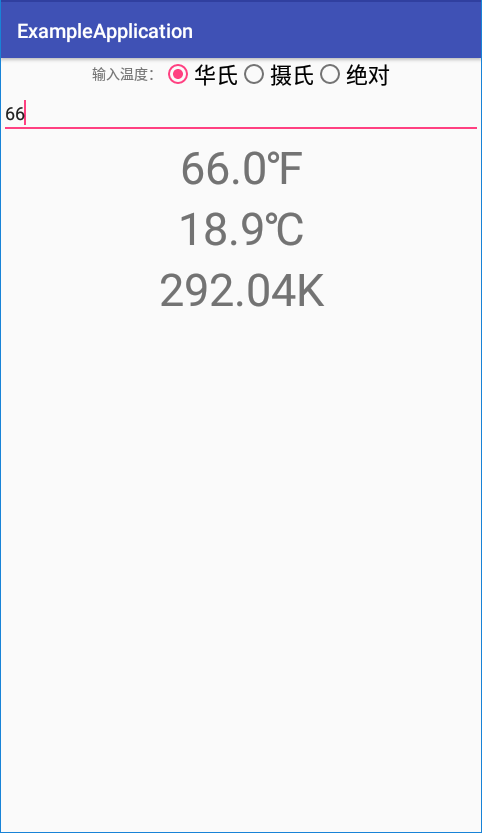

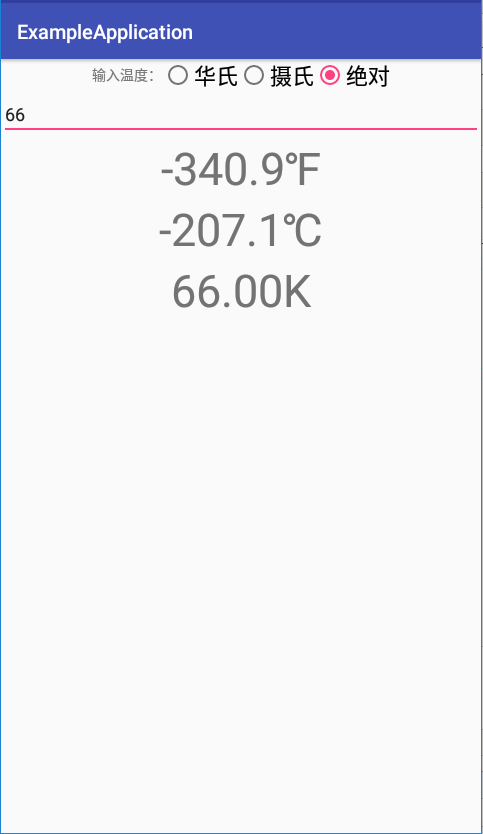
该例子还存在一些问题,这里就不指出了,运行一遍自会发现问题所在,最好能够自行解决。
Android-----RadioButton单选使用(实现简单温度转换)的更多相关文章
- 【笔记】嵩天.Python语言程序设计.完成两个简单实例(温度转换和绘图)
[博客导航] [Python相关] 目标 使用PyCharm,完成两个小实例的编写和运行.一个是温度转换,一个是蟒蛇图形绘制. 过程 1.先设置project目录,虽然命名不是很正式,主要不太习惯软件 ...
- Android SQLite与ListView的简单使用
2017-04-25 初写博客有很多地方都有不足,希望各位大神给点建议. 回归主题,这次简单的给大家介绍一下Android SQLite与ListView的简单使用sqlite在上节中有介绍,所以在这 ...
- 计算机二级Python学习笔记(一):温度转换
今天通过一个温度转换的十行代码,理解了一些Python的基本元素. 所谓温度转换,就是摄氏度和华氏度的转换,要求输入摄氏度,可以输出华氏度,反之一样能实现.代码如下: #TempConvert.py ...
- Xamarin.Android之引导页的简单制作
0x01 前言 对于现在大部分的APP,第一次打开刚安装或更新安装的APP都会有几个引导界面,通常这几个引导页是告诉用户 APP有些什么功能或者修改了什么bug.新增了什么功能等等等. 下面就用Xam ...
- Android Activity的生命周期简单总结
Android Activity的生命周期简单总结 这里的内容参考官方的文档,这篇文章的目的不是去总结Activity是如何启动,如何创造,以及暂停和销毁的,而是从实际开发中分析在Activity各个 ...
- ytu 2029: C语言实验——温度转换(水题)
2029: C语言实验——温度转换 Time Limit: 1 Sec Memory Limit: 64 MBSubmit: 12 Solved: 10[Submit][Status][Web B ...
- Android 设计随便说说之简单实践(合理组合)
上一篇(Android 设计随便说说之简单实践(模块划分))例举了应用商店设计来说明怎么做模块划分.模块划分主要依赖于第一是业务需求,具体是怎么样的业务.应用商店则包括两个业务,就是向用户展示appl ...
- 怎样在Android实现桌面清理内存简单Widget小控件
怎样在Android实现桌面清理内存简单Widget小控件 我们常常会看到类似于360.金山手机卫士一类的软件会带一个widget小控件,显示在桌面上,上面会显示现有内存大小,然后会带一个按键功能来一 ...
- Android BLE与终端通信(一)——Android Bluetooth基础API以及简单使用获取本地蓝牙名称地址
Android BLE与终端通信(一)--Android Bluetooth基础API以及简单使用获取本地蓝牙名称地址 Hello,工作需要,也必须开始向BLE方向学习了,公司的核心技术就是BLE终端 ...
随机推荐
- RHCE试题解析
环境准备 yum-config-manager --add-repo=ADDREPO vim /etc/yum.conf gpgcheck=0(1=on,0=off) 增加指定repo源,关闭签名 ...
- py 包和模块,软件开发目录规范
目录 py 包和模块,软件开发目录规范 什么是包? 什么是模块? 软件开发目录规范 py 包和模块,软件开发目录规范 什么是包? 包指的是内部包__init__.py的文件夹 包的作用: 存放模块,包 ...
- 修改了celery任务老是执行失败,跟shell中调试的结果不同
因为没有重启celery,没有删除celerybeat-schedule,导致使用的task任务一直是原来缓存的,所以代码一直无法生效,也是日了狗了
- 网络协议 5 - ICMP 与 Ping
日常开发中,我们经常会碰到查询网络是否畅通以及域名对应 IP 地址等小需求,这时候用的最多的应该就是 ping 命令了. 那你知道 ping 命令是怎么工作的吗?今天,我们就来一起认识下 ping 命 ...
- 【cf比赛记录】Educational Codeforces Round 78 (Rated for Div. 2)
比赛传送门 A. Shuffle Hashing 题意:加密字符串.可以把字符串的字母打乱后再从前面以及后面接上字符串.问加密后的字符串是否符合加密规则. 题解:字符串的长度很短,直接暴力搜索所有情况 ...
- Unity开发:5.0+版本标准资源包无内置问题
一.问题如下: 在Unity中,一般都会内置有基础的资源包,可以在Assets->Import Package中,点击其下的子项进行导入: 但是我发现,5.0版本与之前的4.x版本相比,安装包变 ...
- 16 个超级实用的 Java 工具类
阅读本文大概需要 4 分钟. 出处:alterem juejin.im/post/5d4a25b351882505c105cc6e 在Java中,工具类定义了一组公共方法,这篇文章将介绍Java中使用 ...
- 【神经网络与深度学习】neural-style、chainer-fast-neuralstyle图像风格转换使用
neural-style 官方地址:这个是使用torch7实现的;torch7安装比较麻烦.我这里使用的是大神使用TensorFlow实现的https://github.com/anishathaly ...
- Spring Boot 2整合Redis做缓存
既然是要用Redis做缓存,自然少不了安装了.但是本文主要讲Spring Boot与Redis整合.安装教程请另行百度! 1.首先是我们的Redis配置类 package com.tyc; impor ...
- fp-growth代码问题(Python)
网上的 python3 fp-growth代码每次在执行时可能会出现找出的频繁项集不一致的情况,这是因为每次执行代码时建的FP树可能不一致. 加了一行代码可以解决这个问题(第59行):先对 frequ ...