
c# Path.Combine
Path.Combine:
c#获取当前项目路径 :
 //获取包含当前执行的代码的程序集的加载文件的完整路径

             var appPath = System.IO.Path.GetDirectoryName(Assembly.GetExecutingAssembly().Location);

             Console.WriteLine(appPath);

             //获取模块的完整路径

             string path = System.Diagnostics.Process.GetCurrentProcess().MainModule.FileName;

             Console.WriteLine(path);

             //获取和设置当前目录(该进程从中启动的目录)的完全限定目录。

             var dicPath = System.Environment.CurrentDirectory;

             Console.WriteLine(dicPath);

             //获取程序的基目录

             string basePath = System.AppDomain.CurrentDomain.BaseDirectory;

             Console.WriteLine(basePath);

             //获取和设置包括该应用程序的目录的名称

             string domainPath = System.AppDomain.CurrentDomain.SetupInformation.ApplicationBase;

             Console.WriteLine(domainPath);
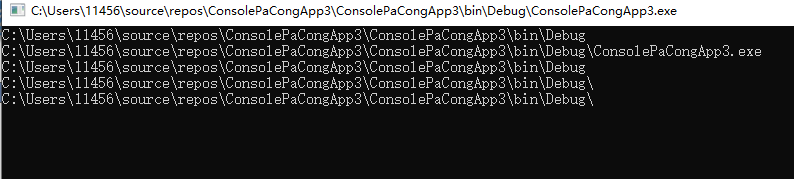
输出结果:
System.IO.Path.Combine 简单来说,就是合并两个及两个以上的路径字符串。
             //两个都是绝对路径,返回后者

             string tmp = Path.Combine(@"C:\user", @"D:\test.txt");

             Console.WriteLine(tmp);

             //如果指定的路径之一是零长度字符串,则该方法返回其他路径。

             //当然,两个都是零长度字符串,则返回的就是 string.Empty ;

             string tmp1 = Path.Combine("", @"D:\test.txt");

             Console.WriteLine(tmp1);

             string tmp2 = Path.Combine(@"C:\user", "");

             Console.WriteLine(tmp2);

             //如果其中一个参数为 null ,会抛出异常(System.ArgumentNullException)

             string tmp3 = Path.Combine(@"C:\user", null);

             Console.WriteLine(tmp3);
输出结果:

所以下面的代码可以完美的工作:
public static void Main()
{
string[] arr_pa = { @"c:\abc\", @"c:\abc" };
string[] arr_pb = { @"test.txt" };
foreach (string pa in arr_pa)
{
foreach (string pb in arr_pb)
{
Console.WriteLine("'{0}' + '{1}'= '{2}'", pa, pb, Path.Combine(pa, pb));
}
}
}
结果如下:

从这个例子可以知道,我们不需要考虑arr_pa里面的字符串是不是以”\” 结尾,这的确提供了方便,而且这也是很多人喜欢使用Path.Combine的一个原因,但是仅此而已。
Path.Combine 虽然解决了路径连接问题,但是由于很多人片面的去理解它,所有它非常容易造成错误的应用,要想用好Path.Combine 并非易事,下面我会列举几个实例来说明这点。
第一个:当path2 是相对路径的时候,返回的是path2,path1会被丢弃。
看一下下面的代码:
public static void Main()
{
string[] arr_pa = { @"c:\abc\", @"c:\abc" };
string[] arr_pb = { @"\test.txt", @"/test.txt", @"test.txt" };
foreach (string pa in arr_pa)
{
foreach (string pb in arr_pb)
{
Console.WriteLine("'{0}' + '{1}'= '{2}'", pa, pb, Path.Combine(pa, pb));
}
}
}
你知道这段代码输出什么吗?
这段代码的输出如下:
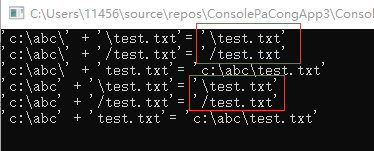
可以看到对于”/test.txt” 和”\test.txt” ,Path.Combine 认为path2是相对路径,所以直接返回path2.。
第二点:路径是驱动器,返回的结果不正确
public static void Main()
{
string[] arr_pa = { @"c:", @"c:\" };
string[] arr_pb = { @"\test.txt", @"/test.txt", @"test.txt" };
foreach (string pa in arr_pa)
{
foreach (string pb in arr_pb)
{
Console.WriteLine("'{0}' + '{1}'= '{2}'", pa, pb, Path.Combine(pa, pb));
}
}
}
输出结果是:

可以看到,如果path1 是” C:”的话,那么Path.Combine结果就是不正确的。
第三点:无法连接http路径
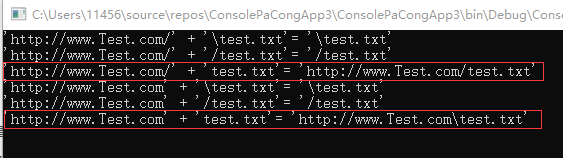
除了连接本地路路径之外,有的时候,也需要拼接http链接地址,可惜的是System.IO.Path.Combine却无法拼接http地址。
将arr_pa 修改为
string[] arr_pa = { @"http://www.Test.com/", @"http://www.Test.com" };
结果如下:
在这里就没有什么技巧了,纯粹的死记硬背,
public static string Combine(string path1, string path2);
public static string Combine(string path1, string path2, string path3);
public static string Combine(string path1, string path2, string path3, string path4);
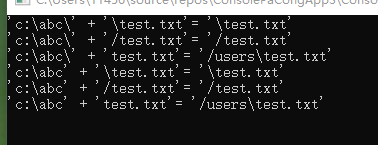
其中第二个后面的所有参数都不能带有 “/” 符号的路径,否则还是会返回最后一个能组成的相对路径的。
  string[] arr_pa = { @"c:\abc\", @"c:\abc" };

             string[] arr_pb = { @"\test.txt", @"/test.txt", @"test.txt" };

             foreach (string pa in arr_pa)

             {

                 foreach (string pb in arr_pb)

                 {

                     Console.WriteLine("'{0}' + '{1}'= '{2}'", pa, pb, Path.Combine(pa,"/users", pb));

                 }

             }
输出如下:
如果需要支持路径的话。那么需要自己扩展一下该方法即可。。
 public static string CombinePath(this string path1, string path2)

 {

 if (string.IsNullOrEmpty(path2))

 return path1;

 var paths = path2.Split(new char[] { '\\', '/' });

 foreach (var item in paths.Select(s => s.Trim()).Where(s =>!string.IsNullOrEmpty( s)))

 {

 path1 = System.IO.Path.Combine(path1, item);

 }

 return path1;

 }
输出结果:
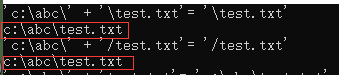
但是还是不能解决Url地址的问题
正是因为上述的几点不足,导致Path.Combine 很难用,这也是有一部分人选择使用String.Format 的原因了。
c# Path.Combine的更多相关文章
- 关于程序路径Path.Combine以及AppDomain.CurrentDomain.BaseDirectory
关于程序路径 LucenePath:@(System.Configuration.ConfigurationManager.AppSettings["LucenePath"])&l ...
- C# Path.Combine 方法的用法
C# Path.Combine 方法的用法 *.注意: string filePath3= Path.Combine(string path1,string path2): 情况一: path2中 ...
- Path.Combine 合并两个路径字符串,会出现的问题
Path.Combine(path1,path2) 1.如果path2字符串,以 \ 或 / 开头,则直接返回 path2
- 基于用Path.Combine的优化
Path.Combine: 什么时候会用到Path.Combine呢?,当然是连接路径字符串的时候! 所以下面的代码可以完美的工作: public static void Main() { strin ...
- 使用System.IO.Combine(string path1, string path2, string path3)四个参数的重载函数提示`System.IO.Path.Combine(string, string, string, string)' is inaccessible due to its protection level
今天用Unity5.5.1开发提取Assets目录的模块,使用时采用System.IO.Path.Combine(string, string, string, string)函数进行路径生成 明明是 ...
- Path.Combine Method
https://docs.microsoft.com/en-us/dotnet/api/system.io.path.combine?view=netframework-4.8#System_IO_P ...
- Path.Combine(
// 获取程序的基目录. var dir1 = System.AppDomain.CurrentDomain.BaseDirectory; // 获取模块的完整路径. var dir2 = Syste ...
- C# Path.Combine 缺陷(http路径用Uri类)
Path.Combine: 什么时候会用到Path.Combine呢?,当然是连接路径字符串的时候! 所以下面的代码可以完美的工作: public static void Main() { strin ...
- [原]System.IO.Path.Combine 路径合并
使用 ILSpy 工具查看了 System.IO.Path 类中的 Combine 方法 对它的功能有点不放心,原方法实现如下: // System.IO.Path /// <summary&g ...
随机推荐
- 计蒜客——Reversion Count
Reversion Count 解析:题目数字的长度最大为 99,因此使用字符串处理,那么必然这些数存在某些规律.对于数 a (XYZW) 和数 b (WZYX),原式 = (1000X + 100Y ...
- java 优秀开源项目
一.https://github.com/zhangdaiscott/jeecg-boot 简介:一款基于代码生成器的JAVA快速开发平台!全新架构前后端分离:SpringBoot 2.x,Ant D ...
- java下载文件工具类
java下载文件工具类 package com.skjd.util; import java.io.BufferedInputStream; import java.io.BufferedOutput ...
- checkbox与label内的文字垂直居中的解决方案
<label style="float:left;margin-top:5px;margin-left:10px;cursor:pointer"><input t ...
- 三层架构BLL+DAL+Model & MVC & MVVM
三层架构 - 国内版 Binghttps://cn.bing.com/search?FORM=U227DF&PC=U227&q=%E4%B8%89%E5%B1%82%E6%9E%B6% ...
- 安装比特币区块链钱包API(Blockchain Wallet用户发送和接收比特币的简单API)
区块链钱包API提供了一个简单的界面,商家可以用它以编程方式与钱包进行交互. 安装:要使用此API,您需要运行负责管理区块链钱包的小型本地服务. 您的应用程序通过HTTP API调用在本地与此服务进行 ...
- nfs高可用
一.简介 NFS是单点的,如果一个节点出现问题,那使用它挂载服务的都将出现问题.所以需要高可用,挂掉一台不影响.采用keepalived+rsync+inotify-tools 环境: ubunt ...
- python初级(302) 3 easygui简单使用二
一.复习 1.easygui 信息提示对话框 2.easygui 是否对话框 二.easygui其它组件 1.选择对话框:choicebox(msg, title, choices) import e ...
- piecewise_construct存在的意义
C++11中大部分的容器对于添加元素除了传统的 insert 或者 pusb_back/push_front 之外都提供一个新的函数叫做 emplace. 比如如果你想要向 std::vector 的 ...
- [LeetCode] 169. Majority Element 多数元素
Given an array of size n, find the majority element. The majority element is the element that appear ...