
C# Path.Combine 缺陷(http路径用Uri类)
Path.Combine:
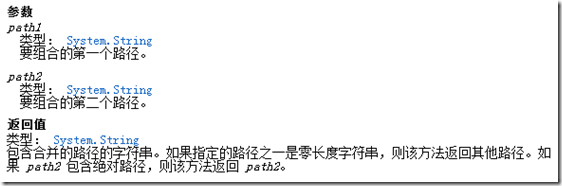
什么时候会用到Path.Combine呢?,当然是连接路径字符串的时候!
所以下面的代码可以完美的工作:
public static void Main()
{
string[] arr_pa = { @"c:\abc\", @"c:\abc" };
string[] arr_pb = { @"test.txt" };
foreach (string pa in arr_pa)
{
foreach (string pb in arr_pb)
{
Console.WriteLine("'{0}' + '{1}'= '{2}'", pa, pb, Path.Combine(pa, pb));
}
}
}
结果如下:

当然你也可以:
Console.WriteLine("'{0}' + '{1}'= '{2}'", pa, pb, Path.Combine(pa, "def", pb));
结果是:

从这个例子可以知道,我们不需要考虑arr_pa里面的字符串是不是以”\” 结尾,这的确提供了方便,而且这也是很多人喜欢使用Path.Combine的一个原因,但是仅此而已。
Path.Combine 虽然解决了路径连接问题,但是由于很多人片面的去理解它,所有它非常容易造成错误的应用,要想用好Path.Combine 并非易事,下面我会列举几个实例来说明这点。
第一个:当path2 是相对路径的时候,返回的是path2,path1会被丢弃。
看一下下面的代码:
public static void Main()
{
string[] arr_pa = { @"c:\abc\", @"c:\abc" };
string[] arr_pb = { @"\test.txt", @"/test.txt", @"test.txt" };
foreach (string pa in arr_pa)
{
foreach (string pb in arr_pb)
{
Console.WriteLine("'{0}' + '{1}'= '{2}'", pa, pb, Path.Combine(pa, pb));
}
}
}
你知道这段代码输出什么吗?
这段代码的输出如下:
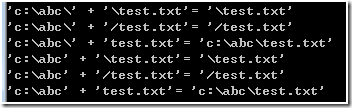
可以看到对于”/test.txt” 和”\test.txt” ,Path.Combine 认为path2是相对路径,所以直接返回path2.。
第二点:路径是驱动器,返回的结果不正确
public static void Main()
{
string[] arr_pa = { @"c:", @"c:\" };
string[] arr_pb = { @"\test.txt", @"/test.txt", @"test.txt" };
foreach (string pa in arr_pa)
{
foreach (string pb in arr_pb)
{
Console.WriteLine("'{0}' + '{1}'= '{2}'", pa, pb, Path.Combine(pa, pb));
}
}
}
输出结果是:
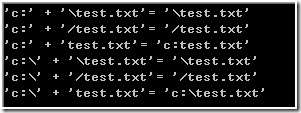
可以看到,如果path1 是” C:”的话,那么Path.Combine结果就是不正确的。
第三点:无法连接http路径
除了连接本地路路径之外,有的时候,也需要拼接http链接地址,可惜的是System.IO.Path.Combine却无法拼接http地址。
将arr_pa 修改为
string[] arr_pa = { @"http://www.Test.com/", @"http://www.Test.com" };
结果如下:

在这里就没有什么技巧了,纯粹的死记硬背,
记住,只有

才会产生正确的解。
如果你将代码修改为:
public static void Main()
{
string[] arr_pa = { @"http://www.Test.com/", @"http://www.Test.com" };
string[] arr_pb = { @"\test.txt", @"/test.txt", @"test.txt" };
foreach (string pa in arr_pa)
{
foreach (string pb in arr_pb)
{
Console.WriteLine("'{0}' + '{1}'= '{2}'", pa, pb, Path.Combine(pa, "def", pb));
}
}
}
那么无论怎样,你都无法得到正确的结果:

正是因为上述的几点不足,导致Path.Combine 很难用,这也是有一部分人选择使用String.Format 的原因了。
The answer is to use the System.Uri-constructor to combine the URL:
public static Uri CombineUri(string baseUri, string relativeOrAbsoluteUri) {
    return new Uri(new Uri(baseUri), relativeOrAbsoluteUri);
}

public static string CombineUriToString(string baseUri, string relativeOrAbsoluteUri) {
    return new Uri(new Uri(baseUri), relativeOrAbsoluteUri).ToString();
}

..

// Results in "http://www.my.domain/relative/path"
var a = CombineUriToString("http://www.my.domain/", "relative/path");

// Results in "http://www.my.domain/absolute/path"
var b = CombineUriToString("http://www.my.domain/something/other", "/absolute/path");
C# Path.Combine 缺陷(http路径用Uri类)的更多相关文章
- C# Path 有关于文件路径等问题类(转)
C# Path 标签:C#, Path C-Sharp 0 Path handles file path processing. The .NET Framework provides effect ...
- 关于程序路径Path.Combine以及AppDomain.CurrentDomain.BaseDirectory
关于程序路径 LucenePath:@(System.Configuration.ConfigurationManager.AppSettings["LucenePath"])&l ...
- Path.Combine 合并两个路径字符串,会出现的问题
Path.Combine(path1,path2) 1.如果path2字符串,以 \ 或 / 开头,则直接返回 path2
- C# Path.Combine 方法的用法
C# Path.Combine 方法的用法 *.注意: string filePath3= Path.Combine(string path1,string path2): 情况一: path2中 ...
- 基于用Path.Combine的优化
Path.Combine: 什么时候会用到Path.Combine呢?,当然是连接路径字符串的时候! 所以下面的代码可以完美的工作: public static void Main() { strin ...
- 使用System.IO.Combine(string path1, string path2, string path3)四个参数的重载函数提示`System.IO.Path.Combine(string, string, string, string)' is inaccessible due to its protection level
今天用Unity5.5.1开发提取Assets目录的模块,使用时采用System.IO.Path.Combine(string, string, string, string)函数进行路径生成 明明是 ...
- c# Path.Combine
Path.Combine: c#获取当前项目路径 : //获取包含当前执行的代码的程序集的加载文件的完整路径 var appPath = System.IO.Path.GetDirectoryName ...
- Path.Combine Method
https://docs.microsoft.com/en-us/dotnet/api/system.io.path.combine?view=netframework-4.8#System_IO_P ...
- Path.Combine(
// 获取程序的基目录. var dir1 = System.AppDomain.CurrentDomain.BaseDirectory; // 获取模块的完整路径. var dir2 = Syste ...
随机推荐
- Ubuntu各个版本下载
官网:https://www.ubuntu.com/download/desktop 没找到历史版本,且下载速度很慢 在网易镜像站下载ubuntu: 网址:http://mirrors.163.com ...
- mysql中source提高导入数据速率的方法
示例: 第一步: 第二步: 使用 source 导入你所需要导入的文件 第三步: 在导入的数据停止后,输入 commit; 这样数据就算是导入完成了.
- Laravel进行数据库迁移(migration)
迁移(migration) 文档的简介是:迁移就像数据库的版本控制,允许团队简单轻松的编辑并共享应用的数据库表结构,迁移通常和 Laravel 的结构构建器结对从而可以很容易地构建应用的数据库表结构. ...
- Word:英文从“单词”中间断行
造冰箱的大熊猫@cnblogs 2019/2/1 在Word输入一个比较长的英文内容,比如“D:/software/myapp/bulids/FieldTest/Final_0533/PViewEdi ...
- Codeforces 437D The Child and Zoo(并查集)
Codeforces 437D The Child and Zoo 题目大意: 有一张连通图,每个点有对应的值.定义从p点走向q点的其中一条路径的花费为途径点的最小值.定义f(p,q)为从点p走向点q ...
- JIRA备份,数据迁移以及小问题
Jira的备份(切记将许可证号备份) Jira默认会打开自动备份的功能,备份路径为/var/atlassian/application-data/jira/export 管理员账号登录Jira,点击右 ...
- 撩测试MM神器cypress使用入门
不很久不很久以前 据说某家公司有两位前端,天天撸bug,为啥嘞?只怪测试MM倾人国,轻语哥哥有bug.✧(๑•̀ㅂ•́)و✧ 可是最近两位有点犯愁 Σ(っ °Д °;)っ.测试MM有几次提了紧急bug ...
- 在SpringBoot程序中记录日志
所有的项目都会有日志,日志文件是用于记录系统操作事件的记录文件或文件集合,可分为事件日志和消息日志.具有处理历史数据.诊断问题的追踪以及理解系统的活动等重要作用.这节描述如何用springboot记录 ...
- LeetCode 105. 从前序与中序遍历序列构造二叉树(Construct Binary Tree from Preorder and Inorder Traversal)
题目描述 根据一棵树的前序遍历与中序遍历构造二叉树. 注意:你可以假设树中没有重复的元素. 例如,给出 前序遍历 preorder = [3,9,20,15,7] 中序遍历 inorder = [9, ...
- Java-数据类型与编码(ASCII、Unicode 和 UTF-8)
机械硬盘硬件结构(了解)https://diy.pconline.com.cn/cpu/study_cpu/1009/2215404_all.html 一.数据储存单位 1.bit(位) https: ...