
CentOS7.5 上使用 bundle 文件安装 MySQL8.0 MySQL5.0
CentOS7.5 上使用 bundle 文件安装 MySQL8.0 MySQL5.0
CentOS7.5 环境
[root@instance-fjii60o3 ~]# rpm -qi centos-release

Name        : centos-release

Version     : 7

Release     : 5.1804.el7.centos

Architecture: x86_64

Install Date: Wed 30 May 2018 07:38:02 PM CST

Group       : System Environment/Base

Size        : 40173

License     : GPLv2

Signature   : RSA/SHA256, Tue 01 May 2018 12:17:56 AM CST, Key ID 24c6a8a7f4a80eb5

Source RPM  : centos-release-7-5.1804.el7.centos.src.rpm

Build Date  : Sun 29 Apr 2018 12:35:55 AM CST

Build Host  : x86-01.bsys.centos.org

Relocations : (not relocatable)

Packager    : CentOS BuildSystem <http://bugs.centos.org>

Vendor      : CentOS

Summary     : CentOS Linux release file

Description :

CentOS Linux release files
[root@instance-fjii60o3 ~]# cat /etc/redhat-release

CentOS Linux release 7.5.1804 (Core)
下载 MySQL
https://dev.mysql.com/downloads/mysql/

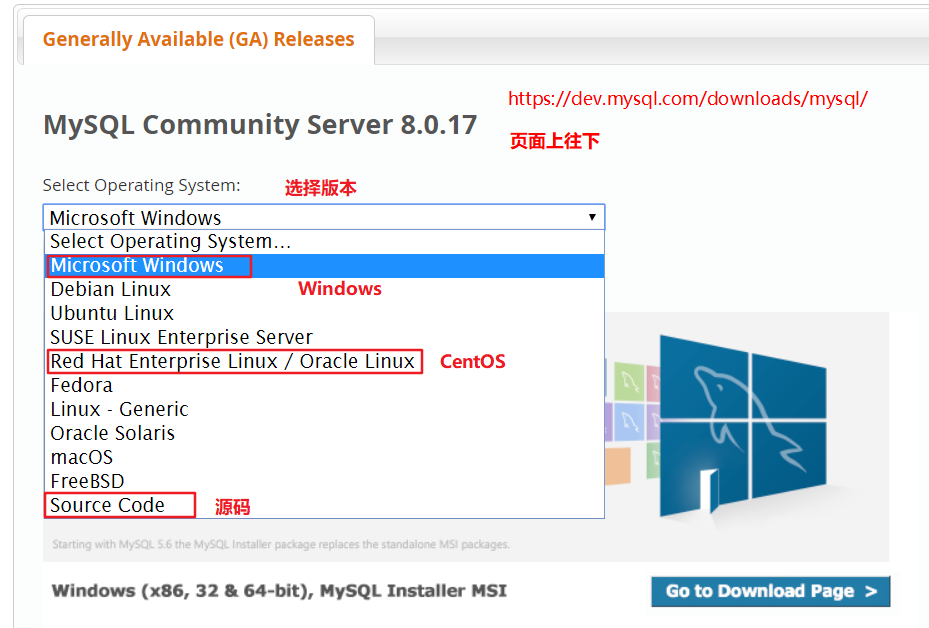
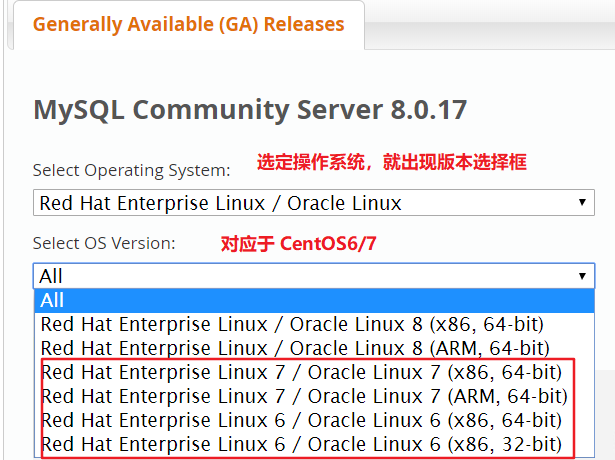
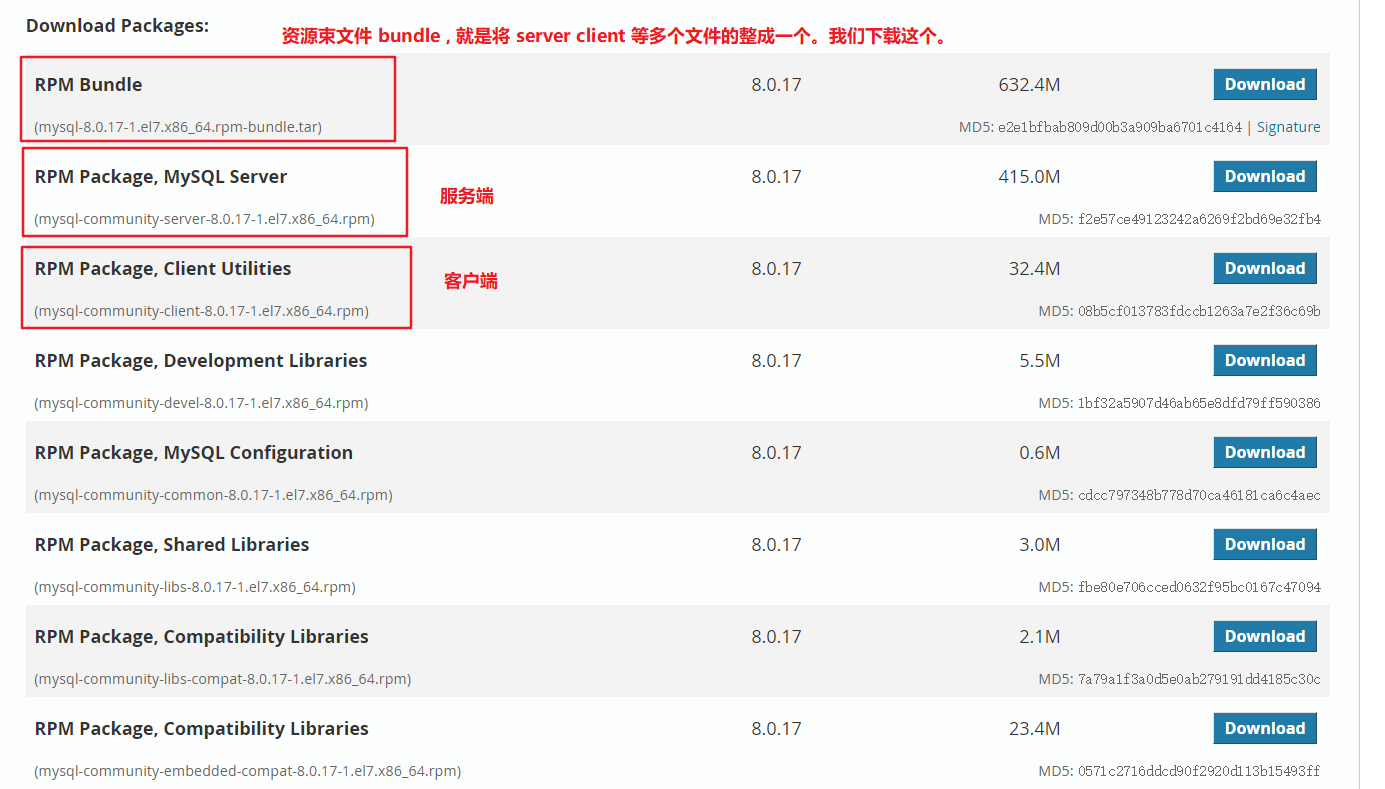
rpm-bundle 资源束
MySQL8.0
# MySQL8.0 资源束

[root@instance-fjii60o3 develop]# tar -xvf mysqlpackage/mysql-8.0.13-1.el7.x86_64.rpm-bundle.tar

mysql-community-client-8.0.13-1.el7.x86_64.rpm

mysql-community-embedded-compat-8.0.13-1.el7.x86_64.rpm

mysql-community-libs-8.0.13-1.el7.x86_64.rpm

mysql-community-server-8.0.13-1.el7.x86_64.rpm

mysql-community-common-8.0.13-1.el7.x86_64.rpm

mysql-community-devel-8.0.13-1.el7.x86_64.rpm

mysql-community-test-8.0.13-1.el7.x86_64.rpm

mysql-community-libs-compat-8.0.13-1.el7.x86_64.rpm
MySQL5.5
# 查看文件大小 -h human 以人可读的方式显示

[root@instance-fjii60o3 ~]# du -sh MySQL-5.5.62-1.el7.x86_64.rpm-bundle.tar

166M	MySQL-5.5.62-1.el7.x86_64.rpm-bundle.tar

# MySQL5.5 资源束

[root@instance-fjii60o3 ~]# tar -xvf MySQL-5.5.62-1.el7.x86_64.rpm-bundle.tar -C develop/mysql5.5/

MySQL-devel-5.5.62-1.el7.x86_64.rpm

MySQL-embedded-5.5.62-1.el7.x86_64.rpm

MySQL-shared-5.5.62-1.el7.x86_64.rpm

MySQL-test-5.5.62-1.el7.x86_64.rpm

MySQL-server-5.5.62-1.el7.x86_64.rpm

MySQL-shared-compat-5.5.62-1.el7.x86_64.rpm

MySQL-client-5.5.62-1.el7.x86_64.rpm
使用 rpm 本地安装 MySQL8.0
rpm 安装缺少依赖会报错,所以安装要按照指定的顺序。
rpm -ivh mysql-community-libs-8.0.13-1.el7.x86_64.rpm

rpm -ivh mysql-community-common-8.0.13-1.el7.x86_64.rpm

rpm -ivh mysql-community-client-8.0.13-1.el7.x86_64.rpm

rpm -ivh mysql-community-server-8.0.13-1.el7.x86_64.rpm
使用 rpm 本地安装 MySQL5.5
尝试安装,报错 perl 。
[root@instance-fjii60o3 mysql5.5]# rpm -ivh *.rpm

warning: MySQL-client-5.5.62-1.el7.x86_64.rpm: Header V3 DSA/SHA1 Signature, key ID 5072e1f5: NOKEY

error: Failed dependencies:

	perl(Data::Dumper) is needed by MySQL-server-5.5.62-1.el7.x86_64

	perl(Data::Dumper) is needed by MySQL-test-5.5.62-1.el7.x86_64

方案:

	安装 perl 和 自动配置 autoconf

# 安装 perl

[root@instance-fjii60o3 mysql5.5]# yum install perl

# 安装 autoconf 解决 perl(Data::Dumper) 问题

[root@instance-fjii60o3 mysql5.5]# yum -y install autoconf

Installed:

  autoconf.noarch 0:2.69-11.el7

Dependency Installed:

  perl-Data-Dumper.x86_64 0:2.145-3.el7
按照指定顺序进行安装
# 安装 autoconf

yum -y install autoconf

rpm -ivh MySQL-client-5.5.62-1.el7.x86_64.rpm

rpm -ivh MySQL-devel-5.5.62-1.el7.x86_64.rpm

rpm -ivh MySQL-server-5.5.62-1.el7.x86_64.rpm
启动 bug
[root@instance-fjii60o3 mysql5.5]# systemctl start mysqld

Failed to start mysqld.service: Unit not found.

原因:

	MySQL5.5 的服务名是 mysql 而不是 mysqld
[root@instance-fjii60o3 mysql5.5]# systemctl start mysql

Job for mysql.service failed because the control process exited with error code. See "systemctl status mysql.service" and "journalctl -xe" for details.

原因:

	MySQL8.0 卸载后没有删除相应数据目录,有残留。造成 MySQL5.5 安装后出问题。完全卸载干净后,重新安装成功。
[root@instance-fjii60o3 mysql5.5]# mysqld

190804 10:38:36 [Note] mysqld (mysqld 5.5.62) starting as process 24055 ...

190804 10:38:36 [ERROR] Fatal error: Please read "Security" section of the manual to find out how to run mysqld as root!
[root@instance-fjii60o3 mysql5.5]# mysqld --verbose --help > a.txt

190804 10:47:41 [Note] mysqld (mysqld 5.5.62) starting as process 24203 ...

190804 10:47:41 [Note] Plugin 'FEDERATED' is disabled.

mysqld: Table 'mysql.plugin' doesn't exist

190804 10:47:41 [ERROR] Can't open the mysql.plugin table. Please run mysql_upgrade to create it.
验证安装是否成功
# mysqld 和 mysql 查看版本号

[root@instance-fjii60o3 develop]# mysql --version

mysql  Ver 8.0.13 for Linux on x86_64 (MySQL Community Server - GPL)

[root@instance-fjii60o3 develop]# mysqld --version

/usr/sbin/mysqld  Ver 8.0.13 for Linux on x86_64 (MySQL Community Server - GPL)
启动 关闭 重启 查看 MySQL 服务
MySQL8.0 服务名为 mysqld , MySQL5.5 的服务名为 mysql 。
# 启动 MySQL8.0 服务。MySQL8.0 服务名为 mysqld , MySQL5.5 的服务名为 mysql 。

[root@instance-fjii60o3 develop]# systemctl start mysqld

# 关闭 MySQL8.0 服务

[root@instance-fjii60o3 develop]# systemctl stop mysqld

# 重启 MySQL8.0 服务

[root@instance-fjii60o3 develop]# systemctl restart mysqld

# 查看 MySQL8.0 服务

[root@instance-fjii60o3 develop]# systemctl status mysqld

# ps 查找 mysql 进程

[root@instance-fjii60o3 develop]# ps -aux | grep mysql

mysql    12991  3.4 18.1 1369508 371432 ?      Ssl  17:38   0:00 /usr/sbin/mysqld

root     13039  0.0  0.0 112708   980 pts/0    R+   17:38   0:00 grep --color=auto mysql

# netstat 查看 3306 端口

[root@instance-fjii60o3 develop]# netstat -ntlp

Active Internet connections (only servers)

Proto Recv-Q Send-Q Local Address           Foreign Address         State       PID/Program name       tcp6       0      0 :::3306                 :::*                    LISTEN      12991/mysqld
完全卸载 MySQL
[root@instance-fjii60o3 mysql5.5]# rpm -qa|grep -i mysql

MySQL-devel-5.5.62-1.el7.x86_64

MySQL-client-5.5.62-1.el7.x86_64

MySQL-server-5.5.62-1.el7.x86_64

[root@instance-fjii60o3 mysql5.5]# rpm -e MySQL-devel-5.5.62-1.el7.x86_64

[root@instance-fjii60o3 mysql5.5]# rpm -e MySQL-client-5.5.62-1.el7.x86_64

[root@instance-fjii60o3 mysql5.5]# rpm -e MySQL-server-5.5.62-1.el7.x86_64

[root@instance-fjii60o3 mysql5.5]# find / -name mysql

/usr/lib64/mysql

/etc/selinux/targeted/tmp/modules/100/mysql

/etc/selinux/targeted/active/modules/100/mysql

/var/lib/mysql

/var/lib/mysql/mysql

/run/lock/subsys/mysql

[root@instance-fjii60o3 mysql5.5]# rm -rf /usr/lib64/mysql /var/lib/mysql /run/lock/subsys/mysql /etc/selinux/targeted/tmp/modules/100/mysql /etc/selinux/targeted/active/modules/100/mysql
MySQL8.0 获取临时密码,客户端本地登录,并修改密码
MySQL8.0 临时密码文件 /var/log/mysqld.log
# 获取临时密码

[root@instance-fjii60o3 develop]# grep 'temporary password' /var/log/mysqld.log

2019-08-03T09:38:05.811773Z 5 [Note] [MY-010454] [Server] A temporary password is generated for root@localhost: vwhK+YKXJ0=v

# 使用临时密码登录 MySQL 客户端

[root@instance-fjii60o3 develop]# mysql -uroot -pvwhK+YKXJ0=v

mysql: [Warning] Using a password on the command line interface can be insecure.

Welcome to the MySQL monitor.  Commands end with ; or \g.

Your MySQL connection id is 8

# 修改密码。注意:因为对密码格式有限制,所以不符合规则的密码会报错。

mysql> ALTER USER 'root'@'localhost' IDENTIFIED BY 'Root1234=';

Query OK, 0 rows affected (0.03 sec)
MySQL5.5 设置登录密码,客户端本地登录
PLEASE REMEMBER TO SET A PASSWORD FOR THE MySQL root USER !

To do so, start the server, then issue the following commands:

/usr/bin/mysqladmin -u root password 'new-password'

/usr/bin/mysqladmin -u root -h instance-fjii60o3 password 'new-password
mysqladmin 修改登录密码,客户端本地登录
[root@instance-fjii60o3 mysql5.5]# /usr/bin/mysqladmin -u root password 'root'

[root@instance-fjii60o3 mysql5.5]# mysql -uroot -proot

Welcome to the MySQL monitor.  Commands end with ; or \g.

Your MySQL connection id is 4

Server version: 5.5.62 MySQL Community Server (GPL)
查看 MySQL8.0 初始配置
datadir=/var/lib/mysql/ 数据库数据文件的存放位置
编写 MySQL 配置文件
利用 mysqld 打印的帮助信息中,查看 MySQL 使用的配置文件。
[root@instance-fjii60o3 ~]# mysqld --verbose --help | grep -A 1 'Default options'

190804 14:32:05 [Note] mysqld (mysqld 5.5.62) starting as process 4698 ...

190804 14:32:05 [Note] Plugin 'FEDERATED' is disabled.

Default options are read from the following files in the given order:

/etc/my.cnf /etc/mysql/my.cnf /usr/etc/my.cnf ~/.my.cnf
创建 /etc/my.cnf 配置文件
# 创建文件 /etc/my.cnf 并修改 MySQL 服务端口号

[mysqld]

port=3307
更详细的参考 MySQL8.0 版手册
# MySQL 8.0 版本参考手册

4.2.4 Specifying Program Options # 选项配置方式。

5.1.1 Configuring the Server

5.1.7 Server Command Options # 选项。
4.2.4 Specifying Program Options

There are several ways to specify options for MySQL programs:

• List the options on the command line following the program name.

• List the options in an option file that the program reads when it starts.

• List the options in environment variables (see Section 4.2.11, “Setting Environment Variables”).
5.1.7 Server Command Options

When you start the mysqld server, you can specify program options using any of the methods described in Section 4.2.4。

mysqld reads options from the [mysqld] and [server] groups.

mysqld_safe reads options from the [mysqld], [server], [mysqld_safe], and [safe_mysqld] groups.

mysql.server reads options from the [mysqld] and [mysql.server] groups.

mysqld accepts many command options. For a brief summary, execute this command:

mysqld --help

To see the full list, use this command:

mysqld --verbose --help
外网连接 MySQL 服务
开放 3306 端口
# 持久化开放 3306 端口,需要防火墙重新加载

[root@instance-fjii60o3 develop]# firewall-cmd --add-port=3306/tcp --permanent

success

# 防火墙重新加载

[root@instance-fjii60o3 develop]# firewall-cmd --reload

success

# 查看开放的端口

[root@instance-fjii60o3 develop]# firewall-cmd --list-ports

80/tcp 8080/tcp 3306/tcp
创建 MySQL 网络用户并进行授权
# 创建 MySQL 网络用户。 % 表示任意网络地址都可以访问。

mysql> CREATE USER 'root'@'%' IDENTIFIED BY 'Root1234=';

Query OK, 0 rows affected (0.07 sec)

# 查询 mysql.user 表,获取用户信息。

mysql> select host, user from mysql.user;

+-----------+------------------+

| host      | user             |

+-----------+------------------+

| %         | root             |

# 授予全部权限。

mysql> grant all on *.* to 'root'@'%';

Query OK, 0 rows affected (0.04 sec)
外部主机连接 MySQL 服务
C:\Users\jie>mysql -h 106.12.196.253 -uroot -pRoot1234=

mysql: [Warning] Using a password on the command line interface can be insecure.

Welcome to the MySQL monitor.  Commands end with ; or \g.

Your MySQL connection id is 14

Server version: 8.0.13 MySQL Community Server - GPL
MySQL8.0 认证插件
# 查看默认密码认证插件

mysql> show variables like '%auth%';

+-------------------------------+-----------------------+

| Variable_name                 | Value                 |

+-------------------------------+-----------------------+

| default_authentication_plugin | caching_sha2_password |

+-------------------------------+-----------------------+

1 row in set, 1 warning (0.00 sec)

# 查看可用的密码认证插件

mysql> show plugins;

+----------------------------+----------+--------------------+---------+---------+

| Name                       | Status   | Type               | Library | License |

+----------------------------+----------+--------------------+---------+---------+

| mysql_native_password      | ACTIVE   | AUTHENTICATION     | NULL    | GPL     |

| sha256_password            | ACTIVE   | AUTHENTICATION     | NULL    | GPL     |

| caching_sha2_password      | ACTIVE   | AUTHENTICATION     | NULL    | GPL     |

# 修改指定用户的密码认证插件

mysql> alter user 'root'@'localhost' identified with caching_sha2_password by 'root';

Query OK, 0 rows affected (0.16 sec)
修改密码规则
mysql之validate_password_policy https://blog.csdn.net/wltsysterm/article/details/79649484
validate_password插件是mysql5.6以后可以引入的一个新密码校验插件(网友说的,同时还说要用这个插件至少要求mysql5.6.6之后的版本,没啥重要的,就没去验证了),在mysql5.7之后会自动安装的(这个是真的,我装的5.7.21是这样的)
validate_password_policy是随着validate_password插件诞生而诞生的,换句话说如果没有安装validate_password插件,就不用看下面的内容了。
md5 工具校验下载的文件
# 利用 md5sum 工具生成文件的校验码和 MySQL 官网下载页提供的校验码应该保持一致。

[root@instance-fjii60o3 ~]# md5sum develop/mysql80-community-release-el7-3.noarch.rpm

893b55d5d885df5c4d4cf7c4f2f6c153  develop/mysql80-community-release-el7-3.noarch.rpm

官网下载页提供的 MD5: 893b55d5d885df5c4d4cf7c4f2f6c153

# 使用 md5sum 工具可以为任意文件生成校验码

[root@instance-fjii60o3 ~]# md5sum a.txt

d41d8cd98f00b204e9800998ecf8427e  a.txt
CentOS7.5 上使用 bundle 文件安装 MySQL8.0 MySQL5.0的更多相关文章
- 在 Windows 上使用压缩文件 安装 MySQL
在 Windows 上使用压缩文件 安装 MySQL 1. 下载 MySQL mysql-5.7.27-win32.zip:二进制文件; 服务器类型: mysqld 2. 解压 mysql-5.7.2 ...
- Win2003下安装PHP5.2.0+MySql5.0.27+PHPMyAdmin2.9.1的配置方法
先下载所需要安装的东东~~ PHP 5.2.0 官方下载地址:http://www.php.net/downloads.php mysql-5.0.27 官方下载地址:http://dev.mysql ...
- Centos7.4上Apache(http)编译安装
前提:1.这个centos操作系统能上网 2.yum 安装apr,apr-util,zlib-devel,groupinstall Development Tools,gcc 1.在apache的 ...
- CentOS7.5上FTP服务的安装与使用
1.FTP简介 1.1FTP:File Transfer Protocol 文件传输协议 FTP是用于在网络上进行文件传输的一套标准协议,使用客户/服务器模式.它属于网络传输协议的应用层.文件传送(f ...
- ELK之在CentOS7.5上使用rpm包安装配置ELK7版本
一,安装环境查看 二,软件版本选用 jdk 1.8.0_171 elasticsearch 7.1.1 kibana 7.1.1 logstash 7.1.1 三,安装配置 1,安装JDK 过程不详述 ...
- ASP.NET上传大文件报错,IIS7.0
打开你系统盘(我是C盘),找到C:\Windows\System32\inetsrv\config\schema目录,该目录下有一个IIS_schema.xml,右击打开文件,Ctrl+F,然后输入& ...
- MySQL在linux上的source code安装方法(configure)
1.建立操作系统用户和组 [root@faspdev ~]# groupadd mysql [root@faspdev ~]# useradd -g mysql mysql 2.解压安装文件,进入解压 ...
- Linux 使用命令行上传下载文件
基本语法: 服务器: 用户名@ip:/路径 scp 要拷贝的文件 要存放的文件 上传文件到服务器 # 把本地 source.md 文件上传到 152.116.113.13 服务器的/home目录 # ...
- centos7上安装mysql8(上)
1.删除系统现存的mysql rpm -pa | grep mysql 2.卸载mysql组件 yum remove mysql-xxx-xxx- 3.删除mysql的配置文件,卸载不会自动删除配置文 ...
随机推荐
- bower安装教程
进入node.js官网下载相应操作系统的安装文件http://www.nodejs.org/download/ ,windows环境下载msi文件即可 打开下载的文件,一直点击下一步,完成安装 安装完 ...
- 基于arm的嵌入式QT开发(课程设计)
一. 项目要求 配置QT5.7基于x86及arm 等两种CPU架构的调试及开发环境: 移植arm编译后的QT5.7及屏幕校准工具tslib1.4至CORTEX ARM9实验平台: 开发基于QT5.7的 ...
- Java判断Integer类型的值是否相等
我们知道Integer是int的包装类,在jdk1.5以上,可以实现自动装箱拆箱,就是jdk里面会自动帮我们转换,不需要我们手动去强转,所以我们经常在这两种类型中随意写,平时也没什么注意 但Integ ...
- linux 开启oracle监听
secureCRT连接到数据库所在的linux机器,切换到oracle用户模式下 [root@nstlbeta ~]# su - oracle 步骤阅读 2 然后用sqlplus登录到数据库,关闭数据 ...
- SQL ----------- 借助视图写多表查询
在多表查询中可能遇到两表.三表乃致四表查询,自己进行直接用sql 语句进行书写的话可能比较难,但是可以借助视图进行分析,书写 1.右击视图点击新建 选择需要的表点击添加,注意两个表之间要有相同的字段 ...
- 图解微信小程序---实现页面的跳转与返回操作
图解微信小程序---实现页面的跳转与返回操作 代码笔记 操作步骤 第一步:在app.json配置文件中,创建跳转页面 第二步:编写首页跳转(注意跳转方式,和设置点击样式类名) 第三步:编写首页样式 第 ...
- 【09】Jenkins:Pipeline 补充
写在前面的话 我们在使用普通的构建任务的时候使用了 Sonar 做代码质量管理,也使用了 Publish Over SSH 插件中更新上线,但是我们在 Pipeline 怎么使用他们呢. 如果你没有查 ...
- Oracle学习笔记(六)
Oralce行定位与rowid: drop table t purge; create table t as select * from dba_objects; create index idx_o ...
- Dapper学习(四)之Dapper Plus的大数据量的操作
这篇文章主要讲 Dapper Plus,它使用用来操作大数量的一些操作的.比如插入1000条,或者10000条的数据时,再使用Dapper的Execute方法,就会比较慢了.这时候,可以使用Dappe ...
- disconf的简单使用与远程配置更改为使用本地配置
这几天因为阿里云迁移到腾讯云的原因,原来服务器上的disconf不再使用了.在这段时间里,系统出现的bug很难寻找原因(项目起不来),现在想要把disconf远程配置更改成直接使用本地配置.首先,了解 ...