
Vue模板语法(一)
Vue模板语法 一
vue简介
1、vue插值
 <!DOCTYPE html>

 <html>

     <head>

         <meta charset="utf-8">

         <title>vue的插值案例</title>

         <script src="https://cdn.bootcss.com/vue/2.6.10/vue.js"></script>

     </head>

     <body>

         <div id="app">

             <ul>

                 <li>

                     <h3>文本</h3>

                     {{msg}}

                 </li>

                 <li>

                     <h3>html标签渲染</h3>

                     <div v-html="htmlStr"></div>

                 </li>

                 <li>

                     <h3>v-bind属性绑定指令</h3>

                     未绑定:<input type="text" value="22" />

                     <!-- v-bind简写 :  -->

                     v-bind绑定:<input type="text" :value="age" />

                 </li>

                 <li>

                     <h3>表达式</h3>

                     {{str.substr(0,6).toUpperCase()}}

                     {{ number + 1 }}

                     {{ ok ? 'YES' : 'NO' }}

                 <li v-bind:id="'list-' + id">我的Id是js动态生成的</li>

                 </li>

             </ul>

         </div>

     </body>

     <script type="text/javascript">

         new Vue({

             el: "#app",

             data: {

                 msg: 'hello Vue!!',

                 htmlStr: '<span style="color: red;">红色小猪佩奇</span>',

                 age: 23,

                 str:'https://www.baidu.com',

                 number:6,

                 ok:true,

                 id:21,

             },

         })

     </script>

 </html>

2、vue指令
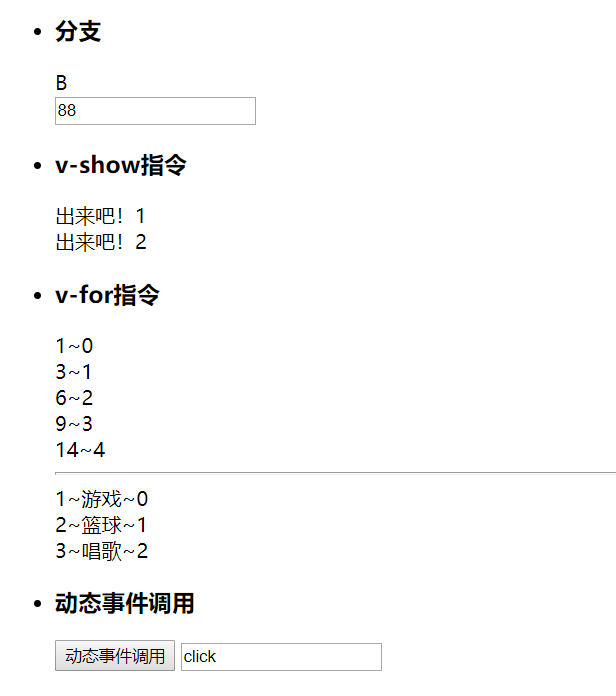
 <!DOCTYPE html>

 <html>

     <head>

         <meta charset="utf-8">

         <title>vue的指令案例</title>

         <script src="https://cdn.bootcss.com/vue/2.6.10/vue.js"></script>

     </head>

     <body>

         <div id="app">

             <ul>

                 <li>

                     <h3>分支</h3>

                     <div v-if="score>90">A</div>

                     <div v-else-if="score>80">B</div>

                     <div v-else-if="score>70">C</div>

                     <div v-else-if="score>60">D</div>

                     <div v-else="">E</div>

                     <input type="text" v-model="score" />

                 </li>

                 <li>

                     <h3>v-show指令</h3>

                     <div v-show="flag">出来吧!1</div>

                     <!-- 分清楚v-if跟v-show的区别

                         v-if:控制的是标签是否答应

                         v-show:控制的是标签的样式

                      -->

                     <div v-if="flag">出来吧!2</div>

                 </li>

                 <li>

                     <h3>v-for指令</h3>

                     <div v-for="item,index in data1">

                         {{item}}~{{index}}<br>

                     </div>

                     <hr />

                     <div v-for="item,index in data2">

                         {{item.id}}~{{item.name}}~{{index}}<br>

                     </div>

                 </li>

                 <li>

                     <h3>动态事件调用</h3>

                     <button v-on:[evname]="xxx">动态事件调用</button>

                     <input type="text" v-model="evname" />

                 </li>

             </ul>

         </div>

     </body>

     <script type="text/javascript">

         new Vue({

             el: "#app",

             data: {

                 score: 88,

                 flag: true,

                 data1: [1, 3, 6, 9, 14],

                 data2: [{

                     id: 1,

                     name: '游戏'

                 },

                 {

                     id: 2,

                     name: '篮球'

                 },

                 {

                     id: 3,

                     name: '唱歌'

                 }],

                 evname:'click'

             },

             methods:{

                 xxx(){

                     console.log('xxx方法被调用')

                 }

             }

         })

     </script>

 </html>
3、vue过滤器
 <!DOCTYPE html>

 <html>

     <head>

         <meta charset="utf-8">

         <title>vue的过滤器案例</title>

         <script src="https://cdn.bootcss.com/vue/2.6.10/vue.js"></script>

     </head>

     <body>

         <div id="app">

             <ul>

                 <li>

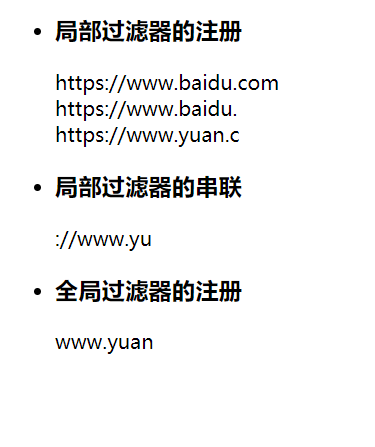
                     <h3>局部过滤器的注册</h3>

                     {{msg}}<br>

                     {{msg|a}}<br>

                     {{yuan|a}}

                 </li>

                 <li>

                     <h3>局部过滤器的串联</h3>

                     {{yuan|a|b}}<br>

                 </li>

                 <li>

                     <h3>全局过滤器的注册</h3>

                     {{yuan|c}}<br>

                 </li>

             </ul>

         </div>

     </body>

     <script type="text/javascript">

         Vue.filter('c',function(v){

             console.log(v)

             return v.substring(8,16);

         })

         new Vue({

             el: "#app",

             data: {

                 msg: 'https://www.baidu.com',

                 yuan:'https://www.yuan.com'

             },

             filters:{

                 // a是过滤器的名字,后面的函数是过滤器的作用

                 'a':function(v){

                     console.log(v)

                     return v.substring(0,18);

                 },

                 'b':function(v){

                     console.log(v)

                     return v.substring(5,14);

                 }

             }

         })

     </script>

 </html>
4、计算属性监听属性
 <!DOCTYPE html>

 <html>

     <head>

         <meta charset="utf-8">

         <title>vue的计算属性监听属性案例</title>

         <script src="https://cdn.bootcss.com/vue/2.6.10/vue.js"></script>

     </head>

     <body>

         <div id="app">

             <ul>

                 <li>

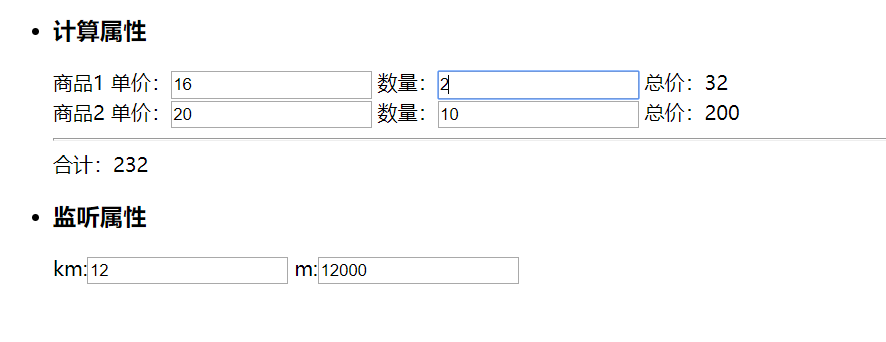
                     <h3>计算属性</h3>

                     商品1

                     单价:<input v-model="price1" />

                     数量:<input v-model="num1" />

                     总价:{{total1}}<br />

                     商品2

                     单价:<input v-model="price2" />

                     数量:<input v-model="num2" />

                     总价:{{total2}}

                     <hr />

                     合计:{{count}}

                 </li>

                 <li>

                     <h3>监听属性</h3>

                     km:<input v-model="km" />

                     m:<input v-model="m" />

                 </li>

             </ul>

         </div>

     </body>

     <script type="text/javascript">

         new Vue({

             el: "#app",

             data: {

                 price1:16,

                 price2:20,

                 num1:1,

                 num2:1,

                 km:1,

                 m:1000

             },

             computed:{

                 total1(){

                     return parseInt(this.price1)*parseInt(this.num1);

                 },

                 total2(){

                     return parseInt(this.price2)*parseInt(this.num2);

                 },

                 count(){

                     return parseInt(this.total1)+parseInt(this.total2)

                 }

             },

             watch:{

                 km(v){

                     this.m=v*1000;

                 },

                 m(v){

                     this.km=v/1000;

                 }

             }

         })

     </script>

 </html>
谢谢观看!!!
Vue模板语法(一)的更多相关文章
- Vue模板语法(二)
Vue模板语法(二) 样式绑定 class绑定 使用方式:v-bind:class="expression" expression的类型:字符串.数组.对象 1.2 style绑 ...
- Vue模板语法(一)
Vue模板语法 一.插值 1.1.1 文本 {{msg}} 1.1.2 html 使用v-html指令用于输出html代码 1.1.3 属性 HTML属性中的值应使用v-bind指令 1.1.4 表达 ...
- Vue 模板语法 && 数据绑定
1 <!DOCTYPE html> 2 <html> 3 <head> 4 <meta charset="UTF-8" /> 5 & ...
- 初始Vue、Vue模板语法、数据绑定(2022/7/3)
文章目录 1.Vue简介 1.1.Vue的安装使用 1.2.实际的运用案例 1.3.vue开发工具的使用(这个需要在浏览器中安装) 2.初始Vue 2.1 .基础知识 2.1 .代码实例 2.2 .页 ...
- (Vue)vue模板语法
Vue.js 使用了基于 HTML 的模版语法,允许开发者声明式地将 DOM 绑定至底层 Vue 实例的数据.Vue.js 的核心是一个允许你采用简洁的模板语法来声明式的将数据渲染进 DOM 的系统. ...
- Vue模板语法与常用指令
Vue.js 使用了基于 HTML 的模板语法,允许开发者声明式地将 DOM 绑定至底层 Vue 实例的数据.在底层的实现上,Vue 将模板编译成虚拟 DOM 渲染函数,结合相应系统,在应用状态改变时 ...
- Vue模板语法(二)
Vue基础模板语法 二 1. 样式绑定 1.1 class绑定 使用方式:v-bind:class="expression" expression的类型:字符 ...
- (32)Vue模板语法
模板语法 文本: <span>Message: {{ msg }}</span> v-once 一次性地插值,当数据改变时,插值处的内容不会更新 <span v-once ...
- 11 - Vue模板语法
Vue.js 使用了基于 HTML 的模板语法,允许开发者声明式地将 DOM 绑定至底层 Vue 实例的数据. 所有 Vue.js 的模板都是合法的 HTML ,所以能被遵循规范的浏览器和 HTML ...
随机推荐
- Hibernate-validator数据验证
前言 数据效验工作在开发工作中,是非常重要的,保证数据的正确性,可靠性,安全性.不仅在前端进行效验,还要在后台继续进行效验. 前端做验证只是为了用户体验,比如控制按钮的显示隐藏,单页应用的路由跳转等等 ...
- 使用PHP开发HR系统(6)
本节讲述如何连接Postgre数据库并查询与显示数据. ==================================================================== ...
- Ubuntu /etc/security/limits.conf 不生效问题
一.问题描述 修改 /etc/security/limits.conf ,重启之后不生效 内容如下: * soft nofile * hard nofile root soft nofile root ...
- CF936C Lock Puzzle 构造
传送门 好久不做构造题脑子都僵化了qwq 无解的条件是\(s\)包含的字符可重集和\(t\)包含的字符可重集不相等,相等的时候下文会给出一种一定可行的构造方案. 考虑增量构造.定义某个字符串\(x\) ...
- 【OO学习】OO第三单元作业总结
[OO学习]OO第三单元作业总结 第三单元,我们学习了JML语言,用来进行形式化设计.本单元包括三次作业,通过给定的JML来实行了一个对路径的管理系统,最后完成了一个地铁系统,来管理不同的线路,求得关 ...
- 1+X证书学习日志 —— css样式表
## 因为初级的内容较多,所以选了一些有用的 需要记忆的内容写下 方便日后回顾 CSS语法 选择符{属性:属性值;} ## 所有的css代码 都要放在css样式表里面 ...
- mysql 的使用
1. 安装 https://dev.mysql.com/downloads/mysql/ 2. 配置 $ vim ~/.bash_profile $ export PATH=$PATH:/usr/lo ...
- python(列表函数)
一.列表函数 1.sort()原址排序 参数默认reverse=False时为正序排序 list1 = [1,3,5,2,1,23,18] list1.sort() print (list1) 当参数 ...
- python的continue和break
continue:表示终止当前循环,开始下一次循环 break:终止所有循环 s = 0 while s < 3: s += 1 print(s) continue#'@' print(abc) ...
- Python——字符串增加颜色
给显示字符添加颜色: salary=int(input('\033[31;1m请输入你的工资:\033[0m')) ('\033[;1m请输入你的工资:\033[0m') 3x是给字符串改变颜色 31 ...