
python 2.7 环境配置
Python 2.7.12
下载地址:https://www.python.org/downloads/

安装路径D:\Program Files\Python27
python环境安装比较简单,下载python语言环境中的windows版本的msi格式文件,下载后双击安装即可。
在安装时选择添加路径到系统中,则环境变量Path中已经自动添加python安装的路径D:\Program Files\Python27
运行cmd,在命令行中测试一下
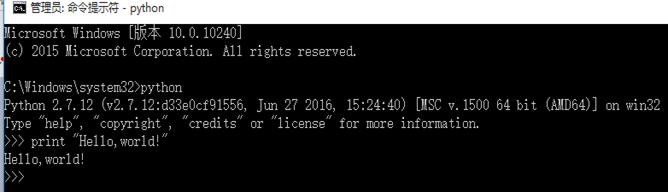
如上图中所示,通过python命令,之后输出经典的Hello, world!,表示python语言环境已经安装成功了。
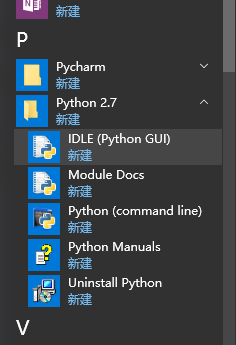
使用IDLE可以进行python程序编译了。
setuptools和pip的安装:这个是可以实现后续相关组件的自动安装,但是在windows下需要手动下载相关组件,并通过python 运行setup.py来进行安装。
安装方法为解压缩下载的安装包,进入setuptools目录,打开cmd,运行python setup.py install命令来安装。
setuptools 28.6.1
setuptools是 Python Enterprise Application Kit(PEAK)的一个副项目,它是一组Python的 distutilsde工具的增强工具(适用于 Python 2.3.5 以上的版本,64 位平台则适用于 Python 2.4 以上的版本),可以让程序员更方便的创建和发布 Python 包,特别是那些对其它包具有依赖性的状况。
下载地址:https://pypi.python.org/pypi/setuptools

安装方法为打开cmd,进入setuptools的解压目录D:\python64\setuptools-28.6.1,运行python setup.py install命令来安装。
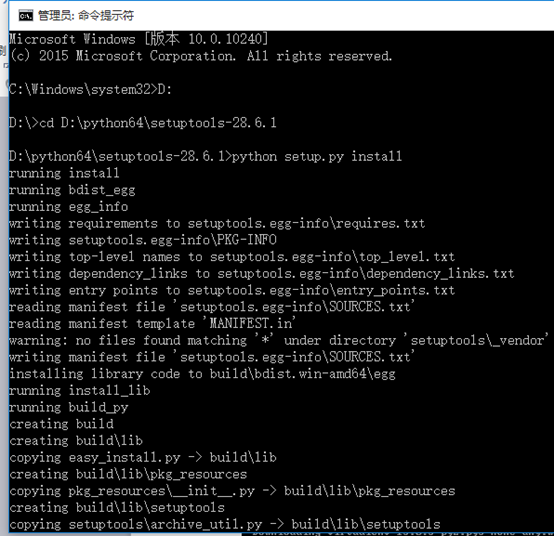
安装完成后可以进入python的安装目录下查看Scripts目录中是否有easy_install.exe,有则表示安装成功了。然后将Scripts路径也加入到环境变量中。
(注:setuptools 安装完后,下图中是没有后三项的, pip相关内容是pip安装后才出现的)
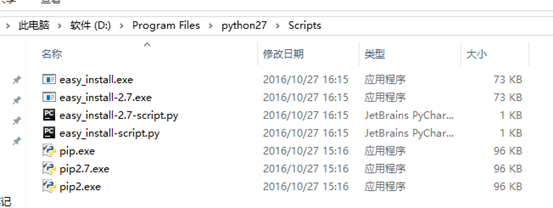
pip
下载最新版pip,使用python setup.py install指令安装。
pip 8.1.2
下载地址:https://pypi.python.org/pypi/pip#downloads


解压缩文件夹,找到setup.py ,进入cmd,使用python setup.py install指令安装。
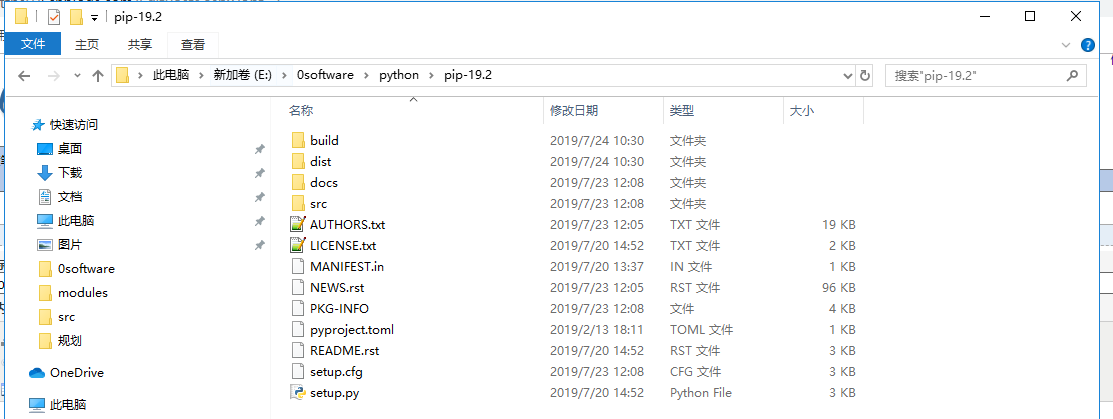
可以不安装,输入pip指令输出如下:(这条没有尝试成功)
D:\python64\setuptools-28.6.1>pip
Usage:
pip <command> [options]
Commands:
install Install packages.
download Download packages.
uninstall Uninstall packages.
freeze Output installed packages in requirements format.
list List installed packages.
show Show information about installed packages.
search Search PyPI for packages.
wheel Build wheels from your requirements.
hash Compute hashes of package archives.
completion A helper command used for command completion
help Show help for commands.
General Options:
-h, --help Show help.
--isolated Run pip in an isolated mode, ignoring
environment variables and user configuration.
-v, --verbose Give more output. Option is additive, and can be
used up to 3 times.
-V, --version Show version and exit.
-q, --quiet Give less output.
--log <path> Path to a verbose appending log.
--proxy <proxy> Specify a proxy in the form
[user:passwd@]proxy.server:port.
--retries <retries> Maximum number of retries each connection should
attempt (default 5 times).
--timeout <sec> Set the socket timeout (default 15 seconds).
--exists-action <action> Default action when a path already exists:
(s)witch, (i)gnore, (w)ipe, (b)ackup.
--trusted-host <hostname> Mark this host as trusted, even though it does
not have valid or any HTTPS.
--cert <path> Path to alternate CA bundle.
--client-cert <path> Path to SSL client certificate, a single file
containing the private key and the certificate
in PEM format.
--cache-dir <dir> Store the cache data in <dir>.
--no-cache-dir Disable the cache.
--disable-pip-version-check
Don't periodically check PyPI to determine
whether a new version of pip is available for
download. Implied with --no-index.
但使用pip时会出现更新提示。
You are using pip version 8.1.1, however version 8.1.2 is available.
You should consider upgrading via the 'python -m pip install --upgrade pip' command.
因此,使用python -m pip install --upgrade pip进行pip更新,
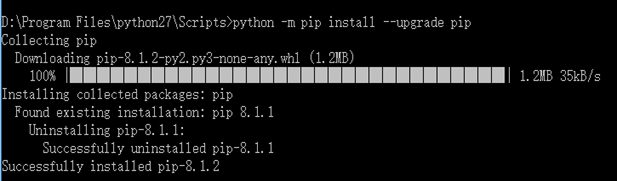
常见pip用法如下:
pip install numpy --安装包numpy
pip uninstall numpy --卸载包numpy
pip show --files PackageName --查看已安装包
pip list outdated --查看待更新包信息
pip install --upgrade numpy --升级包
pip install -U PackageName --升级包
pip search PackageName --搜索包
pip help --显示帮助信息
python 2.7 环境配置的更多相关文章
- python+selenium的环境配置
以前写过关于python和selenium加myeclipse的环境配置,但是myeclipse启动时过于费时,虽然myeclipse有很好的提示功能,但是作为初学者,我还是直接用python的idl ...
- Python selenium chrome 环境配置
Python selenium chrome 环境配置 一.参考文章: 1. 记录一下python easy_install和pip安装地址和方法 http://heipark.iteye.com/b ...
- Python 爬虫2——环境配置
关于环境配置的操作,其实非常简单,假如不使用第三方的框架的话,只需要安装Python即可完成后续的操作. 一.Python的安装和配置: windows系统的安装配置过程如下,假如是Mac系统,可参考 ...
- Python Flask 多环境配置
Python里取配置文件的时候,之前是使用的ini文件和python里configparser 模块: 可参考:https://www.cnblogs.com/feeland/p/4514771.ht ...
- Python沙盒环境配置
一.简介 本文介绍配置python沙盒环境的方法步骤. 二.安装步骤 1.安装pyenv http://www.cnblogs.com/274914765qq/p/4948530.html 2.安装v ...
- 代码编辑器[0] -> Vim/gVim[0] -> 基于 Python 的 gVim 环境配置(Windows)
环境配置 / Environment Setup 基于Python开发的 gVim 环境配置(Windows) 使用方式参考 Vim 的使用. 1 基于vundle进行配置 Vim有多个扩展管理器, ...
- 免安装方式的Python之VSCode环境配置
概述 本文旨在介绍免安装方式,在VSCode中搭建Python(3.73)的配置环境.至于Python是什么.它能做些什么,诸如此类的介绍均不在此文中介绍,相信能看此文的人,多多少少都会有些了解. V ...
- python+django+pycharm 环境配置 (window7)
一.python环境配置 登录python官网,下载windows版的python,本项目使用32位的python2.7.6,下载地址: http://www.python.org/ftp/pytho ...
- python的开发环境配置-Eclipse-PyDev插件安装
安装PyDev插件的两种安装方法: 1.百度搜索PyDev 2.4.0.zip,下载后解压,得到Plugins和Feature文件夹,复制两文件夹到Eclipse目录,覆盖即可. 插件的版本要对应py ...
- python语言开发环境配置
原作者:龙行天下-super 地址:https://www.cnblogs.com/longxingtianxia/p/10181901.html 要点:IDLE是一个轻量级python语言开发环境, ...
随机推荐
- Java 死锁以及死锁的产生
public class DeadLockSample { public static void main(String[] args) { DeadLock d1 = new DeadLock(tr ...
- Hadoop hadoop 之hdfs数据块修复方法
hadoop 之hdfs数据块修复方法: .手动修复 hdfs fsck / #检查集群的健康状态 hdfs debug recoverLease -path 文件位置 -retries 重试次数 # ...
- RNN梯度消失和爆炸的原因 以及 LSTM如何解决梯度消失问题
RNN梯度消失和爆炸的原因 经典的RNN结构如下图所示: 假设我们的时间序列只有三段, 为给定值,神经元没有激活函数,则RNN最简单的前向传播过程如下: 假设在t=3时刻,损失函数为 . 则对于一 ...
- React.createElement 与 JSX
DOM 向JSX的演进 网页由 DOM 元素构成.React DOM 并不是浏览器的 DOM,而React DOM 只是用来告诉浏览器如何创建 DOM 的方法.通常情况下,我们并不需要 React 就 ...
- Tomcat启动过程中找不到JAVA_HOME JRE_HOME的解决方法
转自:http://blog.sina.com.cn/s/blog_61c006ea0100l1u6.html 原文: 在XP上明明已经安装了JDK1.5并设置好了JAVA_HOME,可偏偏Tomca ...
- AUC,ROC我看到的最透彻的讲解
版权声明:本文为博主原创文章,遵循CC 4.0 BY-SA版权协议,转载请附上原文出处链接和本声明. 本文链接:https://blog.csdn.net/u013385925/article/d ...
- 封装qt http文件下载类
#include <QApplication> #include <QtWidgets> #include <QtNetwork> //downloads one ...
- 【idea】断点调试时查看所有变量和静态变量
转载至博客:https://blog.csdn.net/qq32933432/article/details/86672341 缘起 笔者在进行HashMap原理探索的时候需要在IntelliJ ID ...
- vim脚本判断操作系统
Linux 和 Windows 通用配置 其实在配置文件中是可以通过逻辑代码判断平台做条件处理的,这样就可以实现一个配置文件两个个平台下共用了,判断逻辑如下: " ============= ...
- C++提示没有与这些操作数匹配的<<运算符
应该是忘了#include.#include<string>