
SorlNet
Solr学习
上一篇已经讲到了Solr 查询的相关的参数。这里在讲讲C#是如何通过客户端请求和接受solr服务器的数据, 这里推荐使用SolrNet,主要是:SolrNet使用非常方便,而且用户众多,一直都在更新,感兴趣的可以加入他们的邮件群组,方便迅速了解SolrNet的最新动态。
SorlNet源码地址:https://github.com/mausch/SolrNet
SolrNet使用说明文档:https://github.com/mausch/SolrNet/tree/master/Documentation
一、创建一个项目控制台程序,并引用SolrNet.dll。Demo下载
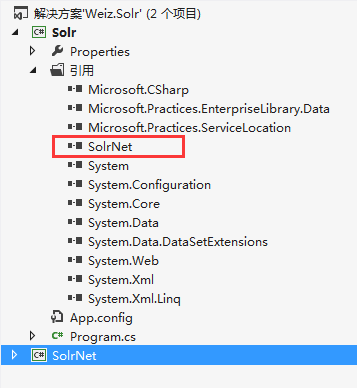
注意:SolrNet 依赖HttpWebAdapters.dll和Microsoft.Practices.ServiceLocation.dll 这两个dll 文件,所以,如果编译或者测试有问题,引用这两个dll 文件应该就ok了。
二、在solr 的schema.xml 增加相关的Filed 字段,同时创建一个实体类,与schema.xml中的Filed 字段映射。

   public class Product

    {

        [SolrUniqueKey("id")]

        public int id { get; set; }

        [SolrField("name")]

        public string name { get; set; }

        [SolrField("title")]

        public string title { get; set; }

        [SolrField("category")]

        public string category { get; set; }

        [SolrField("content")]

        public string content { get; set; }

        [SolrField("price")]

        public double price { get; set; }

        [SolrField("color")]

        public string color { get; set; }

        [SolrField("updatetime")]

        public DateTime updatetime { get; set; }

        [SolrField("orderBy")]

        public int orderBy { get; set; }

    }
同时,schema.xml中也要加上相应的Filed 字段,打开solr_home\mycore1\conf 下的schema.xml文件,增加如下Field 配置,如果不知道如何操作,请参考前一篇文章,《Solr学习总结(二)Solr的安装与配置》
   <field name="id" type="int" indexed="true" stored="true" required="true" multiValued="false" />

   <field name="name" type="string" indexed="true" stored="true" required="true" multiValued="false" />

   <field name="title" type="string" indexed="true" stored="true" required="true" multiValued="false" />

   <field name="category" type="string" indexed="true" stored="true" required="true" multiValued="false" />

   <field name="content" type="string" indexed="true" stored="true" required="true" multiValued="false" />

   <field name="price" type="double" indexed="true" stored="true" required="true" multiValued="false" />

   <field name="color" type="string" indexed="true" stored="true" required="true" multiValued="false" />

   <field name="orderBy" type="int" indexed="true" stored="true" required="true" multiValued="false" />

   <field name="updatetime" type="date" indexed="true" stored="true" required="true" multiValued="false" />
三、开始调用solrnet:
1.初始化
Startup.Init<Product>("http://localhost:8080/solr/mycore1");
2.增加和修改索引(document)
Solr 索引的增加和修改,都是Add() 方法,solr 会自动判断是否存在此所以,有就修改,没有就新增。
     ISolrOperations<Product> solr = ServiceLocator.Current.GetInstance<ISolrOperations<Product>>();

         var p = new Product()

             {

                 id = 201,

                 name = "product 201",

                 title = "title 201",

                 category = "201",

                 content = "title 201 green",

                 color = "green",

                 price = 67.92,

                 updatetime = DateTime.Now.AddDays(-101),

                 orderBy = 101

             };

        solr.Add(p);

        solr.Commit();
3. 删除索引
solrnet 重写了多个 delete()方法。这里只介绍一个,其他的自己研究吧。
     ISolrOperations<Product> solr = ServiceLocator.Current.GetInstance<ISolrOperations<Product>>();

        var p = new Product()

        {

             id = 201,

        };

        solr.Delete(p);

        solr.Commit();
注意:调用 Add() 或是 Delete()方法,必须在他们之后加上 Commit(),否是请求是不会被处理的。
4.查询
            ISolrOperations<Product> solr = ServiceLocator.Current.GetInstance<ISolrOperations<Product>>();

            SolrQueryResults<Product> phoneTaggedArticles = solr.Query(new SolrQuery("id:1"));

            foreach (Product p in phoneTaggedArticles)

            {

                Console.WriteLine(string.Format("{0}: {1}", p.id, p.title));

            }

            Console.WriteLine();
到这里,Solrnet的基本用法已经说完了,下一篇,将聊聊Solr的一些高级用法,solr 的复杂查询,高亮,Facet分组查询等。
SorlNet的更多相关文章
- Solr学习总结(五)SolrNet的基本用法及CURD
上一篇已经讲到了Solr 查询的相关的参数.这里在讲讲C#是如何通过客户端请求和接受solr服务器的数据, 这里推荐使用SolrNet,主要是:SolrNet使用非常方便,而且用户众多,一直都在更新, ...
- Open Source
资源来源于http://www.cnblogs.com/Leo_wl/category/246424.html RabbitMQ 安装与使用 摘要: RabbitMQ 安装与使用 前言 吃多了拉就是队 ...
随机推荐
- 常见问题(FAQ) | VPNCUP
常见问题(FAQ) | VPNCUP 常见问题(FAQ) 关于FAQ 新手开始 登录验证问题 为什么刚注册后,登录VPN服务器提示错误? 免费注册的用户有哪些限制? 为什么连接免费VPN后20分钟自动 ...
- Managing Data in Containers
Managing Data in Containers So far we've been introduced to some basic Docker concepts, seen how to ...
- 在Activity中为什么要用managedQuery()
刚開始接触android的时候,每次用数据库都会犹豫使用哪种方式,一种是getContentResolver().query(...),还有一种是managedQuery(...),后来习惯了使用前一 ...
- Nginx 进程间通信
Linux下的IPC非常多,nginx的进程都是有亲缘关系的进程,对于他们的通信我们选择TCP socket进行通信. TCP socket 用来做进程通信的优点有, 1.socket是文件描 ...
- spring集成 JedisCluster 连接 redis3.0 集群
最近在公司做了 jedisCluster整合spring 的配置, 分享如下 客户端采用最新的jedis 2.7 1. maven依赖: <dependency> <groupId& ...
- 前端控件之Jquery datetimepicker的使用总结
效果图 在介绍jquery datetimepicker的使用方法前,我们先来看一下它的实现效果图,这样以便让你更快地了解它是否是你所需要的. 下面我截了四张常用的效果图(截取自http://xdso ...
- Inno Setup打包添加和去除管理员权限
原文:Inno Setup打包添加和去除管理员权限 添加管理员权限 1.在[Setup]节点添加 PrivilegesRequired=admin 2.进入安装目录,找到文件SetupLdr.e32, ...
- Python每隔一秒钟打印当地时间
import threading,time global t def sayHello(): print time.strftime('%Y-%m-%d %H:%M:%S',time.localtim ...
- Uva10290 - {Sum+=i++} to Reach N
Problem H {sum+=i++} to Reach N Input: standard input Output: standard output Memory Limit: 32 MB A ...
- Java http数据MD5、AES、DES加密
一,数据加密 1.提供了,md5,Hex,Sha等不可逆算法加密 2.AES加密,此加密方式瘦平台影响较重,所以只适合同类平台加密解密 3.DES自定义加密,跨平台,兼容性好 1.org.apache ...