
C# Note18: 使用wpf制作about dialog(关于对话框)
前言
基本上任何software或application都会在help菜单中,有着一个关于对话框,介绍产品的版权、版本等信息,还有就是对第三方的引用(add author credits)。
首先,看下常用软件的关于对话框:


言归正传,进入正题,介绍下我在进行这部分开发时的三种方法:
由于用到了很多需要credit的icons,几种方法主要的区别便在于如何显示这些icons,并加上作者信息。
(1)使用ListView显示,并制作DataTemplate模板
MainWindow.xaml
<Window x:Class="AboutApplicationTest.MainWindow"

        xmlns="http://schemas.microsoft.com/winfx/2006/xaml/presentation"

        xmlns:x="http://schemas.microsoft.com/winfx/2006/xaml"

        xmlns:d="http://schemas.microsoft.com/expression/blend/2008"

        xmlns:mc="http://schemas.openxmlformats.org/markup-compatibility/2006"

        xmlns:local="clr-namespace:AboutApplicationTest"

        mc:Ignorable="d"

        Title="XXXXX Application" Height="460" Width="580" Icon="/images/about.png">

    <Window.Resources>

        <DataTemplate x:Key="MyTemplate" DataType="{x:Type local:IconInfo}">

            <Label Height="30" Width="500">

                <Label.Content>

                    <DockPanel>

                        <Image Source="{Binding Icon}" DockPanel.Dock="Left" Width="20" Height="20"/>

                        <TextBlock Text=" Icon made by " DockPanel.Dock="Left" Margin="10,0,0,0"/>

                        <TextBlock DockPanel.Dock="Left">

                                <Hyperlink NavigateUri="{Binding Url}" Name="linkHelp" ToolTip="Author Credits" Click="linkHelp_Click_1">

                                    <Hyperlink.Inlines>

                                        <Run Text="{Binding Author}"/>

                                    </Hyperlink.Inlines>

                                </Hyperlink>

                        </TextBlock>

                        <TextBlock Text="from www.flaticon.com" DockPanel.Dock="Left" Margin="5,0,0,0"/>

                    </DockPanel>

                </Label.Content>

            </Label>

        </DataTemplate>

    </Window.Resources>

    <Grid Background="LightGray">

        <Grid Margin="0,0,0,0" VerticalAlignment="Top" Width="580" Height="440" HorizontalAlignment="Left" Background="LightGray">

            <Image Source="/Images/user.png" Width="60" Height="60" HorizontalAlignment="Left" Margin="50,10,0,0" VerticalAlignment="Top"/>

            <Label Content="XXXXX Application" FontWeight="Bold" FontSize="16" HorizontalAlignment="Left" Margin="160,10,0,0" VerticalAlignment="Top"></Label>

            <Label Content="Copyright © 2017 by XXXXXX Corporation. All Rights Reserved." HorizontalAlignment="Left" Margin="160,40,0,0" VerticalAlignment="Top"></Label>

            <GroupBox BorderBrush="DarkGreen"  Header="Product Information:" HorizontalAlignment="Left" Height="60" Margin="50,80,0,0" VerticalAlignment="Top" Width="460">

                <Label Name="pbc_version" Content="" HorizontalAlignment="Left" Margin="135,5,0,0" VerticalAlignment="Top"/>

            </GroupBox>

            <Label Content="Included third parties:" HorizontalAlignment="Left" Margin="10,150,0,0" VerticalAlignment="Top"></Label>

            <ListView x:Name="lvIconInfo" ItemTemplate="{StaticResource  MyTemplate}"  Height="180" Width="545" Margin="10,175,0,0" HorizontalAlignment="Left" VerticalAlignment="Top"/>

            <Label Name="WarningInfo" Content="Warning:" HorizontalAlignment="Left" Margin="5,360,0,0" VerticalAlignment="Top" Width="555"></Label>

        </Grid>

    </Grid>

</Window>
MainWindow.xaml.cs
using System;

using System.Collections.Generic;

using System.Collections.ObjectModel;

using System.Diagnostics;

using System.Linq;

using System.Text;

using System.Threading.Tasks;

using System.Windows;

using System.Windows.Controls;

using System.Windows.Data;

using System.Windows.Documents;

using System.Windows.Input;

using System.Windows.Media;

using System.Windows.Media.Imaging;

using System.Windows.Navigation;

using System.Windows.Shapes;

namespace AboutApplicationTest

{

    /// <summary>

    /// Interaction logic for MainWindow.xaml

    /// </summary>

    public partial class MainWindow : Window

    {

        private ObservableCollection<IconInfo> iconInfoList;

        public MainWindow()

        {

            this.WindowStartupLocation = System.Windows.WindowStartupLocation.CenterScreen;

            InitializeComponent();

            WarningInfo.Content += " This computer program is protected by copyright law and international treaties. Unauthoized"

            + "\n" + "reproduction or distribution of this program, or any portion of it, may result in severe civil and criminal"

            + "\n" + "penalties, and will be prosecuted to the maximum extent possible under the law.";

            pbc_version.Content = "Version:     " + System.Reflection.Assembly.GetExecutingAssembly().GetName().Version.ToString(); //利用反射的方式获取assembly的version信息

            iconInfoList = new ObservableCollection<IconInfo>();

            iconInfoList.Add(new IconInfo("/Images/user.png", "https://www.flaticon.com/authors/chanut-is-industries", "Chanut is Industries"));

            iconInfoList.Add(new IconInfo("/Images/password.png", "https://www.flaticon.com/authors/freepik", "Freepik"));

            iconInfoList.Add(new IconInfo("/Images/user.png", "https://www.flaticon.com/authors/chanut-is-industries", "Chanut is Industries"));

            iconInfoList.Add(new IconInfo("/Images/password.png", "https://www.flaticon.com/authors/freepik", "Freepik"));

            iconInfoList.Add(new IconInfo("/Images/user.png", "https://www.flaticon.com/authors/chanut-is-industries", "Chanut is Industries"));

            iconInfoList.Add(new IconInfo("/Images/password.png", "https://www.flaticon.com/authors/freepik", "Freepik"));

            iconInfoList.Add(new IconInfo("/Images/user.png", "https://www.flaticon.com/authors/chanut-is-industries", "Chanut is Industries"));

            iconInfoList.Add(new IconInfo("/Images/password.png", "https://www.flaticon.com/authors/freepik", "Freepik"));

            this.lvIconInfo.ItemsSource = iconInfoList;

        }

        private void linkHelp_Click_1(object sender, RoutedEventArgs e)

        {

            //Hyperlink link = sender as Hyperlink;

            //Process.Start(new ProcessStartInfo(link.NavigateUri.AbsoluteUri));

            if (sender.GetType() != typeof(Hyperlink))

                return;

            string link = ((Hyperlink)sender).NavigateUri.ToString();

            Process.Start(link);

        }

    }

    public class IconInfo

    {

        private string icon;

        private string url;

        private string author;

        public IconInfo(string icon, string url, string author)

        {

            this.icon = icon;

            this.url = url;

            this.author = author;

        }

        public string Icon

        {

            get

            {

                return this.icon;

            }

            set

            {

                this.icon = value;

            }

        }

        public string Url

        {

            get

            {

                return this.url;

            }

            set

            {

                this.url = value;

            }

        }

        public string Author

        {

            get

            {

                return this.author;

            }

            set

            {

                this.author = value;

            }

        }

    }

}
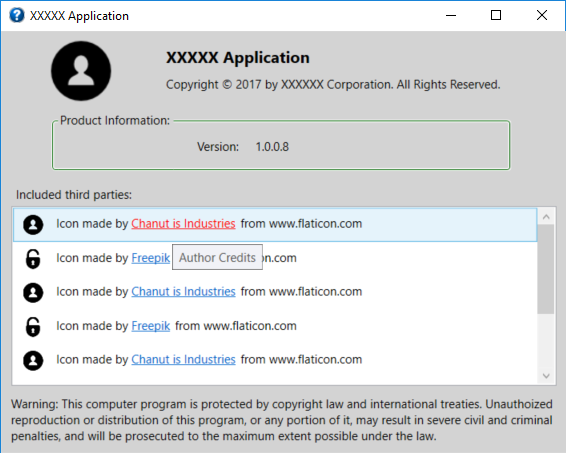
运行效果图:
(2)使用StackPanel包裹Label控件,然后外加滚动条
部分代码:
<Grid Background="LightGray">

        <Grid Margin="0,0,0,0" VerticalAlignment="Top" Width="580" Height="440" HorizontalAlignment="Left" Background="LightGray">

            <Image Source="/Images/pbc_icon.png" Width="120" Height="50" HorizontalAlignment="Left" Margin="30,10,0,0" VerticalAlignment="Top"/>

            <Label Content="XXXXX Application" FontWeight="Bold" FontSize="16" HorizontalAlignment="Left" Margin="160,10,0,0" VerticalAlignment="Top"></Label>

            <Label Content="Copyright © 2017 by XXXXXX Corporation. All Rights Reserved." HorizontalAlignment="Left" Margin="160,40,0,0" VerticalAlignment="Top"></Label>

            <GroupBox BorderBrush="DarkGreen"  Header="Product Information:" HorizontalAlignment="Left" Height="60" Margin="50,80,0,0" VerticalAlignment="Top" Width="460">

                <Label Name="XXX_version" Content="" HorizontalAlignment="Left" Margin="135,5,0,0" VerticalAlignment="Top"/>

            </GroupBox>

            <Label Content="Included third parties:" HorizontalAlignment="Left" Margin="10,150,0,0" VerticalAlignment="Top"></Label>

            <ScrollViewer HorizontalScrollBarVisibility="Auto" VerticalScrollBarVisibility="Auto" Height="180" Margin="10,175,0,0" HorizontalAlignment="Left" VerticalAlignment="Top">

                <StackPanel Background="White" Width="535">

                    <Label Height="30" Width="535">

                        <Label.Content>

                            <DockPanel>

                                <Image Source="/Images/user.png" DockPanel.Dock="Left" Width="20" Height="20"/>

                                <TextBlock Text=" Icon made by " DockPanel.Dock="Left" Margin="10,0,0,0"/>

                                <TextBlock DockPanel.Dock="Left">

                                <Hyperlink NavigateUri="https://www.flaticon.com/authors/chanut-is-industries" Name="linkHelp" Click="linkHelp_Click">Chanut is Industries

                                </Hyperlink>

                                </TextBlock>

                                <TextBlock Text="from www.flaticon.com" DockPanel.Dock="Left" Margin="5,0,0,0"/>

                            </DockPanel>

                        </Label.Content>

                    </Label>

                    <Label Height="30" Width="535">

                        <Label.Content>

                            <DockPanel>

                                <Image Source="/Images/password.png" DockPanel.Dock="Left" Width="20" Height="20"/>

                                <TextBlock Text=" Icon made by " DockPanel.Dock="Left" Margin="10,0,0,0"/>

                                <TextBlock DockPanel.Dock="Left">

                                <Hyperlink NavigateUri="https://www.flaticon.com/authors/freepik" Name="linkHelp1" Click="linkHelp_Click">Freepik

                                </Hyperlink>

                                </TextBlock>

                                <TextBlock Text="from www.flaticon.com" DockPanel.Dock="Left" Margin="5,0,0,0"/>

                            </DockPanel>

                        </Label.Content>

                    </Label>

                    <Label Height="30" Width="535">

                        <Label.Content>

                            <DockPanel>

                                <Image Source="/Images/verifyPassword.png" DockPanel.Dock="Left" Width="20" Height="20"/>

                                <TextBlock Text=" Icon made by " DockPanel.Dock="Left" Margin="10,0,0,0"/>

                                <TextBlock DockPanel.Dock="Left">

                                <Hyperlink NavigateUri="https://www.flaticon.com/authors/freepik" Name="linkHelp2" Click="linkHelp_Click">Freepik

                                </Hyperlink>

                                </TextBlock>

                                <TextBlock Text="from www.flaticon.com" DockPanel.Dock="Left" Margin="5,0,0,0"/>

                            </DockPanel>

                        </Label.Content>

                    </Label>

                    <Label Height="30" Width="535">

                        <Label.Content>

                            <DockPanel>

                                <Image Source="/Images/description.png" DockPanel.Dock="Left" Width="20" Height="20"/>

                                <TextBlock Text=" Icon made by " DockPanel.Dock="Left" Margin="10,0,0,0"/>

                                <TextBlock DockPanel.Dock="Left">

                                <Hyperlink NavigateUri="https://www.flaticon.com/authors/Picol" Name="linkHelp3" Click="linkHelp_Click">Picol

                                </Hyperlink>

                                </TextBlock>

                                <TextBlock Text="from www.flaticon.com" DockPanel.Dock="Left" Margin="5,0,0,0"/>

                            </DockPanel>

                        </Label.Content>

                    </Label>

                    <Label Height="30" Width="535">

                        <Label.Content>

                            <DockPanel>

                                <Image Source="/Images/role.png" DockPanel.Dock="Left" Width="20" Height="20"/>

                                <TextBlock Text=" Icon made by " DockPanel.Dock="Left" Margin="10,0,0,0"/>

                                <TextBlock DockPanel.Dock="Left">

                                <Hyperlink NavigateUri="https://www.flaticon.com/authors/Vectors-Market" Name="linkHelp4" Click="linkHelp_Click">Vectors Market

                                </Hyperlink>

                                </TextBlock>

                                <TextBlock Text="from www.flaticon.com" DockPanel.Dock="Left" Margin="5,0,0,0"/>

                            </DockPanel>

                        </Label.Content>

                    </Label>

                    <Label Height="30" Width="535">

                        <Label.Content>

                            <DockPanel>

                                <Image Source="/Images/error.png" DockPanel.Dock="Left" Width="20" Height="20"/>

                                <TextBlock Text=" Icon made by " DockPanel.Dock="Left" Margin="10,0,0,0"/>

                                <TextBlock DockPanel.Dock="Left">

                                <Hyperlink NavigateUri="https://www.flaticon.com/authors/Pixel-Buddha" Name="linkHelp5" Click="linkHelp_Click">Pixel Buddha

                                </Hyperlink>

                                </TextBlock>

                                <TextBlock Text="from www.flaticon.com" DockPanel.Dock="Left" Margin="5,0,0,0"/>

                            </DockPanel>

                        </Label.Content>

                    </Label>

                    <Label Height="30" Width="535">

                        <Label.Content>

                            <DockPanel>

                                <Image Source="/Images/alarm.png" DockPanel.Dock="Left" Width="20" Height="20"/>

                                <TextBlock Text=" Icon made by " DockPanel.Dock="Left" Margin="10,0,0,0"/>

                                <TextBlock DockPanel.Dock="Left">

                                <Hyperlink NavigateUri="https://www.flaticon.com/authors/freepik" Name="linkHelp6" Click="linkHelp_Click">Freepik

                                </Hyperlink>

                                </TextBlock>

                                <TextBlock Text="from www.flaticon.com" DockPanel.Dock="Left" Margin="5,0,0,0"/>

                            </DockPanel>

                        </Label.Content>

                    </Label>

                </StackPanel>

            </ScrollViewer>

            <Label Name="WarningInfo" Content="Warning:" HorizontalAlignment="Left" Margin="5,360,0,0" VerticalAlignment="Top" Width="555"></Label>

        </Grid>

    </Grid>
(3)在第一种方法的基础上,不用hardcode的方式,而是增加一个xml配置文件,从中读取icons的credit数据。
附:Example using Hyperlink in WPF
C# Note18: 使用wpf制作about dialog(关于对话框)的更多相关文章
- Android中制作自定义dialog对话框的实例
http://www.jb51.net/article/83319.htm 这篇文章主要介绍了Android中制作自定义dialog对话框的实例分享,安卓自带的Dialog显然不够用,因而我们要继 ...
- WPF制作的小型笔记本
WPF制作的小型笔记本-仿有道云笔记 楼主所在的公司不允许下载外部资源, 不允许私自安装应用程序, 平时记录东西都是用记事本,时间久了很难找到以前记的东西. 平时在家都用有道笔记, 因此就模仿着做了一 ...
- WPF制作表示透明区域的马赛克画刷
最近在用WPF制作一款软件,需要像ps一样表示透明区域,于是制作了一个马赛克背景的style.实现比较简单,那么过程和思路就不表了,直接上代码 <DrawingBrush TileMode=&q ...
- WPF制作的小时钟
原文:WPF制作的小时钟 周末无事, 看到WEB QQ上的小时钟挺可爱的, 于是寻思着用WPF模仿着做一个. 先看下WEB QQ的图: 打开VS, 开始动工. 建立好项目后, 面对一个空荡荡的页面, ...
- WPF制作Logo,很爽,今后在应用程序中加入Logo轻松,省事!
原文:WPF制作Logo,很爽,今后在应用程序中加入Logo轻松,省事! 这是效果: XAML代码:<Viewbox Width="723.955078" Height=&q ...
- WPF制作的党旗
原文:WPF制作的党旗 --------------------------------------------------------------------------------引用或转载时请保 ...
- WPF 制作 Windows 屏保
分享如何使用WPF 制作 Windows 屏保 WPF 制作 Windows 屏保 作者:驚鏵 原文链接:https://github.com/yanjinhuagood/ScreenSaver 框架 ...
- WPF中使用文件浏览对话框的几种方式
原文:WPF中使用文件浏览对话框的几种方式 WPF本身并没有为我们提供文件浏览的控件, 也不能直接使用Forms中的控件,而文件浏览对话框又是我们最常用的控件之一. 下面是我实现的方式 方式1: 使用 ...
- WPF编程,C#中对话框自动关闭的一种方法。
原文:WPF编程,C#中对话框自动关闭的一种方法. 版权声明:我不生产代码,我只是代码的搬运工. https://blog.csdn.net/qq_43307934/article/details/8 ...
随机推荐
- WPF窗体の投影效果
有时候我们需要给WPF窗体加上一个毛边(投影效果) 我们可以在窗体下加上如下代码 <Window.Effect> <DropShadowEffect BlurRadius=" ...
- android studio 定位具体的错误原因
编译一个数据监测APP的时候出现了报错: Error:Compilation failed; see the compiler error output for details. 在网上查到方法如下: ...
- UML各种图
UML(Unified Modeling Language)是一种统一建模语言,为面向对象开发系统的产品进行说明.可视化.和编制文档的一种标准语言.下面将对UML的九种图+包图的基本概念进行介绍以及各 ...
- 关于box-shadow和drop-shadow的显著区别
一.box-shadow box-shadow是css3中新增的属性,用于增加边框阴影,让原有的元素变得更多样性,它名下有四位小弟,老大控制水平方向偏移,老二控制垂直方向偏移,老三控制模糊度,最小的老 ...
- 001_自定义过滤及添加文件内容脚本(nginx)
一.工作中遇到sed添加及修改在nginx末尾添加太麻烦了 需求:随意查找添加一条以前不存在的内容加到"}"前一行 实现: #!/usr/bin/env python # codi ...
- PAT A1055 The World's Richest (25 分)——排序
Forbes magazine publishes every year its list of billionaires based on the annual ranking of the wor ...
- JS上传文件、导入文件
//开始导入 function Import() { var filepath = $('#txtUpload').val(); //校验是否选择表格 if (filepath == '') { $( ...
- Linux进程管理 (1)进程的诞生
专题:Linux进程管理专题 目录: Linux进程管理 (1)进程的诞生 Linux进程管理 (2)CFS调度器 Linux进程管理 (3)SMP负载均衡 Linux进程管理 (4)HMP调度器 L ...
- Generative Adversarial Nets[CAAE]
本文来自<Age Progression/Regression by Conditional Adversarial Autoencoder>,时间线为2017年2月. 该文很有意思,是如 ...
- Asp.net中web.config配置文件详解(二)
摘自http://blog.csdn.net/hbqhdlc/article/details/8155668 近日正在看Asp.net,看到Web.config有很不清楚之处,特意从网络.MSDN搜集 ...